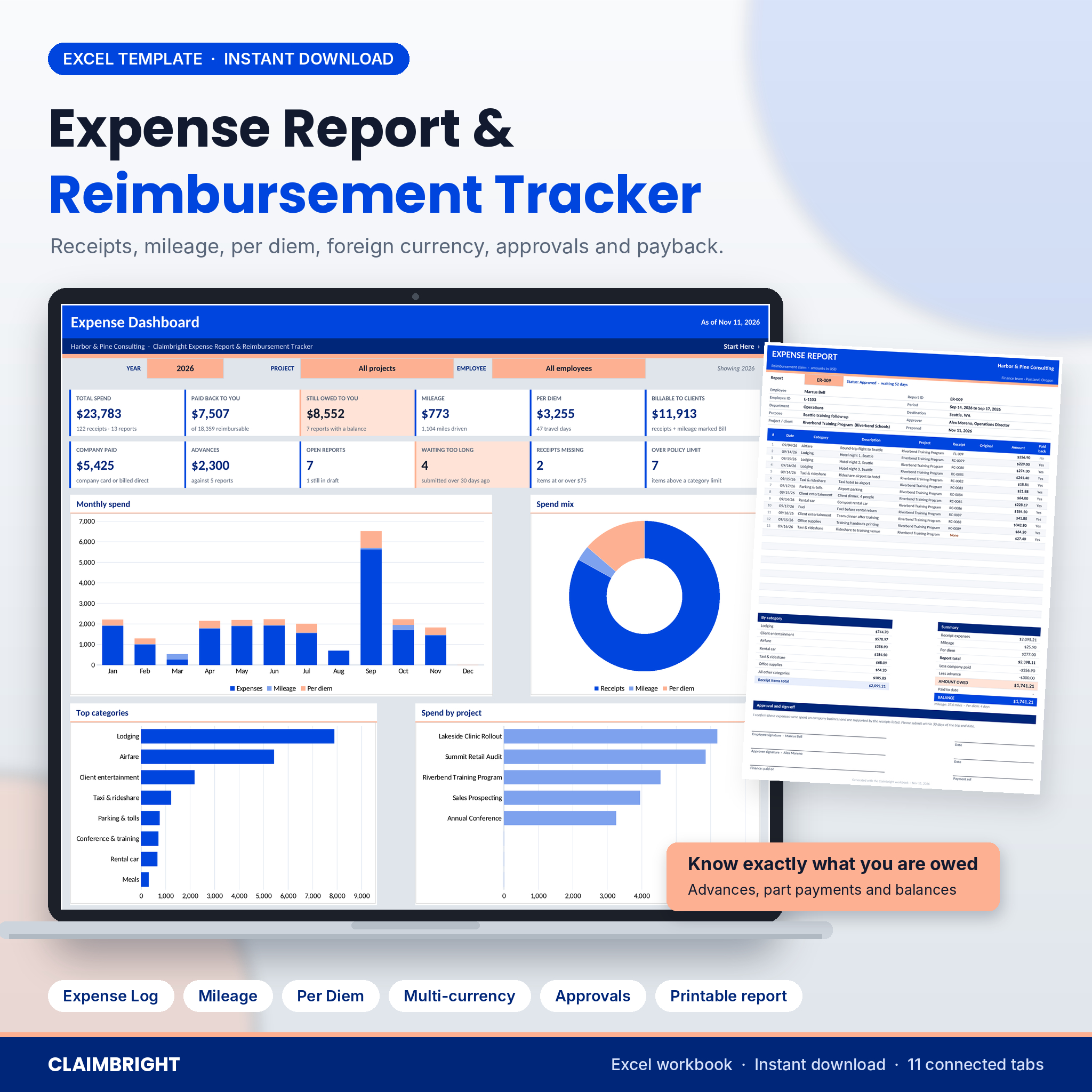


Claimbright is an expense report template for Excel that covers the whole claim, from the first taxi receipt to the day the money lands in your account. Log receipts, business miles and travel days under one Report ID. The workbook converts foreign currency at the rates you enter, applies your per diem rules, takes off any cash advance and prints a clean one-page expense report with a sign-off block. Then it keeps track of every claim until it is paid.
You will always know how much you are owed, which report has sat with your manager for 40 days, and which receipt is missing before anyone asks.
What this expense report and reimbursement tracker does
- Logs every cost: 1,000 receipt rows, 500 mileage trips and 400 per diem days in one file.
- Works out what you are owed: report total, company-paid items, advance, amount owed, paid to date and balance for each report.
- Tracks approval and payment: Draft, Submitted, Approved, Returned, Rejected, Part paid and Paid, with days waiting counted for you.
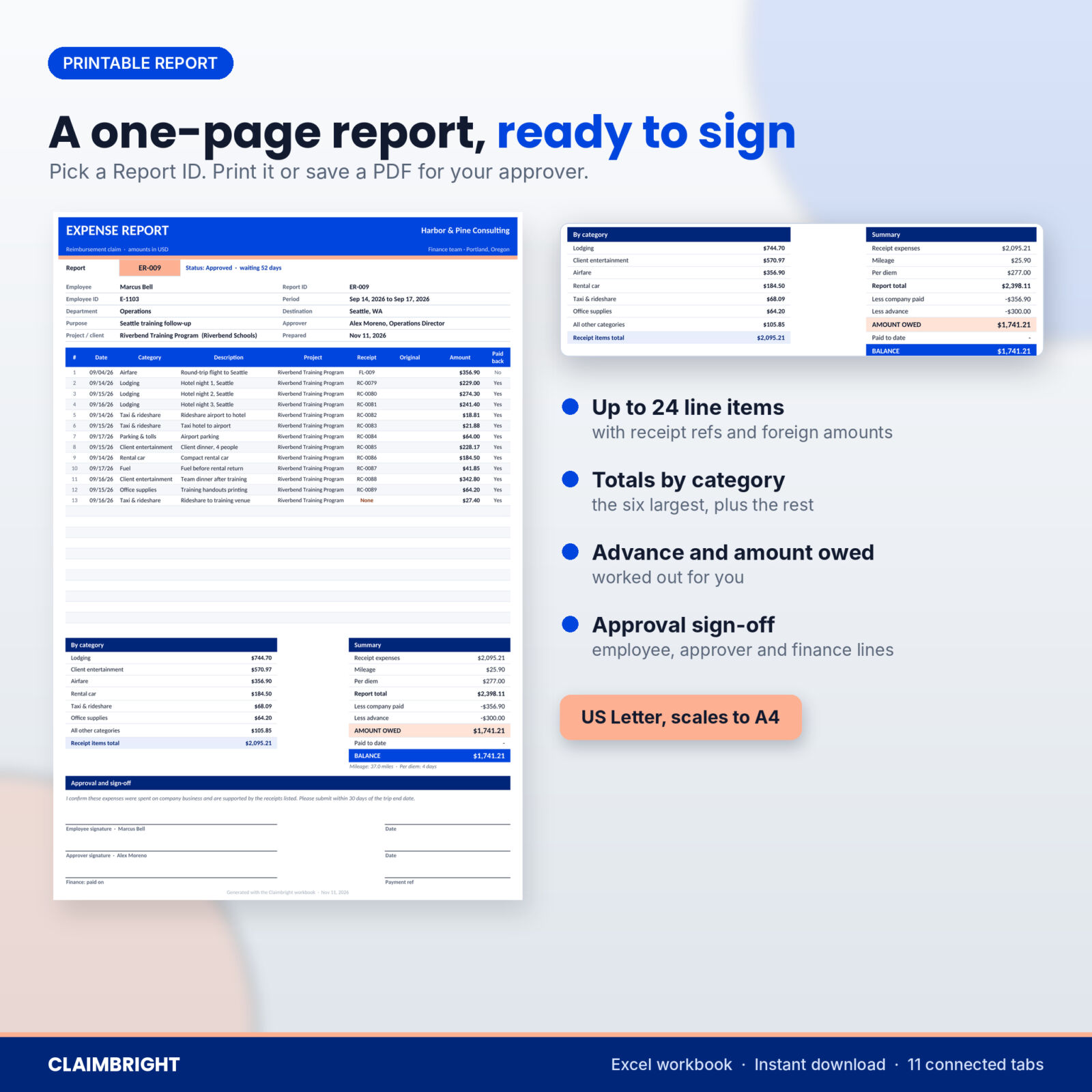
- Prints the claim: pick a Report ID and get a one-page expense report with line items, category totals and signature lines.
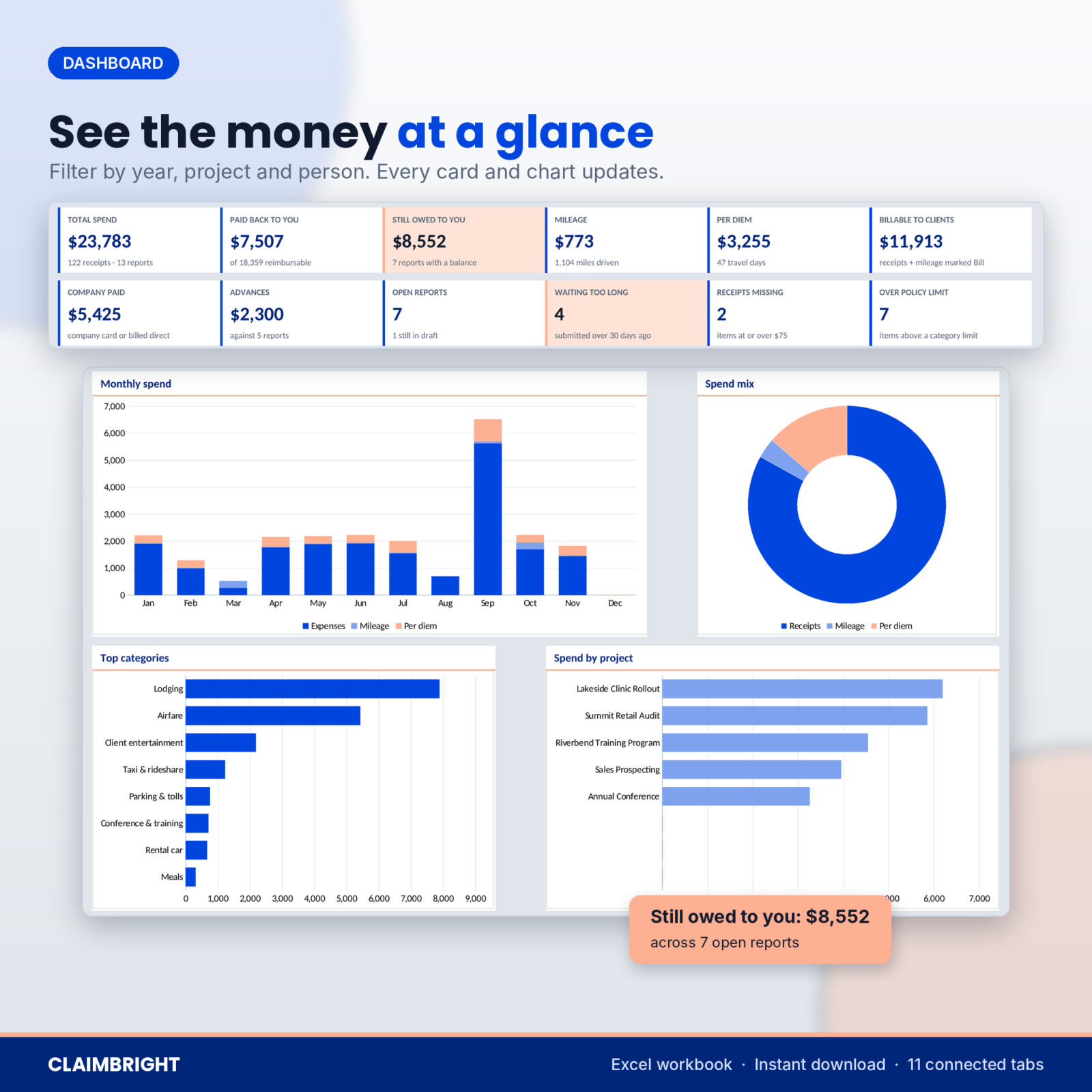
- Shows the big picture: a Dashboard with 12 KPI cards, four charts and a list of reports that need a nudge.
Who it is for
Employees who pay for work travel on their own card. Freelancers and consultants who rebill travel to clients. Office managers who handle claims for a few staff. Sales reps with lots of local driving. Anyone with receipts in pounds, euros or pesos.
Features
Expense Log with multi-currency conversion
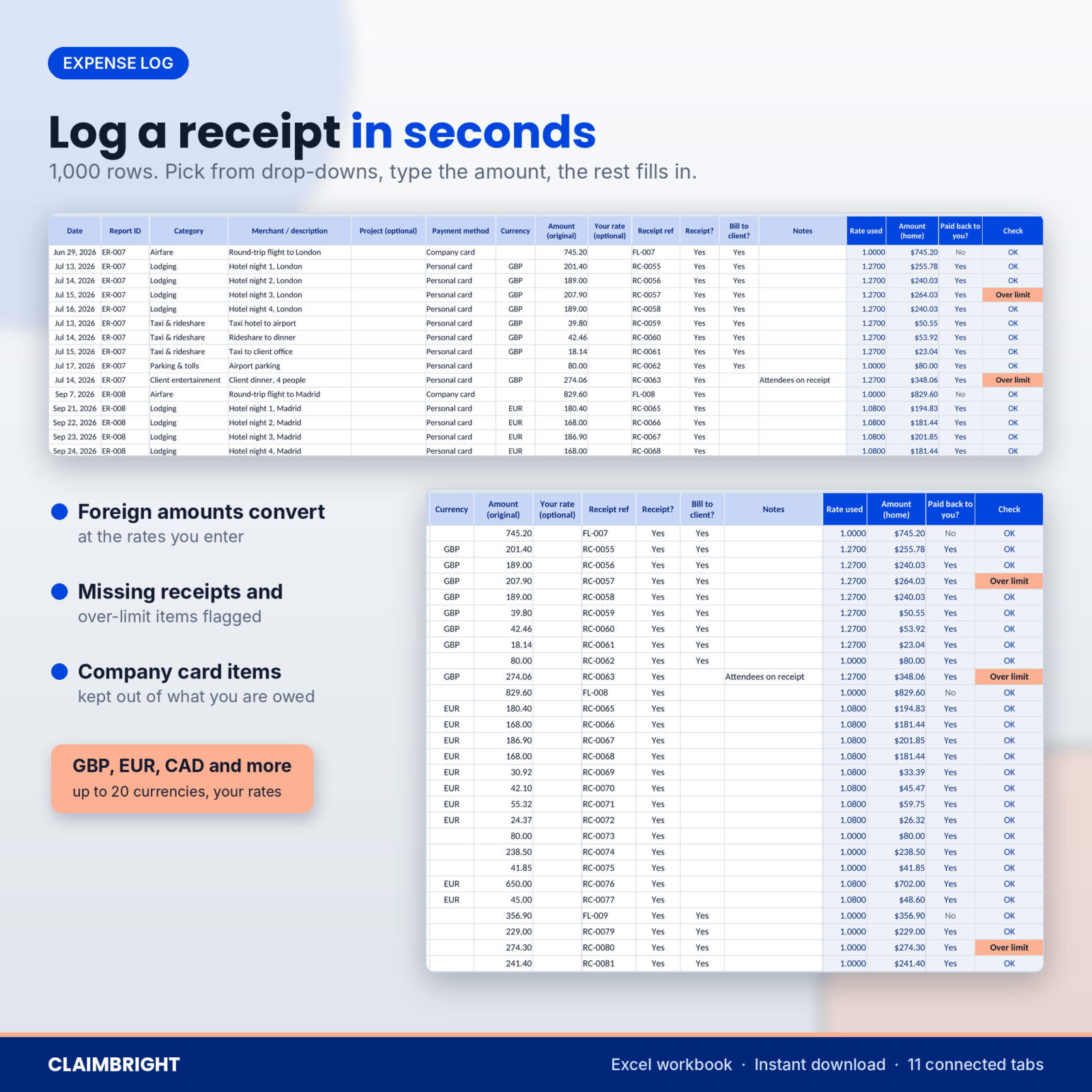
Type the amount exactly as it appears on the receipt and pick the currency. Claimbright converts it to your home currency using the exchange rates you keep on Settings, or a rate you type for that one item from your card statement. Each row checks itself: Receipt needed for items at or above your receipt threshold, Over limit when a category limit is passed, and Add rate if a currency has no rate yet. Company card items stay on the report but are kept out of what you are owed.
Mileage log at your own rate
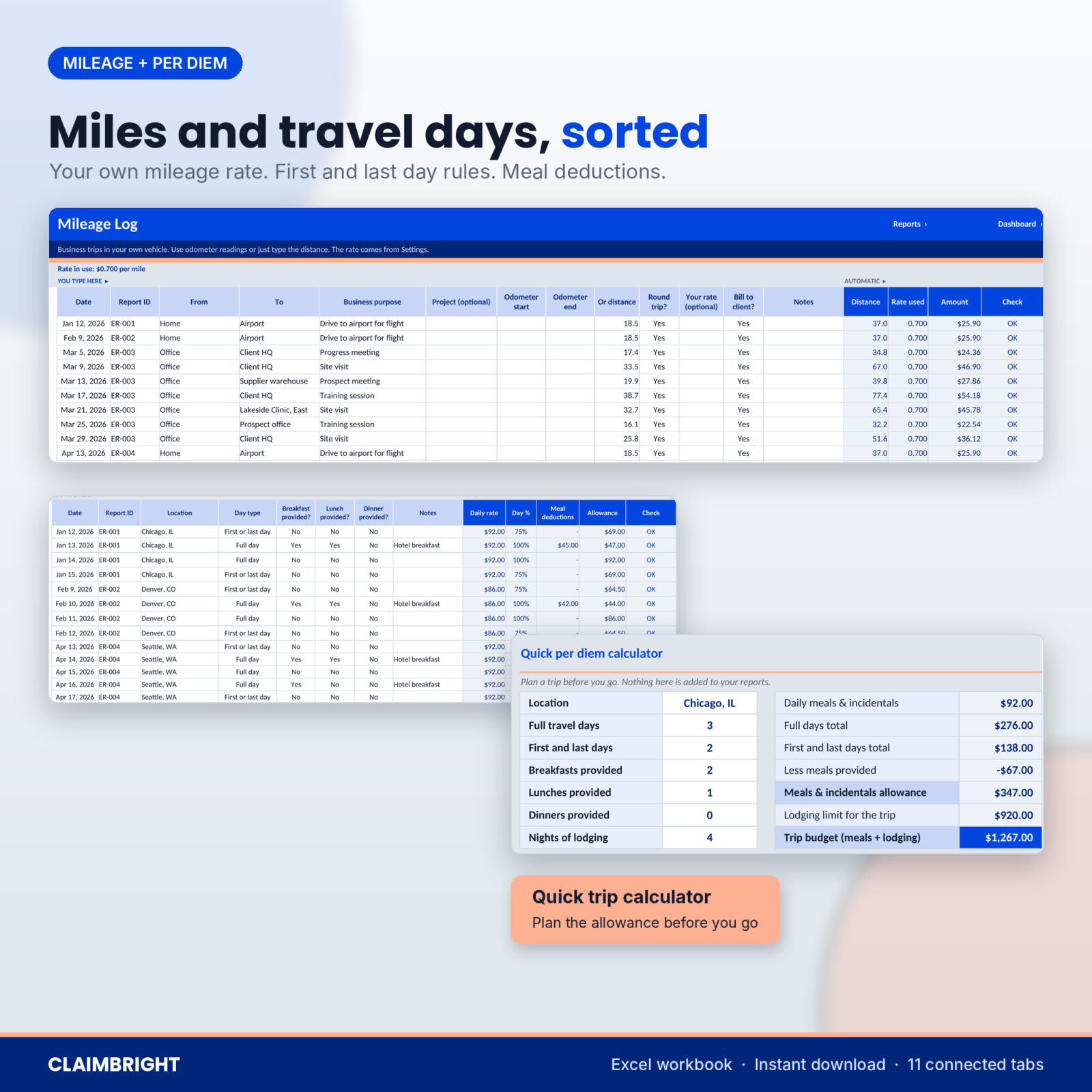
Use odometer readings or just type the distance, with a round-trip option. You enter the mileage rate per mile or km, so it always matches your employer’s policy or the current official rate. There is no out-of-date figure built in.
Per diem calculator
Add one row per travel day. The daily meals and incidentals rate comes from your own location table, first and last days use your percentage (75% by default), and any meal that was provided comes off automatically. A quick trip calculator helps you estimate the allowance and lodging limit before you go.
Advances, approvals and part payments
Log each step on the Status Tracker. Part payments add up on their own, and if your advance was bigger than the claim, the balance turns negative until you log the repayment. Reports waiting longer than your chase-up window (30 days unless you change it) are flagged in coral.
One-page printable expense report
Employee, ID, department, purpose, period, destination and approver at the top. Up to 24 line items with receipt references and original foreign amounts. Totals by category, mileage, per diem, advance, amount owed and balance. Signature lines for the employee, approver and finance. It prints on one US Letter page and scales to A4.
Client Rebill page
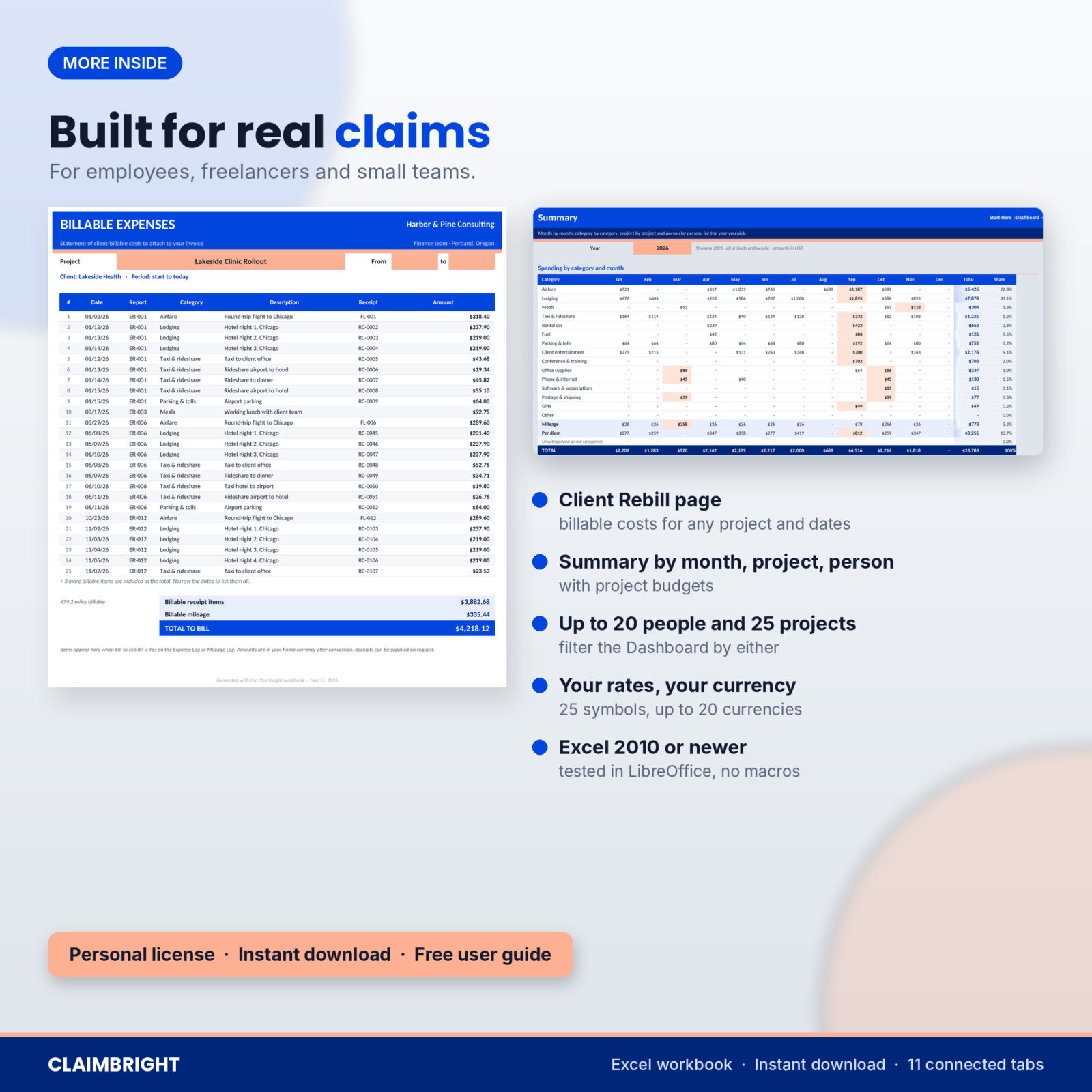
Pick a project and a date range to list every cost marked billable, with a total to put on your invoice. Ideal for consultants who pass travel on at cost.
Dashboard and Summary
Filter by year, project and employee to see spend, paid back, still owed, billable costs and alerts, plus four charts. The Summary tab adds a category-by-month grid, project budgets and a per-person payback table.
What is included
- Claimbright-Expense-Report-Reimbursement-Tracker.xlsx: 11 connected tabs (Start Here, Dashboard, Reports, Expense Log, Mileage Log, Per Diem, Status Tracker, Expense Report, Client Rebill, Summary, Settings)
- Claimbright-User-Guide.docx: a step-by-step guide with screenshots, troubleshooting and FAQs
How it works
- On Settings, pick your currency symbol and type your mileage rate, per diem rates, exchange rates, people, approvers and projects.
- On Reports, add a row for each trip, project or month and give it a Report ID.
- Log receipts, drives and travel days under that Report ID.
- Open the Expense Report tab, pick the Report ID and print or save a PDF.
- Log Submitted, Approved and Paid on the Status Tracker and watch the balance reach zero.
File format and software
One .xlsx workbook built for Microsoft Excel 2010 or newer on Windows or Mac, tested in LibreOffice Calc. No macros, add-ins or internet links. Formula cells are protected without a password, so you can unlock any tab if you want to change it. It is not designed for Google Sheets or Apple Numbers.
Customize it
Pick from 25 currency symbols and every money cell follows. Rename the 15 expense categories and set a limit and GL code for each. Add up to 20 employees, 10 approvers, 25 projects, 20 currencies and 30 per diem locations.
Real situations it handles
- A four-day client trip to London with hotel nights in pounds, an $800 advance and a part payment from payroll.
- A month of local client visits claimed as mileage, with two receipts still missing.
- A consultant billing a client for every flight, hotel night and mile on one project.
- A small team where the office manager needs to see who is owed what, and which claims are stuck.
Digital download
Instant download, nothing is shipped. The file is blank and ready for your claims. The listing images show it with sample data.
FAQ
Does it include the IRS mileage rate or GSA per diem rates?
No. You type the rates you are allowed to claim, so the file never goes out of date. Your employer’s policy or your tax office’s website has the current figures.
Can I use it in another currency?
Yes. Pick your currency symbol and home currency code. Receipts in other currencies convert at the rates you enter.
Does it work in Google Sheets?
It is built for Microsoft Excel 2010 or newer and tested in LibreOffice Calc. It is not designed for Google Sheets or Apple Numbers.
Can several employees use one file?
Yes. Add up to 20 people. Each report belongs to one person, and the Dashboard and Summary filter by person.
How do I print an expense report?
Open the Expense Report tab, pick the Report ID in the coral box and print. The page is already set to fit one sheet.
What happens if my advance was more than I spent?
The amount owed shows as a negative number. Log the repayment as Paid / settled and the balance returns to zero.
Is this tax or accounting advice?
No. It is an organizing tool. The rates and limits you enter are your own.
License
Personal license for one person or one small business. Use and edit it for your own expense claims as much as you like. Please do not resell, share or upload the file or the guide, in full or in part.

Reviews
There are no reviews yet.