


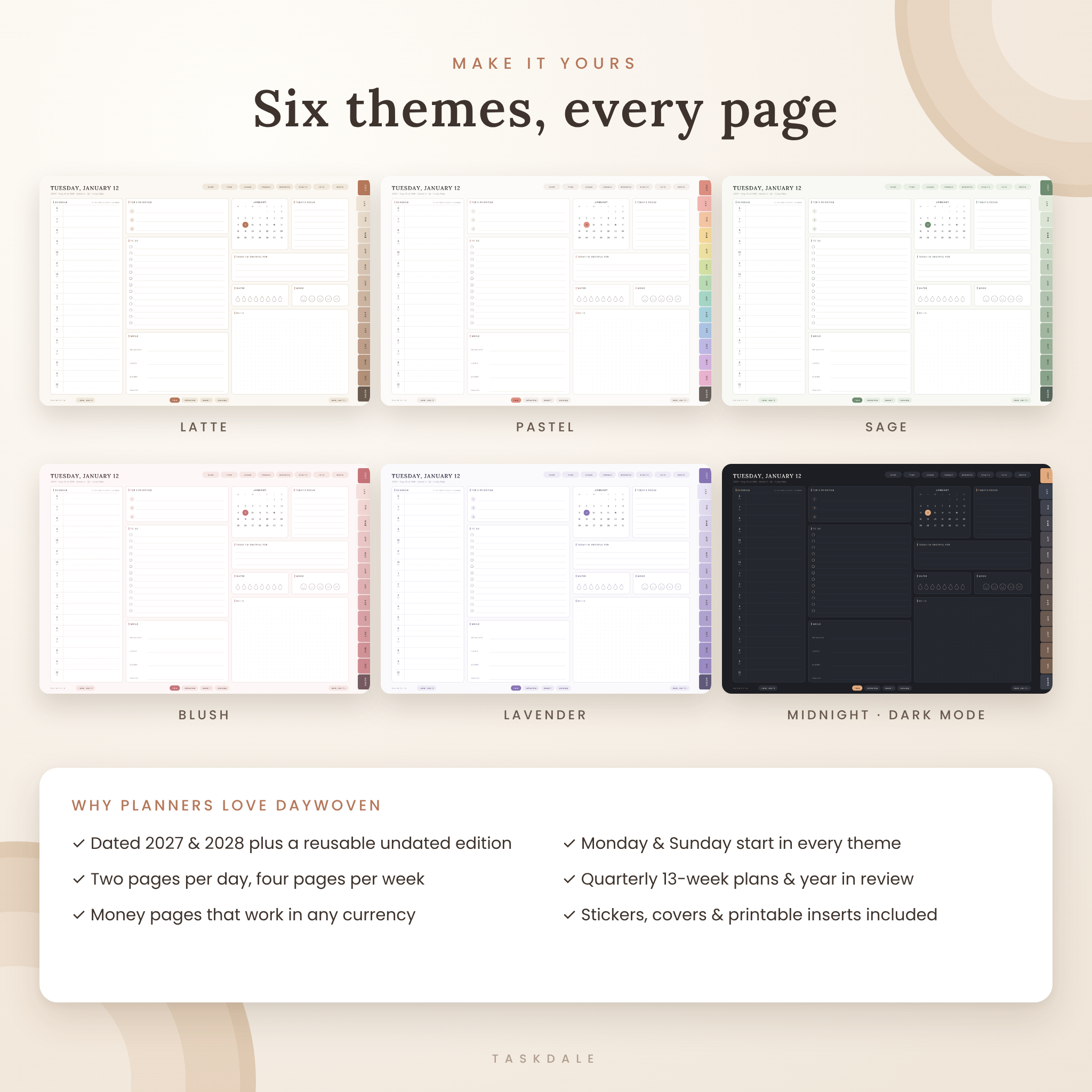
Daywoven is an all-in-one digital planner for 2027, 2028 and any undated year, built as a fully hyperlinked PDF for your tablet. More than 1,280 linked pages bring your calendar, goals, money, health, home and notes into one calm, beautifully organized place, with big tap-friendly tabs on every page and Google Calendar links on every hour of every day.
Pick your edition, your theme and your week start, import the PDF into your favorite note-taking app, and start planning in minutes. All 36 planner files are included, so you can switch themes or years whenever you like.
Why choose the Daywoven digital planner
- Two pages for every day: a Daily Plan and a Daily Reflection, linked to each other and to the day before and after.
- Four linked pages for every week: Plan, Schedule, Reflection, and Meals & Groceries.
- Google Calendar links: tap any hour on a daily page to open a new event at that exact date and time, or tap + on a weekly or monthly date for an all-day event.
- Big, labeled navigation: twelve month tabs on the edge of every page plus clear section buttons (Home, Year, Goals, Finance, Wellness, Health, Lists, Notes). No tiny icons to hunt for.
- Quarterly 13-week plans and a Year in Review that turn yearly goals into weekly action.
- US holidays pre-printed on the 2027 and 2028 calendars.
- Six themes, including dark mode, each in Monday-start and Sunday-start versions.
- Works in any currency: every money field reads Amount, with a Currency box on each finance page.
What’s included
- 36 hyperlinked planner PDFs: 2027, 2028 and Undated editions × 6 themes (Latte, Pastel, Sage, Blush, Lavender, Midnight) × Monday and Sunday start. Delivered as 18 ZIP files, one per edition and theme.
- 870 digital stickers as transparent PNGs (sticky notes, word labels, icons, date and month stickers, washi tape, appointment and to-do boxes, highlighters, tabs) plus an 11-sheet Sticker Book PDF.
- 24 matching notebook covers (JPG) across all six themes.
- 95 printable insert pages in US Letter and A4 for paper or binder planning.
- Illustrated user guide (DOCX) with setup steps, a tour of every section, tips, troubleshooting and FAQ.
Inside each digital planner
Yearly and quarterly planning
Home index, how-to page, Year at a Glance, Year Planner with a line for every day, Yearly Overview, Yearly Goals across six life areas, Key Dates & Birthdays, four Quarterly Plans with a linked week-by-week check-in, a Year in Review, and a four-year Future Planner (or a Future Log in the undated edition).
Monthly, weekly and daily pages
Each month has a Calendar (with week links, holidays and a notes column), an Overview with goals, priorities, focus areas and a line for every day, and a Monthly Review. Each week has a Weekly Plan with habit tracker, an hourly Weekly Schedule, a Weekly Reflection and a Meals & Groceries page. Each day has a Daily Plan (hourly schedule, top 3, to-do list, focus, gratitude, meals, water, mood, notes and a linked mini calendar) and a Daily Reflection (affirmation, intentions, highlights, lessons, sleep, energy, self-care check-in and tomorrow’s top 3).
280+ pages for the rest of life
- Finance: yearly finances, 12 monthly budgets (budget vs actual), 12 expense logs, bill tracker, savings goals, sinking funds, debt payoff, accounts, subscriptions, no-spend challenge and net worth.
- Wellness: 12 habit trackers, 12 wellness logs (mood, sleep, water, energy), Year in Pixels, medication & supplements, self-care menu, cycle tracker, sleep routine and a 100-item gratitude jar.
- Health & Food: fitness plan, 12 activity logs, 6 workout logs, body measurements, fitness journey, steps challenge, meal ideas, a 40-page linked recipe book, kitchen inventory and master grocery list.
- Goals & Productivity: 9 linked goal planners, 20 linked project planners, to-do lists, priority matrix, custom lists, routines, meeting notes, 30-day challenges, brain dump, vision board and future ideas.
- Lists & Life: reading list and log, watchlist and movie log, cleaning planner, home maintenance, wishlist, gift planner, birthday tracker, travel planners, packing list, delivery tracker, universal trackers, contacts and password hints.
- Notes: 10 color-coded notebook sections, six note paper templates (lined, dotted, grid, two Cornell styles, blank), quick notes and a Layout Library with 12 daily and 4 weekly alternative layouts to mix and match.
How it works
- Download the ZIP for the edition and theme you want and unzip it.
- Import the PDF as a new document in a note-taking app that supports PDF hyperlinks.
- Tap tabs, dates and buttons to move around, and write with your stylus or finger.
File formats and requirements
- Hyperlinked PDF planners, landscape, sized for tablets (about 4–5 MB each, so they open quickly).
- Designed for PDF annotation apps that support internal hyperlinks, such as GoodNotes, Notability, Noteshelf, Xodo and Samsung Notes. Link behavior can vary slightly between apps.
- Stickers: transparent PNG. Covers: JPG. Printables: PDF (US Letter and A4). Guide: DOCX.
- Google Calendar links need an internet connection and a Google account. Links create new events; they do not sync events back into the planner.
Customize it your way
Choose from six color themes, swap in any of the 24 covers, decorate with stickers, duplicate project, recipe, notes or layout pages as often as you like, and delete sections you never use. Write your own names on goal, project and notebook index pages so the planner becomes your personal table of contents.
Perfect for
- Busy parents running the family calendar, meals and budget in one place.
- Professionals who time-block their day and want calendar events created in one tap.
- Students planning classes, study sessions and assignments, with reading and goal pages built in.
- Anyone moving from a paper planner to an iPad or Android tablet.
- Planners who enjoy reflection, habit tracking and wellbeing pages, not just to-do lists.
Digital download
This is an instant digital download. No physical item will be shipped. After purchase, download your files from your order confirmation or account page.
Frequently asked questions
Which app do I need for this digital planner?
Any PDF note-taking app that supports hyperlinks. Popular choices are GoodNotes, Notability, Noteshelf, Xodo and Samsung Notes.
Is there a 2027 and a 2028 version?
Yes. You get dated 2027 and 2028 planners plus a reusable undated planner, in all six themes.
Can I choose a Sunday start?
Yes. Every theme and edition comes in both Monday-start and Sunday-start versions.
Does it sync with Google Calendar?
Calendar links open Google Calendar with a new event already set to the date and time you tapped. The planner does not pull events back in.
Is there a dark mode planner?
Yes. The Midnight theme is a full dark-mode version of every page.
Can I print the pages?
Yes. 95 undated printable pages are included in US Letter and A4.
Can I use my own currency?
Yes. All money fields say Amount and each finance page has a Currency box for your symbol.
License: for personal use only. Please do not share, resell or redistribute the files. © Taskdale.
Reviews
There are no reviews yet.