




An annual budget spreadsheet that does the math for you
Most budget templates make you copy the same bills into every month. Emberlune doesn’t. This annual budget spreadsheet for Google Sheets asks for each paycheck, bill and budget line once, with how often it repeats. Then it lays out all 12 months, fills a bill calendar, tracks your net worth and builds a plan to clear your debt.
It’s dressed in space black, deep lavender and sunrise orange, with big summary cards and clean charts. You’ll actually want to open it. And it’s simple enough for a first budget, with the depth a long-time budgeter expects.
Who it’s for
- Households and couples who want every account, bill and goal in one place.
- People paid weekly, every two weeks or twice a month. Budget by paycheck, not just by month.
- Anyone paying down cards or loans who wants a real debt-free date instead of a guess.
- Savers building an emergency fund, a trip fund or a down payment.
Main features
A planner that repeats itself
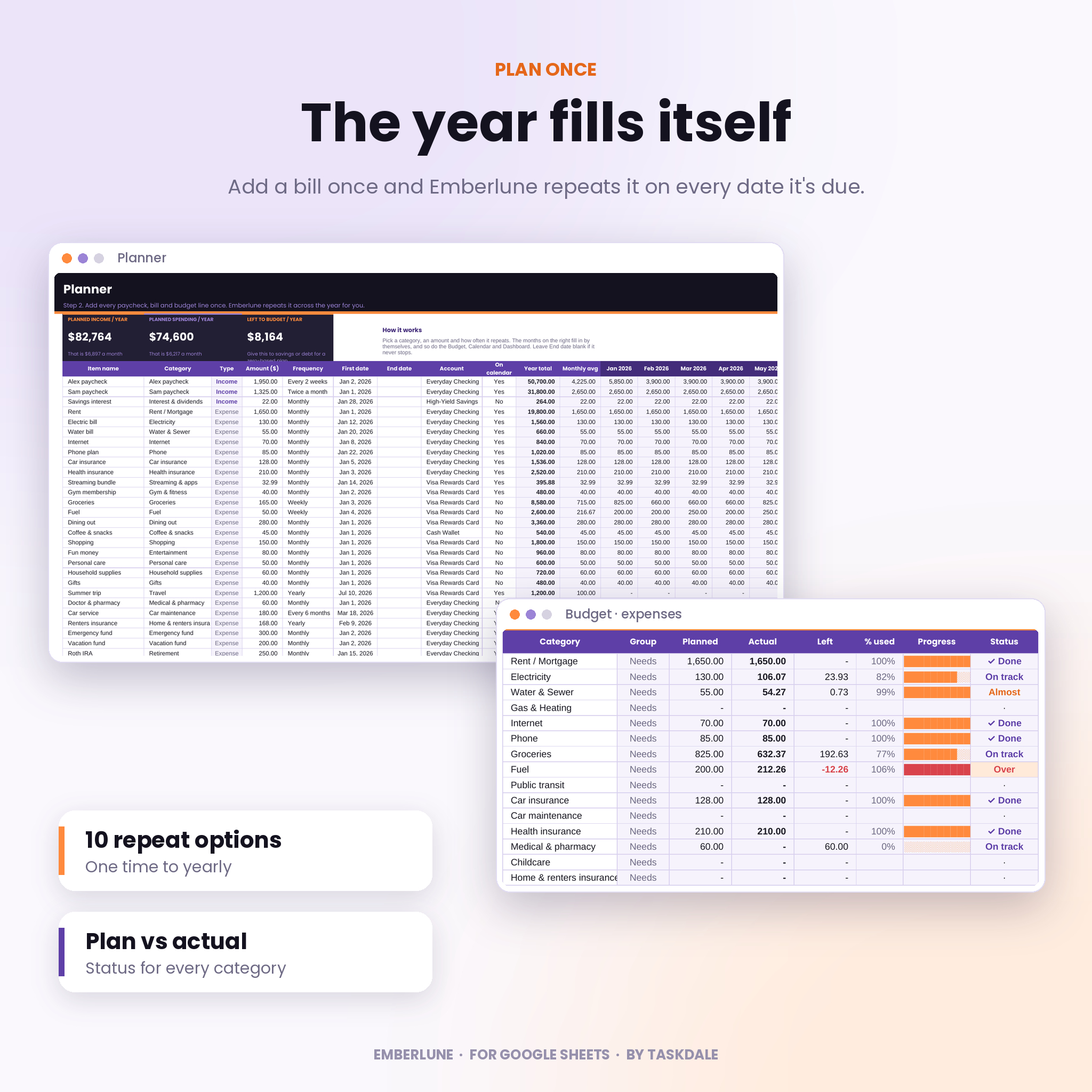
Pick a category, an amount, a first date and one of 10 repeat options: one time, weekly, every 2 weeks, every 4 weeks, twice a month, monthly, every 2 months, quarterly, every 6 months or yearly. Add an end date for anything that stops. Up to 150 planner items fill the 12 months automatically, so a biweekly paycheck shows up three times in the months that have three paydays.
A paycheck budget planner for any dates
The Budget tab shows one month, or any start and end dates you type. Use it as a weekly budget, a biweekly budget or a budget for this exact paycheck. You get planned vs actual for every category, a progress bar, and a status that reads On track, Almost, Done, Over or Unplanned. A spending pace box tells you how much you can spend per day and still finish on plan.
Bill calendar with paid status
Every planned bill and paycheck sits on its day. Each day shows money in, money out and a projected balance for the accounts you pay bills from. Link a transaction to its bill and the list beside the calendar marks it Paid or Received. Anything past its date shows as Overdue, and bills within three days show as Due soon.
Annual dashboard
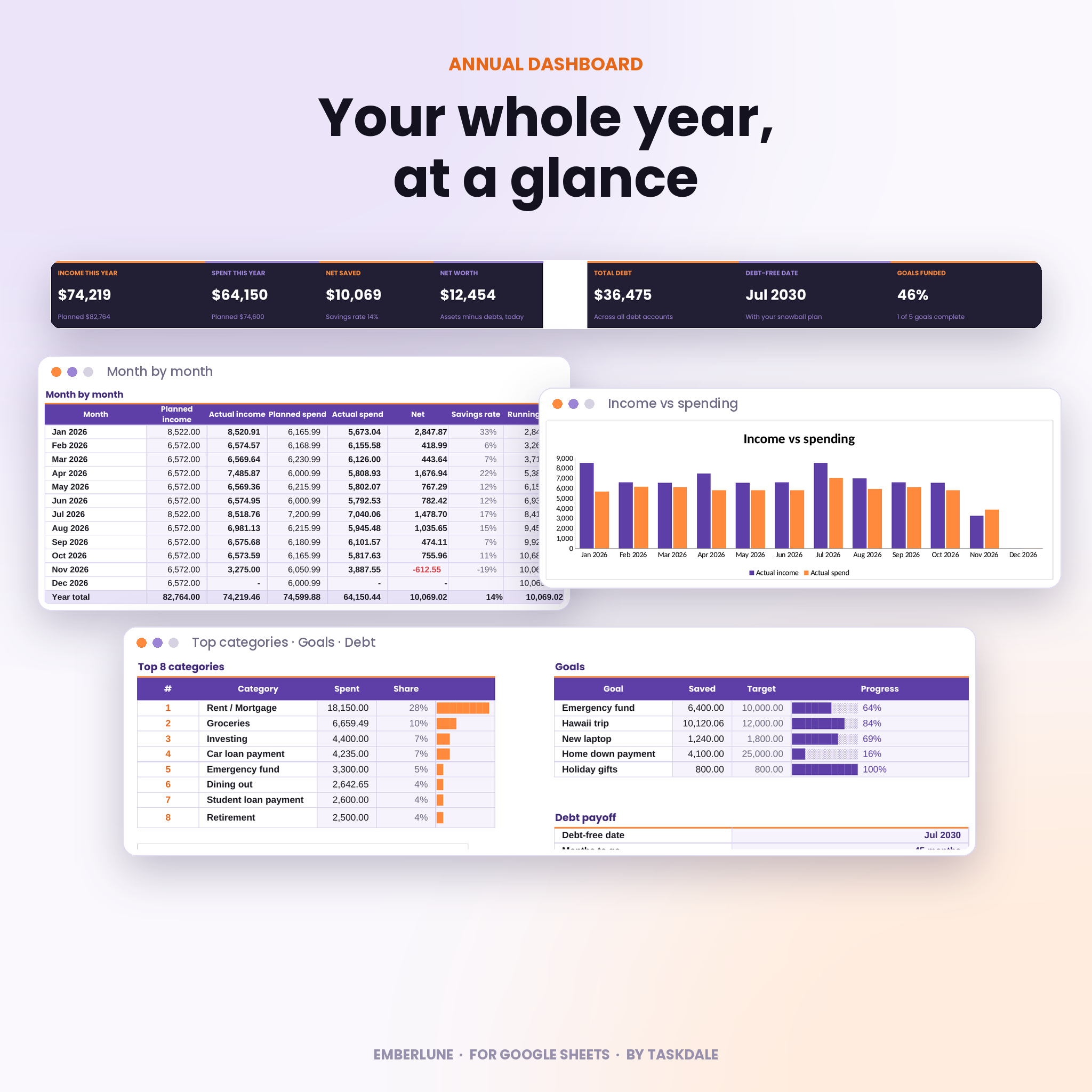
Seven summary cards cover income, spending, net saved, net worth, total debt, your debt-free date and goal progress. Below them you’ll find a month-by-month table, an income vs spending chart, your spending split by needs, wants, savings and debt, your top 8 categories, and a category-by-month heatmap that shows where spending creeps up.
Debt payoff tracker
List up to 40 debts with balance, APR and minimum payment, or link a debt to an account and the balance comes in by itself. Choose snowball, avalanche or your own order, add an extra monthly payment, and see your debt-free date, total interest, a year-by-year balance chart and the interest you save compared with paying only minimums. Freed-up payments roll onto the next debt for you.
Net worth and savings goals
Net Worth works out month-end balances for up to 80 accounts from your transactions and transfers, so you never type them by hand. Goals tracks up to 12 savings goals: link one to an account and it follows that balance, or type what you’ve saved.
What’s included
- Emberlune Annual Budget Planner (.xlsx file for Google Sheets) with 11 tabs: Start Here, Setup, Planner, Dashboard, Budget, Calendar, Transactions, Transfers, Net Worth, Debt Payoff and Goals.
- 42 starter categories sorted into needs, wants, savings and debt. Rename, delete or add your own.
- DOCX user guide with setup steps, an explanation of every tab, tips, troubleshooting and FAQs.
How it works
- Setup. Choose your currency symbol and the month your budget year starts. Add your accounts with today’s balances.
- Plan. Add your paychecks, bills and budget lines once, with how often they repeat.
- Log. Record what you earn and spend. Type and group fill in by themselves.
That’s it. Dashboard, Budget, Calendar, Net Worth, Debt Payoff and Goals all update on their own.
File format and requirements
- Format: one .xlsx spreadsheet plus a .docx user guide.
- Software: Google Sheets with a free Google account. Upload the file to Google Drive and choose Open with Google Sheets. The guide walks you through it.
- Tested in Google Sheets: formulas, dropdowns, charts, links and the calendar. Excel and Apple Numbers aren’t officially supported.
- Best on: a laptop or desktop browser. It opens on tablets too.
Make it yours
One currency setting controls every heading and summary card, with $ as the default. Change your 50/30/20 targets, rename categories, change colors with the normal toolbar, and start your budget year in any month. Next year, make a copy, clear the transactions and keep going. No need to buy it again.
Real ways people use it
- Planning a family budget for the year and checking each payday what the paycheck has to cover.
- Seeing which week of the month is tight before rent and the car payment land together.
- Choosing between snowball and avalanche by comparing the debt-free date and interest of each.
- Tracking an emergency fund and a vacation fund that update from real account balances.
- Reviewing the heatmap at month end to spot creeping spending on dining out or shopping.
Digital download
This is an instant digital download. Nothing ships. After checkout you’ll get your files right away from your order confirmation and your account page.
FAQ
Does this budget spreadsheet work in Google Sheets?
Yes. It was built and tested for Google Sheets. You only need a free Google account.
Can I budget by paycheck or by week?
Yes. On the Budget tab choose Custom dates and type the pay period. Planned and actual amounts follow those dates.
Will it work with my currency?
Yes. Type any symbol on the Setup tab and every heading and summary follows it.
Do I have to start in January?
No. Pick any start month and the 12 months follow from there.
How many accounts and categories can I add?
Up to 80 accounts, 15 income categories, 80 expense categories, 150 planner items, 2,000 transactions and 40 debts.
Can I reuse it next year?
Yes. Make a copy, clear the transactions and set the new start month.
Is this financial advice?
No. Emberlune is a planning tool. For money decisions, talk to a qualified professional.
Licence
Personal use licence for you and your household. Please don’t resell, share or upload the files.
Reviews
There are no reviews yet.