


Emberly is a simple budget spreadsheet for people who want to know where their money goes without wrestling with formulas. You type a plan, log what you spend, and the planner does the rest. It works in Microsoft Excel and Google Sheets, and it suits a first budget as much as a fifth.
Plenty of budget templates stop at one tab. That is fine for a week or two. Then you copy the tab, the formulas drift, and the habit fades. Emberly fixes that. Your history lives in one transaction log, so a new period is just a new start date. Your plan carries over. Your year adds itself up.
What this budget spreadsheet does
It gives you one place for income, savings, bills, everyday spending and debt payments. Each one has a planned amount and an actual amount. The gap between them is what you watch.
- Plans your money for any period you choose
- Pulls actual totals from your Transactions log automatically
- Flags categories that hit 90% in gold and over-budget lines in red
- Shows which bills are paid, due soon or overdue
- Tracks savings goals and estimates debt payoff dates
Who it is for
Beginners who want a clear, friendly start. Biweekly and weekly earners who are tired of forcing paychecks into a monthly sheet. Families keeping bills and goals together. Anyone working toward a debt-free date. It also suits people who get overwhelmed easily, because each tab does one job and the colors tell you where to type.
Features
Budget dashboard
- Six live cards: income received, total out, left to spend, left to budget, ending balance and savings rate
- Budget Overview by group with planned, actual, left and percent used
- Top 5 spending categories for the period, with their share of spending
- Bills Check-In: bills paid, overdue count, amount still to pay and the next bill due
- Three charts: balance through the period, planned vs actual and where your money went
Flexible periods
Choose Monthly, Biweekly, Weekly, Semi-monthly or Custom. The end date sets itself. Start a biweekly budget on payday and the planner counts 14 days from there.
Spending tracker
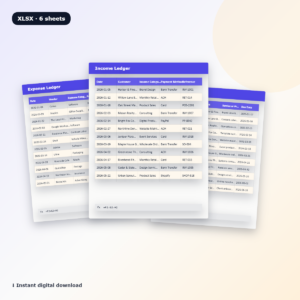
- 1,000 transaction rows, enough for a full year of normal use
- Category dropdown built from your own list, so there are no typos
- The group fills in automatically, and a check mark shows what counts this period
- Account dropdown and filters to view one card, category or date range
Bill tracker
Add a due day for each bill. Status updates to Paid, Due with the date, Overdue or Next period on its own.
Savings goals and debt payoff
Track up to 10 goals with a target, a monthly amount needed and a ten-block progress bar. Track up to 10 debts with interest rate, months to go and an estimated payoff date. Payments you log are counted for you.
Year View
Month by month totals for income, each group, money out, net and savings rate, plus a chart. A full breakdown of every category by month shows the slow leaks that one period hides.
What is included
- Emberly Simple Budget Planner (.xlsx), clean and ready for your numbers
- Emberly Sample File (.xlsx), filled with a year of example data
- Emberly User Guide (.docx), 12 pages with screenshots, tips, troubleshooting and FAQ
How it works
- Make it yours. On Settings, pick your currency symbol and edit the category lists. Each group holds 20.
- Plan your period. On Budget, choose the period type and start date, add your starting balance and type planned amounts in the amber cells.
- Track as you go. On Transactions, add the date, pick a category and type the amount. The dashboard updates right away.
Next period? Change the start date. That’s it.
File formats and software requirements
- Format: Excel workbook (.xlsx) plus a Word user guide (.docx)
- Microsoft Excel 2010 or newer, Microsoft 365, or Excel for Mac 2016 or newer
- Google Sheets with a free Google account. Upload the file to Google Drive and choose File, Save as Google Sheets
- Best set up on a computer. You can add entries later in the Excel or Google Sheets mobile apps
Customization
Rename the five groups and up to 100 categories, or translate them into your own language. Set any currency with one cell, and every label and card follows. Formula cells are locked without a password so they stay safe, and you can unlock a sheet any time to change colors or layout. Every tab prints on US Letter or A4.
Digital download
This is an instant digital download. No physical item will be shipped. Your files are ready on the order confirmation page and in your account as soon as payment clears.
Real ways people use it
- A nurse paid every other Friday runs a biweekly budget that starts on payday
- A couple tracks rent, utilities and streaming bills so nothing slips past a due date
- A student budgets weekly and sends anything left to a vacation fund
- A family pays off a credit card and watches the payoff date move closer each month
- A freelancer with uneven income uses custom dates and checks Year View for slow months
Budget spreadsheet FAQ
Does it work in Excel and Google Sheets?
Yes. Formulas, dropdowns, charts and tab links were tested in both.
Can I use my own currency?
Yes. Type any symbol on Settings, such as €, £, R or ₹, and every label updates.
Can I budget by paycheck?
Yes. Choose Weekly or Biweekly and set the start date to your payday.
Do I need to copy a tab every month?
No. Change the start date and the planner moves forward. Your history stays in Transactions and Year View.
How many categories and transactions can I add?
Up to 20 categories in each of the five groups, so 100 in all, plus 1,000 transaction rows.
Is it good for beginners?
Yes. There are three steps to start, amber cells show where to type and the guide explains every tab.
Can I edit the design?
Yes. Sheets are protected without a password, so you can unlock them to change colors or layout.
Licence: for personal use only. Please do not resell, share or redistribute the files. Emberly is a budgeting tool and does not give financial advice. © 2026 Taskdale.
Reviews
There are no reviews yet.