




Feedwell is a social media content planner that runs in your web browser from one file. Download it, double-click it, and start planning. No account, no subscription, no app to install. Every post moves from a rough idea to drafted, ready and posted on a drag-and-drop board, and your week sits on one clear dashboard.
It’s made for people who post for their own business and want a calm system that actually gets used. Your ideas, captions and numbers stay on your own computer.
What this social media content planner does
Most content calendars stop at “what goes out on Tuesday.” Feedwell covers the whole job. You catch ideas, write captions with live platform limits, schedule posts, and log the results afterwards. Then the Results screen shows which posts landed and which day works best for you.
- This week dashboard: posts going out in the next 7 days, slipped posts, a weekly goal ring, your goal streak and a week-ahead chart by platform.
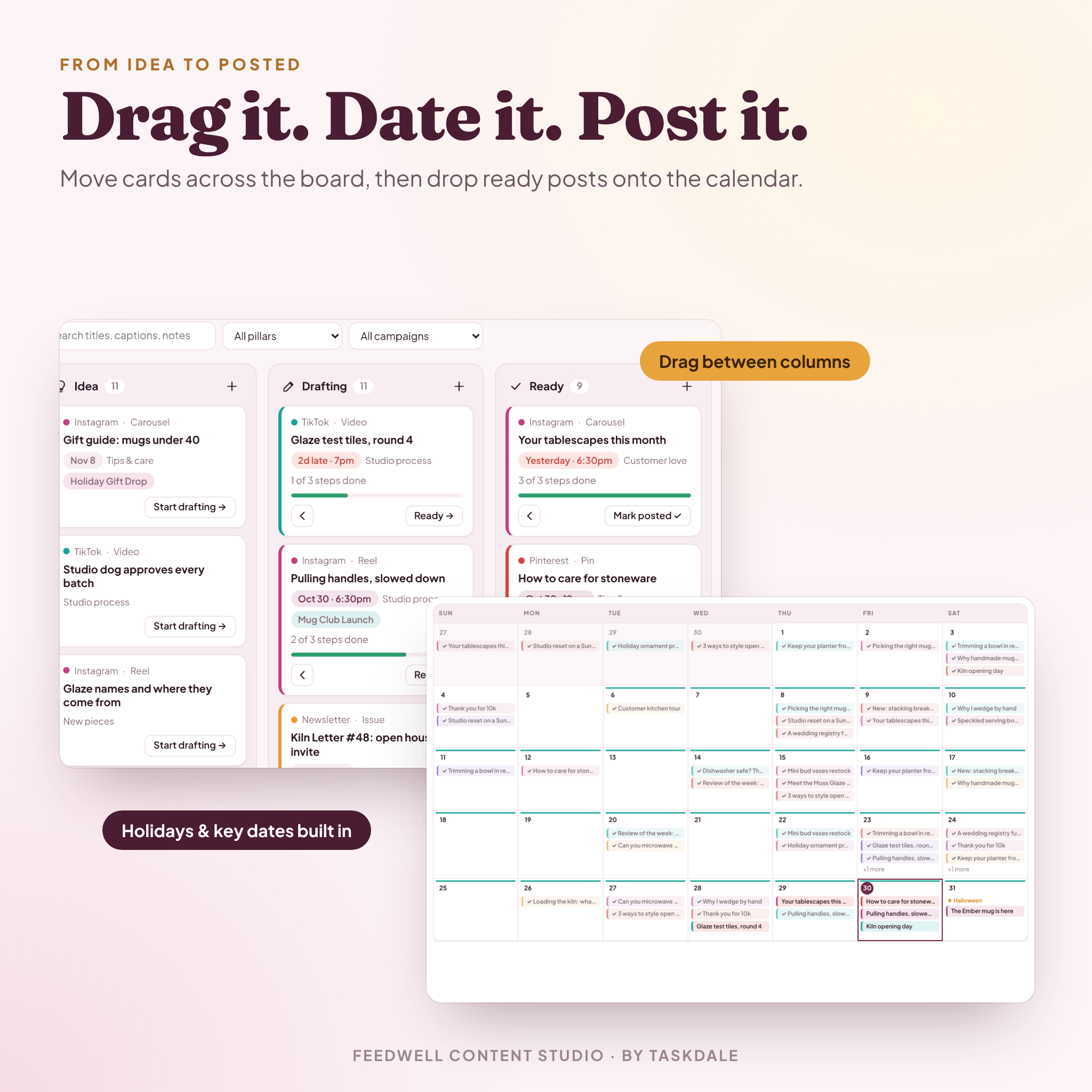
- Pipeline board: Idea, Drafting, Ready and Posted columns. Drag cards across, or tap the arrow buttons.
- Content calendar: month, week and list views. Drag posts to new days. US holidays and shopping days like Black Friday show up on their own.
- Post editor: caption counter that warns you near each platform’s character and hashtag limit, a “before more” preview, a checklist, and one-click copy.
- Results tracker: log reach, likes, comments, shares, saves and clicks. See engagement rate, top posts, pillar mix, formats and your best day to post.
Who it’s for
Small business owners doing their own marketing. Etsy and handmade sellers. Coaches, creators, bloggers and newsletter writers. Social media managers planning their own channels. Basically anyone who’s tired of a messy spreadsheet or a paper planner that gets abandoned by week three.
Features that make it worth opening every week
A swipe file built in
Blank caption? Pick from 60 hooks in six styles, 12 caption frameworks and 30 calls to action. Star the ones you like. Add your own. Insert a hook straight into any caption from the editor.
Idea bank with idea sparks
Type an idea and press Enter. Done. When nothing comes, the idea spark bar offers 50 prompts across Educate, Inspire, Behind the scenes, Promote and Engage.
Hashtag sets
Save the hashtags you reuse, then add a whole set to a post in one click. Feedwell adds the # signs, strips commas and removes repeats for you.
Campaigns
Group a launch, sale or seasonal push. Set dates and a post goal, then watch progress on the dashboard and the calendar.
Brand deals tracker
Track pitches, deliverables, due dates, fees and payment status from Pitched to Paid. Totals show what’s in talks, what’s owed and what you’ve been paid this year. Money values follow one currency setting, with $ as the default.
Platforms, pillars and brand kit
Give each platform a weekly goal and its own caption and hashtag limits. Set target shares for your content pillars and see how the last 90 days compare. Keep your bio, voice, colors and go-to lines in a printable brand kit.
Time savers
- Make a version copies a post to other platforms in two clicks.
- Repeat schedules a weekly series up to 52 times.
- Search everything with Ctrl + K, plus keyboard shortcuts for common jobs.
- Undo after a delete, so one wrong click costs nothing.
What’s included
- Feedwell.html, the content planner app (13 screens)
- Feedwell User Guide (Word document, 20 pages with screenshots)
- CSV import template for bringing in posts from a spreadsheet
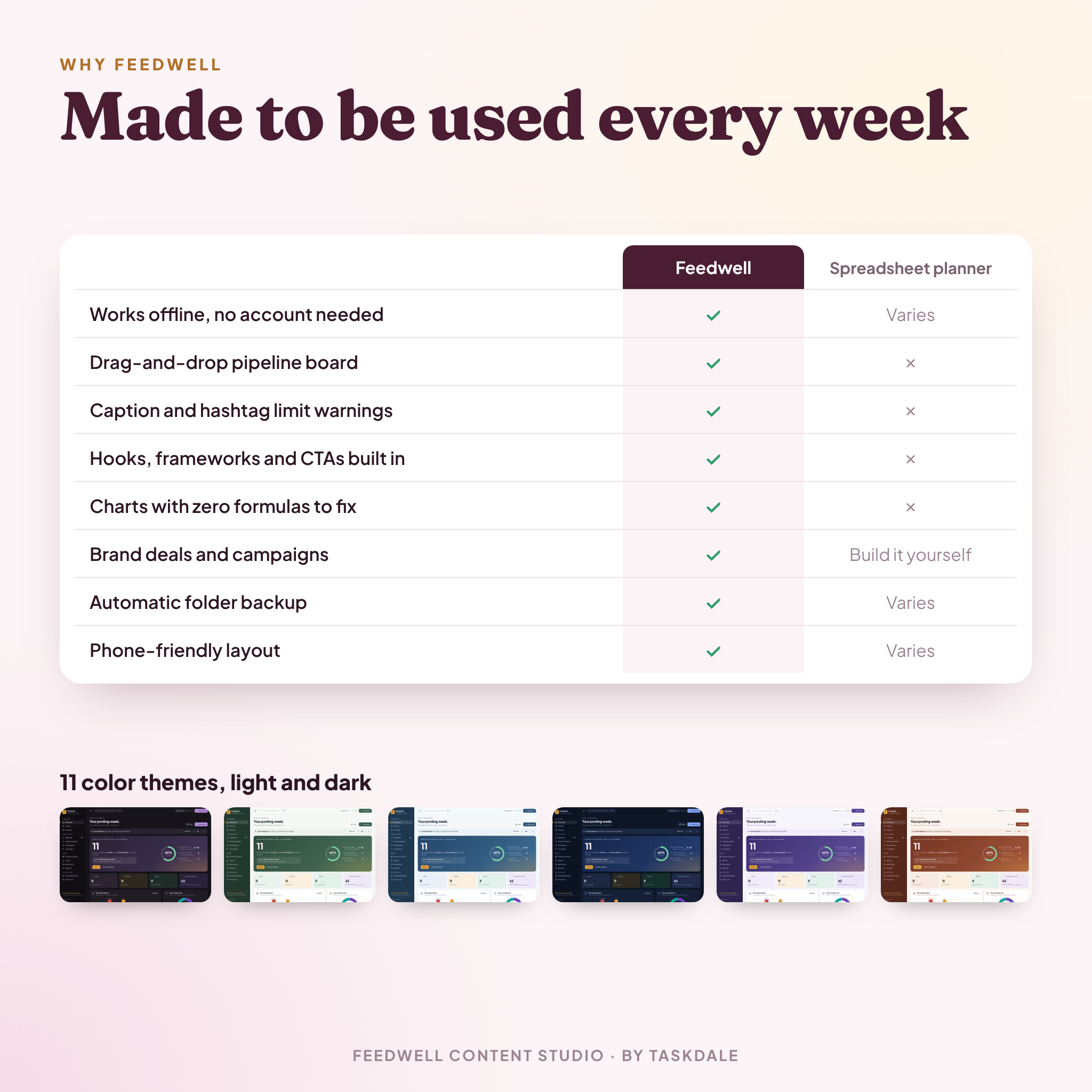
- 11 color themes, three of them dark
- Sample data you can load to explore, then clear in one click
How it works
- Download your files and save Feedwell.html somewhere you’ll find it again.
- Double-click to open it in Google Chrome or Microsoft Edge.
- Pick your platforms and weekly goals in the one-minute setup.
- Drop ideas into the Idea bank, then move them along the board.
- Give ready posts a date and mark them posted when they go live.
File format and requirements
One HTML file that works offline. Built and tested for Google Chrome and Microsoft Edge on Windows and Mac computers. The layout also adapts to phones and tablets. You don’t need Excel, Canva or any other software. The user guide opens in Word, Google Docs or any app that reads .docx files.
Your data stays private
Everything saves in your own browser on your own device. Nothing is uploaded. Download a backup any time. In Chrome and Edge you can also pick a folder, such as a Dropbox or OneDrive folder, and Feedwell writes a dated backup there after every change. Export your posts to CSV whenever you like.
Make it yours
Change the currency symbol, week start day, 12 or 24-hour time, default checklist steps and color theme. Add as many platforms, pillars, hashtag sets, campaigns and key dates as you need.
Real ways people use it
- A candle maker batches a month of Instagram and Pinterest posts on one Sunday afternoon.
- A coach runs a “Tip Tuesday” series on LinkedIn using the Repeat button.
- A creator tracks three sponsorships and spots which brand still owes an invoice.
- An Etsy seller plans a Black Friday campaign with posts across four platforms.
Digital download
This is a digital product. Nothing is shipped. You’ll get your download links right after checkout.
FAQ
Do I need an account or internet connection?
No. Feedwell opens from the file and works offline.
Does it post to Instagram or TikTok for me?
No. It plans, organizes and tracks. You copy the caption and post from each app yourself.
Is there a monthly fee?
No. You pay once and keep it.
Can I use it on my phone?
The layout fits phones and tablets, and Android Chrome can open the file. Each device keeps its own data, so use Backup and Restore to move between them. A computer is best for planning.
Can I import my old content calendar spreadsheet?
Yes. Save it as CSV, match the template’s column names, and import. New platforms and pillars are created for you.
What if I clear my browser data?
Your planner would be wiped, which is why Feedwell reminds you to back up and offers automatic folder backup.
Can I change the currency?
Yes. One setting controls every money value in the app.
Licence
For personal and own-business use. Please don’t resell, share or redistribute the file, or include it in another product.

Reviews
There are no reviews yet.