


Graphic Designer Resume Template for Word, Ready in an Afternoon
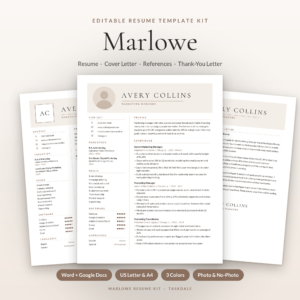
Goldcrest is a graphic designer resume template for Microsoft Word with a confident navy sidebar, gold section labels and a round photo frame with a gold ring. You get five matching files in two paper sizes, so your resume, cover letter and references page all look like one set when a hiring manager opens them. Everything is editable in Word on Windows or Mac.
The sample content is not filler. Every line is written the way a working designer would write it: a short profile, achievement bullets with real numbers, and skills that recruiters search for. Read it, then type over it with your own story.
What Is Included
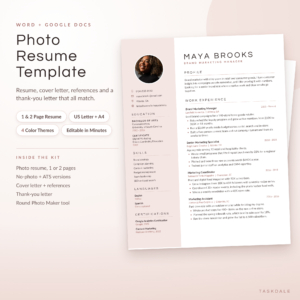
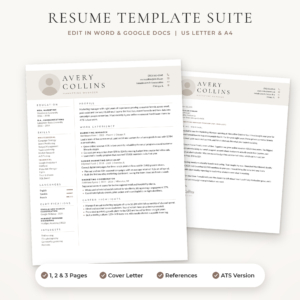
- Resume, 1 page: photo, contact details, five skill bars, software, languages, profile, work experience and education.
- Resume, 2 pages: adds certifications, awards, strengths, interests, selected projects and volunteering.
- Cover letter: same header and sidebar, with a sample letter for a senior design role.
- References page: room for four references, with phone, email and how each person knows you.
- ATS resume: a single-column version with no photo and no tables, for online job portals.
- Two sizes: all five files in US Letter (8.5 x 11 in) and A4 (210 x 297 mm).
- Poppins font files and their free licence, as a backup install.
- User guide (DOCX): step-by-step editing help plus a resume cheat sheet for graphic designers.
Why This Graphic Designer Resume Template Word Kit Is Easier to Use
Most Word resume templates break in the same places. Fonts go missing, text boxes slide around, and one extra bullet pushes the design onto a second page. We built Goldcrest to avoid each of those problems.
Fonts embedded in every file
Poppins is embedded inside each .docx, so the design shows correctly without installing anything. If your copy of Word ignores embedded fonts, the font files are in the zip too.
No floating text boxes
The two columns are built from a table, and the navy sidebar sits in the page header. Text stays in the normal flow, so you can type, paste and delete without anything jumping out of place. It also means applicant tracking software can read every word.
Real Word styles
Every heading, bullet and sidebar line uses a named style such as Heading 1, List Bullet or Sidebar Text. Change a style once in the Styles pane and the whole resume updates.
A photo frame that stays round
Right-click the photo, choose Change Picture, and your new photo drops into the same circle with the same gold ring. No cropping tools needed. If you prefer a resume without a photo, delete it and the sidebar moves up.
Tested to stay on one page
We added three extra bullets and a two-line job title to the 1-page resume, in both paper sizes, and it still printed on one page.
How It Works
- Download the zip and the user guide, then unzip the kit.
- Open the US-Letter or A4 folder and pick a file.
- Click into any line and type over the sample text.
- Swap the photo with Change Picture, or delete it.
- Drag a skill bar to set your level, and add or remove bullets with Enter and Delete.
- Save as PDF from Word and send it.
Who This Resume Template Is For
It suits graphic designers at any level, from a first junior role to a senior or lead position. Brand designers, packaging designers, production artists, marketing designers and art directors can use it as is. The layout also works for UX, UI and social media designers who want a creative resume that still reads cleanly.
Real situations where buyers use it
- Applying to an agency that asks for a resume plus portfolio link, where the sidebar puts your portfolio URL right under your phone number.
- Moving from in-house to freelance or agency work, using the 2-page version to show selected projects.
- Applying through a job board that parses resumes, where you upload the ATS version and attach the designed PDF.
- Applying abroad, where A4 is the standard paper size.
File Formats and Software
- Microsoft Word .docx files (Word 2013 or newer, Word for Mac, or Word for the web)
- Opens in Google Docs and Apple Pages with minor layout differences; export your final PDF from Word when you can
- Instant digital download, no physical item ships
Customization
Change the navy and gold to your own colors with Shape Fill and the style settings, switch fonts from the Normal style, rename any section, and copy whole job entries to add more roles. The user guide shows each step with the exact menu names. It also includes a designer cheat sheet: a bullet formula, 30 action verbs, 30 keywords recruiters search for, and what to write in each section.
Frequently Asked Questions
Do I need Canva or Adobe software?
No. The graphic designer resume template works in Microsoft Word. You only need Word to edit it.
Is this resume ATS friendly?
The designed versions keep all text in normal paragraphs and table cells, not text boxes. For portals that parse resumes into fields, use the included single-column ATS version.
Can I use it in Google Docs?
Yes, you can open the .docx in Google Docs, but some shapes may shift slightly. Word gives the best result.
Which paper size should I choose?
US Letter for the US and Canada, A4 for most other countries. Both are included.
Can I remove the photo?
Yes. Click the photo and press Delete.
Is the sample photo a real person?
No. The sample photo is an AI-generated image of a fictional person, and all sample names, companies and schools are fictional. Swap in your own photo with Change Picture.
Can I use it for other careers?
Yes. Change the title, skills and bullets. The design fits most creative and marketing roles.
Licence
Personal use only. Edit and use the files for your own job applications. Please do not resell or share the files, edited or unedited.
Reviews
There are no reviews yet.