


Merrymade: the Christmas holiday planner app for gifts, budget and every December plan
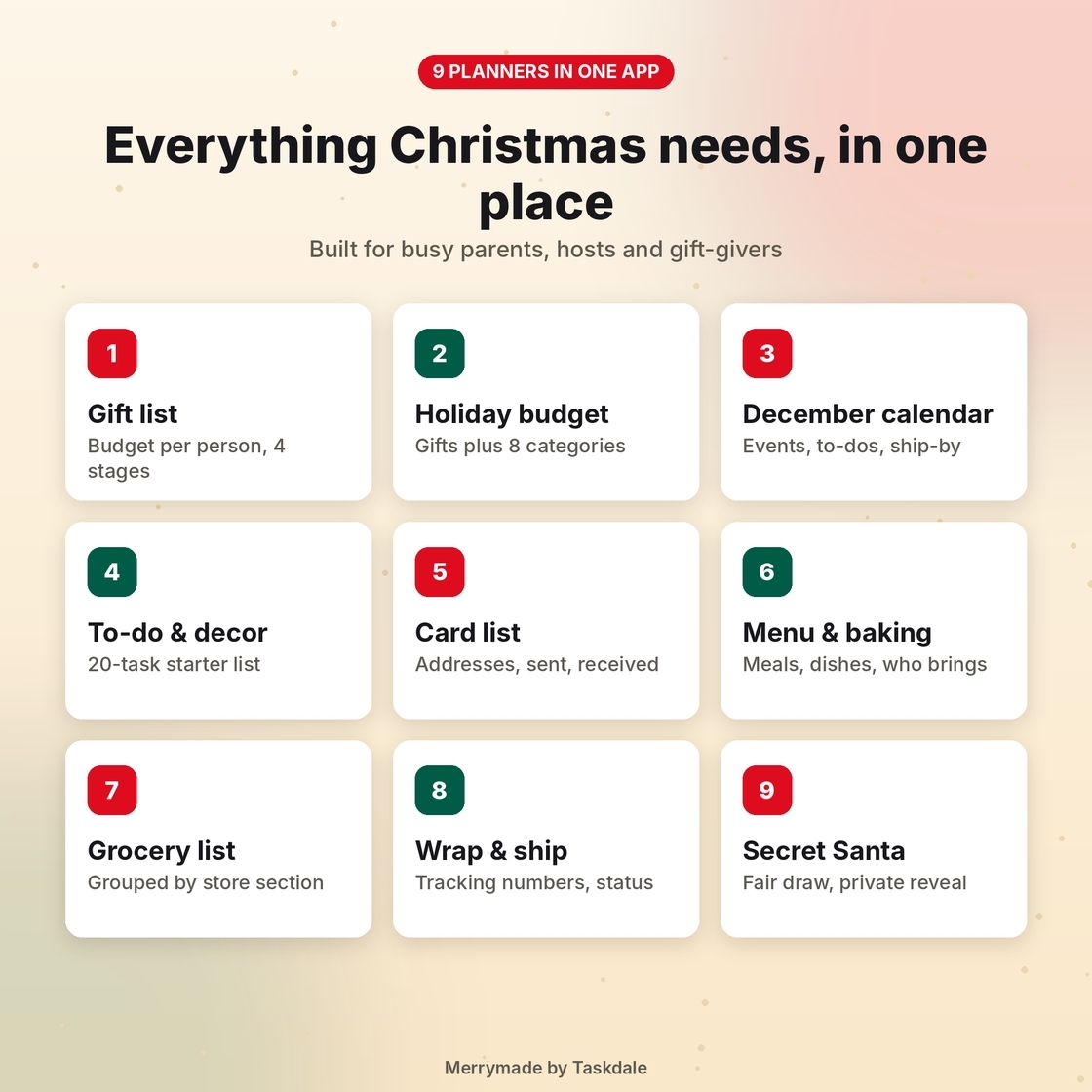
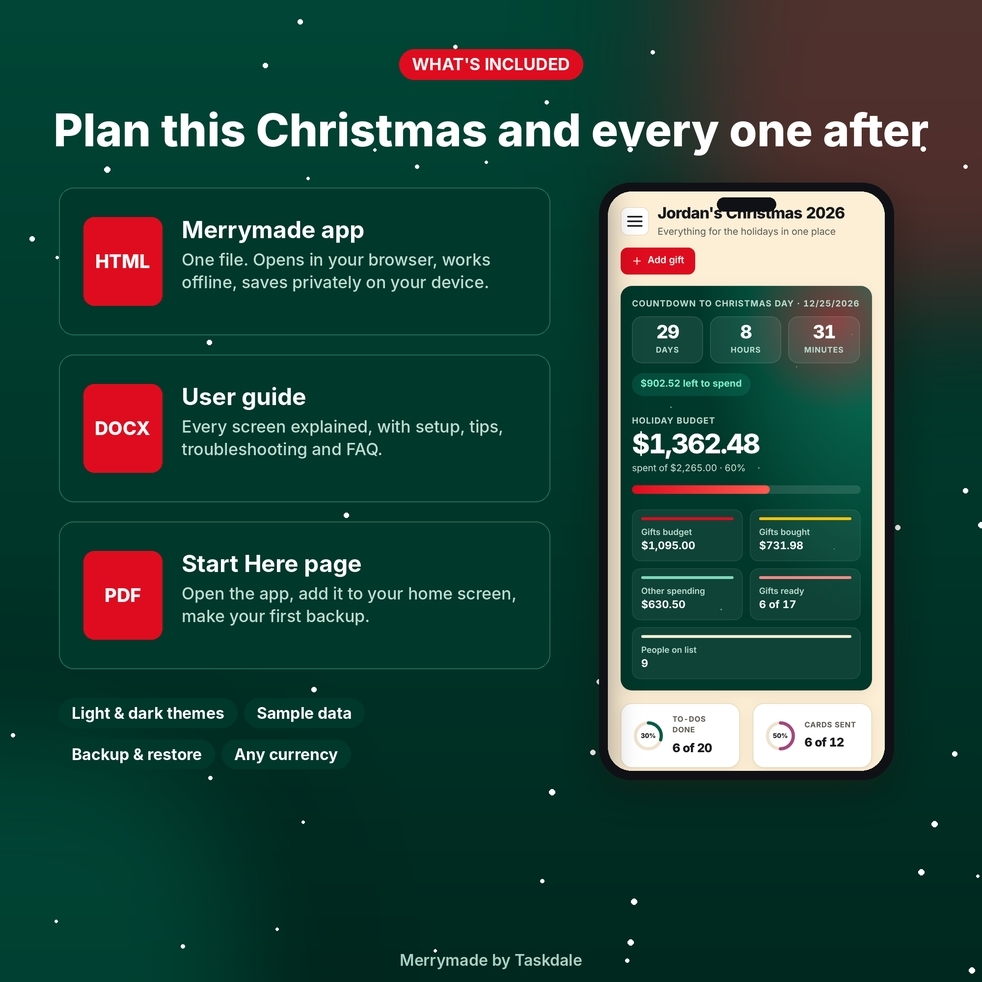
Merrymade is a Christmas holiday planner app that runs in your web browser from one downloaded file. It keeps your gift list, holiday budget, card list, meal plans, baking days, packages and Secret Santa draw in one place, with a live countdown to Christmas Day on the dashboard. No subscription, no account and no login.
Everything you type stays on your own device. Gift ideas never sit in a shared cloud folder where curious kids could find them, and the app works offline once downloaded.
Who this Christmas planner is for
- Parents buying for kids, grandparents, teachers, coaches and the mail carrier.
- Hosts cooking Christmas Eve dinner and the big Christmas Day meal for 10 or more.
- Anyone who spent too much last December and wants to see the total as it grows.
- Families posting gifts to relatives in other states who need ship-by reminders.
- Offices, friend groups and big families running a Secret Santa gift exchange.
Features of the Merrymade holiday planner app
Dashboard with a Christmas countdown
A deep green panel counts down the days, hours and minutes to Christmas Day and shows what you have spent, the total holiday budget and what is left. Four progress rings track to-dos done, cards sent, packages shipped and groceries ticked. A donut shows where the money goes, and Coming up lists the next seven events, deadlines and ship-by dates.
Christmas gift list with a budget per person
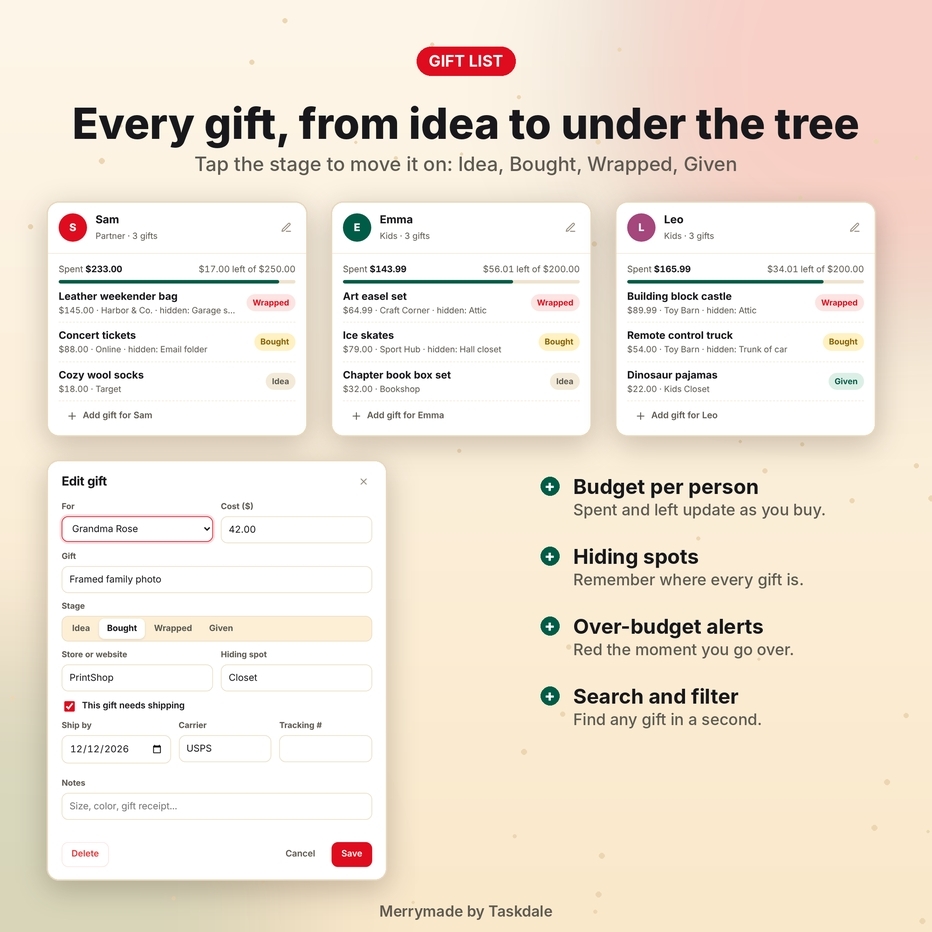
Add each person with a group and a gift budget. Add gift ideas with the cost, store, hiding spot and notes, then click the stage label to move each one from Idea to Bought, Wrapped and Given. Ideas stay out of the total until you buy them. Go over a person’s budget and their card shows the amount over in red. Search, filter by stage and print the list for shopping trips.
Holiday budget that adds itself up
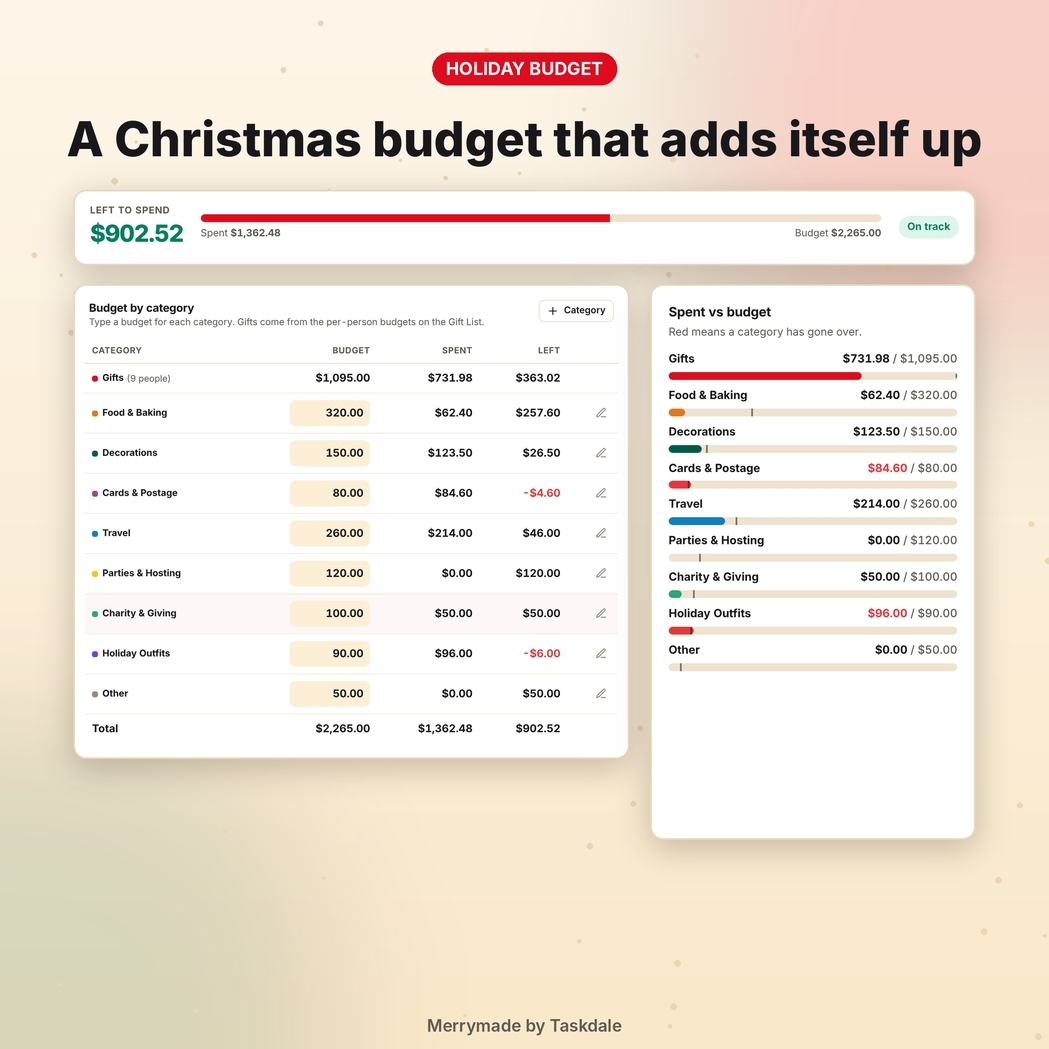
Gift spending flows in from the gift list. Type budgets for eight more categories: Food & Baking, Decorations, Cards & Postage, Travel, Parties & Hosting, Charity & Giving, Holiday Outfits and Other. Log expenses like the tree or train tickets, and watch Left to spend and the spent vs budget bars update. Rename, recolor or add categories.
December calendar
One month view pulls in parties, school concerts, travel, to-do deadlines, baking days, meals, ship-by dates and the Secret Santa exchange, each in its own color. Click any empty day to add an event, or click an item to open it. Christmas Day carries a red star.
To-do and decor checklist
Tasks sit in seven lists (Decor, Home, Shopping, Food, Kids, Travel, Other), each with its own progress ring. One click adds a 20-task starter list with dates, from testing the tree lights to thawing the turkey. Overdue tasks turn red.
Christmas card list
Keep names and full mailing addresses, tick Sent as cards go out and Received as theirs arrive, and print the list for writing envelopes.
Menu, baking plan and grocery list
Plan each holiday meal with a date, time and guest count. Add dishes by course with who brings each one. The baking plan gives every batch of cookies a baking day, and the grocery list groups items by store section so the big shop goes faster.
Wrap and ship tracker
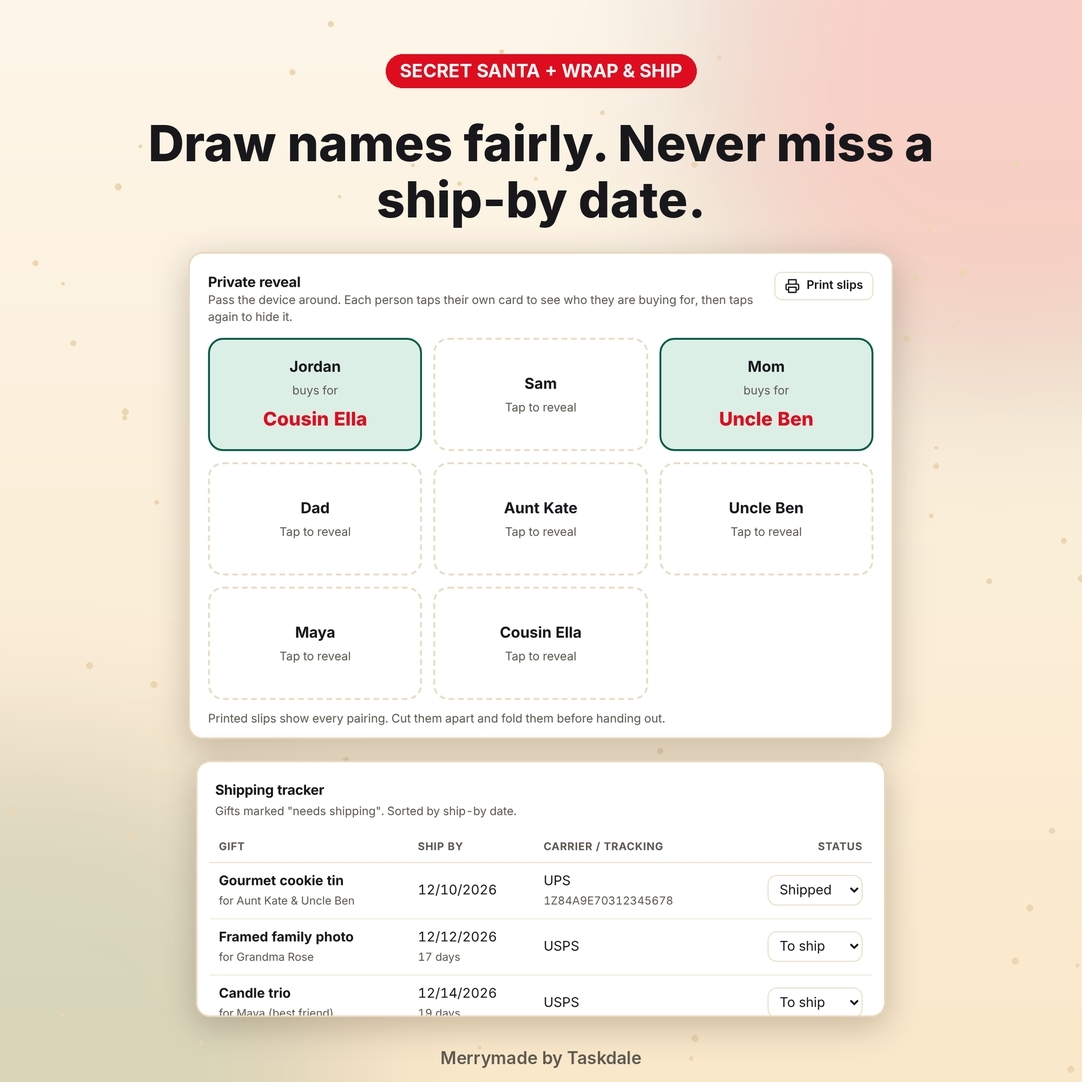
The wrapping station lists every gift you have bought but not wrapped. The shipping tracker sorts packages by ship-by date, shows days left, stores the carrier and tracking number, and flags anything late.
Secret Santa generator
Add everyone taking part, keep partners apart with Can’t draw, set a spend limit and an exchange date, then draw names. Nobody draws themselves, and everyone gives and receives once. Pass the device around for a private tap-to-reveal, or print slips to cut and fold.
What is included
- Merrymade Christmas holiday planner app (one HTML file, about 130 KB)
- User guide (DOCX, 15 pages with screenshots, tips, troubleshooting and FAQ)
- Start Here quick-start page (PDF)
- All three files in one ZIP, plus the app and guide as separate downloads
How it works
- Download and unzip the files after checkout.
- Double-click the HTML file. It opens in your browser.
- Pick your currency, keep the starter to-do list, or explore with sample data first.
- Add your people and budgets, then plan gifts, meals and events as December fills up.
File format and software requirements
Format: a single offline HTML app plus DOCX and PDF documents. You need a current web browser. We tested Merrymade in Google Chrome and Microsoft Edge at desktop, tablet and phone screen sizes. It uses only standard web features, so other modern browsers should run it too. No internet connection, account or extra software is needed after download.
On Android, open the file in Chrome and add it to your home screen. On iPhone and iPad, Apple’s Files preview cannot run web apps, so open the file in a browser or an HTML viewer app; the guide explains how. Data is saved in the browser on each device, and Export and Import backup move it between devices.
Customization
Choose your currency from the list or type any symbol, and show it before or after amounts. Set the Christmas year, switch between light and dark themes, and rename or recolor budget categories. When the season ends, Start next Christmas keeps your people, budgets and card names and clears the rest.
Digital download
This is a digital product. Nothing is shipped. Your files are ready to download right after checkout, with unlimited downloads from your account. Personal use license: use it for your own household on your own devices. No resale, sharing or redistribution.
Real ways people use this Christmas planner
- Setting a $200 budget for each child in November, then seeing at a glance that one is $34 over.
- Remembering the ice skates are in the hall closet and the truck is in the trunk of the car.
- Drawing names for an eight-person family exchange where two couples must not draw each other.
- Getting a reminder that Grandma’s framed photo has to ship by December 12.
FAQ
Is this a Christmas planner app or a printable?
It is an interactive app that runs in your browser. Several screens also print cleanly: the gift list, to-dos, card list, menus and Secret Santa slips.
Is there a monthly fee?
No. You pay once and can reuse it every Christmas.
Does it work on my phone?
Yes, the layout adapts to phones and tablets. On Android use Chrome. On iPhone or iPad, open the file in a browser or HTML viewer app, because the Files preview cannot run it.
Can I use my own currency?
Yes. One setting controls every amount in the app, with $ as the default.
Can my partner and I share it?
Each browser keeps its own copy. Export a backup and import it on the other device to share. Changes do not sync live.
Can I try it before entering my own plans?
Yes. Click Explore with sample data on the welcome screen, then clear it in Settings.
Reviews
There are no reviews yet.