

Emberline Net Worth Tracker & FIRE Calculator: Your Private Early Retirement Planner
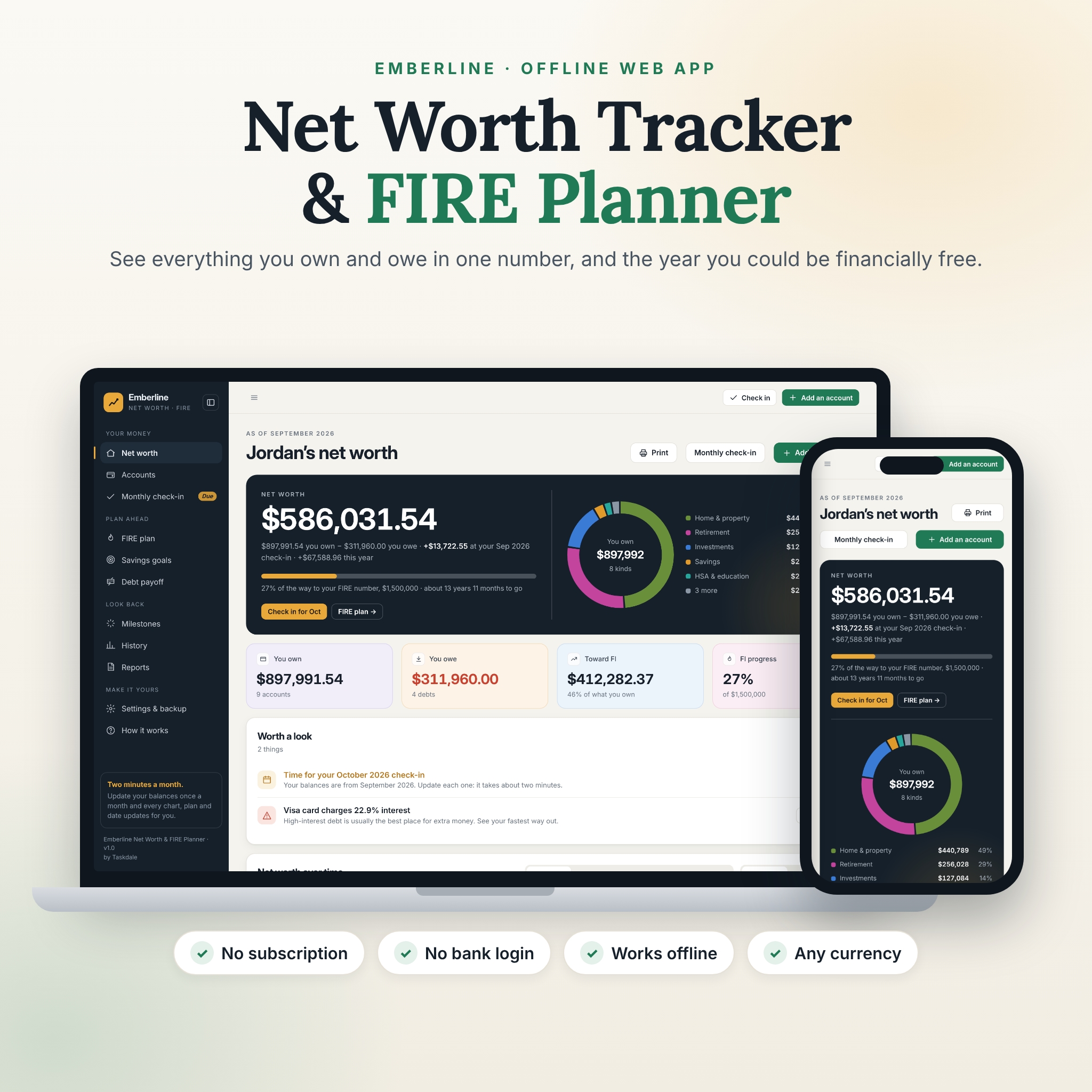
Emberline is a net worth tracker and FIRE calculator that shows everything you own and owe in one number, and the year you could reach financial independence. It’s a single file you download and open in your web browser. There’s no sign-up, no subscription and no bank login, and your figures stay on your own computer.
Update your balances once a month (it takes about two minutes) and Emberline does the rest: your net worth, charts, FIRE number, Coast FI, debt-free date, savings goals and milestones all update for you. No formulas to fix, ever.
What this net worth tracker does for you
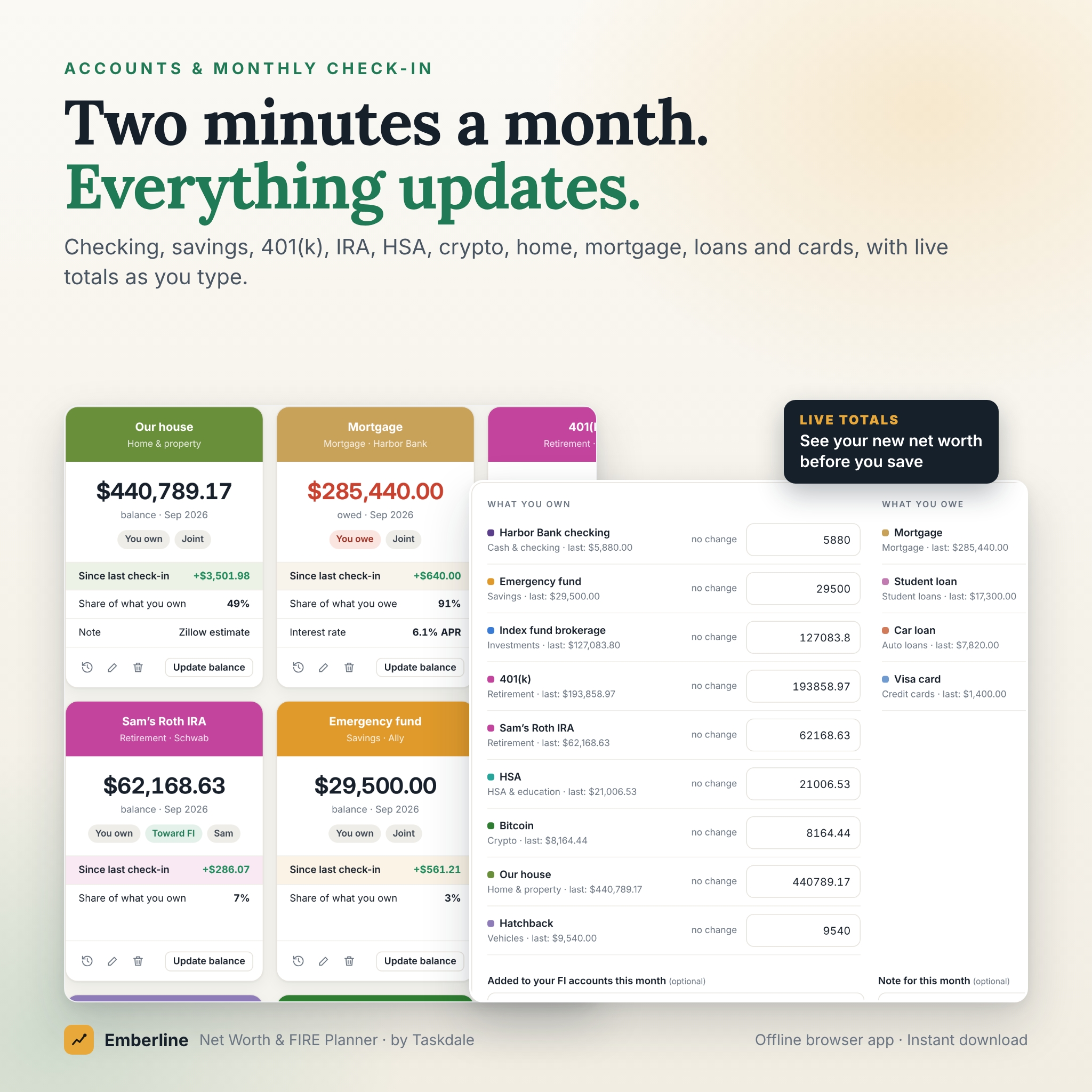
- Shows your whole financial picture. Checking, savings, 401(k), IRA, HSA, brokerage, crypto, your home and car, minus your mortgage, student loans, car loans and credit cards.
- Turns it into a plan. Two numbers (what you spend in a year and what you invest each month) become your FIRE number and the month you could stop working.
- Keeps you motivated. Milestones, personal records, a monthly change chart and a little celebration when you pass a big mark.
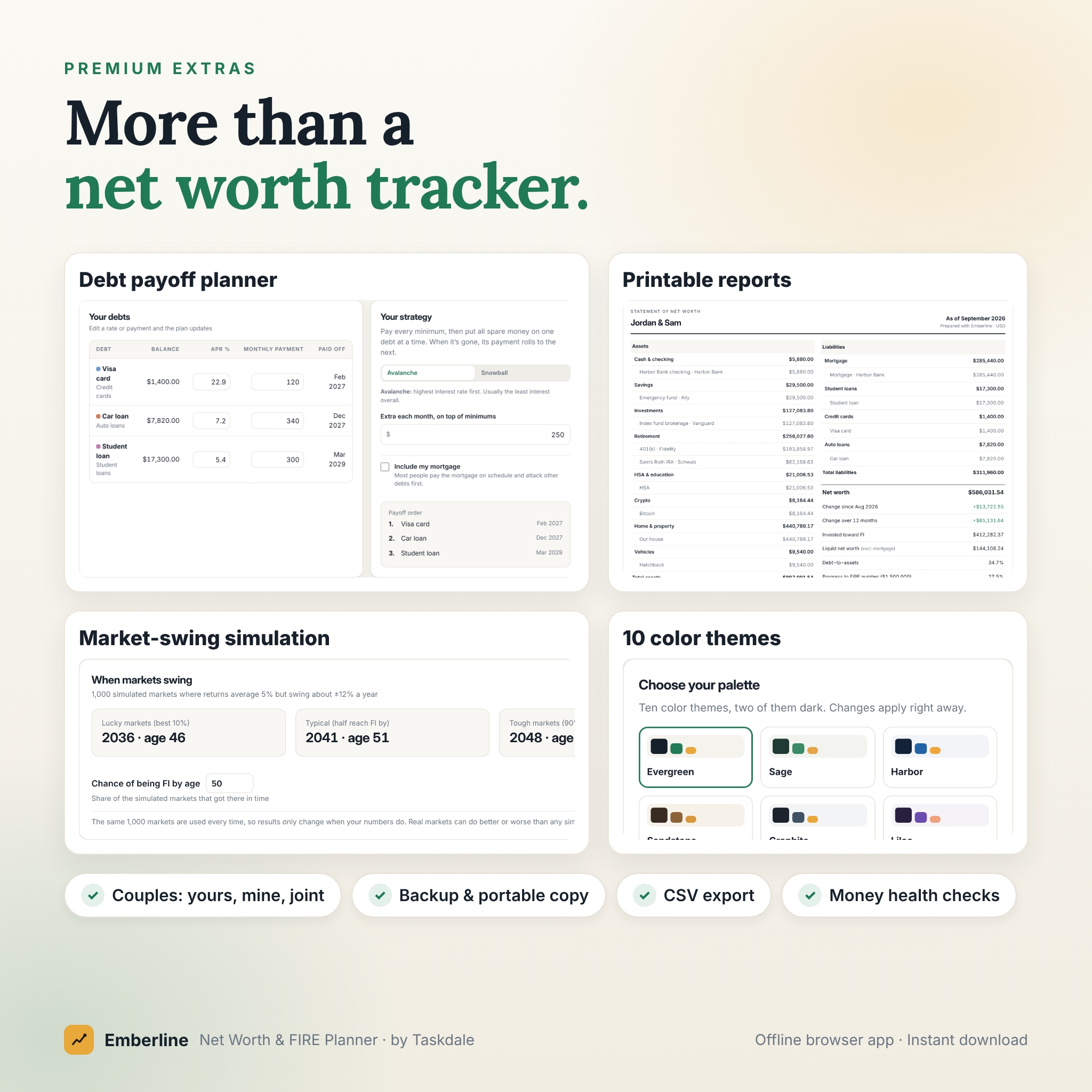
- Helps you clear debt faster. Avalanche or snowball plans show your exact debt-free month and the interest you save.
Features
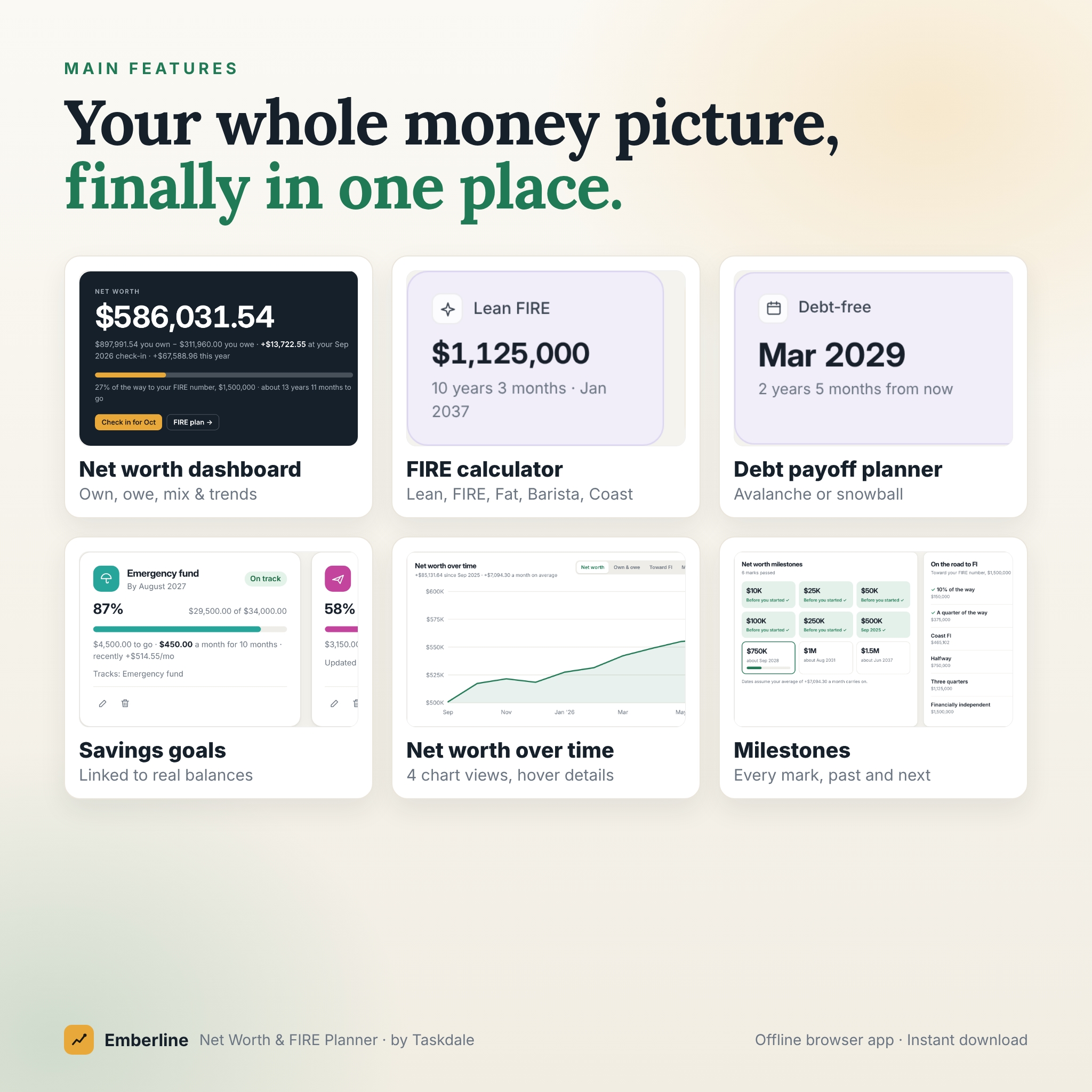
Net worth dashboard
- Your net worth, what you own and owe, and the change since last month and this year
- Asset mix ring, “What moved” by account, and “Worth a look” alerts (check-in due, backup reminder, high-interest debt, thin emergency fund, nearby milestone)
- Net worth over time with four views: net worth, own & owe, toward FI and monthly change, over 12 months, 3 years or all time
- Money health checks: emergency cushion, debt-to-assets, liquid net worth and savings rate
- Couples mode: mark accounts as yours, your partner’s or joint and see each person’s share
FIRE calculator and early retirement planner
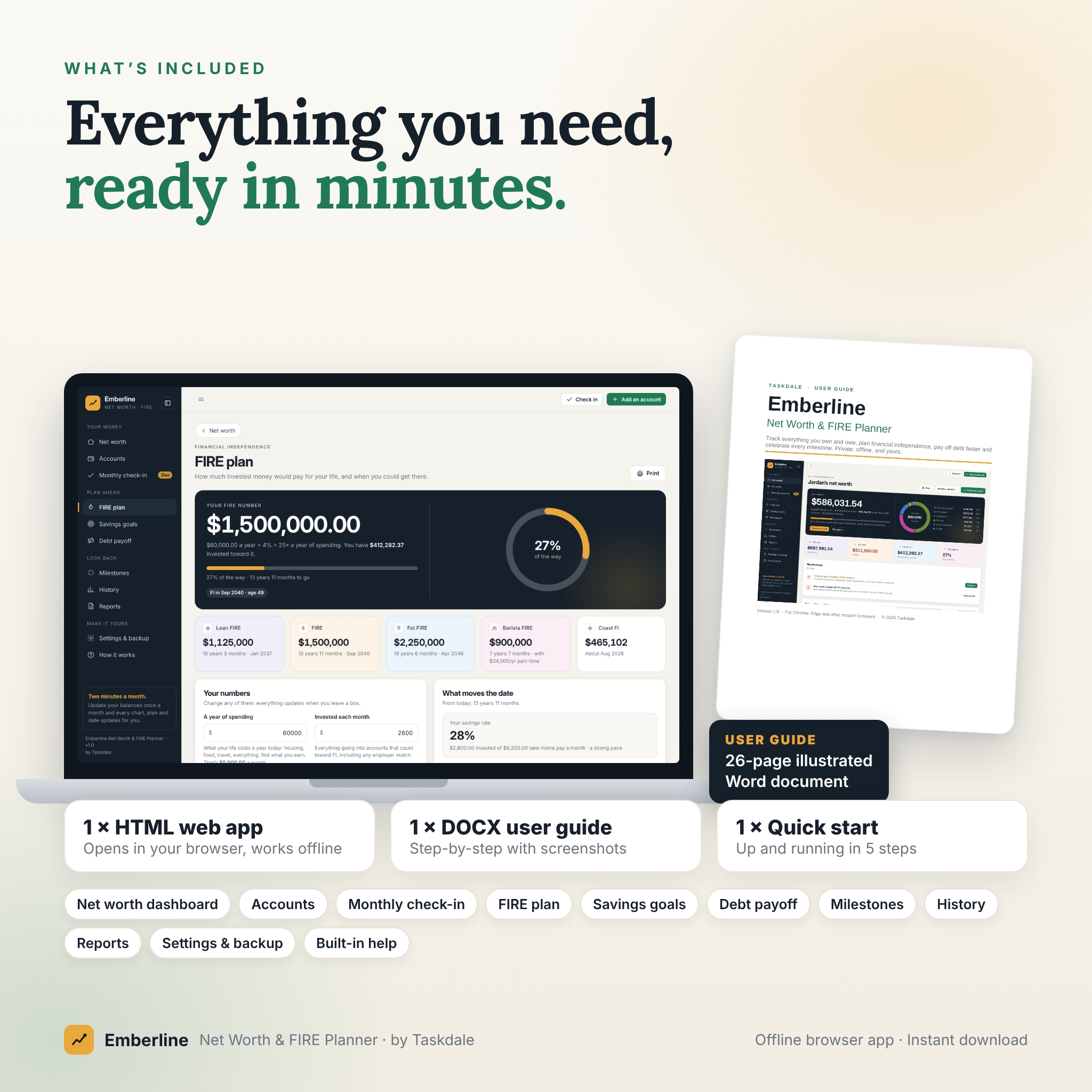
- FIRE number, progress and your FI date and age
- Lean FIRE, regular FIRE, Fat FIRE, Barista FIRE and Coast FI side by side
- Adjustable withdrawal rate, return after inflation, retirement age and yearly increase in investing
- “What moves the date”: see how spending less or investing more changes your timeline, plus a what-if slider
- Projection chart with a range of outcomes, a 1,000-market simulation (lucky, typical and tough markets) and your chance of reaching FI by a chosen age
- Year-by-year table of your expected invested money
Accounts and the two-minute monthly check-in
- Colorful account cards or a sortable table, with search, filters, notes and balance history charts
- One-screen monthly check-in with live totals and month-over-month changes
- Add past months to bring over your old spreadsheet history
- Optional “amount invested” per month to split growth into what you saved and what the market added
Debt payoff planner and savings goals
- Avalanche (highest rate first) or snowball (smallest balance first), extra monthly payments, payoff order and interest saved vs. minimums only
- Savings goals linked to real account balances, or updated by hand, with the amount needed each month and an on-track badge
Milestones, history and printable reports
- Net worth milestones from $10K to $100M and FI milestones (10%, 25%, Coast FI, halfway, 75%, FI) with past and projected dates
- History by year and month, per-account balances, and CSV export for Excel or Google Sheets
- A one-page statement of net worth and a year in review, ready to print or save as PDF on US Letter or A4
What’s included
- Emberline Net Worth & FIRE Planner (one HTML file, about 0.5 MB)
- 26-page illustrated user guide (DOCX: opens in Word, Google Docs, Pages or LibreOffice)
- Quick-start sheet (TXT)
How it works
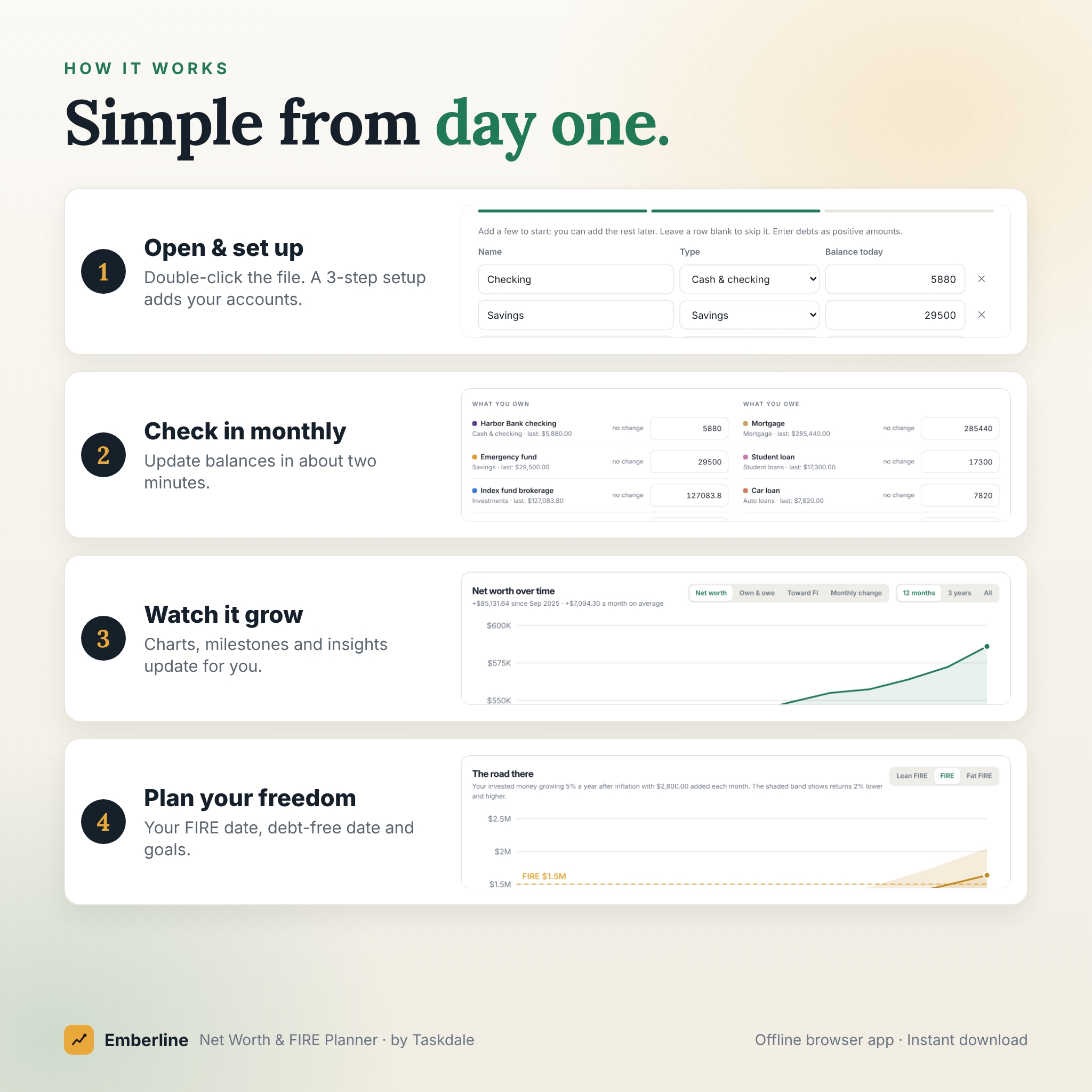
- Download the files and save them somewhere easy to find, such as Documents.
- Double-click the HTML file to open it in your browser.
- Follow the 3-step setup: your name and currency, your accounts, and your FIRE basics. Or explore the sample household first.
- Once a month, do the two-minute check-in and watch your net worth grow.
- Download a backup after each check-in from Settings & backup.
File format and software requirements
Emberline is an offline HTML web app. It runs in a modern desktop web browser, and we build and test it in Google Chrome and Microsoft Edge. No internet connection, installation or account is needed. Phones and tablets can view the app and do quick check-ins; it works best on a computer. The user guide is a Word (.docx) document.
Customization
Choose from nearly 50 currencies (US dollars are the default) or set your own symbol. Every amount reads from one currency setting. Pick from 10 color themes, including two dark themes, choose your date format and whether to show cents, hide screens you don’t need, add your own account types with their own colors, and add a partner to track a household together.
Privacy and your data
Emberline never connects to your bank and never uploads anything. Your data is stored in your own browser on your own device. Download a backup at any time (the app reminds you), restore it on another computer, or download a portable copy of the app with your data inside.
Perfect for
- Anyone pursuing FIRE who wants a FIRE number, Coast FI and a realistic retirement date
- Couples tracking combined finances month by month
- People paying down credit cards, student loans or a car loan
- Anyone replacing a net worth spreadsheet with something simpler and better looking
- Anyone who wants their financial data to stay private
Frequently asked questions
Do I need to link my bank account?
No. You type in your balances once a month. Nothing is ever connected or uploaded.
Is this a subscription?
No. You pay once and keep the file for as long as you like.
Does it work offline?
Yes. Once downloaded, Emberline works without an internet connection.
Can I use my own currency?
Yes. Choose from nearly 50 currencies or set any symbol in Settings. Dollars are the default.
Can I use it with my partner?
Yes. Mark accounts as yours, theirs or joint, and share a portable copy so you both have the same data.
Can I bring in my past net worth history?
Yes. Use the month picker in the monthly check-in to enter balances for earlier months.
What happens if I clear my browser?
Your data lives in your browser, so keep backups. Restore the latest backup file and everything comes back.
Is this financial advice?
No. Emberline is a planning tool. Projections use steady average returns in today’s money; real markets go up and down.
Digital download and licence
This is an instant digital download. Nothing will be shipped. Your purchase includes a personal-use licence: use Emberline for your own household on your own devices and print copies for yourself. Reselling, sharing, redistributing or including the files in another product is not permitted. Due to the digital nature of this product, refunds aren’t available once downloaded, but please contact us if you have any problem with your order.


Reviews
There are no reviews yet.