

Golf Stats Tracker Spreadsheet & Handicap Calculator for Excel
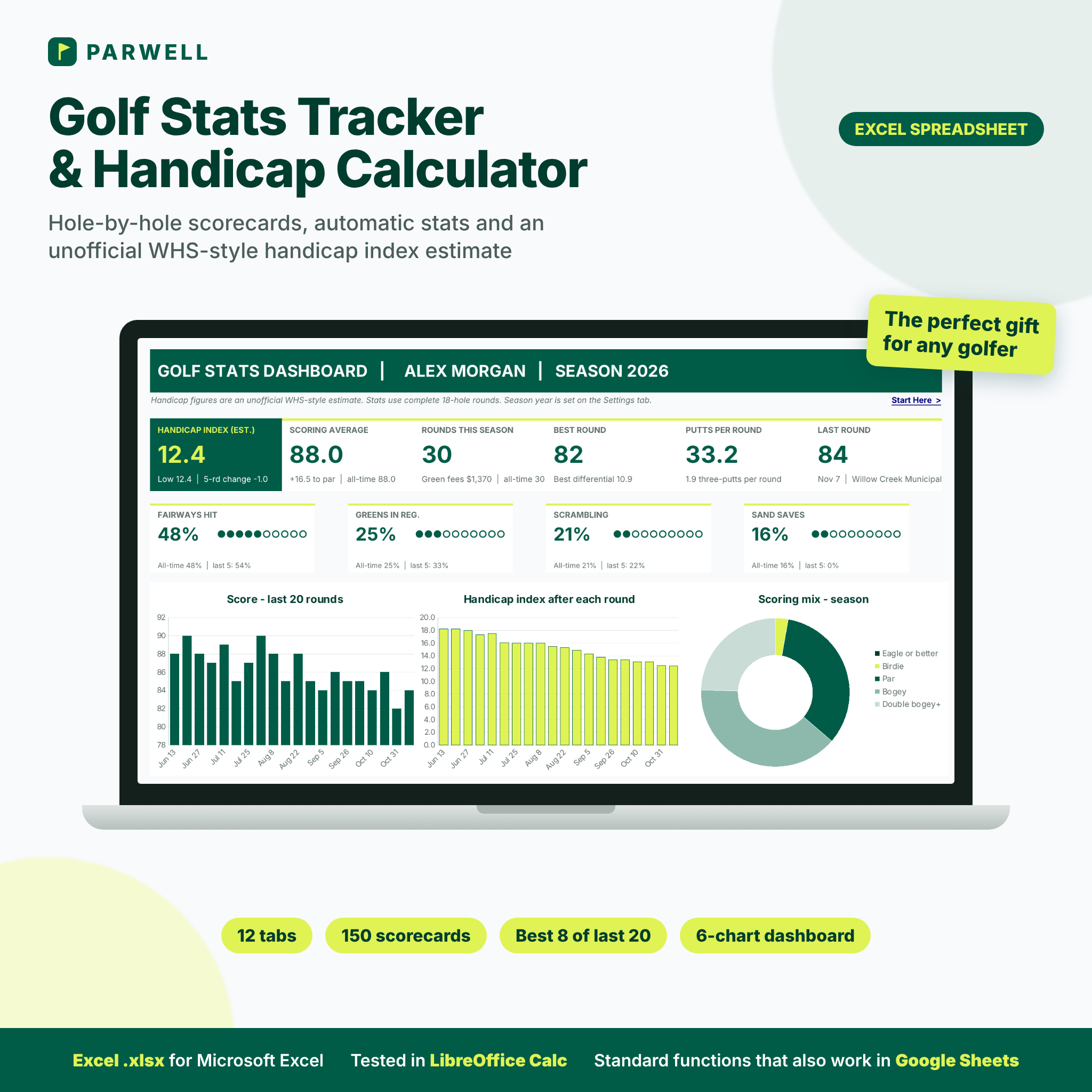
Parwell is a golf stats tracker spreadsheet that turns your scorecards into real answers: where your strokes go, how your handicap estimate is moving and what to practice next. Enter each round hole by hole and Parwell calculates score differentials, an unofficial WHS-style Handicap Index estimate, course handicaps, fairways hit, greens in regulation, scrambling, sand saves, putting and scoring trends, all shown on a clean dashboard.
It is built for amateur golfers who want more than a score, and it makes a thoughtful Christmas, birthday or Father’s Day gift for a golfer, with a gift tag built into the Start Here tab.
What Parwell does
- Hole-by-hole scorecards (150 rounds): type score, putts, fairway result (hit, left, right or short), sand saves and penalties. Greens in regulation and up-and-downs are calculated for you, and birdies, bogeys and doubles are color-coded.
- Automatic score differentials: (113 / Slope) x (Adjusted gross score – Course rating), with each hole capped at net double bogey once you have an estimate.
- Handicap index estimate: the average of the lowest 8 of your most recent 20 differentials, using the World Handicap System table for shorter records. A star shows exactly which rounds count. Labeled as an unofficial estimate.
- “What score do I need?”: the highest adjusted score that would count toward your index at the tees you choose.
- Course handicap calculator: course and playing handicap for any tee, strokes received on each hole, and a printable table for every tee in your database.
- Stats trends: season vs last 5, 10 and 20 rounds vs all-time for scoring average, putts, three-putts, FIR %, GIR %, scrambling %, sand saves, penalties, birdies and par 3, 4 and 5 scoring averages, plus a month-by-month table.
- Dashboard: KPI tiles, dot meters and 6 charts: score for the last 20 rounds, index after each round, scoring mix, monthly fairways, greens and scrambling, average carry by club and practice time by area.
- Club distances and gapping: log up to five carries per club; averages and gap warnings update automatically.
- Practice log and goals: 300 practice sessions with time by focus area, and 12 goals with live progress.
- Course database: 60 course and tee combinations with rating, slope, par and hole handicap.
Who it is for
- Weekend golfers trying to break 100, 90 or 80.
- Club players who want to follow a handicap estimate between official revisions.
- Golfers who want to know whether putting, approach shots, tee shots or penalties cost them most.
- Anyone shopping for a practical golf gift that gets used after every round.
Main benefits
You see your game the way a coach would. Instead of guessing, you can tell whether your misses go left or right, how often you scramble, and how your last five rounds compare with your season. Every number comes from a formula you can check, there is no subscription, and your data stays in one file you own.
What’s included
- Parwell-Golf-Stats-Tracker.xlsx: 12 tabs (Start Here, Dashboard, Scorecards, Round Log, Handicap, Course Hcp, Trends, Courses, Clubs, Practice, Goals, Settings). It ships clean, with no sample data.
- Parwell-User-Guide.docx: a step-by-step guide covering setup, every tab, how the handicap estimate works, customization, tips, troubleshooting and FAQ.
How it works
- Set your currency, yards or meters, season year and name on Settings.
- Add the courses and tees you play: course rating, slope, par and hole handicap for each hole.
- After each round, fill in a scorecard. Yellow cells are for typing; everything else is calculated.
- Open the dashboard to see your handicap estimate, stats, charts and goal progress update.
File formats and software requirements
Excel-format .xlsx for Microsoft Excel; tested in LibreOffice Calc; built with standard functions that also work when you open it in Google Sheets. No macros or add-ins. The workbook uses the free Inter font; if it is not installed, your spreadsheet app substitutes a similar font.
Customization
One currency setting controls every money value (green fees and practice costs), with $ as the default. Choose yards or meters, set the handicap allowance for playing handicaps, change gap warning limits and rename dropdown items such as practice focus areas. Formula cells are locked and input cells are open; sheets are protected with no password, so you can unprotect them any time. Every tab has a print area set for clean printouts, and scorecards print four to a page.
Digital download
This is an instant digital download. No physical item will be shipped. After purchase, download the workbook and the user guide from your Taskdale account.
Use cases
- Logging weekend rounds and seeing your scoring average drop over a season.
- Checking your course handicap before a club competition or a trip to a new course.
- Finding the club gap that leaves you between yardages, then fixing it.
- Planning winter practice around the stat that costs you most.
- Giving a golfer a Christmas gift with a personal message on the gift tag.
Frequently asked questions
Is this an official Handicap Index?
No. It is an unofficial estimate that follows the World Handicap System approach. It does not include playing conditions calculations, index caps or exceptional score reductions. Post scores with your golf association for an official index.
Does it work in Google Sheets?
It is an Excel-format .xlsx for Microsoft Excel, tested in LibreOffice Calc, and built with standard functions that also work when you open it in Google Sheets.
Do I need to calculate greens in regulation myself?
No. GIR and up-and-downs are calculated from your score, putts and par.
How many rounds can I track?
150 hole-by-hole scorecards, 60 course tees, 300 practice sessions, 16 clubs and 12 goals.
Can I track 9-hole rounds?
You can save them on a scorecard, but stats and the handicap estimate use complete 18-hole rounds.
Does it handle plus handicaps?
Yes. Plus indexes and course handicaps are shown with a plus sign.
Is there a free version?
Yes. Parwell Lite includes 10 scorecards, score differentials and a starter dashboard.
License
Personal use only. You may use and edit the file yourself, or give your purchased copy as a gift to one person. Reselling, sharing, uploading or redistributing the files is not allowed. (c) Taskdale.


Reviews
There are no reviews yet.