


Church Volunteer Schedule Spreadsheet for Every Ministry
Pewshift is a church volunteer schedule spreadsheet for Microsoft Excel and Google Sheets that turns a messy group chat and a whiteboard into one tidy quarter plan. List your volunteers once, tell the workbook which services and ministries you run, and fill a 13-week rotation grid with names from dropdowns. Every booking is checked automatically, so you see a double-booked greeter, a nursery worker whose background check expires next month or a usher who is on vacation before Sunday morning, not during it.
It is a one-time download with no monthly fees, made for small and mid-size churches that need more than a sign-up sheet but don’t want another subscription.
What the Ministry Volunteer Schedule Does
- Plans 13 weeks at a time for up to 3 weekly services (for example Sunday 9:00, Sunday 11:00 and a Saturday service) and 10 ministries with up to 6 spots each.
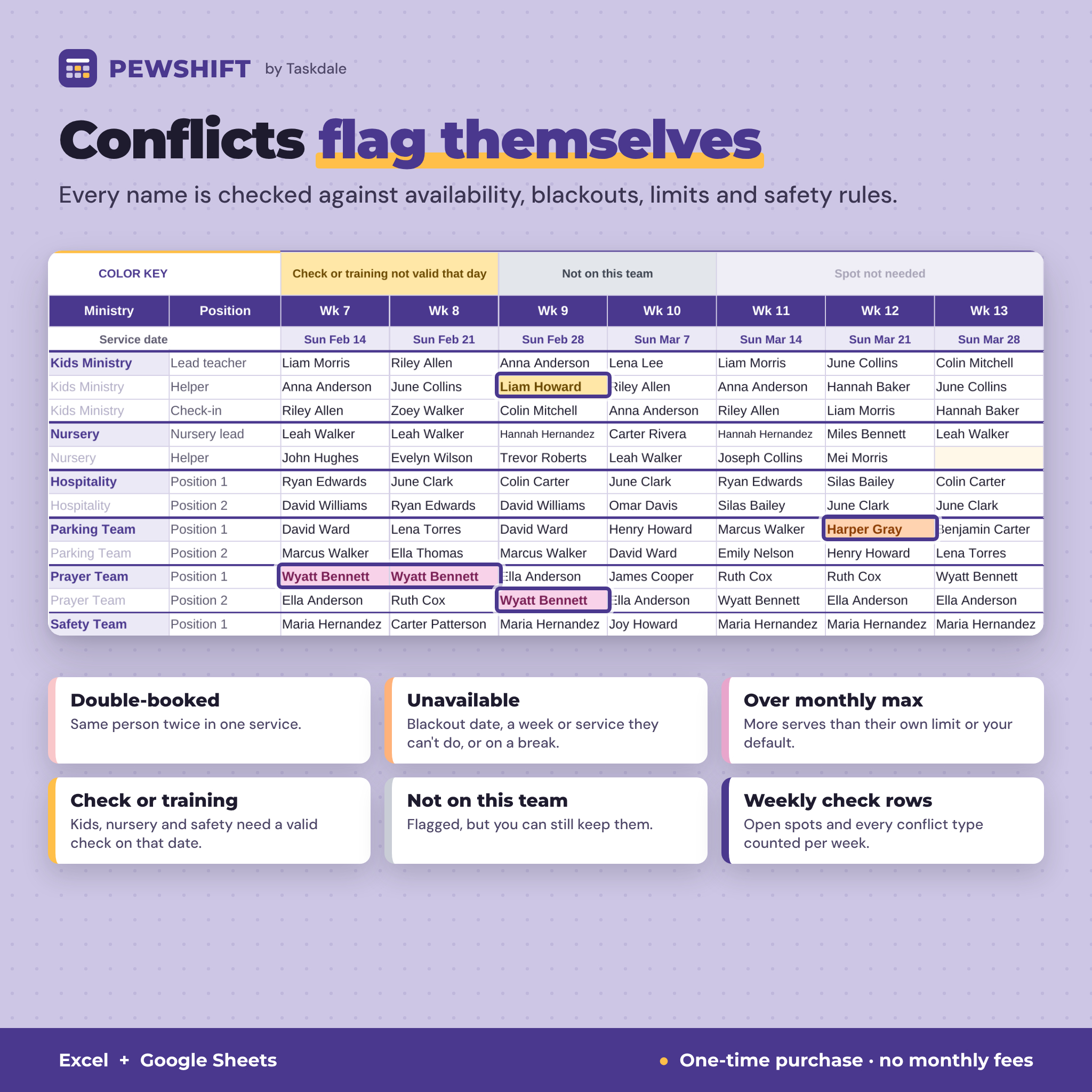
- Checks every name as you type and colors the cell: double-booked, unavailable (blackout, a week or service they can’t do, or on a break), over their monthly maximum, background check or training not valid on that date, or not on that team.
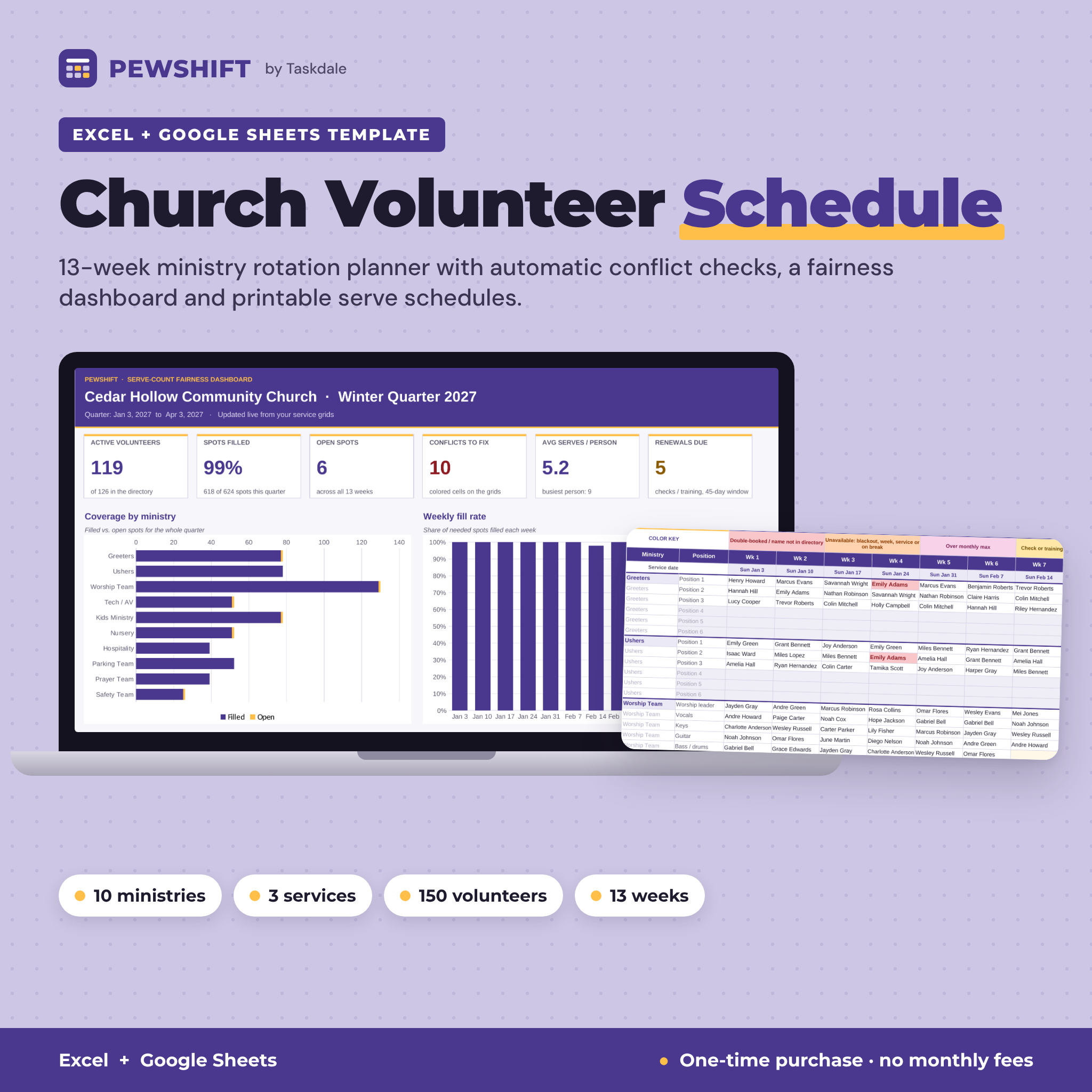
- Keeps serving fair with a dashboard that shows how many times each person serves, the 10 most-scheduled volunteers, who hasn’t been asked yet and a simple Even / Fair / Uneven rating.
- Tracks child-safety requirements: background check and training dates, automatic expiry dates, Due soon / Expired / Missing status and a renewals-due list.
- Prints and shares a one-page monthly serve schedule for any ministry and a one-page personal schedule for any volunteer.
Who It Is For
Volunteer coordinators, church administrators, pastors and ministry leads who schedule greeters, ushers, worship team, tech and AV, kids ministry, nursery, hospitality, parking, prayer or safety teams. It also works for youth groups, food pantries and any community group with weekly gatherings and rotating helpers.
Features
Settings
Church name, quarter label and first Sunday, coordinator contact, default max serves per month, renewal reminder window, how long checks and training stay valid, up to 3 services with day and time, and up to 10 ministries with team lead, people needed per service and whether a background check or training is required.
Volunteer directory (150 people)
Contact details, preferred contact method, status (Active, On break, Inactive), up to 3 ministries, which services and which weeks of the month each person can serve, a personal monthly limit, background check and training dates with calculated expiry and status, and serves this quarter.
Blackout dates (300 entries)
Vacations, work trips and family events. Each entry tells you if that person is already booked inside the window.
Team rosters
Each ministry’s active members list themselves automatically, with member count and bench depth (members per spot) so you know which teams need recruiting. These rosters feed team-only dropdowns on the grids.
13-week rotation grids with conflict checks
One grid per service with a built-in color key, light highlighting for open spots, the current week highlighted and weekly check rows counting needed, filled and open spots plus every conflict type.
Serve-count fairness dashboard
Six KPI tiles (active volunteers, % filled, open spots, conflicts, average serves, renewals due) and five charts: coverage by ministry, weekly fill rate, serve-count distribution, most-scheduled volunteers and safety and training status.
Printable monthly serve schedule
Pick a ministry and a month: every service date, who serves in each position (or Open), team lead, coordinator and team contacts. Fits one Letter or A4 page.
Personal serve schedule
Pick a volunteer to print all 13 weeks with date, ministry and position for each service.
Swap request log
Log requests and covers. The sheet finds the grid week, checks the cover’s availability, team, check and training, and reminds you to update the grid after you approve.
Email and text list builder
Eight audiences, including everyone serving in a chosen week, one ministry team, people not scheduled yet and people whose background check or training is due. Copy one box into BCC, or copy the mobile numbers for a group text.
What Is Included
- Pewshift Ministry Volunteer Schedule (.xlsx): the blank workbook with 13 tabs
- Example Church, Filled In (.xlsx): a fictional church with 126 volunteers and a full quarter scheduled, so you can explore first
- User Guide (.docx): setup, every tab, color key, customizing, new-quarter steps, troubleshooting and FAQ
How It Works
- Fill in Settings: church, quarter start, services and ministries.
- Add volunteers, their teams, availability and check dates.
- Add blackout dates.
- Pick names on each service grid. Colors flag problems instantly.
- Check the dashboard, then print schedules and copy email lists.
File Formats and Software
Excel workbook (.xlsx) that works in Microsoft Excel 2016 or later (Windows and Mac), Microsoft 365 and Google Sheets (free with a Google account). No macros, add-ons or internet connection needed in Excel. The user guide is a Word document (.docx) that also opens in Google Docs. Apple Numbers is not supported.
Customizing
Rename services, ministries and position labels (Vocals, Sound, Check-in), set needs per service, your own limits and reminder window, and how long checks last. Formula cells are locked without a password, so you can unlock any tab when you want to change the layout.
Instant Digital Download
This is a digital product. You download the files right after purchase; nothing is shipped. Personal use only (or use within your own church or ministry). You may not resell, share, or redistribute the files.
Ways Churches Use It
- Building the winter, spring, summer or fall quarter for greeters, ushers and parking in one sitting
- Keeping kids ministry and nursery scheduled only with volunteers whose background check is current
- Spotting burnout on the worship or tech team before someone quits
- Emailing everyone who serves next Sunday a reminder in 30 seconds
- Handing each team lead a printed monthly schedule with contacts
FAQ
Does this volunteer schedule template work in Google Sheets?
Yes. Upload the .xlsx to Google Drive and open it with Google Sheets. Formulas, dropdowns, colors and charts use features both programs share.
How many volunteers and ministries can I schedule?
Up to 150 volunteers, 10 ministries, 6 people per ministry per service, 3 services, 300 blackout dates and 200 swap requests per file.
Can I use it for more than one quarter?
Yes. Save a copy, change the first Sunday in Settings and clear the grids. Your volunteers and check dates carry over.
Does it send reminder emails or texts?
No. It builds BCC-ready email lists and text lists for you to paste into your own email or phone.
Can volunteers sign up themselves?
No. It is a coordinator’s planning tool. Share printouts or a view-only copy with your teams.
Is the background check tracker legal advice?
No. It records the dates you enter and flags expiry. Follow your church’s child-safety policy, insurer and state rules.
Do I need Excel 365?
No. Excel 2016 or later, Microsoft 365 or free Google Sheets all work.
Reviews
There are no reviews yet.