



A plumbing job tracker that writes your estimates and invoices
Pipeworth is a plumbing job tracker for Excel and Google Sheets that runs your work from the first phone call to the paid invoice. You log the service call, pick the flat-rate tasks and parts you used, and the workbook does the rest: a branded estimate, a matching invoice, the balance and due date, permit reminders, warranty dates, the profit on the job and a monthly dashboard.
It replaces the stack of paper tickets, the generic invoice template and the calculator in the truck, without a monthly software bill.
Who it is for
- Owner-operator plumbers and small plumbing companies with one to ten technicians
- Drain cleaning, water heater and service-and-repair shops that price by flat rate
- Plumbers who still write estimates by hand or in a blank invoice template
- Shops that want job costing and profit numbers without paying for field service software
Main benefits
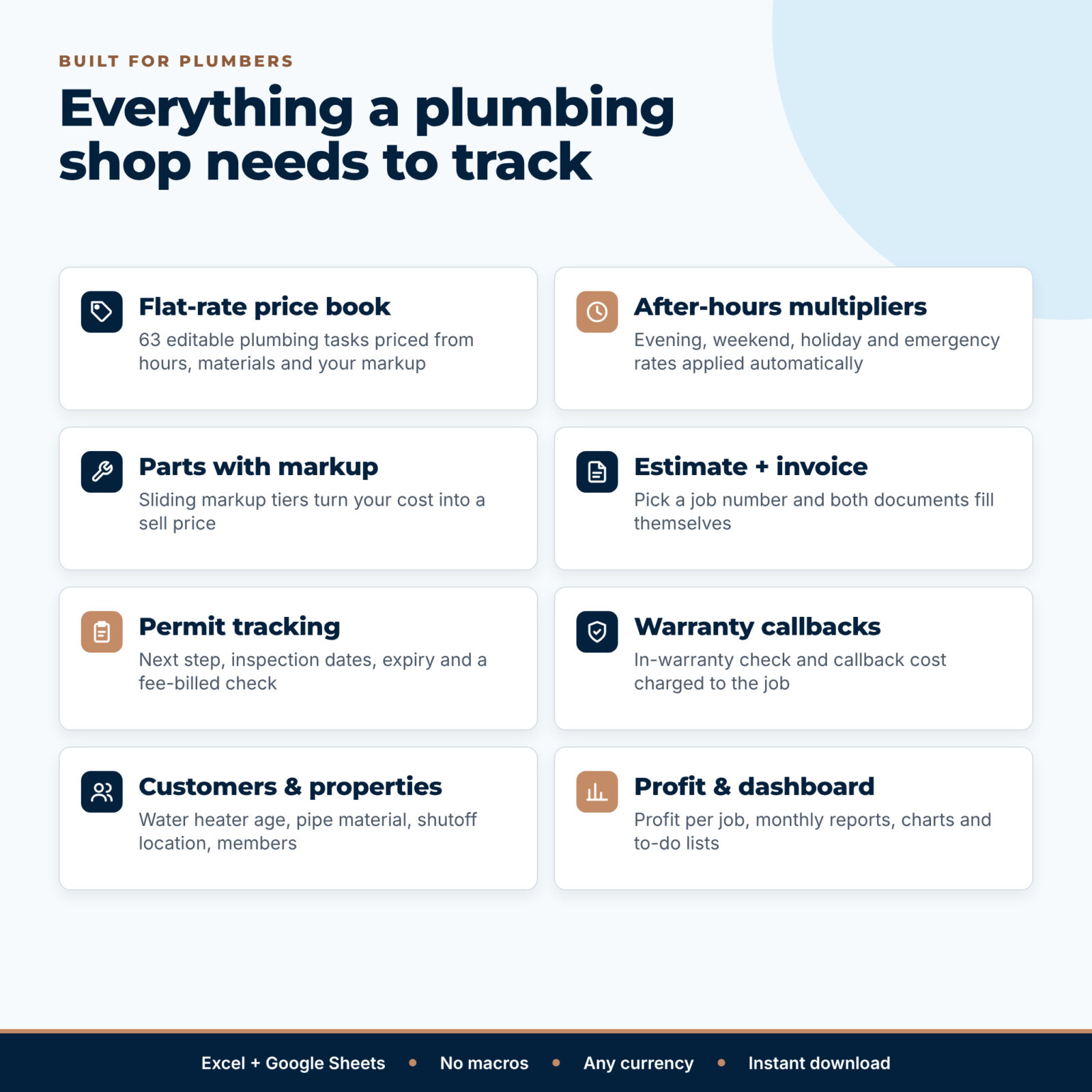
- Price every job the same way. Flat-rate prices are built from hours, materials and your markup, so two techs quote the same price for the same task.
- Charge properly for nights, weekends and emergencies. Pick the call type and the multiplier is applied to labor, flat-rate work and the trip charge.
- Get paid faster. Estimates and invoices fill themselves in seconds, and overdue balances are flagged on the dashboard.
- Know your real margin. Profit per job counts materials, labor at your true cost, permit fees and unpaid callback visits.
Plumbing estimate and invoice features
Jobs and job lines
- Job log for 500 service calls: customer, category, call type, technician, lead source, stage, scheduled and completed dates
- Two payments per job with dates and method; automatic balance, due date, days overdue and payment status (Unpaid, Partial, Overdue, Paid)
- 2,500 line items: flat-rate tasks, parts, time-and-material labor, trip charge, diagnostic fee, permits, disposal and discounts
- Show a line on the estimate only (declined options) or the invoice only (extra work found on site)
- A Check column that flags unknown codes, duplicate job numbers and missing dates
Auto-filled estimate and invoice
- Type a job number and the printable page fills in: your business details and license number, customer, service address, scope of work and up to 22 lines
- Estimate: valid-until date, deposit amount, terms and a customer approval line
- Invoice: payments received, balance due, a PAID IN FULL or PAST DUE stamp, payment instructions and the warranty end date
Flat-rate price book and parts markup
- 63 editable example tasks across drains, toilets, fixtures, water heaters, leaks, gas, sump pumps, disposals, camera inspection, backflow and repipes (room for 150)
- Price = hours x your flat-rate hourly rate + materials with markup, rounded up; member price, estimated cost and margin on every task
- Parts catalog for 200 items with six sliding markup tiers or your own markup per part
Customers, permits and callbacks
- Customer and property records: water heater type and age, supply pipe material, sewer or septic, shutoff location, access notes and maintenance-plan membership
- Replacement and repipe leads flagged automatically (older water heaters, galvanized or polybutylene pipe)
- Permit and inspection tracker with the next step, expiry warning and a check that the permit fee was billed
- Warranty and callback log with in-warranty check, root cause and callback cost charged back to the original job
Reports and dashboard
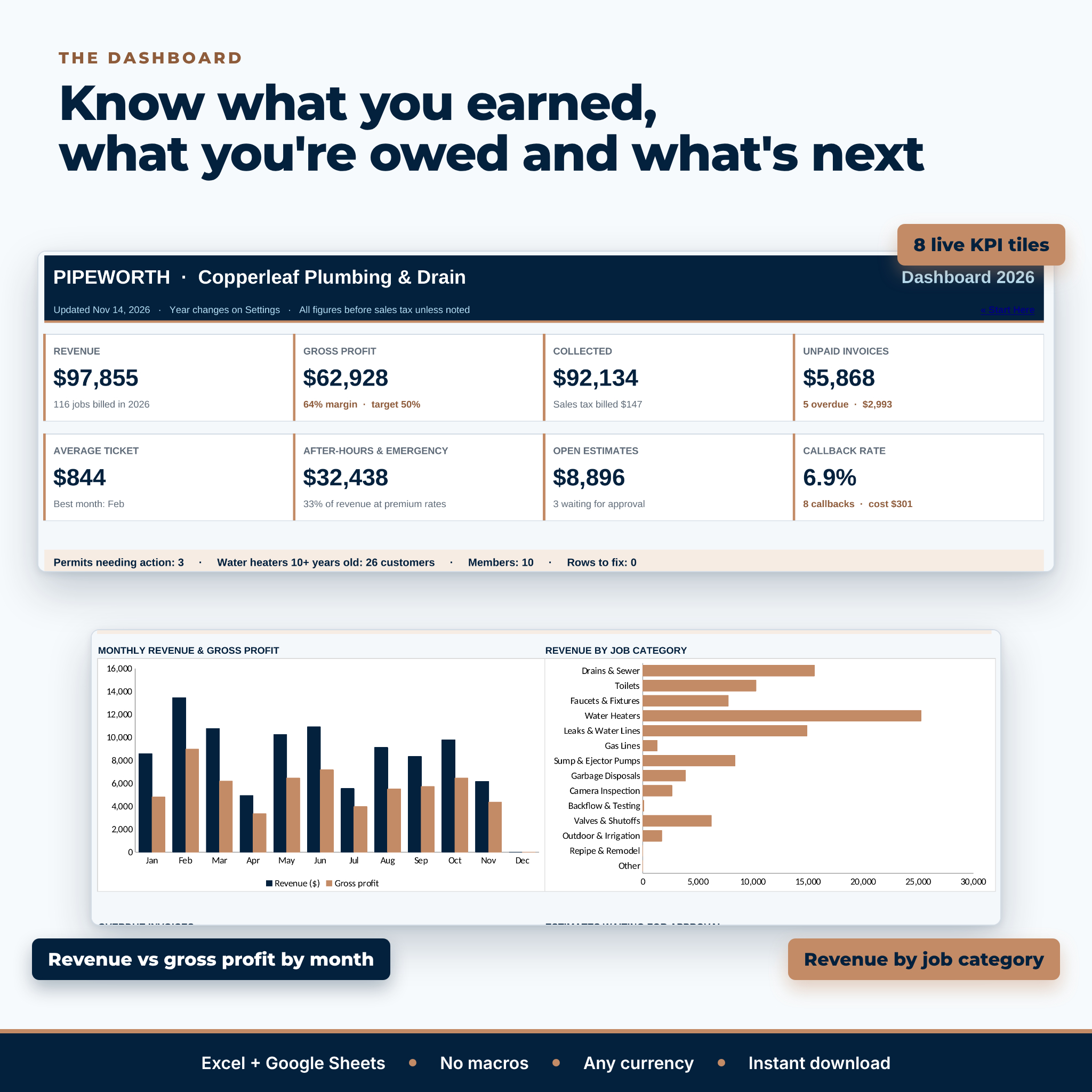
- Month-by-month revenue, sales tax, collected, job costs, gross profit, margin, after-hours revenue and average ticket
- Results by job category, technician (with callback rate), call type and lead source
- Dashboard with eight KPI tiles, two charts and lists of overdue invoices, open estimates, permits and callbacks
What is included
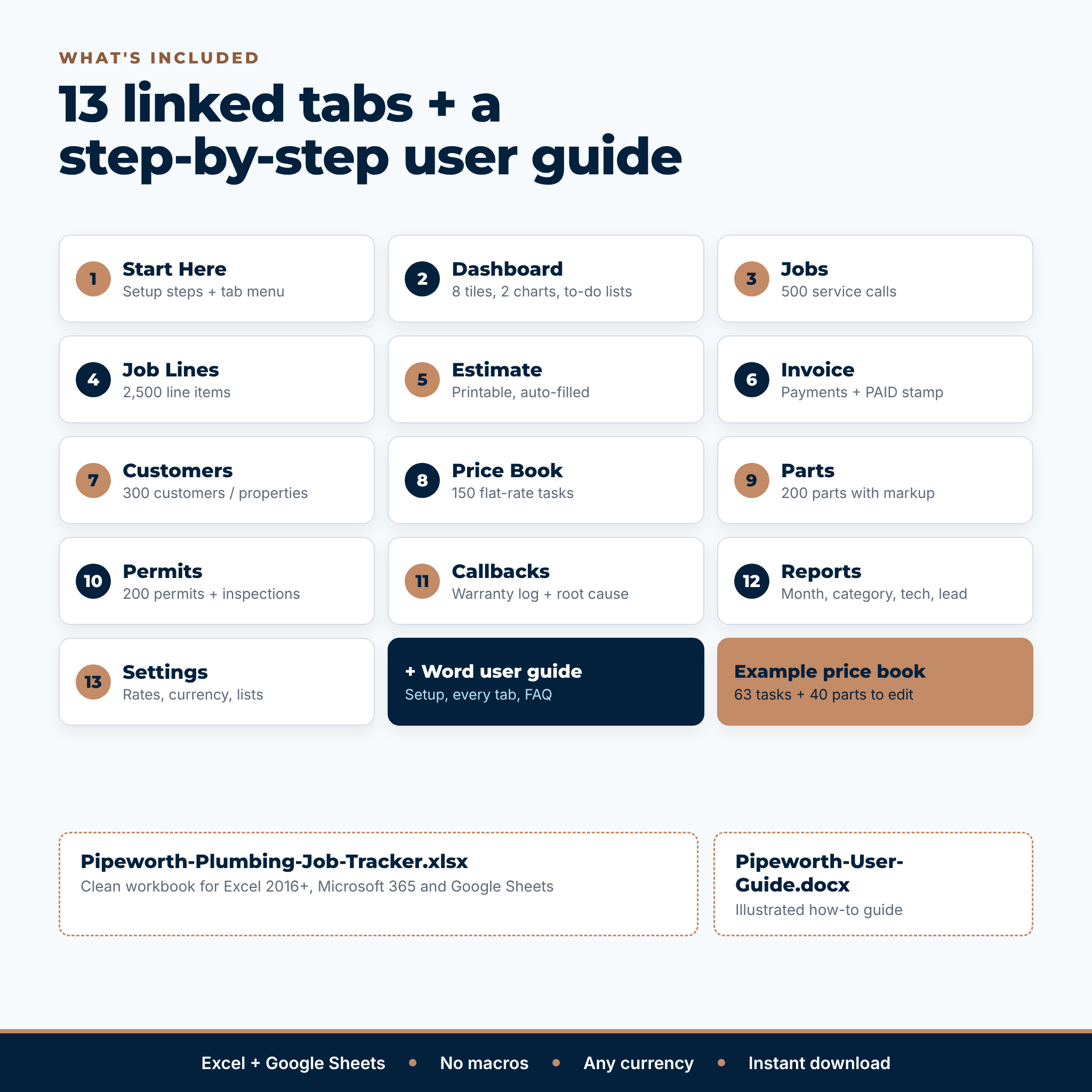
- Pipeworth Plumbing Job Tracker (.xlsx) with 13 tabs: Start Here, Dashboard, Jobs, Job Lines, Estimate, Invoice, Customers, Price Book, Parts, Permits, Callbacks, Reports and Settings
- Pipeworth User Guide (.docx, 23 illustrated pages)
How it works
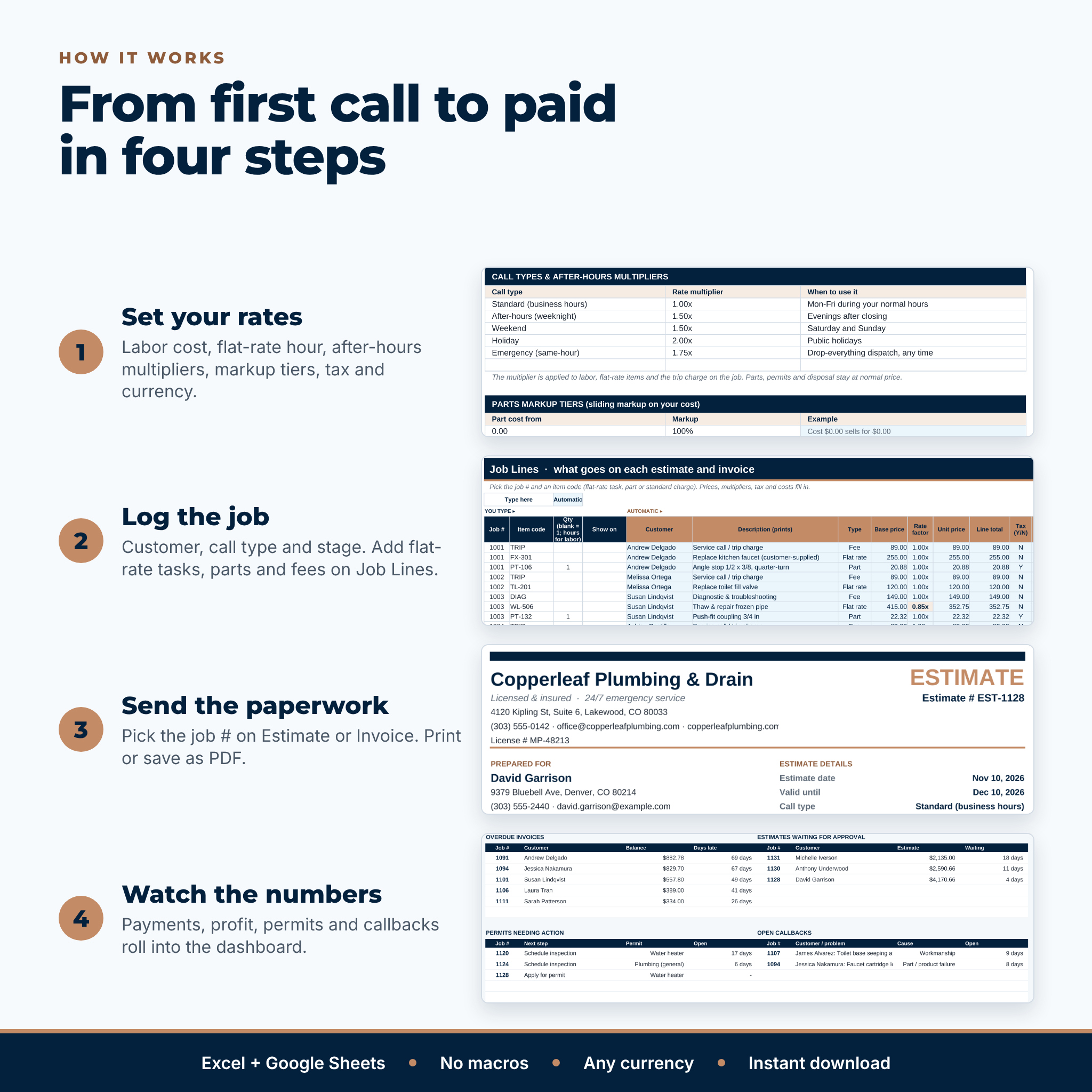
- On Settings, enter your business details, currency, sales tax, flat-rate hourly rate, your labor cost, after-hours multipliers and markup tiers.
- Edit the example Price Book and Parts with your own hours, costs and prices.
- Add customers, then log each job and its line items.
- Pick the job number on the Estimate or Invoice tab and print or save as PDF.
- Record payments, permits and callbacks; the reports and dashboard update on their own.
File format and software requirements
One .xlsx workbook for Microsoft Excel 2016 or later, Microsoft 365 (Windows and Mac) and Google Sheets in any browser. No macros, add-ins or subscriptions. Estimates and invoices are set to print on one US Letter page and scale to A4.
Customization
Choose any currency symbol, before or after the amount. Rename call types and set your own multipliers, markup tiers, standard charges, job categories, technicians, lead sources, permit types and payment methods. Formula cells are locked without a password, so you can unprotect a tab to add your logo or change colors.
Digital download
This is a digital product. Nothing is shipped. Download the files right after checkout from your order confirmation or your account.
Real situations it handles
- A Saturday-night burst pipe billed at your emergency rate, with the trip charge multiplied and parts at normal price
- A water heater replacement estimate with a deposit, permit fee and haul-away, then the invoice once the work is done
- A drain call where you found a second clog and added it as invoice-only work
- A callback for a leaking fitting that comes off the original job’s profit instead of hiding in overhead
- A slow week when you call every customer with a water heater over ten years old
FAQ
Does this plumbing invoice template work in Google Sheets?
Yes. Upload the .xlsx to Google Drive and save it as a Google Sheets file. It uses standard functions only and no macros.
Can I use my own flat-rate prices?
Yes. Edit the hours and material cost so the formula prices each task, or type your own price in the Price override column.
How does the after-hours multiplier work?
Each job has a call type such as Weekend or Emergency. Its multiplier applies to labor, flat-rate tasks and the trip charge; parts and permits stay at normal price.
Can I track parts markup?
Yes. Enter your cost and the sliding markup tiers set the sell price, or type a markup for an individual part.
Does it calculate profit per job?
Yes. Each job shows materials, labor at your cost, permit fees, callback cost, gross profit and margin.
Can I use a different currency?
Yes. Type any symbol on Settings and every printed amount follows it.
How many jobs can I track?
500 jobs, 2,500 line items and 300 customers per workbook. Most shops start a fresh copy each year.
License: personal use only, or use within your own business. You may not resell, share or redistribute the files. © 2026 Taskdale. This is a record-keeping tool, not tax or legal advice; check sales tax and permit rules with your accountant and local building department.
Reviews
There are no reviews yet.