


Meeting Minutes Templates That Make the Secretary’s Job Easy
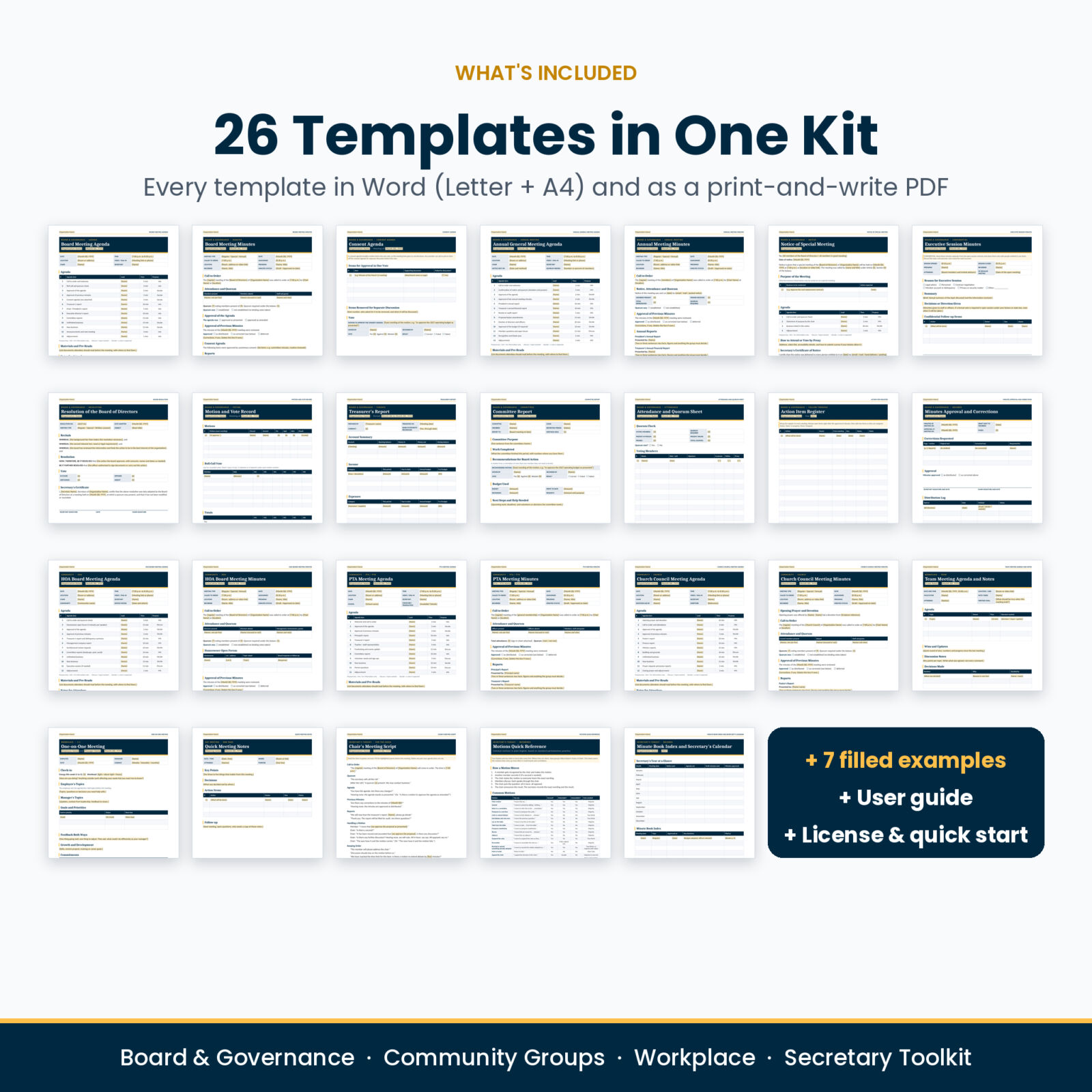
Quorumly is a meeting minutes template kit for Microsoft Word, built for the person who has to take the notes. You get 26 editable templates covering the whole meeting cycle: the notice, the agenda, the sign-in sheet, the minutes, the motions, the reports and the records you file afterward.
It works for formal boards and for relaxed team check-ins. HOA boards, PTAs and PTOs, church councils, nonprofit boards, clubs, committees, and managers running weekly meetings and one-on-ones will all find a ready-made layout.
Open a template, replace the highlighted fields, and your minutes are done. Prefer pen and paper? Every template also comes as a print-and-write PDF.
Why Secretaries Pick Quorumly
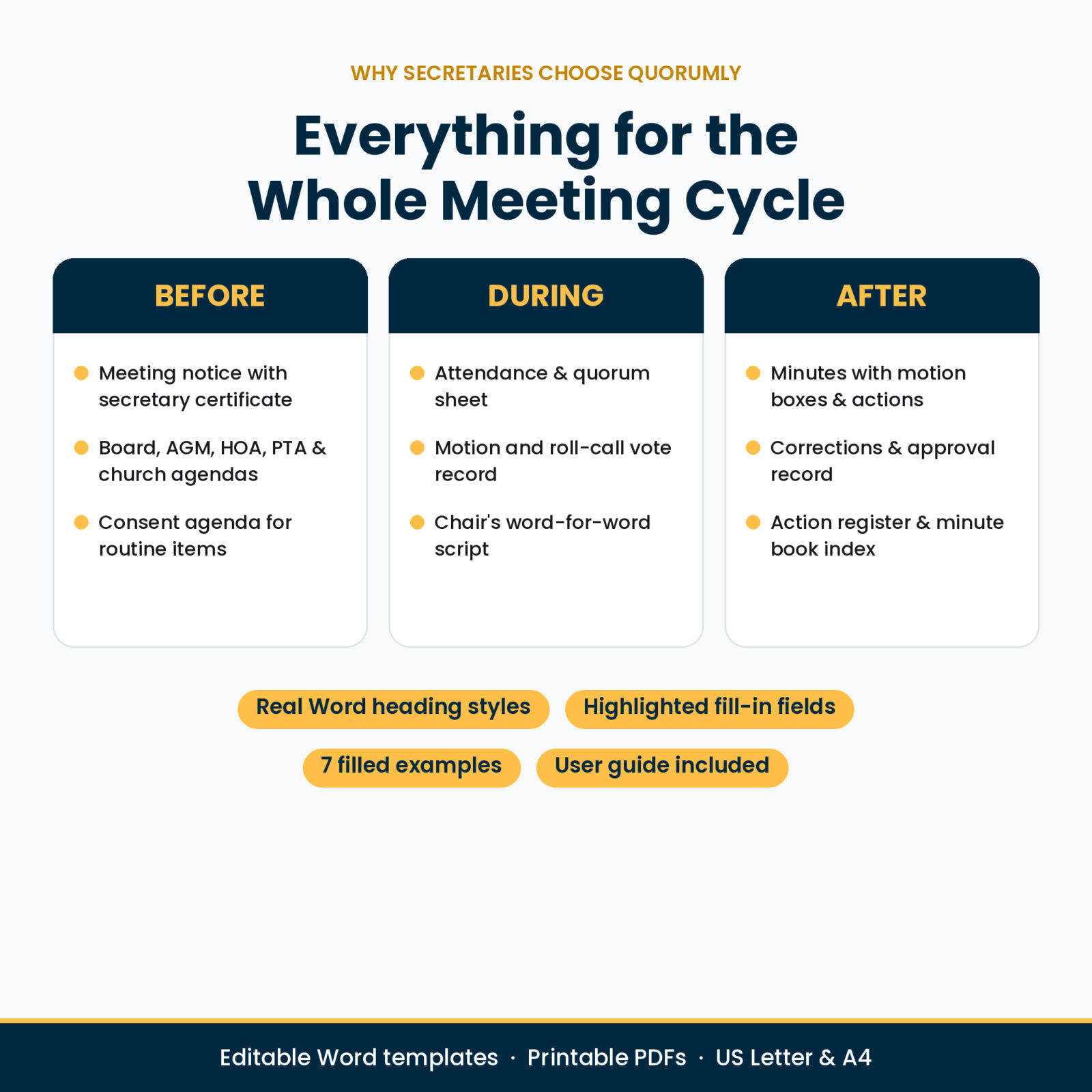
Most minutes templates give you one page with “Old Business” and “New Business” and leave you to work out the rest. Volunteer secretaries told us the hard parts are different: recording a motion correctly, checking quorum, handling an executive session, keeping track of who promised to do what. Quorumly builds those parts in.
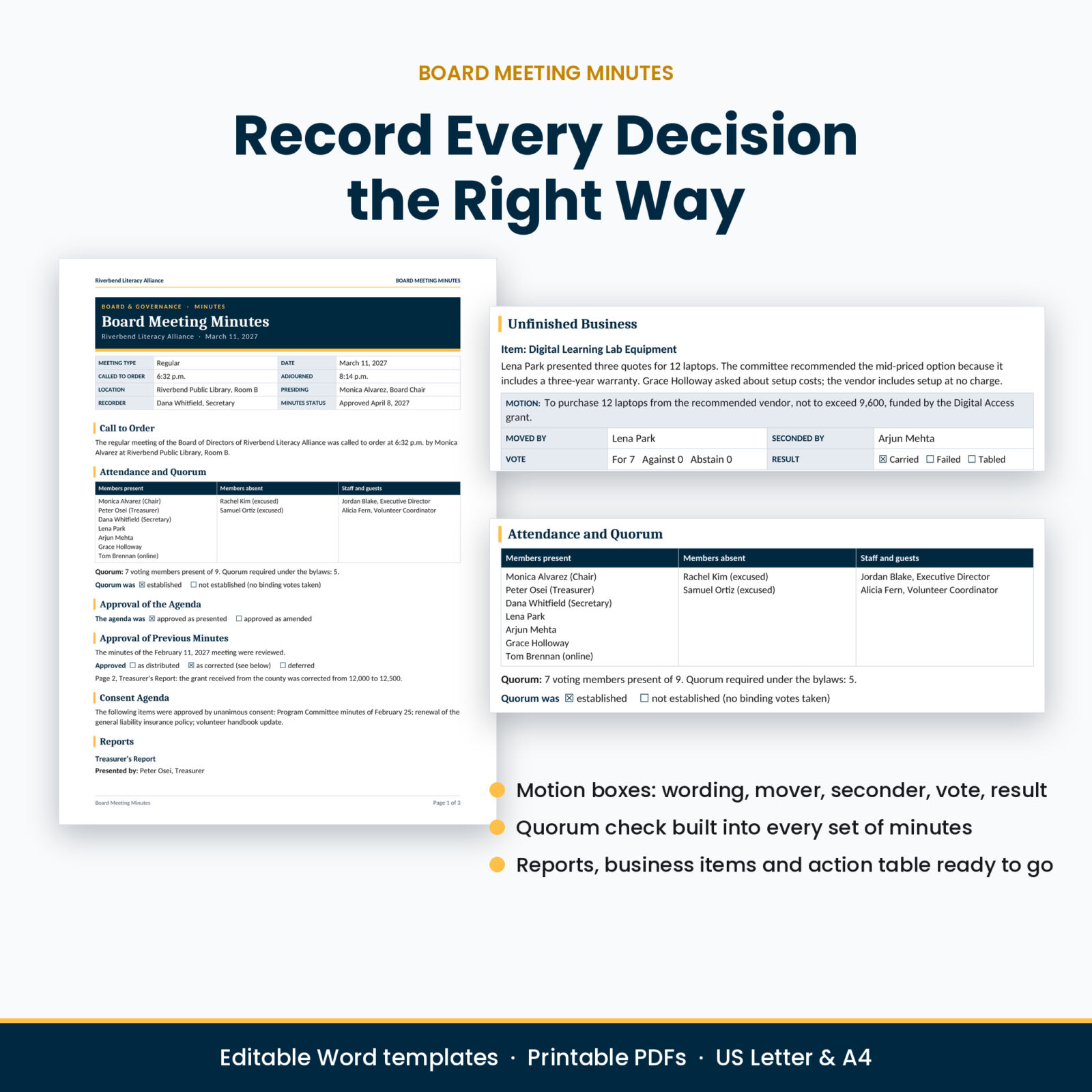
- Motion boxes in every set of minutes: exact wording, moved by, seconded by, vote count and result.
- Quorum check with members present, total voting members and the number your bylaws require.
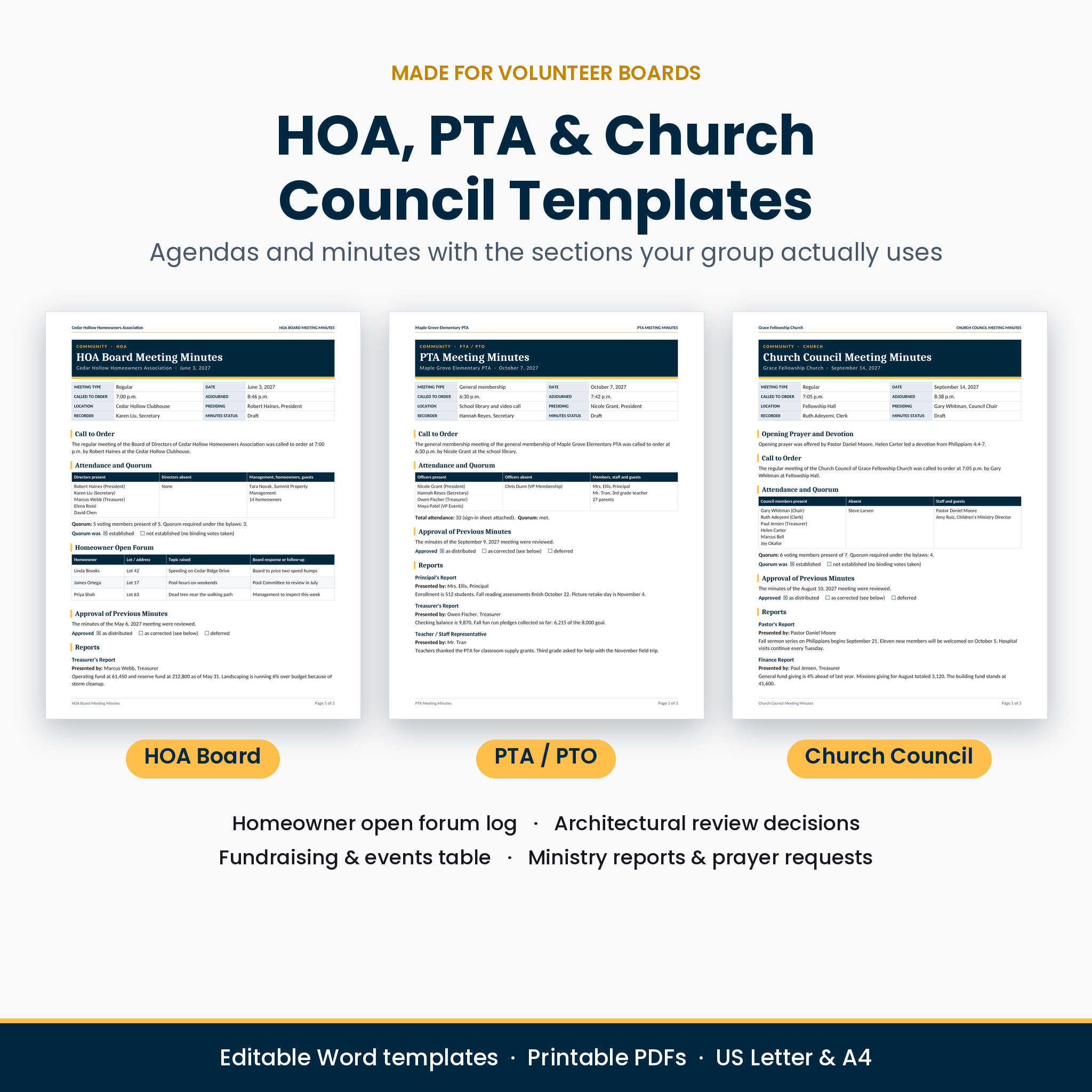
- Group-specific sections: homeowner open forum and architectural review decisions for HOAs, a fundraising and events table for PTAs, ministry reports and prayer requests for churches.
- A secretary’s toolkit: a word-for-word chair’s script, a motions quick reference and a minute book index with a year-at-a-glance deadline calendar.
- Easy to spot placeholders: every fill-in field sits in [square brackets] with a soft highlight, so nothing gets missed.
What’s Included
Board and Governance (14 templates)
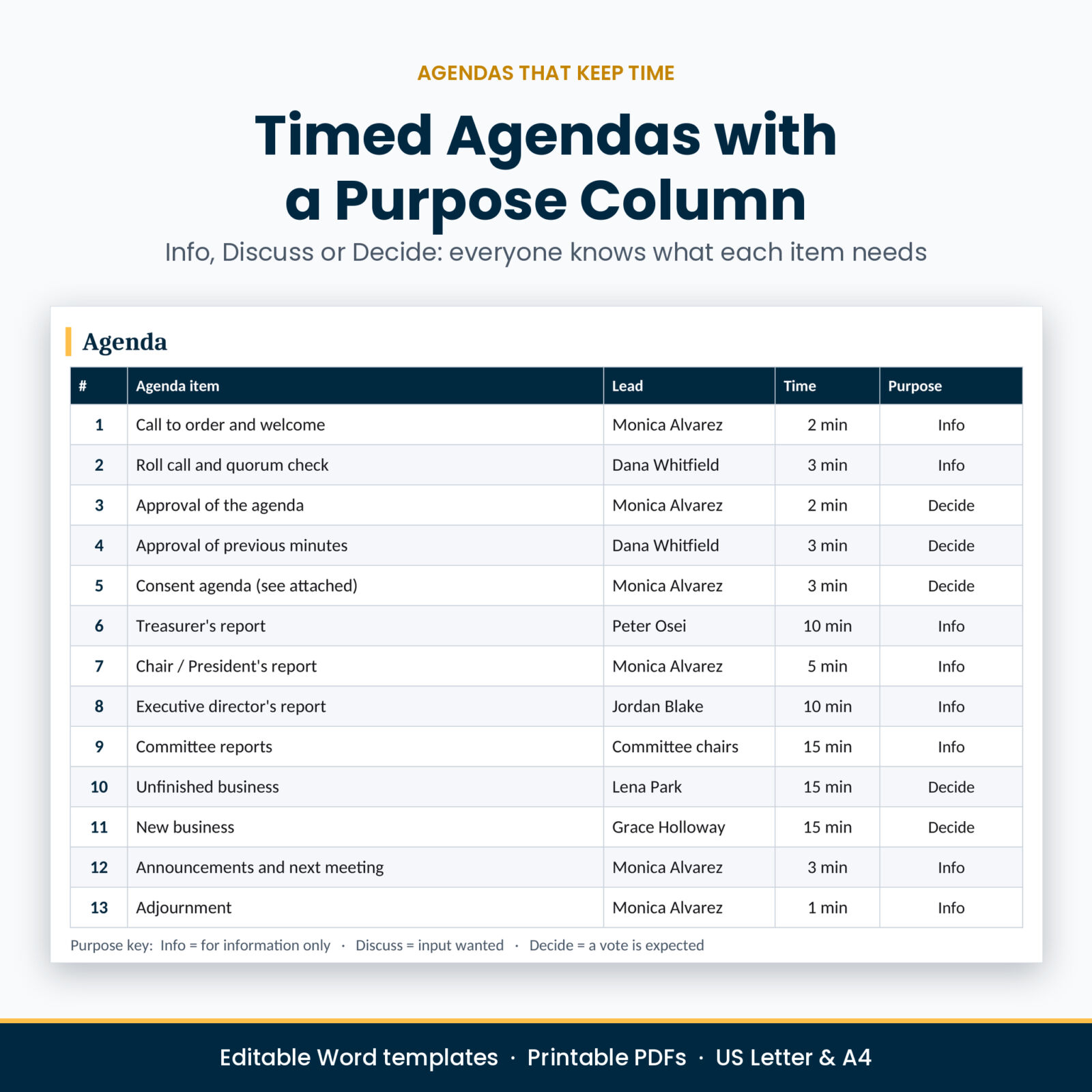
- Board Meeting Agenda with a purpose column (Info, Discuss, Decide) and suggested times
- Board Meeting Minutes with attendance, quorum, reports, motion boxes and action items
- Consent Agenda for approving routine items in one vote
- Annual General Meeting Agenda and Annual Meeting Minutes with an election results table
- Notice of Special Meeting with a secretary’s certificate of notice
- Executive Session Minutes, kept separate and marked confidential
- Board Resolution in WHEREAS / RESOLVED format with vote and certificate
- Motion and Vote Record with a roll-call grid
- Treasurer’s Report with account summary, income and expenses against budget, and bills awaiting approval
- Committee Report with a recommended motion and budget used
- Attendance and Quorum Sheet with in-person, online and proxy columns
- Action Item Register for the whole year
- Minutes Approval and Corrections record with a distribution log
Community Groups (6 templates)
- HOA Board Meeting Agenda and HOA Board Meeting Minutes
- PTA Meeting Agenda and PTA Meeting Minutes (works for PTOs and booster clubs too)
- Church Council Meeting Agenda and Church Council Meeting Minutes
Workplace (3 templates)
- Team Meeting Agenda and Notes with a decisions log and parking lot
- One-on-One Meeting template with an employee-first agenda, goals, feedback, commitments and a question bank
- Quick Meeting Notes, one page for any meeting
Secretary’s Toolkit (3 templates)
- Chair’s Meeting Script with lines for opening, handling motions, keeping order and adjourning
- Motions Quick Reference covering 17 common motions: what to say, second, debate, amend and vote needed
- Minute Book Index and Secretary’s Calendar with a records checklist
Plus
- Every template as an editable Word file in US Letter and A4 (52 .docx files)
- Every template as a print-and-write PDF in US Letter and A4 (52 PDFs)
- 7 filled examples: board agenda, board minutes, HOA, PTA, church council, team meeting and one-on-one
- User guide (Word) with setup steps, customizing tips, minute-writing advice, troubleshooting and FAQs
How It Works
- Download and unzip the kit, then open the folder for your paper size.
- Open a template in Word and add your organization name and logo once. Save it as your master copy.
- For each meeting, save a copy with the date in the file name.
- Replace the highlighted [fields]. Press Ctrl+F and search for [ to jump from one field to the next.
- Delete any section you don’t need, save as PDF and send it to your board or team.
Real Word Styles, Easy to Customize
Every section title uses Word’s built-in Heading 1 and Heading 2 styles, so the Navigation Pane shows a clickable outline and you can restyle a whole document by changing one style. Swap the navy banner for your brand color, add your logo to the header, or change the fonts. The templates use Calibri and Cambria, which come with Microsoft Office, so they look the same on Windows and Mac.
Money fields are labeled Amount and the treasurer’s report has a Currency field, so you can use dollars or any other currency.
Who This Kit Is For
- A newly elected HOA, PTA or club secretary who wants to get the first minutes right
- Church clerks and council secretaries who need consistent records
- Nonprofit board secretaries preparing for an annual meeting, election or audit
- Managers and team leads who want shorter meetings with clear decisions and owners
- Property managers and community volunteers who take minutes for several committees
File Formats and Requirements
- Editable files: Microsoft Word .docx (Microsoft Word for Windows or Mac)
- Printables: PDF with embedded fonts, US Letter (8.5 x 11 in) and A4
- Instant digital download. Nothing is shipped.
Frequently Asked Questions
Can I edit these meeting minutes templates in Word?
Yes. Every template is a fully editable Word document. Type over the highlighted fields, add or delete rows and sections, and change colors and fonts.
Do the templates follow Robert’s Rules of Order?
The layouts follow standard parliamentary practice used by many boards: motions, seconds, quorum and approval of minutes. Your own bylaws always come first, and the motions reference says so.
Is there a template for HOA board meetings?
Yes, an HOA agenda and HOA minutes with a homeowner open forum log, delinquency summary, architectural review decisions and an executive session line.
Can I print the templates and write by hand?
Yes. The kit includes print-and-write PDF versions with ruled lines and empty boxes in US Letter and A4.
Are there examples of completed minutes?
Yes. Seven filled examples show the right length and tone for board, HOA, PTA, church, team and one-on-one meetings.
Can I use the kit for more than one organization?
The license covers the organizations you personally serve in. If you are handing the files to different, unrelated groups to keep, buy one copy per organization.
License
Personal use license. Use, edit and print the templates for your own meetings and the organizations you serve. The minutes and agendas you create are yours to share. Please do not resell, share or distribute the template files themselves.
Reviews
There are no reviews yet.