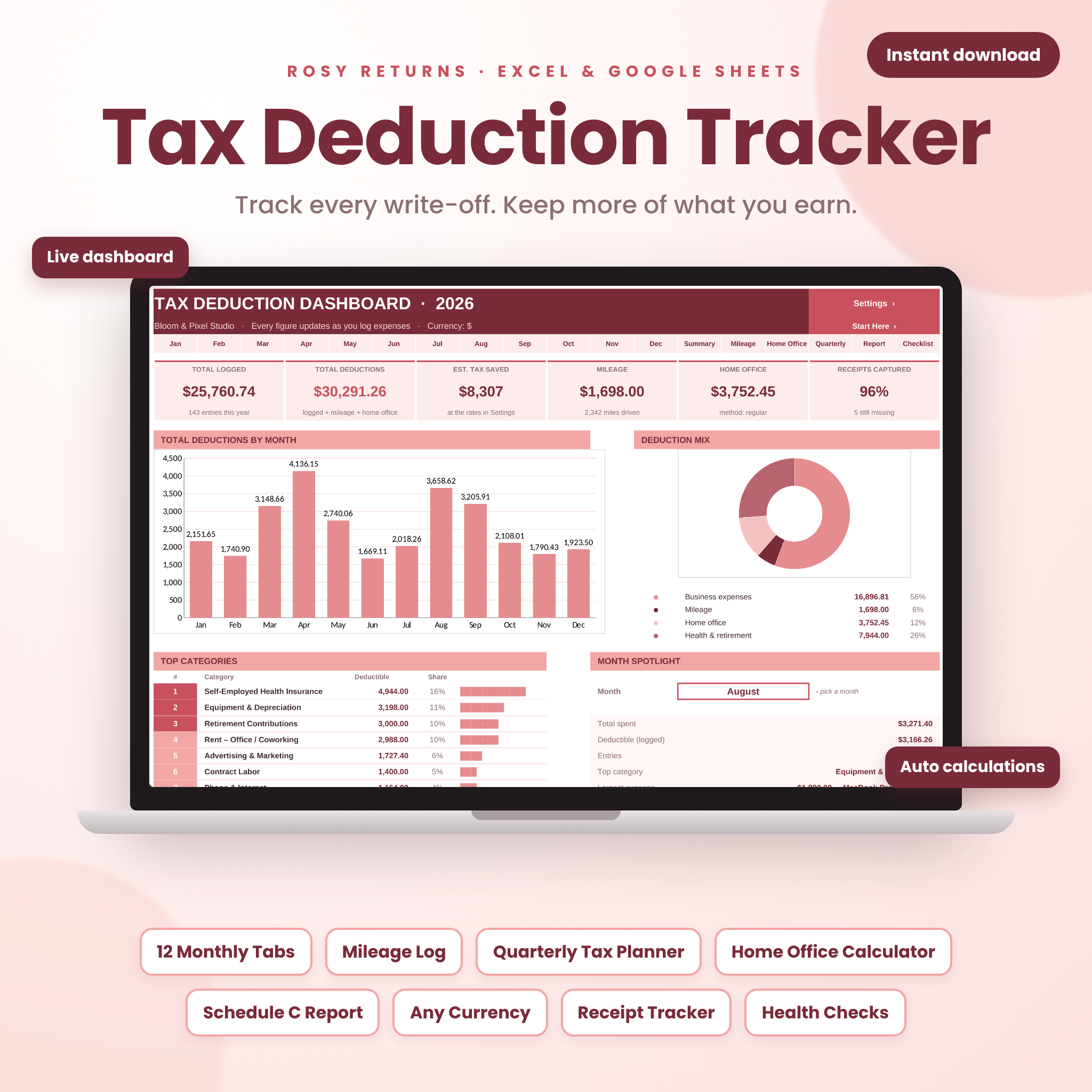





The Rosy Returns Tax Deduction Tracker is a done-for-you tax deduction tracker spreadsheet for Excel and Google Sheets that turns everyday business expenses into an organized, tax-ready record. Log what you spend each month, and the tracker instantly calculates what is deductible, totals everything by category and IRS Schedule C line, estimates your quarterly taxes and builds a printable year-end report for your tax preparer. No formulas to write, no math to check, and no shoebox of receipts in April.
A tax deduction tracker that does the work for you
Most expense trackers stop at adding up numbers. Rosy Returns goes further: it applies business-use percentages, limits meals to 50% automatically, adds your mileage and home office deductions, flags mistakes before they cost you, and shows the result on a live dashboard you will actually enjoy opening. The soft rose and burgundy design keeps it calm and easy to read, while white “type here” cells and pink “automatic” cells make it clear exactly where to enter information.
Who it’s for
- Freelancers, independent contractors and anyone who receives 1099 income
- Sole proprietors and single-member LLC owners who file Schedule C
- Etsy, Amazon, eBay and Shopify sellers, creators and side hustlers
- Photographers, designers, coaches, consultants, real estate agents, stylists and rideshare or delivery drivers
- Bookkeepers and tax preparers who want clients to arrive organized
Features
Spectacular live dashboard
- Six live totals: total logged, total deductions, estimated tax saved, mileage, home office and receipts captured
- Total deductions by month chart and a deduction mix doughnut chart
- Top 8 categories ranked automatically with share bars
- Month spotlight: pick any month to see its spending, top category, largest expense and missing receipts
- Quarterly estimated tax panel with color-coded Paid, Due soon and Overdue status
- Health checks that flag unknown categories, dates in the wrong month, missing receipts, vehicle method conflicts and overdue payments
- Year progress bars for months logged, receipts, checklist and quarterly payments
12 monthly expense logs
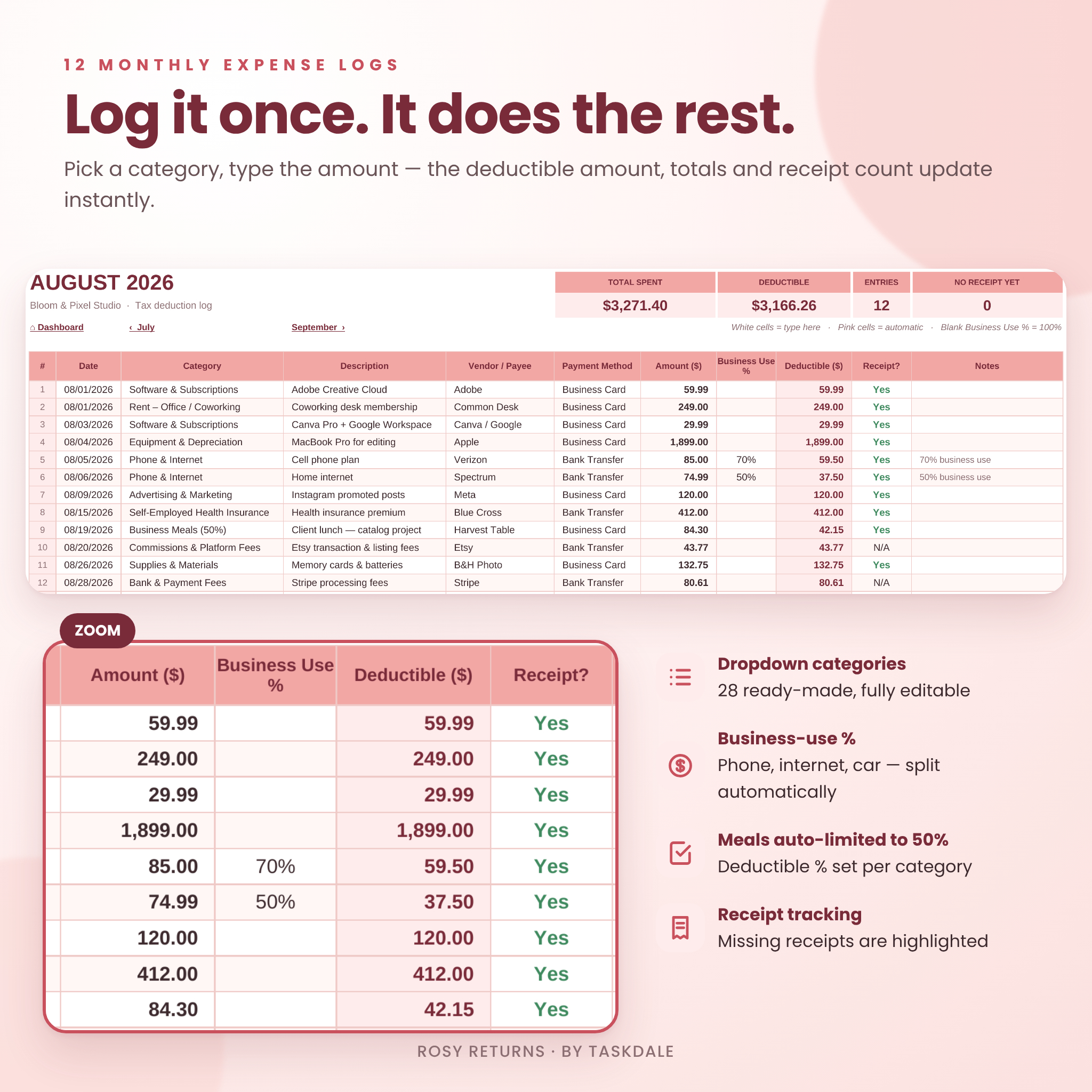
- 100 rows per month (1,200 per year) with date, category, description, vendor, payment method, amount, business-use %, receipt status and notes
- Dropdown categories linked to Settings, so your summary stays organized
- Automatic deductible amount: amount × business-use % × category deductible %, rounded to the cent
- Month totals, entry count and missing-receipt count at the top of every tab
Annual summary by category and Schedule C line
A full category-by-month grid with a heat map, plus mileage, home office, total deductions, total spent and a Schedule C vs. Schedule 1 split. An “unmatched category” row catches renamed categories so your totals always add up.
Mileage log
Up to 400 trips. Enter odometer readings or just the distance, mark round trips, and the deduction is calculated at the rate on your Settings tab (pre-set to the IRS 2026 business rate of 72.5¢ per mile). Works in miles or kilometers.
Home office deduction calculator
Compare the simplified method ($5 per square foot, up to 300 sq ft) with the regular actual-expense method side by side. Choose a method or let the tracker pick the larger deduction automatically.
Quarterly estimated tax planner
Enter your monthly income to see estimated self-employment and income tax for each IRS payment period (Jan–Mar, Apr–May, Jun–Aug, Sep–Dec), due dates that update with your tax year, payments made, balances and a safe-harbor check based on last year’s tax.
Printable year-end tax report
One clean page of totals by Schedule C line (8 through 30) and Schedule 1 lines 16 and 17, a profit snapshot, business miles and a notes box for your preparer.
Commonly missed deductions checklist
Thirty write-offs people often forget, each with what counts and where to log it, plus a progress bar.
What’s included
- Rosy-Returns-Tax-Deduction-Tracker.xlsx: the blank tracker with 21 tabs
- Rosy-Returns-Tax-Deduction-Tracker-SAMPLE.xlsx: the same tracker filled with a full year of example data
- Rosy-Returns-User-Guide.docx: a 13-page illustrated guide covering setup, every feature, customizing, troubleshooting and FAQs
How it works
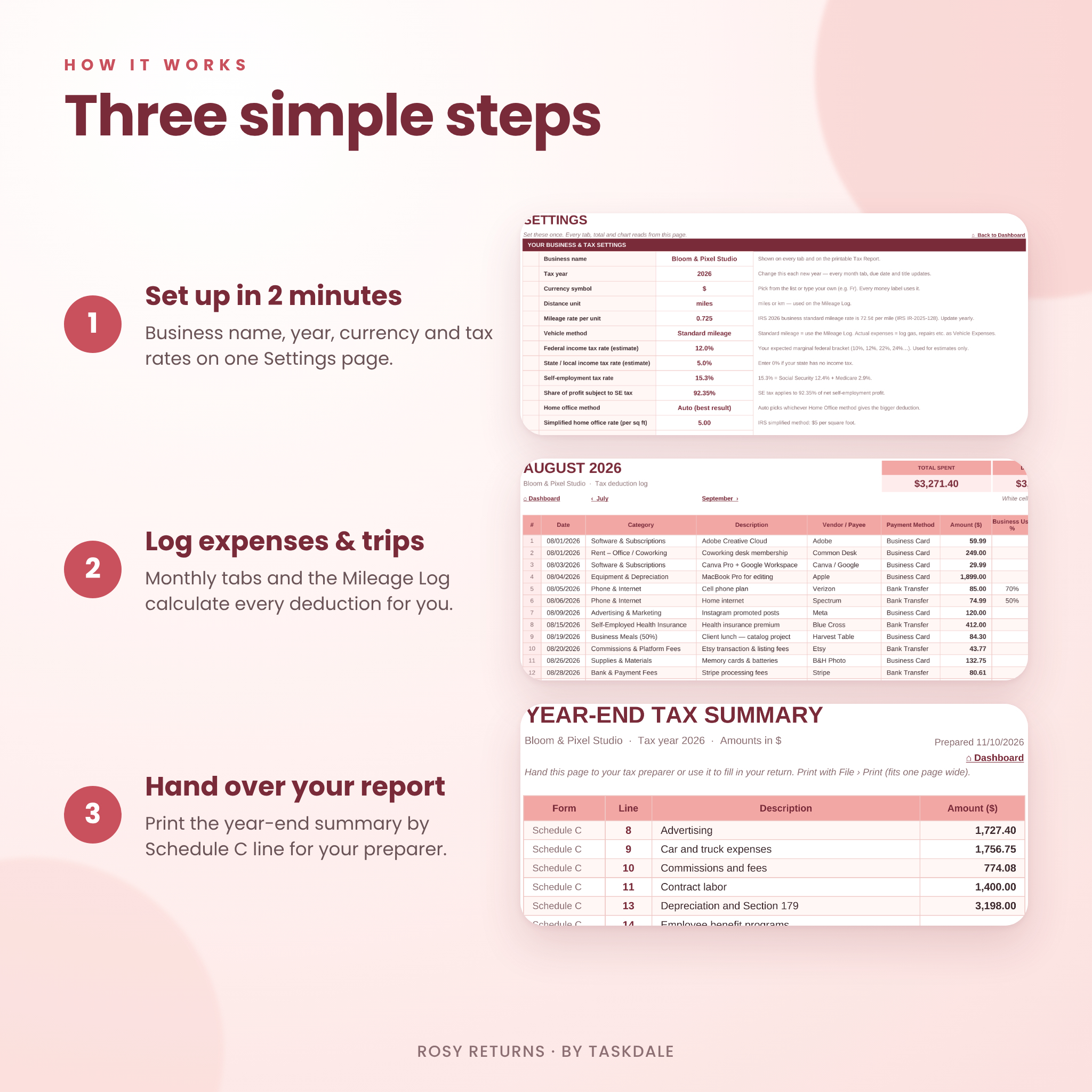
- Set up in two minutes. Add your business name, tax year, currency, mileage rate and estimated tax rates on the Settings tab.
- Log as you go. Add expenses to the month tabs and trips to the Mileage Log. Deductible amounts calculate instantly.
- Check the dashboard. See your totals, charts, health checks and quarterly payments at a glance.
- Hand over your report. At tax time, print the Tax Report or send the file to your preparer.
File formats and software requirements
- Microsoft Excel .xlsx: Excel 2010 or later for Windows, Excel for Mac 2016 or later and Microsoft 365
- Google Sheets: upload the .xlsx to Google Drive and open it with Google Sheets (free Google account)
- No macros, add-ons or subscriptions
- User guide in Word .docx format, which also opens in Google Docs, Pages and LibreOffice
Customization
Rename any of the 28 ready-made categories or add your own in seven empty slots, choose the tax-form line and deductible percentage for each, and pick any currency symbol. One currency setting updates every money label in the workbook. Formula cells are locked in Excel without a password to prevent accidents, and you can unprotect a sheet whenever you want to change colors or layout.
Digital download
This is a digital product. No physical item will be shipped. Your files are available to download immediately after purchase. The license is for personal use in your own business or household; the files may not be resold, shared or redistributed.
Use cases
- A freelance designer logs software, a new laptop and client lunches and sees her estimated tax savings grow each month.
- An Etsy seller tracks platform fees, shipping supplies and post-office trips in one place before quarterly taxes are due.
- A photographer compares home office methods and uses the Tax Report to file Schedule C in minutes.
- A rideshare driver records every trip in the Mileage Log and keeps parking and tolls separate.
- A new LLC owner works through the deductions checklist to make sure nothing is missed in year one.
Frequently asked questions
Does this tax deduction tracker work in Google Sheets?
Yes. Upload the .xlsx file to Google Drive and open it with Google Sheets. Formulas, dropdowns, charts, links and formatting all carry over.
Can I use it on a Mac?
Yes, in Excel for Mac or in Google Sheets in any browser.
Can I use my own currency?
Yes. Choose $, €, £ and more, or type your own symbol. The tax lines follow US forms, but the tracking works anywhere.
How many expenses can I track?
Up to 100 per month (1,200 per year) plus 400 mileage trips.
Can I reuse it next year?
Yes. Save a copy, clear your entries and change the tax year on the Settings tab.
Does it calculate my quarterly estimated taxes?
Yes. It estimates self-employment and income tax for each IRS payment period using the rates you enter, shows due dates and tracks what you’ve paid.
Is this tax advice?
No. Rosy Returns organizes your records and gives planning estimates. Always confirm deductions and payments with a qualified tax professional.

Reviews
There are no reviews yet.