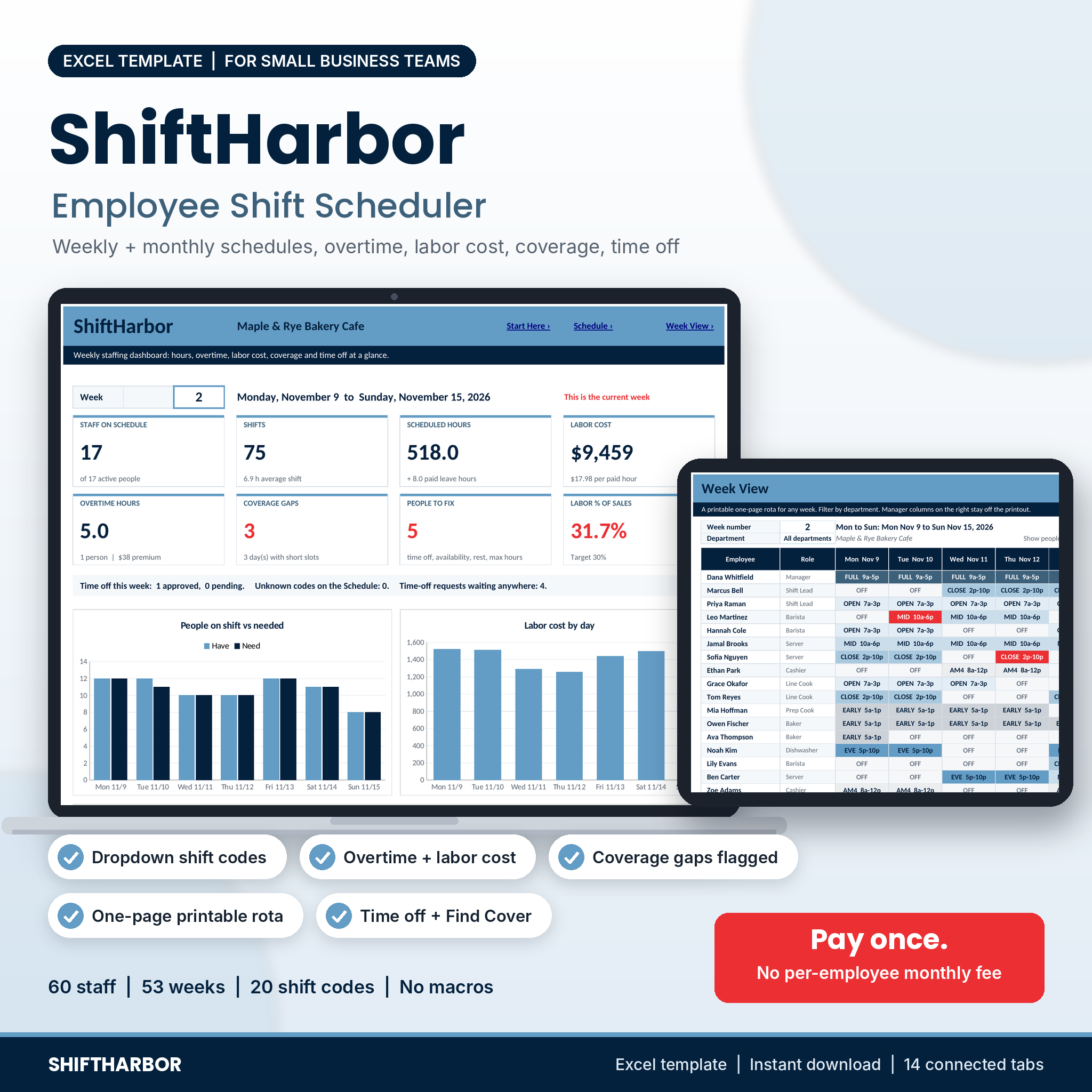




ShiftHarbor is an employee shift schedule spreadsheet for Microsoft Excel, made for small businesses that build the staff schedule by hand. You add your people and your shift codes once. Then you pick a code for each person and day from a drop-down, and the workbook does the counting: hours per person and per day, overtime, labor cost, coverage against how many people you need, time off and the clashes you would rather catch before the schedule goes on the wall.
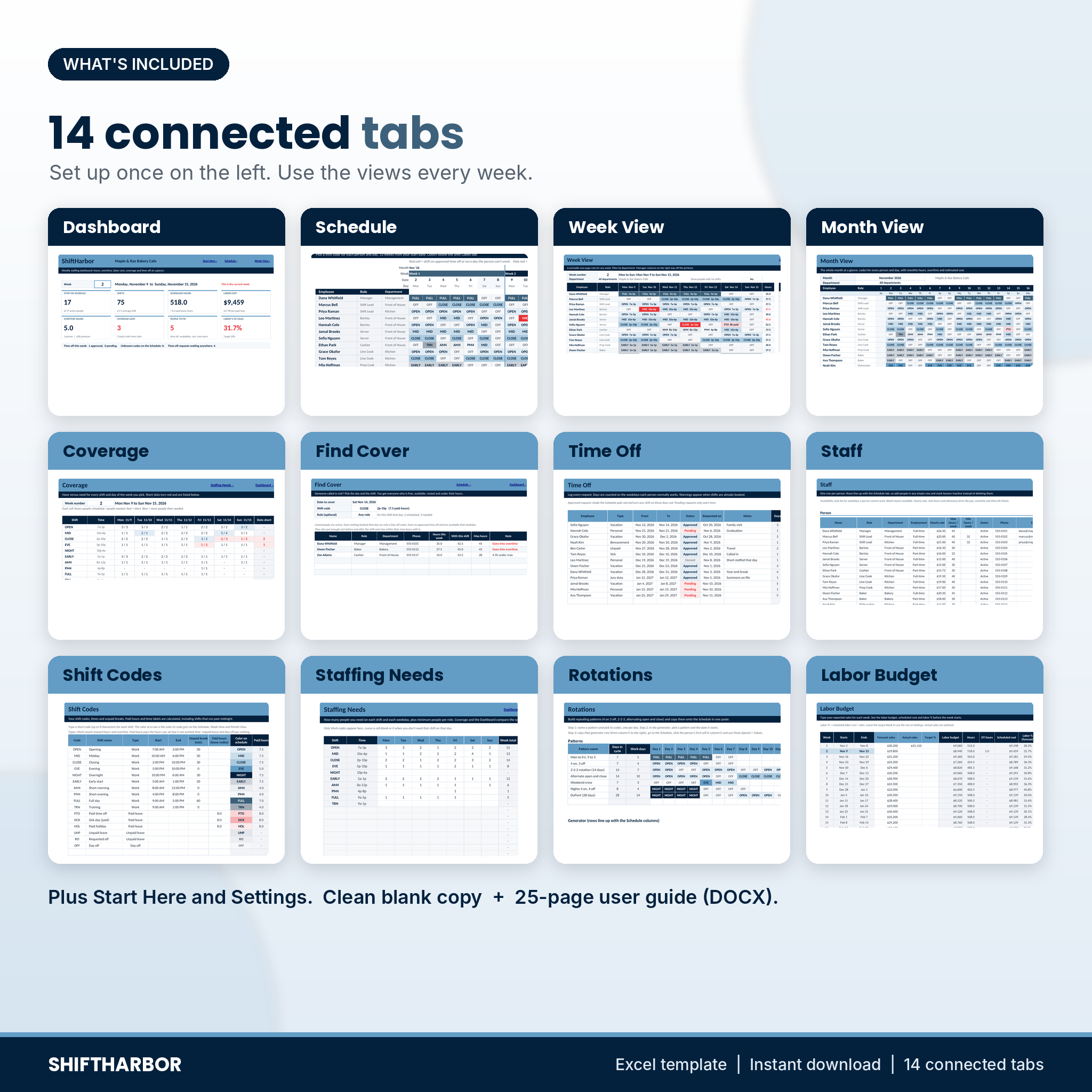
One file, 14 connected tabs, no subscription and no fee per employee.
What the employee schedule template does
- Schedule grid with drop-down shift codes. 60 people by 53 weeks from any start date. Each code has its own color.
- Automatic hours and pay. Paid hours come from start, end and unpaid break, including night shifts that end after midnight. Weekly overtime (40 hours by default), optional daily overtime, a holiday pay multiplier and paid leave all flow into labor cost.
- Clash warnings as you type. A shift on approved time off or on a weekday someone can’t work turns red. Approved time off shades the day pale red, so you see it before you book.
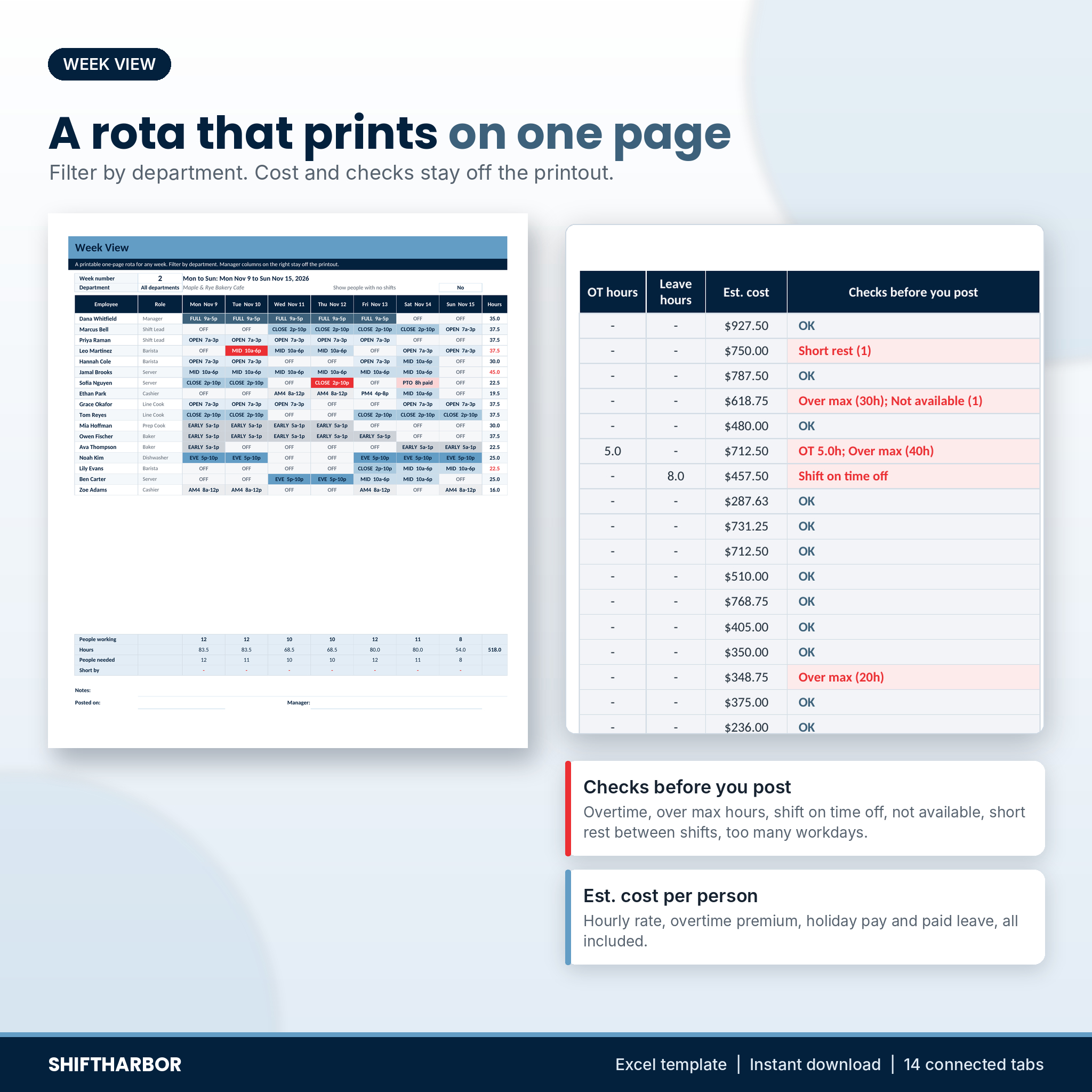
- Checks before you post. For every person and week: overtime, over max hours, under min hours, shift on time off, not available, short rest between shifts (for example a close then an open), too many workdays, unknown codes and inactive staff.
- Coverage per day vs required staff. Set how many people each shift needs on each weekday, plus role minimums such as one shift lead every day. The Coverage tab shows scheduled / needed for each slot and lists every gap.
Weekly rota, monthly view and dashboard
Week View: a printable rota on one page
Pick a week and, if you like, a department. The rota shows each person’s shift and times for every day and their weekly hours. It prints on one portrait page, US Letter or A4, with up to 30 people. Labor cost and the checks sit to the right, outside the print area, so staff only see their shifts.
Month View
Everyone’s codes for the whole month, with shifts, hours, overtime hours, leave hours and estimated cost per person, and daily totals at the bottom.
Dashboard
Eight tiles for the week you pick: staff on the schedule, shifts, scheduled hours, labor cost, overtime hours and premium, coverage gaps, people to fix and labor % of sales. Seven charts show people on shift against people needed, labor cost by day, labor cost against budget over 12 weeks, hours by department, the top 10 people by hours, labor cost by month and approved time off by type.
Extra tools that save time
- Find Cover. Someone calls in sick? Pick the date and shift. You get up to 20 people who are free that day, not on time off, available on that weekday, rested enough before and after, and still under their max hours, with phone numbers and a note when the extra shift means overtime.
- Time Off tracker. 300 requests with type, dates, status (Pending, Approved, Denied) and days counted on the weekdays each person works. Yearly allowance, used, pending and left update on the Staff tab, and a warning shows how many shifts are already booked inside a request.
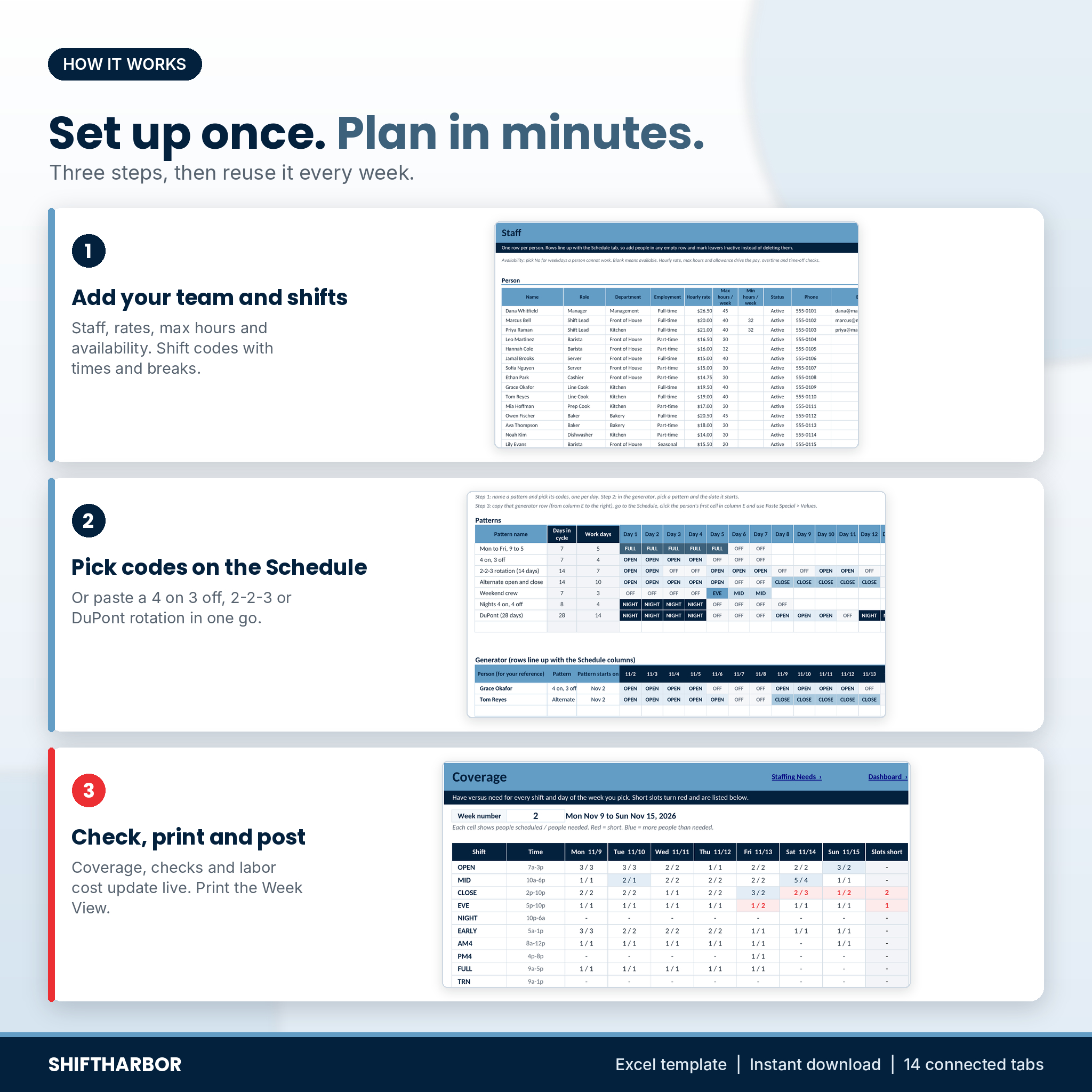
- Rotations. Seven ready patterns (Mon to Fri, 4 on 3 off, 2-2-3, alternating open and close, weekend crew, nights 4 on 4 off, DuPont) plus your own, up to 28 days. The generator lines the pattern up with your schedule dates so you can paste it in one go.
- Labor Budget. Type the sales you expect each week. See the labor budget, scheduled cost, labor % and whether the week is over or under budget.
- Currency setting. $ by default. Pick from 20 symbols and every money cell switches.
Who it is for
Owners and shift managers of cafes, restaurants, bakeries, bars, retail stores, salons, clinics, gyms, hotels, warehouses and cleaning crews. If you run a team of 5 to 60 hourly people and want to see overtime, gaps and time-off clashes before the week starts, this is built for you.
Real situations it helps with
- A cafe owner plans next week on Thursday, sees that Saturday close is one person short and that a barista is booked on a day she said she can’t work, fixes both, and prints the rota.
- A store manager checks the Dashboard and sees labor at 31.7% against a 30% target, then trims two short shifts on the quietest day.
- A kitchen lead gets a sick call at 6 a.m., opens Find Cover, and calls the first cook on the list who won’t go into overtime.
What is included
- ShiftHarbor-Employee-Shift-Scheduler.xlsx: the blank workbook with 14 tabs (Start Here, Dashboard, Settings, Staff, Shift Codes, Staffing Needs, Schedule, Week View, Month View, Coverage, Time Off, Find Cover, Rotations, Labor Budget). 16 shift codes, 7 rotation patterns and a list of US holidays are filled in for you to edit.
- ShiftHarbor-User-Guide.docx: a 25-page illustrated guide with setup steps, every tab explained, how the numbers are worked out, troubleshooting and FAQ.
How it works
- Settings: business name, currency, the first day of week 1, overtime and rest rules, roles, departments and holidays.
- Shift Codes and Staff: your shift times and breaks, then each person with rate, max hours and availability.
- Staffing Needs: people needed per shift and weekday.
- Schedule: pick codes or paste a rotation. Check the Week View, Coverage and Dashboard, then print.
File format and software
One .xlsx file built for Microsoft Excel 2010 or newer on Windows or Mac, and tested in LibreOffice Calc. No macros, add-ins or internet links. Formula cells are locked without a password; input cells stay open. It has not been tested in Google Sheets or Apple Numbers.
Customize it
Rename codes, roles and departments, change times, breaks and pay rules, start weeks on any day and pick 12-hour or 24-hour labels.
Digital download
This is a digital product. Nothing is shipped. You get the workbook and the guide as instant downloads after purchase. The license is for use in your own business: please do not resell, share or upload the files.
FAQ
Does this staff schedule template work on a Mac?
Yes. It is built for Excel 2010 or newer on Mac and Windows, and tested in LibreOffice Calc.
Can I use it in Google Sheets?
It is made and tested for Excel and LibreOffice. Google Sheets and Apple Numbers are not supported.
How many employees can I schedule?
Up to 60 people, 20 shift codes, 300 time-off requests and 53 weeks in one file.
Does it calculate overtime?
Yes. Weekly overtime after the hours you set (40 by default), optional daily overtime, and your own pay multiplier.
Can I print a weekly rota?
Yes. The Week View prints on one page with up to 30 people, without the cost columns.
Does it handle overnight shifts?
Yes. A shift that ends after midnight counts its full hours, and the rest check works across midnight.
Is it a timesheet or payroll system?
No. It plans shifts and estimates labor cost from the schedule. It does not record clock-in times or run payroll.
Reviews
There are no reviews yet.