


Stashwell Folio is a digital life organizer that keeps the little things in one place: the Wi-Fi hint, the paint color, the recipe screenshot, the packing list you rewrite every summer. It works like a filing cabinet that sits beside your main planner. Open it in split screen, tap a folder, and you are there.
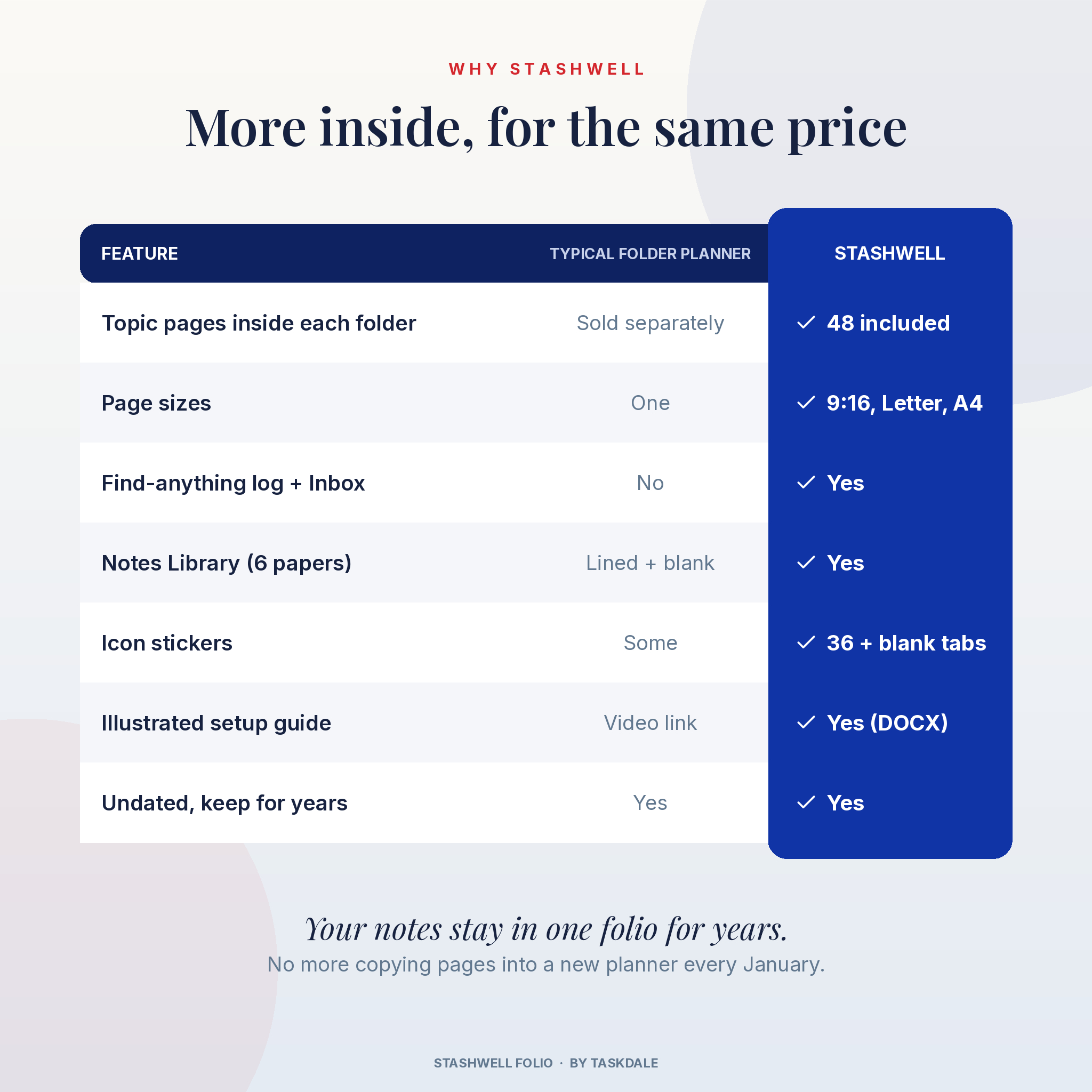
Most folder planners give you empty tabs and sell the inserts separately. This one doesn’t. Every folder opens to real fill-in pages, so you can start using it the day you download it.
What this digital life organizer does
You get 24 color-coded folders in Egyptian blue, stone blue and scarlet red. Twenty of them come filled with pages for a specific part of life. Four are blank, ready for whatever you want to track. Each folder has a cover page with tappable links to everything inside, plus a lined page and a dot grid page you can duplicate as often as you like.
The whole folio is undated. You won’t need to move your notes into a new planner every January. Keep it for years and add pages as you go.
Who it is for
- Digital planners who use GoodNotes, Notability, Xodo, Noteshelf or a similar PDF app
- iPad users who like to plan in Split View, with a planner on one side and their notes on the other
- Busy parents running a household from a tablet or phone
- Anyone with notes scattered across five apps and three old planners
- People who still like paper: the US Letter and A4 editions print cleanly at home
Main benefits
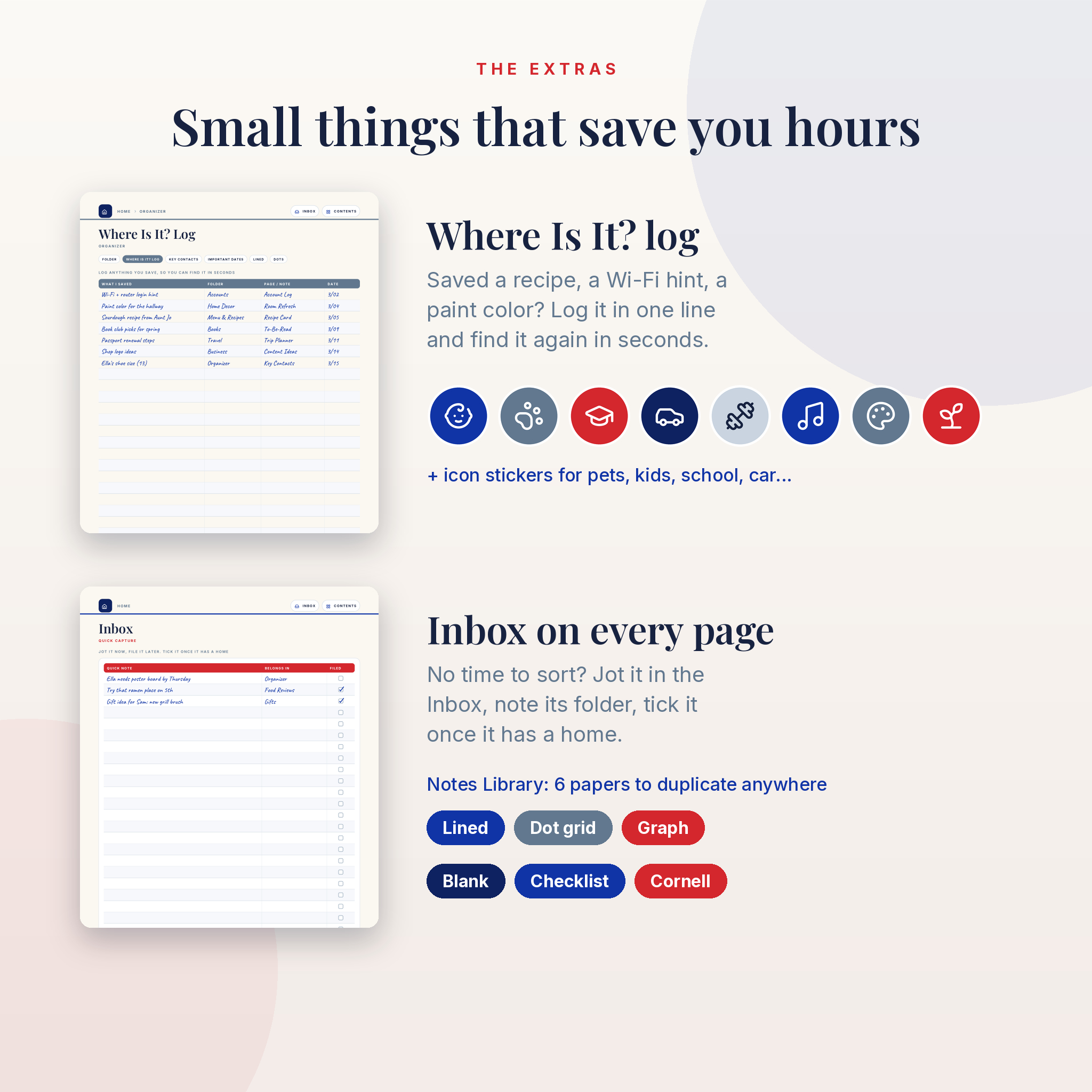
- Find things fast. The Where Is It? log takes ten seconds to fill in and saves the ten-minute hunt later.
- Capture first, sort later. An Inbox button sits on every page for quick notes.
- Never lose your place. A Home button, a folder link and page pills appear on every single page.
- Use it on any screen. A tall 9:16 edition fits split screen and phones. Letter and A4 editions fill a full tablet screen or a sheet of paper.
Features of the Stashwell Folio planner
The folders and what’s inside
- Notes: Brain Dump, Cornell Notes
- Organizer: Where Is It? Log, Key Contacts, Important Dates
- Travel: Trip Planner, Packing List, Daily Itinerary
- Bucket List: a 50-line bucket list, Dream in Detail
- Menu & Recipes: Weekly Menu, Grocery List, Recipe Card
- Home Decor: Room Refresh (mood board, palette, shopping list), Home Wishlist
- Bible Study: S.O.A.P. Study, Prayer List
- Ministry & Service: Serving Schedule, Meeting Notes
- Finance: Monthly Budget, a full-year Bill Tracker, Savings Goal with a color-in progress bar
- Business: Project Planner, Client Log, Content Ideas
- Party & Events: Event Planner, Guest List & RSVP
- Adventures: Adventure Ideas, Adventure Log with photo frames
- Food Reviews: Restaurant Reviews with star ratings, Places to Try
- Books: Reading Log, Book Review, To-Be-Read list
- Scrapbook: Photo Page, Memory Journal
- Wardrobe: Outfit Planner, Capsule Wardrobe, Closet Wishlist
- Health & Wellness: monthly Wellness Tracker, Appointments Log, Self-Care Menu
- Goals & Habits: Goal Planner, 31-day Habit Tracker
- Accounts & Logins: 12 account cards built for password hints, not full passwords
- Gifts & Birthdays: Birthday Calendar, Gift Ideas
- My Folder 1 to 4: blank folders with lined, dot grid and checklist pages
Extras
- Home dashboard with 24 folder tabs
- Linked Contents page that lists every page
- Notes Library with lined, dot grid, graph, blank, checklist and Cornell paper
- PDF outline (bookmarks) for apps that show a sidebar
- 36 round icon stickers and 5 blank tab stickers as transparent PNG files
What is included
- Stashwell Folio, 9:16 split-screen edition (PDF, 137 pages)
- Stashwell Folio, US Letter edition (PDF, 137 pages)
- Stashwell Folio, A4 edition (PDF, 137 pages)
- Sticker pack: 36 icon stickers and 5 blank tab stickers (PNG)
- Illustrated user guide (DOCX) with setup steps, tips, troubleshooting and FAQ
- Licence and credits file
How it works
- Download the ZIP and unzip it. On iPad, tap the ZIP once in the Files app.
- Import the PDF into your note app as a new document. Don’t import it as stickers or images.
- Tap “Open my folio” on the cover. Pick a folder on the Home page and start writing.
- Want it beside your planner? Open Split View on iPad and drag the folio to one side.
File formats and software requirements
The planner pages are hyperlinked PDF files with embedded fonts. Each file is about 3 MB, so it opens quickly. You’ll need a PDF annotation app that keeps links, such as GoodNotes, Notability, Xodo, Noteshelf, PDF Expert or Samsung Notes. The stickers are PNG files with transparent backgrounds. The guide is a Word file that also opens in Google Docs and Pages. You don’t need Canva, Excel or a subscription.
Customization
Name the four blank folders and label their tabs with the blank tab stickers. Swap any folder’s purpose, so Bible Study can become Journaling if that suits you better. Duplicate any page, add your own photos into the frames, and use any Notes Library page as a custom template. Money fields say “Amount” and the budget pages have a Currency line, so you can use dollars, pounds, euros or any currency you like.
Digital download information
This is an instant digital download. Nothing will be shipped. Your files show up on the order confirmation page and in your Taskdale account as soon as payment goes through. The licence is for personal use only. Please don’t share or resell the files.
Real ways people use it
- Planning a family beach weekend: trip budget, bookings, packing list and a day-by-day plan, all in the Travel folder
- Keeping the Sunday reset short: menu for the week, grocery list and bills to pay, each one tap away
- Running a small side business: client log, content ideas and project milestones next to your daily planner
- Remembering the good stuff: restaurant ratings, book reviews and photos from the year’s adventures
FAQ
Does this digital planner work with GoodNotes 6?
Yes. It is a standard hyperlinked PDF, and GoodNotes 5 and 6 both support it. The same goes for Notability, Xodo and Noteshelf.
Can I use it on an Android tablet or a phone?
Yes. Open it in a PDF app that keeps links, like Xodo or Samsung Notes. The 9:16 edition is shaped for phone screens.
Is the planner dated?
No. Every page is undated, so you can start any day of the year.
Can I print it?
Yes. Print the US Letter or A4 edition at 100% scale. Inside pages keep a safe margin for home printers.
Do the links still work after I duplicate a page?
Yes, the copy keeps its own links. Other pages won’t link to the copy, so add it to the Where Is It? log or bookmark it in your app.
Can I type instead of handwrite?
The pages are made for a stylus, but most note apps have a text tool, so you can type on any line.
What if my links don’t work?
Switch to read mode, or put the pen down and tap with your finger. Check that you imported the PDF as a document and not as images. The user guide walks through each app.
Reviews
There are no reviews yet.