




IFTA Fuel Tax Spreadsheet and Quarterly Return Calculator
Statecross is an IFTA fuel tax spreadsheet for owner-operators and small fleets who want to file their own quarterly fuel tax return without paying for a monthly software subscription. You record the miles each truck drives in every state or province and every gallon of fuel you buy. The workbook does the IFTA math for you and lays out every jurisdiction line, ready to copy into your base jurisdiction’s online return.
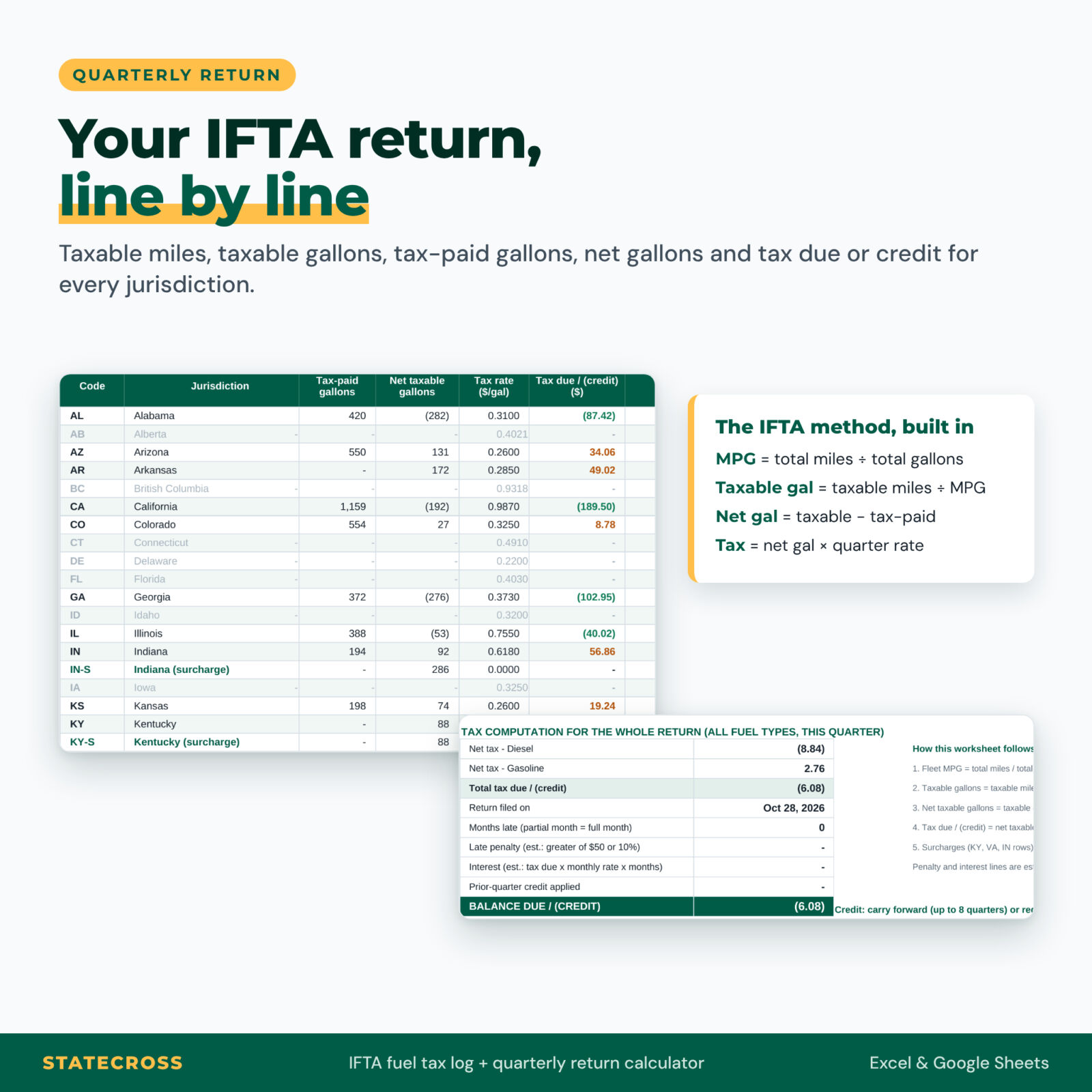
It is built around the same steps as the official IFTA quarterly return: fleet miles per gallon, taxable gallons, tax-paid gallons, net taxable gallons and tax due or credit, including the separate Kentucky and Virginia surcharge lines.
Who it is for
- Owner-operators with their own authority who file IFTA themselves.
- Small fleets of up to 25 qualified vehicles, running diesel, gasoline or both.
- Office managers and bookkeepers who prepare IFTA returns for a carrier.
- New carriers who want an organized, audit-ready system from their first quarter.
Why truckers choose Statecross
- Accurate by design. Fleet MPG is rounded to two decimals and gallons to whole numbers, the way return forms ask. Prefer decimals? Switch it in Settings.
- No stale tax rates. Rates change every quarter, so the Tax Rates sheet ships empty with a direct link to the official IFTA, Inc. rate matrix. Paste the quarter’s rates in two minutes and the workbook flags any jurisdiction you forgot.
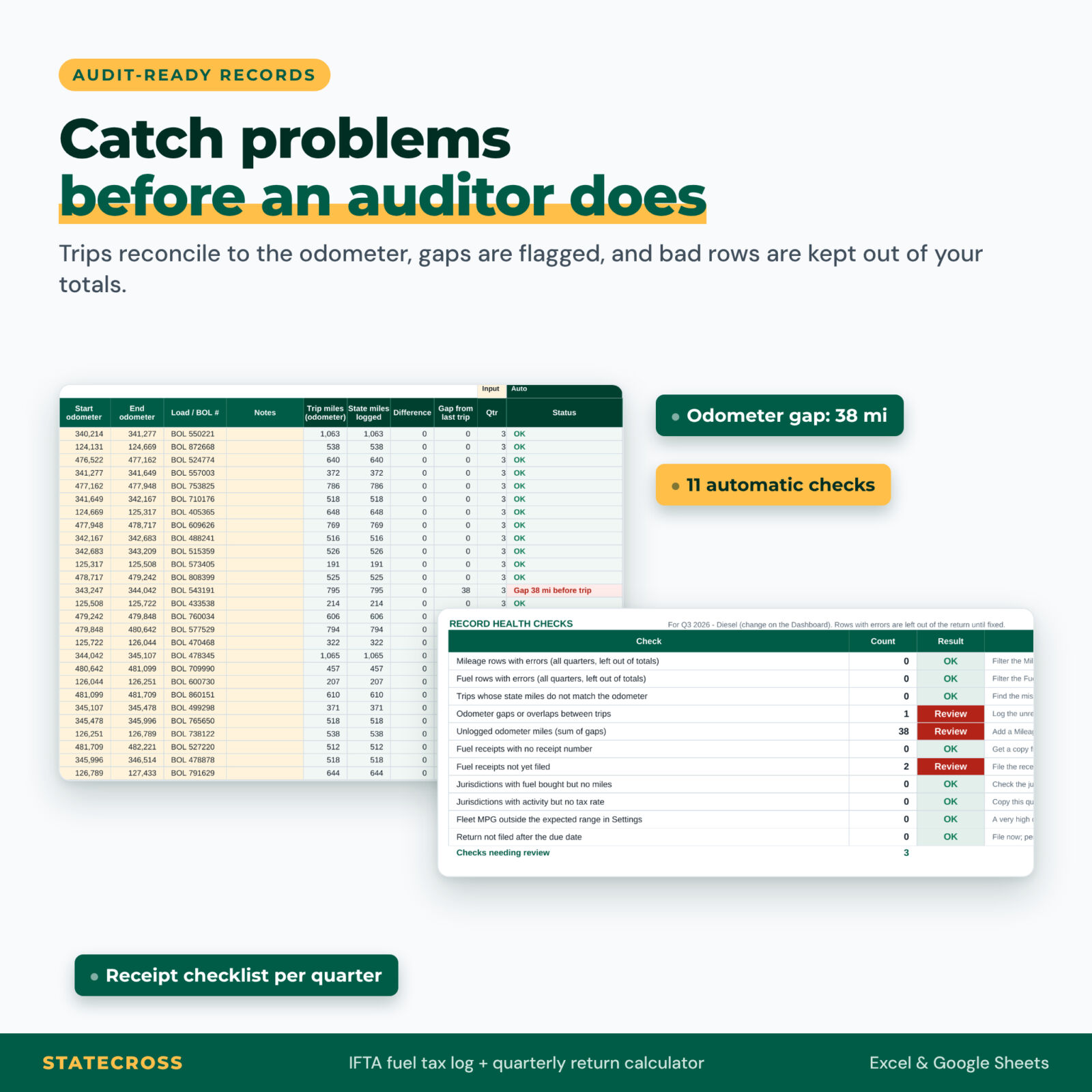
- Audit-ready records. The Trips sheet proves your state miles add up to the odometer and finds gaps between trips. Fuel receipts are tracked as filed, not filed or missing a number.
- One typo can’t distort your taxes. A row with a problem (wrong truck, odometer out lower than in, a date in another year) is flagged in red and left out of the totals until you fix it.
Features
Dashboard
Pick the quarter and fuel type from two drop-downs. Ten KPI tiles show total miles, total gallons, fleet MPG, net tax due or credit, fuel spend, jurisdictions traveled, unlogged miles, the return due date, record checks to review and the share of receipts filed. Action items turn red when something needs fixing, and four charts show miles by jurisdiction, fuel used vs fuel bought, net tax by quarter and MPG by truck.
Quarterly Return worksheet
Every jurisdiction line with total miles, taxable miles, taxable gallons, tax-paid gallons, net taxable gallons, rate and tax due or credit. Below it, the tax computation adds diesel and gasoline, then estimates late penalty (the greater of 50 or 10%) and interest, and applies any credit carried forward.
Logs
- Trips (750 rows): origin, destination, route, driver and start and end odometer, with automatic reconciliation.
- Mileage Log (3,000 rows): odometer in and out at each state line, non-taxable miles and non-IFTA travel.
- Fuel Log (1,500 rows): gallons, cost, tax paid at the pump, retail or bulk, receipt number and receipt filed.
Year View, Truck Summary and Audit Center
See all four quarters side by side, compare MPG, fuel spend and fuel cost per mile for each truck, and track filing with due dates, confirmation numbers and the date you can stop keeping records. The Audit Center runs 11 automatic checks and includes a 12-point quarterly records checklist based on IFTA record-keeping requirements.
What is included
- Statecross IFTA Fuel Tax Log (.xlsx): 12 sheets, including Start Here, Dashboard, Settings, Fleet, Tax Rates, Trips, Mileage Log, Fuel Log, Quarterly Return, Year View, Truck Summary and Audit Center
- Statecross User Guide (.docx): an illustrated 12-page guide with a worked example, troubleshooting and FAQ
How it works
- Add your company, IFTA account, base jurisdiction and tax year in Settings, and your trucks in Fleet.
- Log trips, state-line miles and every fill-up as you go.
- After the quarter ends, copy the rates from the IFTA matrix into Tax Rates.
- Pick the quarter on the Dashboard, fix any red action items, then copy the Quarterly Return lines into your base jurisdiction’s return.
File format and software requirements
One .xlsx workbook that opens in Microsoft Excel 2016 or later (Windows and Mac), Microsoft 365 and Google Sheets (upload to Google Drive, then open with Google Sheets). It uses only standard formulas: no macros, add-ins or internet connection required. Apple Numbers is not supported. The user guide is a Word document that also opens in Google Docs.
Customization
Set your currency symbol, gallon rounding, monthly interest rate for late estimates, trip mismatch tolerance and expected MPG range in Settings. Formula cells are locked to protect your calculations, but every sheet can be unprotected without a password if you want to add columns or change colors.
Digital download
This is a digital product. No physical item will be shipped. You can download the files right after purchase from your Taskdale account.
Use cases
- An owner-operator with a single tractor who has been sorting paper receipts into folders at tax time.
- A five-truck fleet with a gas hotshot pickup that needs separate MPG for diesel and gasoline.
- A carrier preparing for an IFTA audit who wants every trip to reconcile to the odometer.
- A bookkeeper filing returns for several small carriers, with one workbook per carrier per year.
FAQ
Does it include the current IFTA tax rates?
No, on purpose. Rates change every quarter, so you copy them from the official IFTA, Inc. tax rate matrix (linked in the file). That keeps your return accurate.
Does it file my IFTA return?
No. It prepares every figure; you enter them in your base jurisdiction’s online system or paper return.
Does it work in Google Sheets?
Yes. Upload the .xlsx to Google Drive and open it with Google Sheets.
How many trucks can I track?
Up to 25 qualified vehicles, diesel and gasoline, with 3,000 mileage rows and 1,500 fuel rows per workbook.
Does it handle Canadian provinces and surcharges?
Yes. All 58 IFTA jurisdictions are included, plus separate Indiana, Kentucky and Virginia surcharge lines. Mileage is in miles and fuel in U.S. gallons, the way U.S.-based licensees report.
Is this tax advice?
No. Statecross is an educational record-keeping and calculation tool. Verify your figures with your base jurisdiction or a tax professional before filing.
Not affiliated with or endorsed by IFTA, Inc. or any jurisdiction. Personal use only (or use within your own business). You may not resell, share, or redistribute the files. © 2026 Taskdale.

Reviews
There are no reviews yet.