


Theme park vacation budget spreadsheet that plans the whole trip
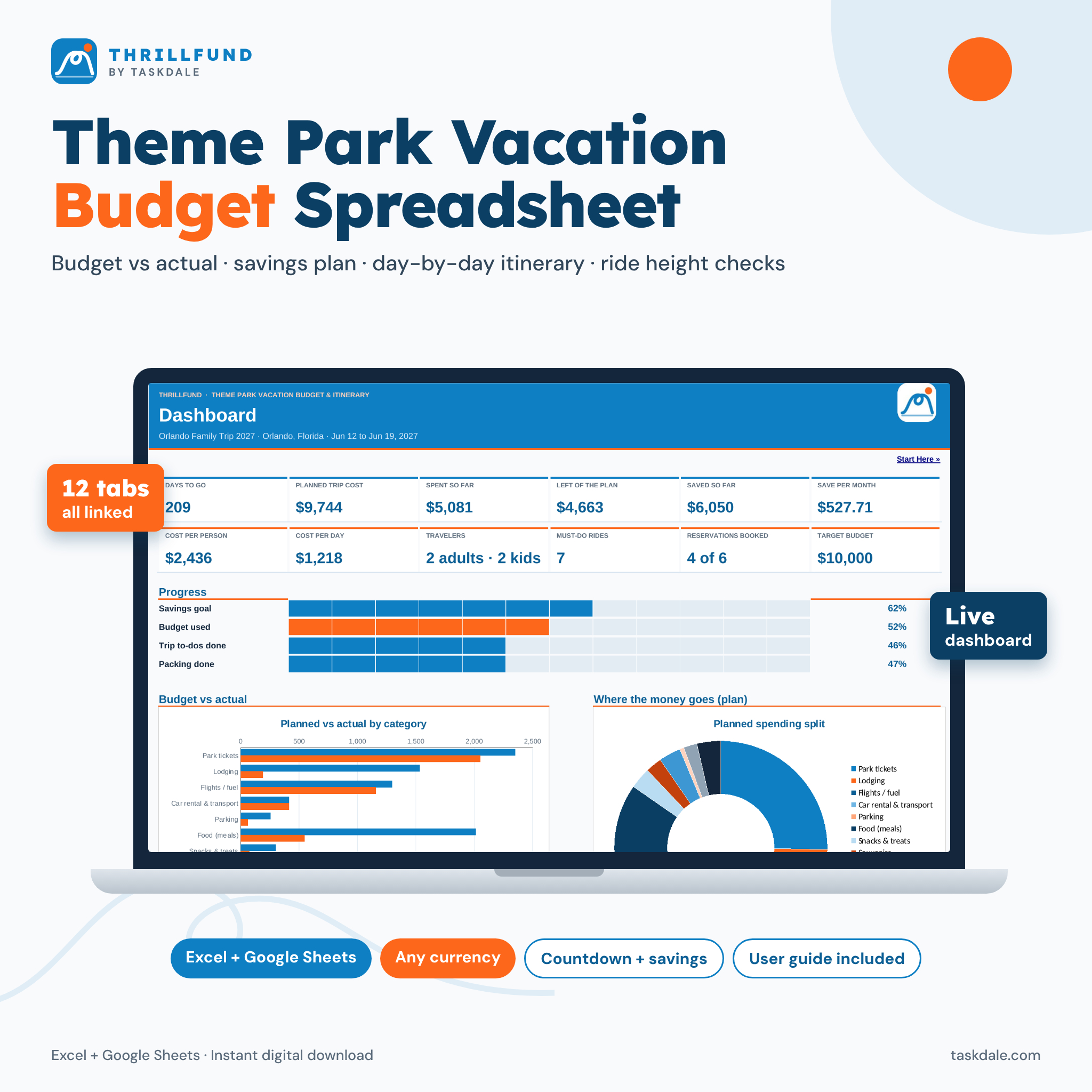
Thrillfund is a theme park vacation budget spreadsheet and itinerary planner in one workbook. You enter your dates, the people going and what things cost. It works out the total trip cost, the cost per person and per day, how much to save each month, which rides each child is tall enough for, and what you need to book next. A live dashboard pulls everything together, so you can see at a glance whether the trip fits your budget.
Most vacation budget templates stop at a list of categories. Thrillfund connects the budget to the plan: your food allowance flows into the budget, your dining reservations show up on the right day of the itinerary, and what you spend in the parks flows back into budget vs actual.
Who it is for
- Families planning an Orlando family trip or any theme park vacation who want the real total before they book.
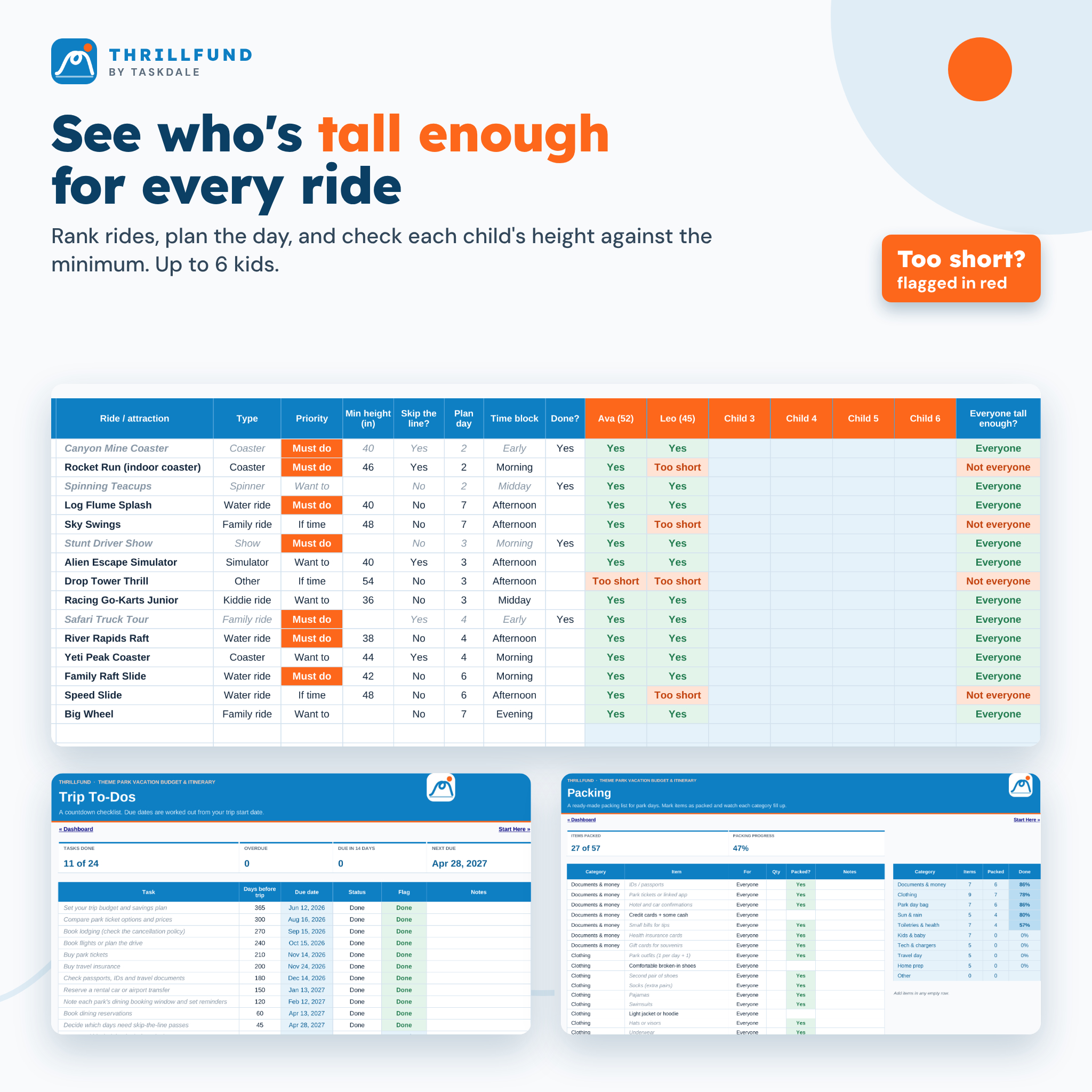
- Parents with kids of different heights who want to know which rides everyone can do.
- Savers who want a clear monthly amount and an on-track check every month until departure.
- Group and multigenerational trips that need one shared, printable plan.
Main benefits
- No surprise costs. Tickets, lodging, flights or fuel, car rental, parking, meals, snacks, souvenirs, skip-the-line add-ons, tips, insurance and a just-in-case buffer are all in the plan.
- A savings plan that adds up. The month-by-month plan reaches your goal to the cent, and the last month absorbs rounding.
- Less time on park days. Each day is planned by time block, with reservations and must-do rides ready to go.
- Beginner-proof. Formulas are locked (no password), input cells are white, and drop-downs keep entries clean.
Features
Dashboard with charts
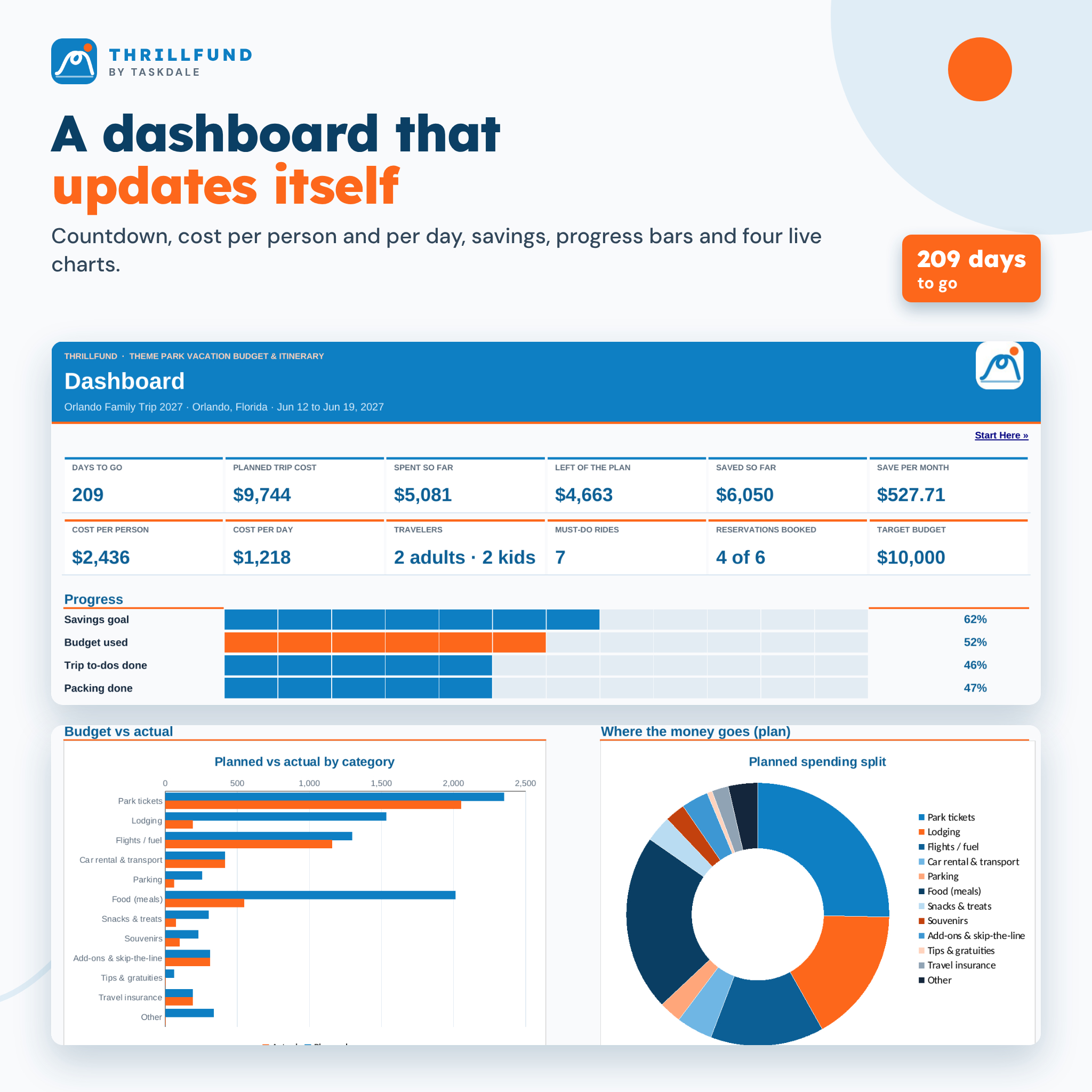
A countdown to departure, 12 live tiles (planned cost, spent so far, left of the plan, saved so far, save per month, cost per person, cost per day, travelers, must-do rides, reservations booked and your target), progress bars for savings, budget, to-dos and packing, and four native charts: planned vs actual by category, a spending split doughnut, saved vs target balance and spending per trip day. It also lists the next six to-dos and a ride height snapshot.
Trip budget vs actual
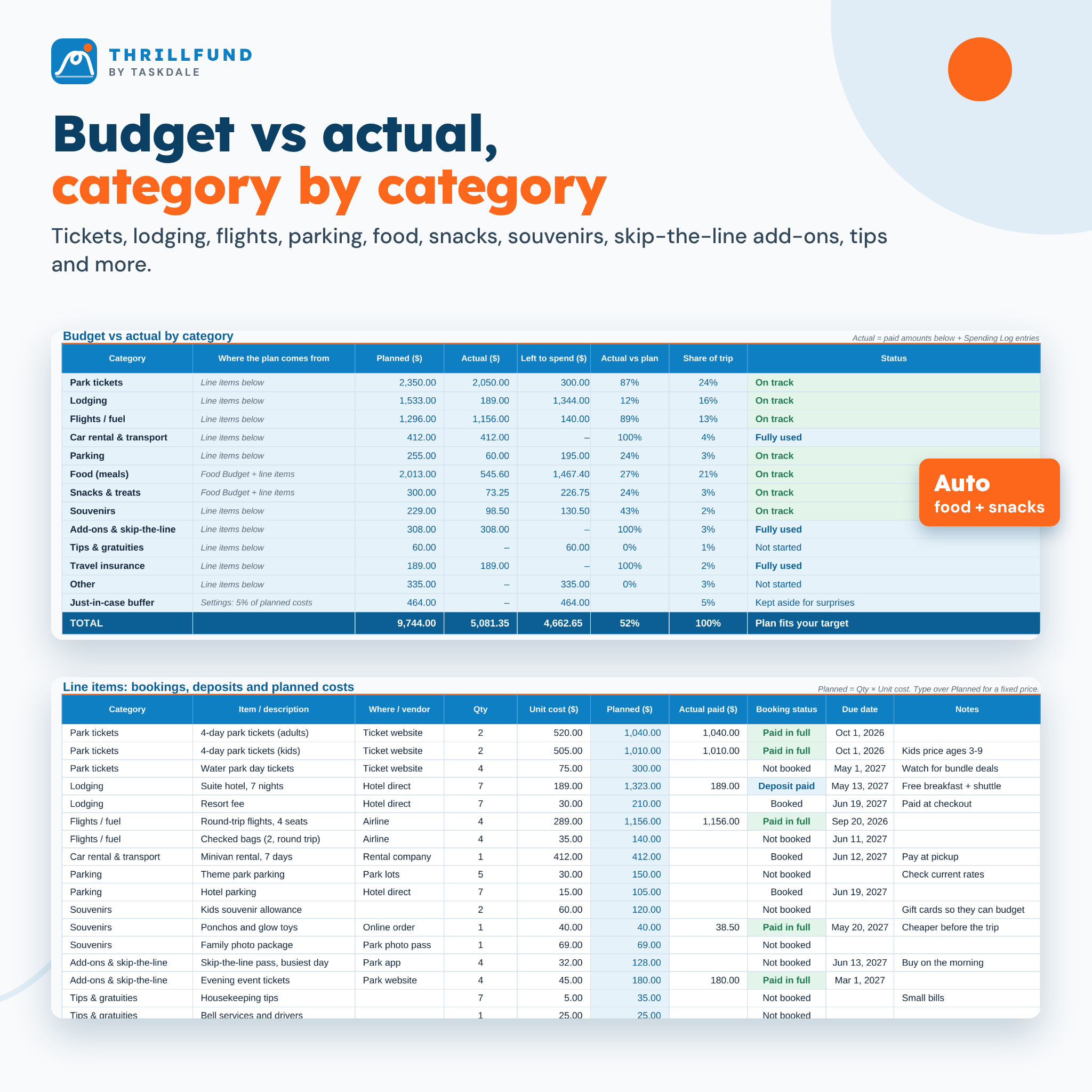
Twelve renameable categories with planned, actual, left to spend, percent used, share of the trip and a status (On track, Nearly used, Fully used, Over by). Below sit 100 line items with quantity × unit cost, actual paid, booking status and due dates that turn red when a payment is overdue.
Food budget per person per day
Set breakfast, lunch, dinner, drinks and snacks per adult and per child, with separate amounts for park days and other days. Tax and tips are added to meals, and the totals feed the budget automatically.
Vacation savings plan
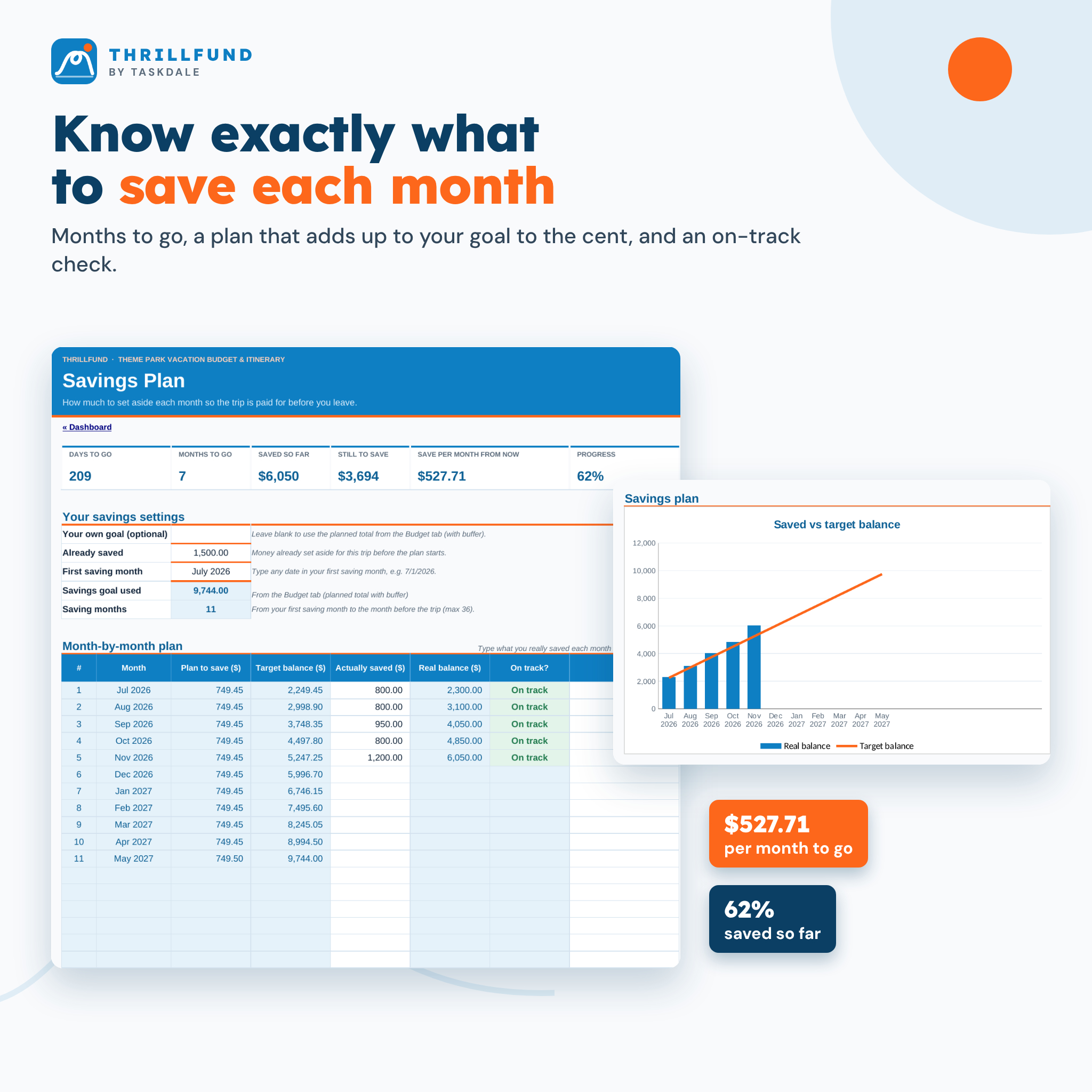
Months to go, the amount to save per month from today, a month-by-month plan for up to 36 months, what you really saved and an on-track check for each month, plus a chart of your real balance against the target.
Itinerary, dining plan and ride priority list
A day-by-day itinerary grid for up to 21 days with day types (park day, water park day, pool or rest day, travel day) and six time blocks. A dining plan for 40 reservations with times, party size, confirmation numbers and estimated cost. A ride priority list for 80 rides (must do, want to, if time) that checks each child’s height against the minimum and flags anyone who is too short.
Trip to-dos, packing list and spending log
A 24-task countdown checklist with due dates worked out from your trip date, a 57-item theme park packing list in nine categories with progress per category, and a 300-row spending log for in-trip purchases.
What is included
- Thrillfund Theme Park Vacation Budget Spreadsheet (.xlsx, 12 tabs, clean and ready to fill)
- A filled-in example trip so you can see every feature working
- A designed user guide (.docx) with screenshots, tips, troubleshooting and FAQ
How it works
- Open Settings and enter your trip dates, park days, currency, budget target and the people going (with each child’s height).
- Add bookings on the Budget tab and a daily food allowance on the Food Budget tab.
- Pick your first saving month on the Savings Plan to get your monthly amount.
- Plan each day, your reservations and your ride list.
- During the trip, log spending each evening and watch budget vs actual update.
File format and software requirements
One Excel workbook (.xlsx) that works in Microsoft Excel 2016 or later (including Microsoft 365 on Windows and Mac) and in Google Sheets (upload to Google Drive and save as a Google Sheet). It uses no macros, no add-ons and no internet connection. Every tab is set up to print on US Letter paper and scales to A4.
Customization
Choose any currency symbol and its position once on Settings and every money value follows it. Rename budget categories, packing categories, meals, ride types, time blocks and payment methods on the Lists tab. The to-do and packing templates are fully editable, and colors and fonts can be changed on the protected sheets.
Digital download
This is an instant digital download. No physical item will be shipped. After checkout you can download the spreadsheet, the example file and the user guide straight away.
Use cases
- Pricing out a week-long Orlando family trip before deciding on dates and hotel.
- Saving $500 a month toward a summer theme park vacation and checking you are on track.
- Planning which park to visit each day and which rides the youngest can do.
- Tracking spending in the parks so souvenirs and snacks do not blow the budget.
- Splitting costs on a group trip with grandparents or friends.
FAQ
Does this vacation budget spreadsheet work in Google Sheets?
Yes. Upload the file to Google Drive and save it as a Google Sheet. Formulas, drop-downs and charts carry over.
Is it only for Orlando theme parks?
No. It works for any theme park destination and any number of parks. You type your own park, ride and restaurant names.
Can I use my own currency?
Yes. Type any symbol or code ($, £, €, C$, A$) on Settings and choose whether it goes before or after the amount.
Does it include current park prices or height rules?
No. Prices and rules change often, so the spreadsheet uses the numbers you enter. Check each park’s official site when you book.
How many kids can it check for ride heights?
Up to six children, against up to 80 rides, with up to eight travelers in total.
Do I need Excel skills?
No. You only type in the white cells and pick from drop-downs. Formulas are locked so nothing breaks, and the user guide walks you through each tab.
Can I print it?
Yes. Every tab has print settings, so you can print the itinerary, packing list or budget for the trip.
Thrillfund is not affiliated with, endorsed by or sponsored by any theme park or resort company. Personal use only. You may not resell, share, or redistribute the files. © 2026 Taskdale.
Reviews
There are no reviews yet.