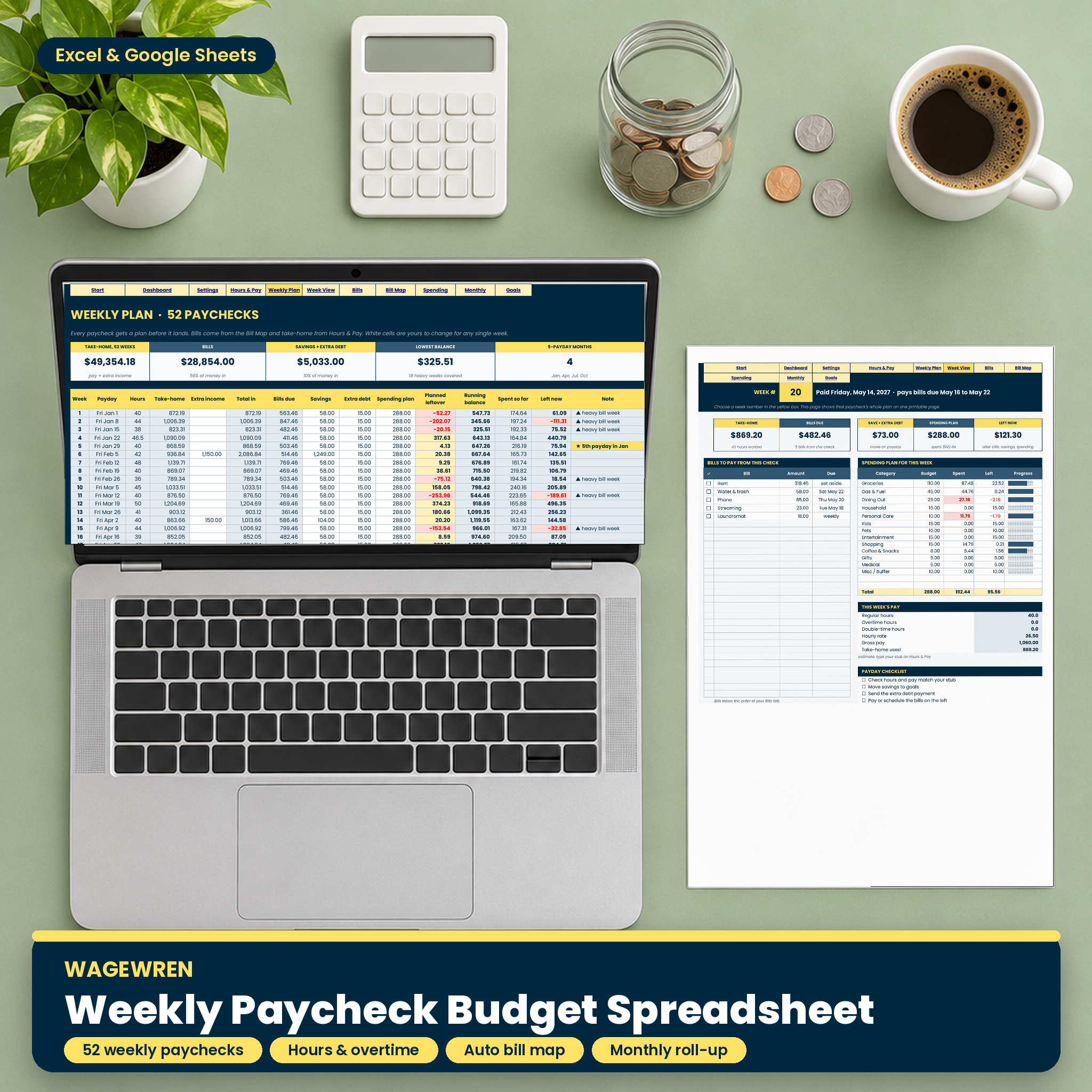



Most budget templates assume you get paid once a month. If your paycheck lands every Friday and changes with your hours, a monthly budget never quite fits. Wagewren is a weekly paycheck budget spreadsheet built around the way you actually get paid: 52 paychecks a year, each one planned before it arrives, with overtime, bills and leftover worked out for you.
Type your hours. Wagewren turns them into take-home pay, matches every bill to the right payday, tells you what is left that week and rolls it all up into months and a full year. It works in Microsoft Excel and Google Sheets, with any currency.
What this weekly paycheck budget spreadsheet does
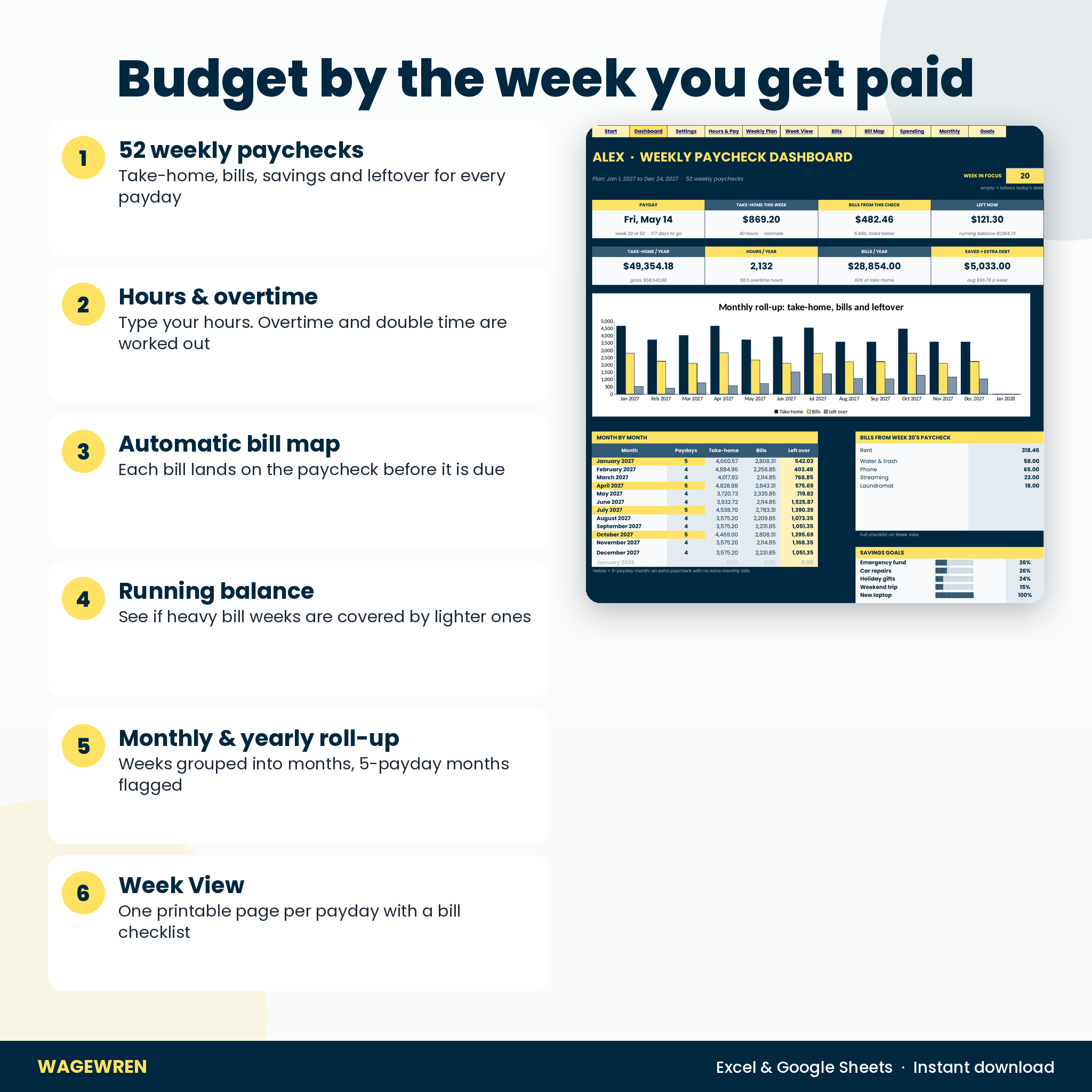
- Plans all 52 paychecks. Take-home, bills due, savings, extra debt payment, spending plan and planned leftover for every week of the year.
- Calculates pay from your hours. Type the hours you worked. Regular hours, overtime (1.5x after 40 hours, or your own rules) and double time are split and paid out automatically.
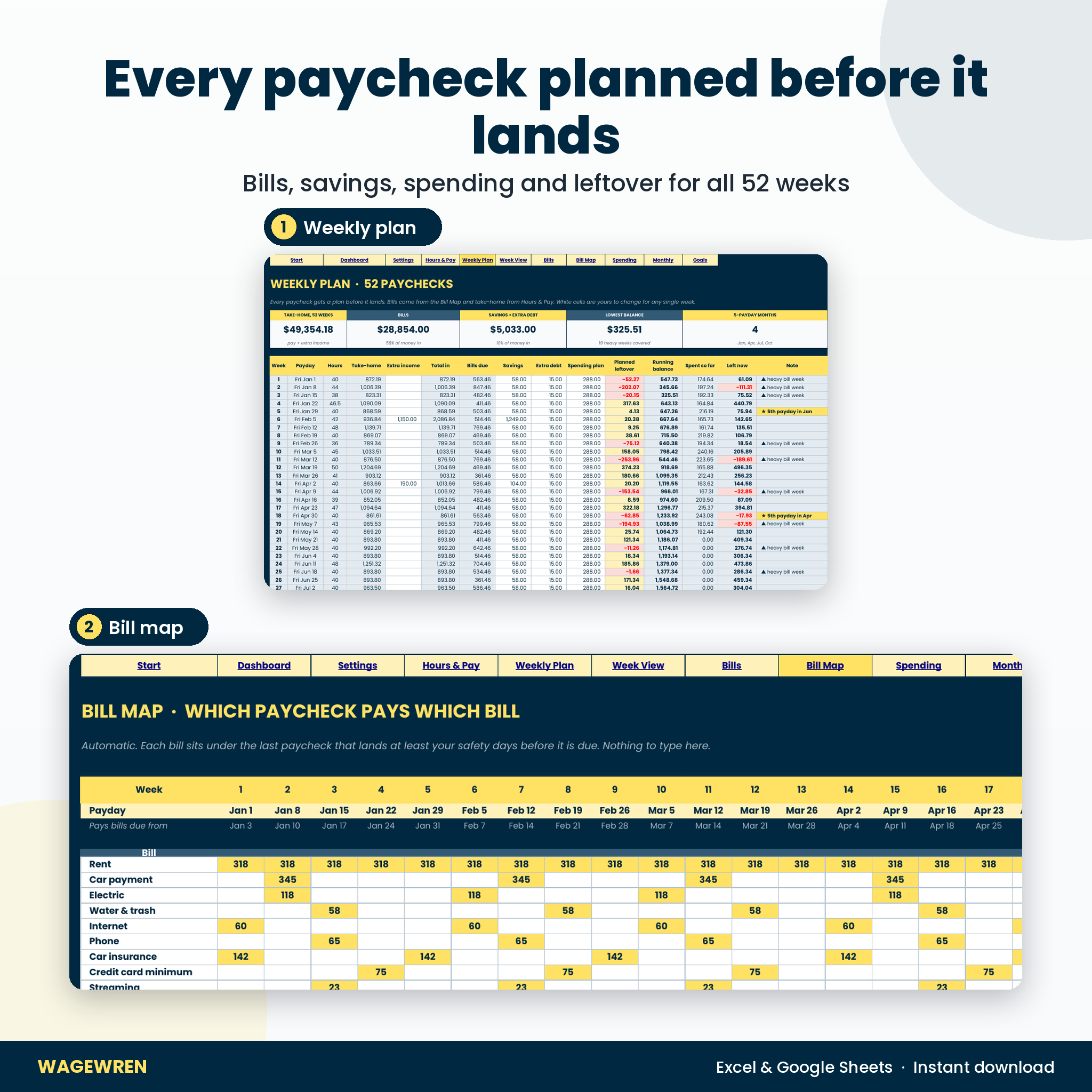
- Maps every bill to a paycheck. Each bill goes on the last paycheck that lands before its due date, with safety days you choose so payments have time to clear.
- Shows your running balance. A heavy bill week is fine if lighter weeks already set money aside. Wagewren shows that week by week and warns you before the balance dips below zero.
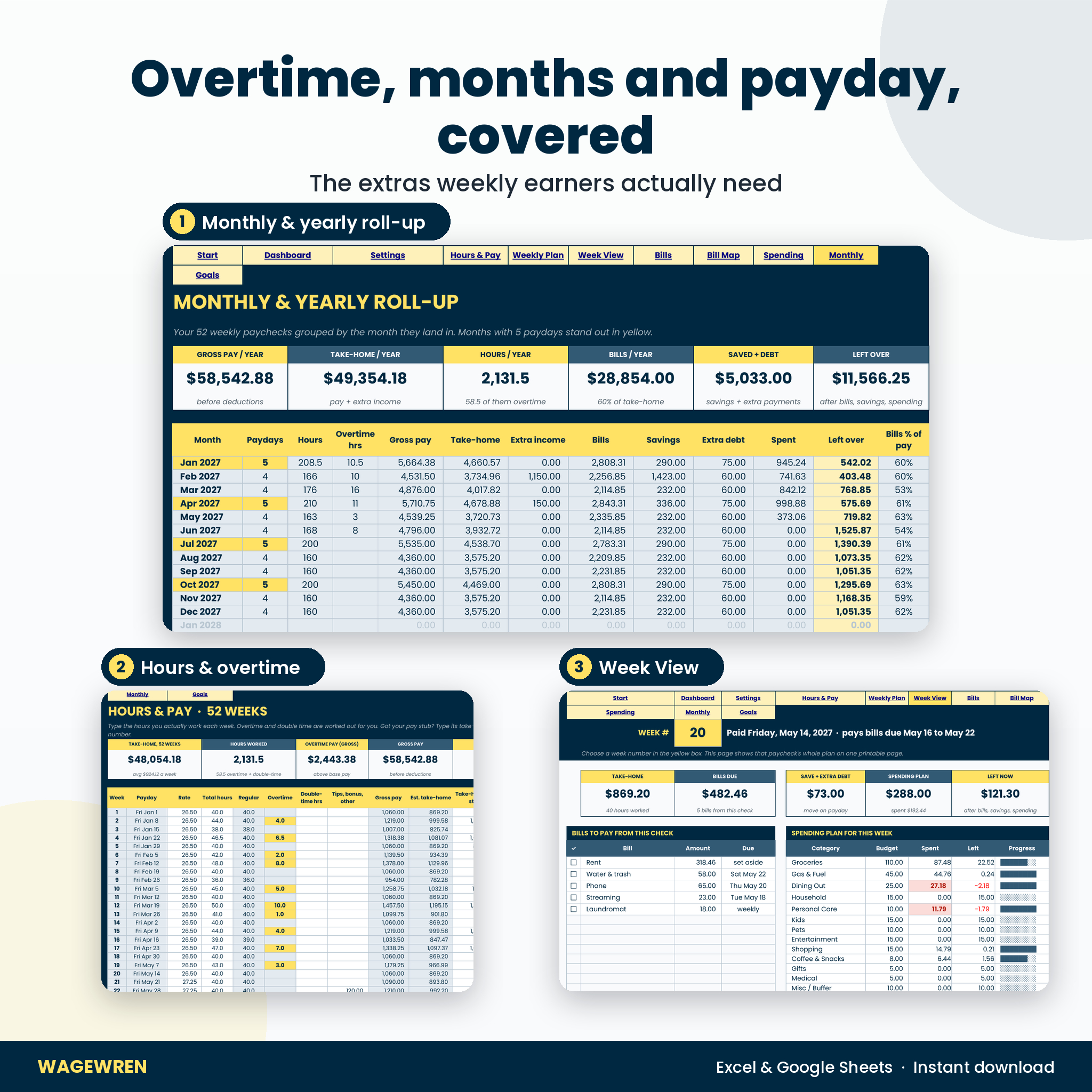
- Rolls weeks into months and a year. Paydays, hours, overtime, gross pay, take-home, bills, savings and leftover for every month, plus the yearly total.
Who it is for
Hourly and shift workers, warehouse, retail and restaurant staff, nurses and healthcare aides, drivers, trades and anyone paid weekly. It also suits salaried people on weekly pay: choose “Fixed weekly pay” and type your usual take-home. If you have ever had rent due in the same week as a short paycheck, this file was made for you.
Features
Hours & Pay calculator
- 52 weeks with pay rate and hours pre-filled from your settings
- Automatic regular and overtime split with your own threshold and overtime rate
- Double-time hours, tips, bonuses and shift pay
- Gross pay and estimated take-home from your deduction percentage
- Type your pay stub take-home and the real number replaces the estimate
- Your real deduction rate, worked out from the stubs you enter
Bills and the automatic Bill Map
- Up to 40 bills: monthly, every week, quarterly, yearly, or “monthly, set aside weekly” to spread rent evenly across all 52 paychecks
- Bill safety days from 0 to 6
- Due dates on the 29th to 31st move to the last day of shorter months, so nothing is skipped
- Autopay column, notes and pink warnings for any bill missing information
Weekly Plan and Week View
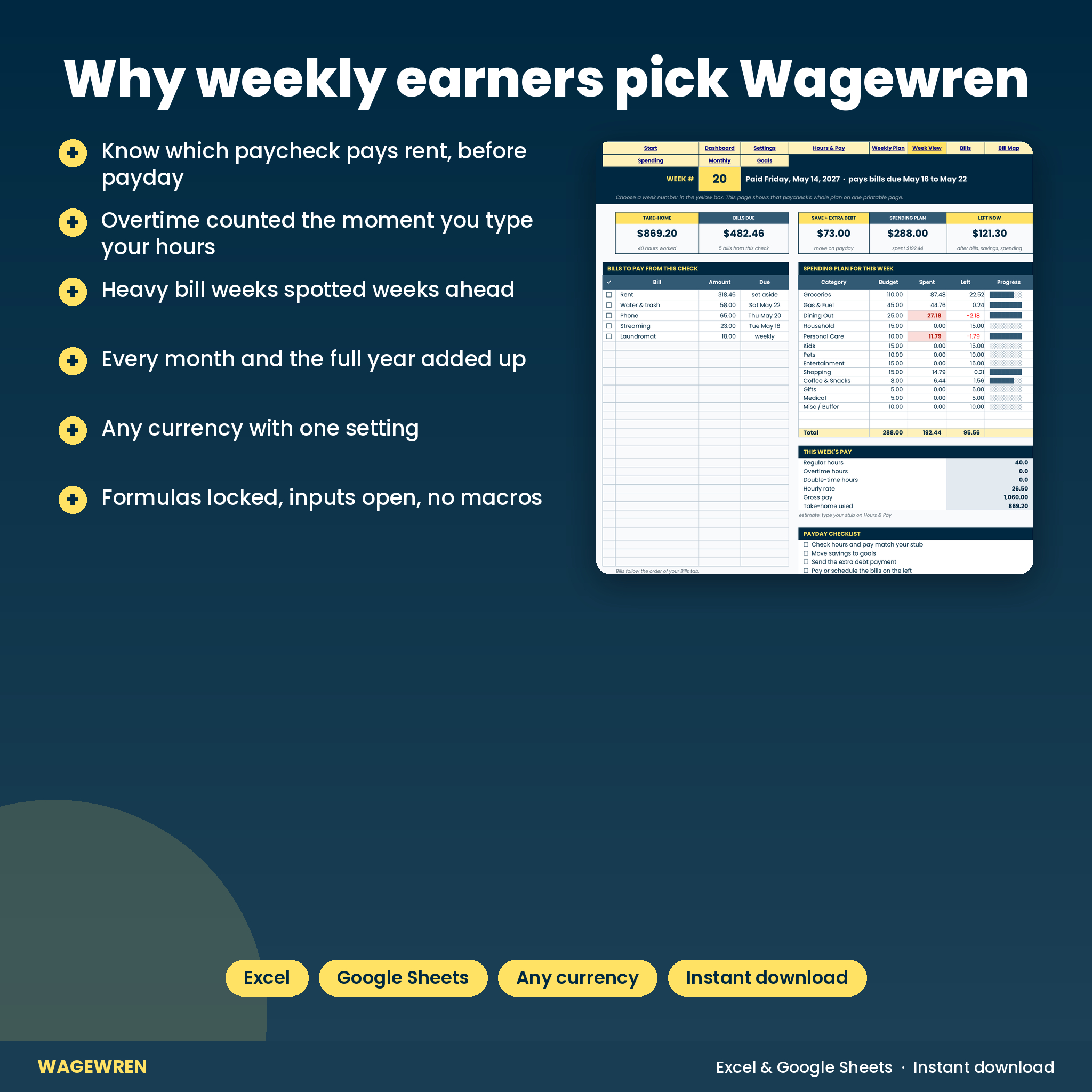
- Every paycheck with planned leftover, running balance, spent so far and left now
- Flags for 5th paydays in a month, heavy bill weeks and weeks where the balance goes below zero
- Week View: one paycheck on one printable page with a bill checklist, due dates, spending budget vs spent and a payday checklist
Dashboard, monthly roll-up and goals
- Dashboard with a week-in-focus box that follows today’s date, or any week you pick
- Yearly totals for take-home, hours, overtime, bills, savings and extra debt
- Monthly roll-up table and charts, with 5-payday months highlighted
- 600-row spending log matched to the right week by date
- 6 savings goals with an amount per week and an estimated finish date
What is included
- Wagewren Weekly Paycheck Budget workbook (.xlsx) with 11 connected tabs: Start Here, Dashboard, Settings, Hours & Pay, Weekly Plan, Week View, Bills, Bill Map, Spending, Monthly Roll-up and Goals
- Wagewren User Guide (.docx), 7 pages with setup steps, every feature explained, troubleshooting and FAQ
How it works
- Set your pay once. Currency, first payday, hourly rate, usual hours, overtime rules and deductions. Or choose fixed weekly pay.
- List your bills. Amount, how often and the due day. The Bill Map assigns each one to a paycheck.
- Type your hours each week. Take-home, leftover, the running balance and the dashboard update on their own.
- Use Week View on payday. Pay the bills on the list, move your savings and log spending as the week goes.
File formats and software
One .xlsx workbook. It opens in Microsoft Excel (desktop, Mac and Microsoft 365) and in Google Sheets: upload it to Google Drive and open it with Google Sheets. All formulas are standard functions with no macros or scripts. The tab buttons at the top of each sheet jump between tabs in Excel; in Google Sheets you use the tab bar at the bottom. The user guide is a Word file that also opens in Google Docs.
Customizing
Pick any currency symbol, rename the 15 spending categories, set your own overtime threshold and rates, and choose your payday. Paydays repeat every 7 days from the date you type, so the file is undated and works for any year. Formula cells are locked to protect them, and the sheets are protected with no password, so you can switch protection off to change the design.
Digital download
This is a digital product. Nothing is shipped. Your files are ready to download right after checkout. For personal use only: please do not share or resell the files.
Real situations where it helps
- Your rent is due on the 1st and you want to know which Friday check should cover it.
- You picked up 10 hours of overtime and want to see where the extra money can go.
- A month has 5 paydays and you want to use the extra check on purpose.
- Your hours drop for a few weeks and you need to see whether bills are still covered.
- You want a monthly and yearly total for a loan, rental application or tax time.
FAQ
Does this weekly budget spreadsheet work in Google Sheets?
Yes. Upload the .xlsx to Google Drive and open it with Google Sheets. The tab buttons only work in Excel, so use the tab bar in Sheets.
Does it calculate overtime pay?
Yes. Hours above your threshold are paid at your overtime rate, and double-time hours have their own rate.
Can I use it if I am paid the same amount every week?
Yes. Choose “Fixed weekly pay” on Settings and type your usual take-home.
Does it work out my exact taxes?
It estimates take-home from a deduction percentage. Type your pay stub take-home for exact numbers on any week.
Is it dated for one year?
No. You choose the first payday and the 52 paydays follow from it.
My payday is Thursday. Will it work?
Yes. Any weekday works.
Can I print it?
Yes. Week View prints one paycheck on one page with a light background.
Reviews
There are no reviews yet.