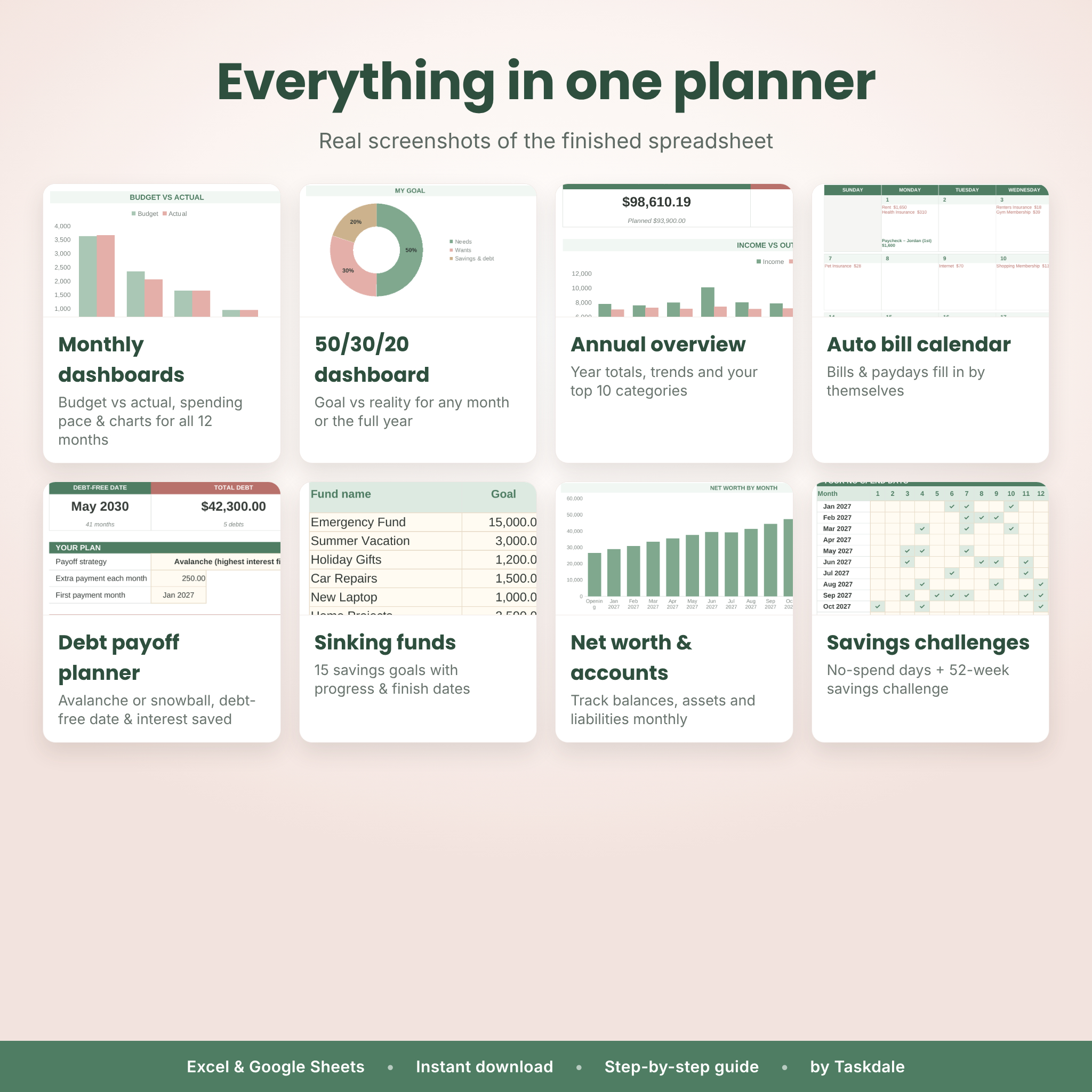




The Sagebloom 50/30/20 Budget Planner is a complete budget spreadsheet for Excel and Google Sheets that gives every dollar a job. Log your money once in a single Transactions list and 26 connected tabs do the rest: monthly dashboards, a 50/30/20 dashboard, an annual overview, an auto-filled bill calendar, a debt payoff planner, sinking funds, net worth and two savings challenges. It’s simple enough for your first budget and complete enough to run your household finances all year.
What this 50/30/20 budget spreadsheet does
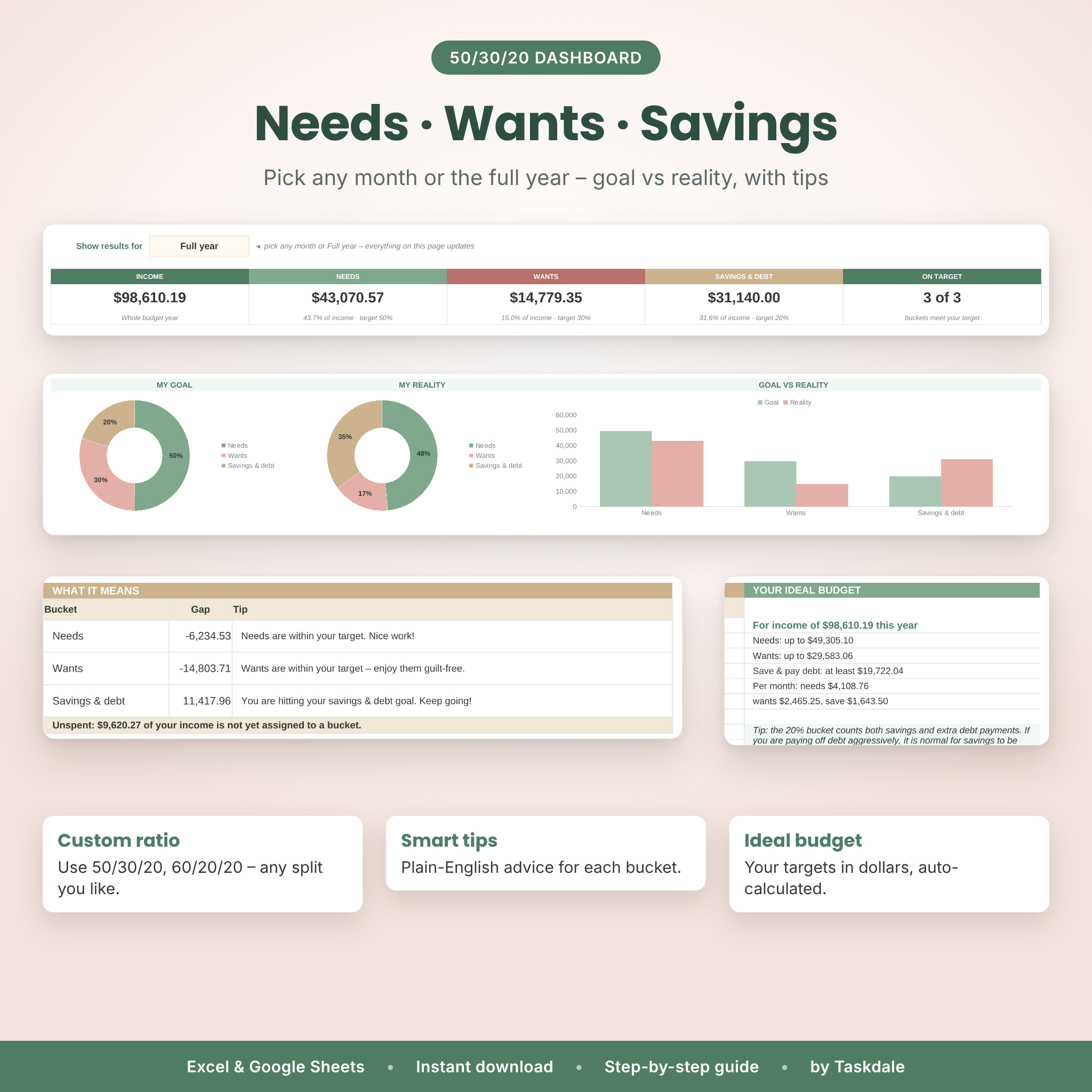
The 50/30/20 rule splits your income into three buckets: about 50% for needs, 30% for wants and 20% for savings and debt payoff. Sagebloom tracks every bucket automatically, shows your real split next to your goal, and gives plain-English tips when a bucket drifts off target. Prefer 60/20/20 or 70/20/10? Change the ratio once in Settings and every dashboard updates.
Who it’s for
- Beginners who want a guided monthly budget planner without spreadsheet skills
- Couples and families managing one household budget
- Anyone paying off credit cards, car loans or student loans who wants a debt-free date
- Savers building an emergency fund or saving for trips, gifts and big purchases
- People with irregular income who want leftover money to carry into next month
Main benefits
- One entry, everywhere: type each transaction once – every month tab, chart and tracker picks it up.
- See problems early: the spending pace chart shows whether you’re spending faster than your budget before the month ends.
- Never miss a bill: bills and paydays appear on the calendar automatically.
- Get out of debt faster: compare avalanche, snowball or your own order and see the interest you save.
- Hard to break: formulas are protected, dropdowns prevent typos and a Health Check flags anything that needs attention.
Features
Budgeting and tracking
- Start on any month and year – month tabs relabel themselves
- One currency setting used by every money value (dollar by default)
- Carry-over (rollover) or zero-based budgeting with one switch
- Up to 10 income and 50 expense categories, each grouped as Needs, Wants, Savings or Debt
- Budget Plan: one amount fills all 12 months, then override any month; zero-based “left to assign” check
- Transactions log with 1,500 rows, dropdowns, account and sinking-fund tags, and automatic error checks
Dashboards and charts
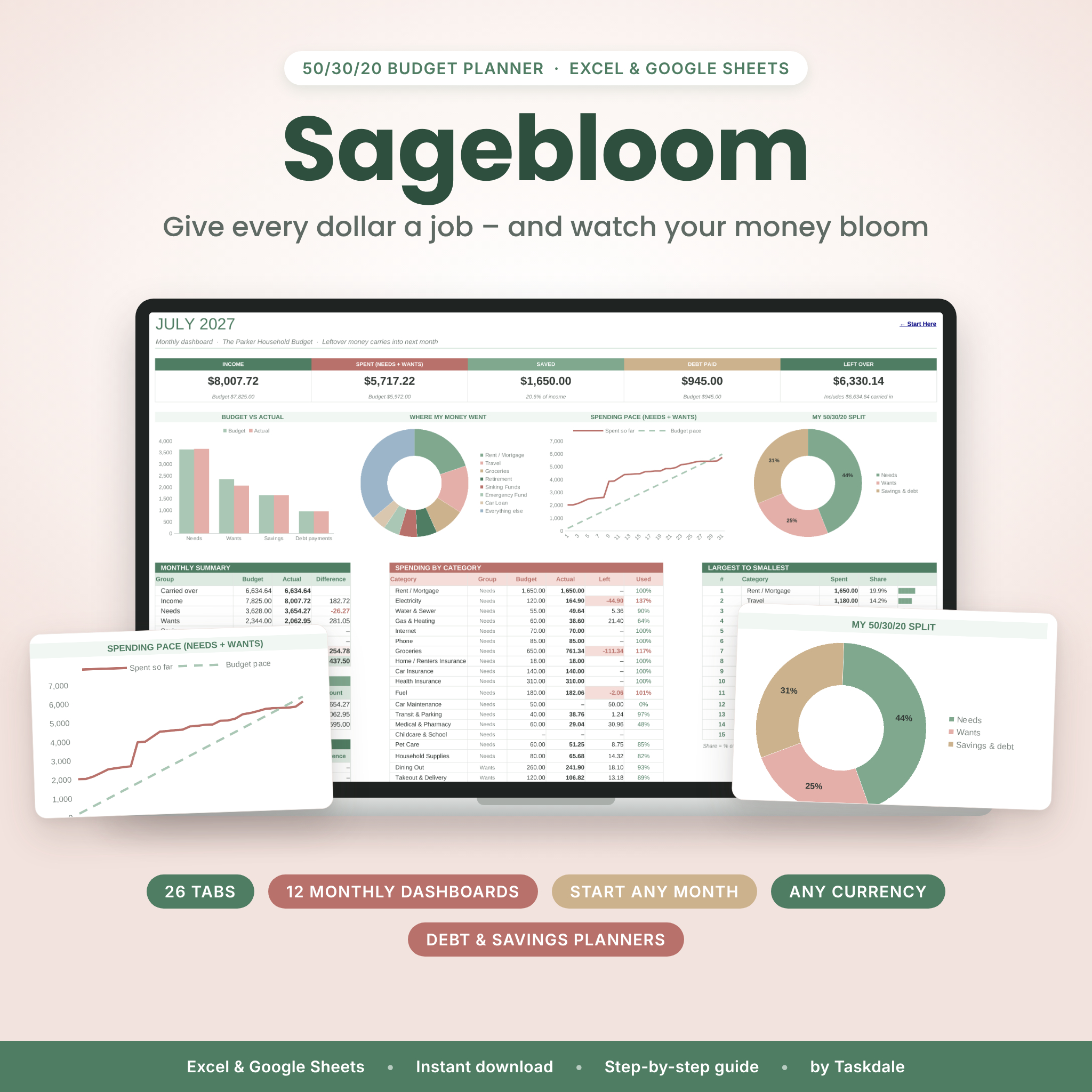
- 12 monthly dashboards: income, spent, saved, debt paid and left-over cards; budget vs actual, where my money went, spending pace and 50/30/20 charts; category table with % used; largest-to-smallest list
- 50/30/20 dashboard for any month or the full year with goal vs reality, tips and your ideal budget
- Annual dashboard with month-by-month totals, savings rate, net cash flow and top 10 categories
Bills, debt and savings
- Bills & Subscriptions list (up to 40) with weekly, every-2-weeks, monthly, quarterly, yearly and one-time frequencies, next due date and a 12-month paid tracker
- Auto-filled Bill Calendar with a date-ordered “due this month” list
- Debt Payoff planner for up to 10 debts: avalanche, snowball or custom order, payoff month for each debt, debt-free date and interest saved vs minimum payments
- Sinking Funds for up to 15 goals with progress bars, monthly targets and estimated finish dates
- Accounts tracker for up to 10 accounts and a Net Worth tracker with charts
- Bonus: No-Spend Challenge and 52-Week Savings Challenge
What’s included
- Sagebloom 50/30/20 Budget Planner (.xlsx) – one workbook with 26 tabs
- User Guide (.docx) – setup steps, every feature explained, customizing, tips, troubleshooting and FAQ
How it works
- Set up once: choose your currency, first month, ratio, categories and accounts on Settings.
- Plan: type your expected monthly income and spending on Budget Plan.
- Add bills: list recurring bills and paydays – the calendar fills itself in.
- Log: add transactions as you go (about 10 seconds each).
- Review: open the month dashboard and the 50/30/20 tab, follow the tips and adjust.
File formats and software requirements
- Microsoft Excel 2019, 2021, 2024 or Microsoft 365 (Windows or Mac)
- Google Sheets with a free Google account (upload the file to Google Drive, then File > Save as Google Sheets)
- No macros, add-ons or scripts. Desktop or laptop recommended for setup.
Customization
Rename categories and accounts, change the 50/30/20 ratio, pick your currency symbol, choose a Sunday or Monday week start and rename the month tabs. Input cells are cream-colored so you always know where to type; calculated cells are protected without a password, so you can unprotect a tab if you want to make deeper changes.
Digital download
This is an instant digital download. No physical item will be shipped. After purchase you can download the spreadsheet and the user guide right away from your account and confirmation email. Personal-use license: please do not share, resell or redistribute the files.
Real-life ways to use it
- Set a new-year budget in January – or start fresh in July, September or any month
- Plan for an irregular month with three paychecks, a holiday or a big trip
- Build a debt snowball and watch your debt-free date move closer
- Save for Christmas gifts, car repairs or a vacation with sinking funds
- Run a no-spend month or a 52-week savings challenge with your family
- Do a monthly “money date” with your partner using one shared file
Frequently asked questions
Does this budget planner work in both Excel and Google Sheets?
Yes. It is an .xlsx file for Excel 2019 or newer, including Microsoft 365, and converts to Google Sheets in a few clicks. Step-by-step instructions are in the guide.
Can I start my budget in the middle of the year?
Yes. Choose any first month and year in Settings and all 12 month tabs follow.
Can I use my own currency?
Yes. Pick or type your currency symbol once and every money value uses it. The dollar sign is the default.
Can I change the 50/30/20 percentages?
Yes. Use any split that adds up to 100%, such as 60/20/20 or 70/20/10.
Do I have to enter transactions on every month tab?
No. You enter everything once on the Transactions tab and each month dashboard picks up its own dates automatically.
Is it beginner friendly?
Yes. A Start Here tab, color-coded input cells, dropdowns, error checks and a full user guide walk you through it.
Does it include a debt snowball calculator?
Yes. The Debt Payoff tab supports snowball, avalanche and custom order for up to 10 debts and shows your debt-free date and interest saved.
Can I print it?
Yes. Every tab has a print area set to fit the page width.
This planner is a budgeting tool and does not provide financial, tax or legal advice.
Reviews
There are no reviews yet.