Best Receipt Template: Which Kit Suits Your Business?
The best receipt template is the one that matches how you take payment. For occasional cash or card sales, a clean printable receipt is enough. If you also send invoices and chase late payers, choose an Excel or Google Sheets workbook that issues receipts from recorded payments, so every receipt matches your records.
Choosing can feel more complicated than it should, because most listings bundle receipts with invoices, quotes and dashboards. We'll keep it simple and explain what each extra does, so you only pay for what you'll use.
- A receipt is proof that money has been received, while an invoice is a request for money still owed.
- Spreadsheet-based kits calculate subtotal, tax and balance for you, which removes most arithmetic mistakes.
- Every product here works with any currency, and most come in US Letter and A4 sizes.
- Only Client Billing Hub lists Google Sheets support, and none of its features need macros.
- There are 5 options below, and they range from a tracking-first workbook to a craft-order forms pack.
 Invoice Template Excel Spreadsheet with Estimates, Receipts & Payment Tracker | Paidmark
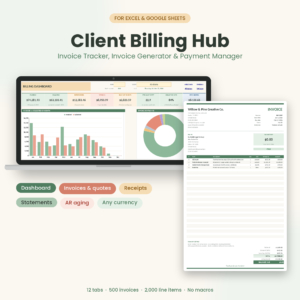 Client Billing Hub Invoice Tracker Spreadsheet | Invoice Generator, Payment Tracker, Receipts, Client Statements & AR Aging Dashboard for Excel & Google Sheets
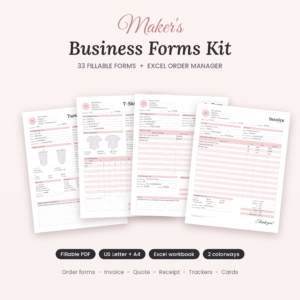 Maker’s Business Forms Kit | 33 Fillable Craft Order Forms, Invoice, Price Quote & Receipt Templates + Excel Order Tracker, US Letter & A4
Table of Contents Toggle
- What should the best receipt template include?
- How do the receipt templates compare?
- Which receipt template suits which business?
- How do you use a receipt template properly?
- What mistakes should you avoid with receipt templates?
- What affects the cost of a receipt template?
- Which receipt template should you pick?
- Common questions
What should the best receipt template include?
A good receipt template records who paid, how much, for what and when, and gives each receipt a unique number. Beyond that, the useful differences are in automation, file format, tracking and layout. Here are the five factors that separate the options on this page.
Automatic numbering and calculation
Automatic numbering means the template assigns the next receipt or invoice number for you. This matters because duplicated or skipped numbers are the first thing an accountant or tax inspector queries. Paidmark auto-numbers invoices, estimates, receipts and credit notes. The Ledgerline Invoice, Quote & Receipt Template Kit fills in subtotal, discount, tax and balance due once you pick a client and items.
Link between receipts and invoices
A receipt should come from a payment you have recorded, not be typed from scratch. Client Billing Hub generates payment receipts inside the same file as your invoices and statements. Maker's Business Forms Kit builds invoices and receipts from orders entered in its Excel Order Manager. Typing a receipt separately is how amounts end up differing between documents.
File format and where you work
Excel suits most desktop users, Google Sheets suits people who work on several devices, and fillable PDFs suit anyone who wants to type directly on a form. Client Billing Hub works in both Excel and Google Sheets. The Ledgerline kits add editable Word files and printable PDFs. Maker's Business Forms Kit centres on 33 fillable PDFs, in US Letter and A4.
Payment tracking and ageing
Payment tracking records whether an invoice is paid, part-paid or overdue, and ageing groups unpaid amounts by how late they are. If you only ever take payment at the point of sale, you can skip it. If you invoice, it saves you remembering who owes what. Paidmark tracks paid, partial and overdue status with an ageing report. Client Billing Hub lists Paid, Partly Paid, Overdue and 6 more statuses.
Layout, print options and tax handling
Check the tax setup against how you charge. Paidmark applies tax per line. Client Billing Hub allows two named taxes plus discount and shipping, with unlimited line items per invoice. The Ledgerline kits print in black or taupe, and Maker's Business Forms Kit offers Blush and Ink-Saver colourways, which helps if you print a lot and want to save ink.
How do the receipt templates compare?
The five templates differ mainly in how much tracking they add around the receipt. The table sets out what each one supplies, based on the product descriptions.
| Product | Formats | Receipts and related documents | Tracking and reporting |
|---|---|---|---|
| Invoice Template Excel Spreadsheet with Estimates, Receipts & Payment Tracker | Paidmark | Excel | Invoices, estimates, receipts and credit notes, auto-numbered | Paid, partial and overdue status, ageing report, dashboard with 5 charts |
| Client Billing Hub Invoice Tracker Spreadsheet | Invoice Generator, Payment Tracker, Receipts, Client Statements & AR Ageing Dashboard for Excel & Google Sheets | Excel and Google Sheets | Invoices, quotes, payment receipts, client statements | 9 or more statuses, AR ageing, dashboard with year and client filters |
| Maker's Business Forms Kit | 33 Fillable Craft Order Forms, Invoice, Price Quote & Receipt Templates + Excel Order Tracker, US Letter & A4 | Fillable PDF and Excel | 33 forms including order forms, invoice, quote, receipt and thank-you cards | Excel Order Manager, dashboard for sales, profit and unpaid balances |
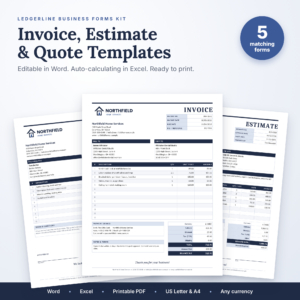 Ledgerline Business Forms Kit | Editable Invoice, Estimate & Quote Templates for Word and Excel with Receipt, Purchase Order & Printable PDF | Word, Excel and PDF | Invoice, job estimate, quote, sales receipt, purchase order | Invoice tracker and dashboard showing who still owes you |
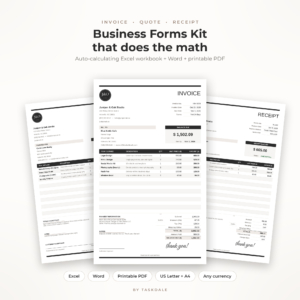 Ledgerline Invoice, Quote & Receipt Template Kit | Auto-Calculating Excel Invoice Template, Editable Word Forms & Printable PDF for Small Business | Excel, Word and PDF | Invoice, quote and receipt, in black or taupe | Built-in invoice log, client statements with ageing, paid and overdue dashboard |
Which receipt template suits which business?
Each template suits a different way of working, and the right match depends on whether you issue receipts alone or as part of a billing routine. These are the realistic fits.
Paidmark suits a freelancer or small service business that sends invoices and estimates and wants status and ageing to update on their own. You add a client and a few lines, pick the number and print a one-page invoice.
Client Billing Hub suits anyone who wants the full billing loop in one file, including client statements. It is the only one here that lists Google Sheets, and it comes with a 14-page user guide, which helps if spreadsheets make you nervous.
Maker's Business Forms Kit suits crafters selling tumblers, T-shirts, mugs, signs or ornaments. It has dedicated order forms for those items, so the receipt follows from a proper order record.
Ledgerline Business Forms Kit suits a trade or contractor who needs a matching set of five documents, including a purchase order and job estimate, in Word as well as Excel.
Ledgerline Invoice, Quote & Receipt Template Kit suits a small business that wants fewer documents but strong automation, with a log, statements and a simple paid-versus-overdue dashboard.
How do you use a receipt template properly?
You use a receipt template by recording the payment first, then issuing the receipt from that record. The steps below work for any spreadsheet-based option on this page.
- Download the file and save a clean master copy before you type anything.
- Enter your business name, address, tax details and default currency once.
- Add the client and the items or services supplied.
- Record the payment amount, date and method, using the template's status or log where it has one.
- Generate or print the receipt, and check the number is the next in sequence.
- Save a PDF copy in a folder named by year, and keep it for as long as your tax rules require.
With fillable PDFs such as those in Maker's Business Forms Kit, fill the form on screen, save under a new name, and never overwrite the blank original.
What mistakes should you avoid with receipt templates?
The most common mistake is issuing receipts that don't match your records. A handful of others cause repeat trouble.
- Mixing up invoices and receipts. Send a receipt only once money has arrived. Sending one on request for payment confuses clients and your own books.
- Editing the template directly. Always work on a copy, or formulas in a spreadsheet can be overwritten.
- Ignoring part payments. If a client pays half, the template should show a balance. Templates with a Partly Paid status handle this better than a plain form.
- Choosing the wrong paper size. US Letter and A4 differ, so pick the one your printer uses.
- Skipping backups. A single spreadsheet holding all your billing needs a regular copy elsewhere.
What affects the cost of a receipt template?
The cost of a receipt template depends mostly on how much tracking and automation it adds. A simple set of fillable forms costs less than a multi-sheet workbook with dashboards, statements and ageing reports, and a bigger bundle of documents costs more up front than a single receipt form.
Format also plays a part. Kits that include Excel, Word and PDF versions cover more situations than one file type. Because template prices change, check the live product cards beside this text for current figures. Judge value by what you would otherwise do by hand, such as chasing late payers or working out tax, rather than by the lowest price.
Which receipt template should you pick?
Pick by the job you need done most often. If you only need to hand over proof of payment, choose a straightforward kit with printable forms, such as the Ledgerline Business Forms Kit. If you chase payments, choose Paidmark or Client Billing Hub for their status and ageing tracking.
If you sell made-to-order craft items, Maker's Business Forms Kit fits best. If you want a lean set of automated documents with statements, the Ledgerline Invoice, Quote & Receipt Template Kit is the match. Browse the 5 options below and compare the product cards against your own routine before you buy.
Common questions
Do I need a receipt if I already sent an invoice?
Usually yes. An invoice asks for payment, while a receipt confirms it has arrived. Many clients need the receipt for their own records, and it gives you a dated proof of payment if a dispute arises later.
Can I use an Excel receipt template for part payments?
Yes, if the template tracks balances. Paidmark shows paid, partial and overdue status, and Client Billing Hub includes a Partly Paid status. A plain one-off form won't update the remaining balance, so you would have to calculate it yourself.
Which of these templates works in Google Sheets?
Of the products on this page, only Client Billing Hub lists Google Sheets alongside Excel. The others are described for Excel, Word or PDF, so check the product card if you need cloud editing on a phone or tablet.
Are these receipt templates only for the US?
No. The Ledgerline kits and Maker's Business Forms Kit come in both US Letter and A4, and all five products work with any currency. The Ledgerline kits use $ as the default, which you can change.
Do I need macros to use these templates?
Client Billing Hub states that it uses no macros, so it avoids the security warnings some people dislike. For the other products, macros aren't mentioned in the descriptions, so check the listing details before you buy if this matters to you.