Best Resume With Photo: Templates for Word & Google Docs
A resume with photo works best when the template also includes a no-photo version and an ATS-friendly layout, so you can adapt it to each employer. Among these templates, Hollis, Linen and Calla suit most people because they pair a photo layout with a monogram fallback, a plain ATS resume and a round photo maker or guide.
Key facts at a glance:
- A resume with photo template is a pre-designed document with a space for a headshot, usually supplied for Word, Google Docs or both.
- Most kits on this page include 1, 2 and 3 page resumes, a cover letter, a references page and a thank-you letter in a matching design.
- Every kit offers US Letter and A4 sizes, so you can match the paper standard in your country.
- The Ellery template works in Word only, while the others on this page support Word and Google Docs.
- The 9 Resume Templates Bundle for Word is the widest choice, with 9 modern designs and 16 ATS-friendly layouts.
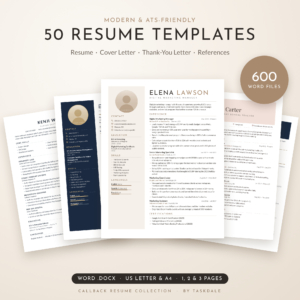 50 Resume Templates Bundle for Word | Callback Resume Collection with Cover Letters, Thank-You Letters & References | ATS-Friendly & Modern | 1, 2 & 3 Page | US Letter & A4
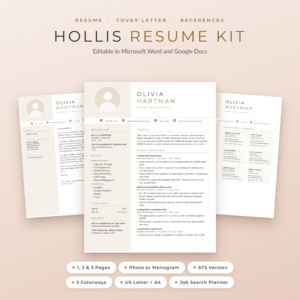 Hollis Resume Template for Word & Google Docs | Resume with Photo, Cover Letter & References | 1, 2 & 3 Page CV | ATS Resume | Job Search Planner | US Letter & A4
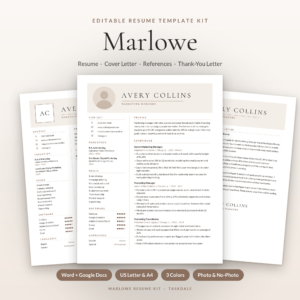 Marlowe Resume Template Kit for Word & Google Docs | Resume, Cover Letter, References & ATS Resume, 1 to 3 Pages
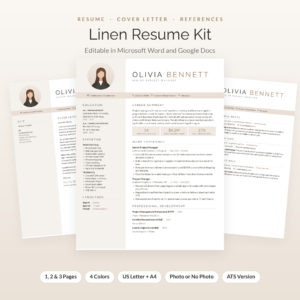 Linen Resume Kit: Resume Template with Photo for Word & Google Docs | Cover Letter, References & Thank-You Letter | 1, 2 & 3 Page CV | ATS Resume + Job Tracker
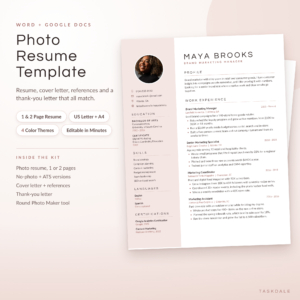 Photo Resume Template for Word & Google Docs | Calla Resume Kit with Cover Letter, References & Thank You Letter | 1 & 2 Page CV | ATS Version | US Letter & A4
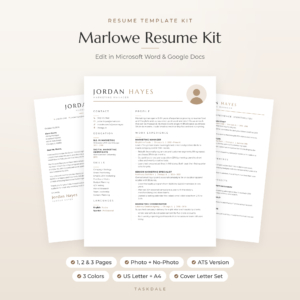 Marlowe Resume Template for Word & Google Docs | Minimalist Resume with Photo, Cover Letter & References | 1, 2 & 3 Page CV | ATS Resume | US Letter & A4
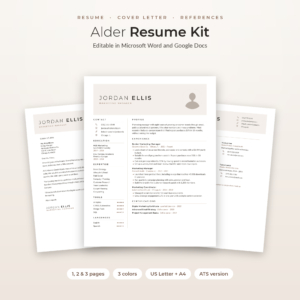 Alder Resume Template with Photo for Word & Google Docs | Minimalist Resume, Cover Letter & References | 1, 2 & 3 Page CV | ATS Resume | Job Tracker
Table of Contents
<details> <summary>Toggle</summary>
- What should you look for in the best resume with photo?
- How do the resume with photo templates compare?
- Which resume with photo template suits which job seeker?
- How do you set up a resume with photo template?
- What mistakes should you avoid with a resume with photo?
- What affects the price of a resume with photo template?
- How do you choose the best resume with photo for you?
- Common questions
</details>
Choosing between 9 templates can feel like more decisions than a job application should need. This guide narrows it down by the few things that genuinely differ, so you can pick one and get on with writing.
What should you look for in the best resume with photo?
The best resume with photo template is one you can edit comfortably, that offers a version without the photo, and that includes an ATS layout for online portals. Six factors separate these templates, and they are easier to judge than the designs themselves.
A photo layout with a no-photo or monogram option
A photo resume is only useful if you can remove the photo when an employer would rather not see one. Hollis and Linen offer a photo or a monogram in the header. Marlowe, Alder, Sloane, Ellery and Calla supply photo and no-photo versions of the resume. Check this first, because a design that falls apart without its photo will leave you stuck.
An ATS-friendly version in the same kit
An ATS, or applicant tracking system, is software that scans and sorts resumes submitted through online job portals. Photos and decorative columns can confuse some of these systems. Every kit here includes an ATS resume. The 9 Resume Templates Bundle goes furthest, with 16 ATS-friendly layouts alongside 9 modern designs.
The software you actually use
Word is Microsoft's word processor, and Google Docs is the free browser-based alternative. Hollis, Marlowe (both versions), Linen, Calla, Alder and Sloane cover both. The 9 Resume Templates Bundle and Ellery are listed for Word. Calla supplies separate Word and Google Docs editions designed to keep their layout, which helps if you switch between devices.
Page lengths that match your experience
A one-page resume suits early-career candidates and anyone applying for a role that asks for brevity. Two pages suit most established professionals, and three pages suit long careers or academic and technical histories. Most kits include all three lengths. Calla stops at 1 and 2 pages, which is enough for most applicants.
Paper size and colour choice
US Letter is the standard in the United States and Canada, and A4 is used in the UK and most other countries. Every kit includes both. Colour options differ: Ellery has two themes, Hollis, Marlowe (Mocha, Sage, Navy), Alder and the minimalist Marlowe have three, and Linen and Calla have four. Sloane offers Stone, Sage and Navy.
Bonus tools that save you time
Several kits add job-hunting extras. Hollis, Calla and Alder include a round photo maker, which crops a headshot into a circle without design software. Most also add an Excel or Google Sheets job tracker, a written guide and icon packs. Treat these as a tiebreaker, because the templates matter more than the extras.
How do the resume with photo templates compare?
The templates differ mainly in file count, colour choice, photo handling and extras. The table below sets out what each listing states.
| Product | Photo handling | Software | Page lengths | Colours and files | Main extras |
|---|---|---|---|---|---|
| 9 Resume Templates Bundle for Word | Callback Resume Collection with Cover Letters, Thank-You Letters & References | ATS-Friendly & Modern | 1, 2 & 3 Page | US Letter & A4 | Not stated in the listing | Word | 1, 2 and 3 | 9 templates, 600 .docx files | Job Search Playbook, Excel tracker, 248 icons, 16 fonts |
| Hollis Resume Template for Word & Google Docs | Resume with Photo, Cover Letter & References | 1, 2 & 3 Page CV | ATS Resume | Job Search Planner | US Letter & A4 | Photo or monogram | Word and Google Docs | 1, 2 and 3, plus 1 and 2 page ATS | 3 colourways, 84 files | Job Search Planner, 216 action verbs, round photo maker |
| Marlowe Resume Template Kit for Word & Google Docs | Resume, Cover Letter, References & ATS Resume, 1 to 3 Pages | Photo or no-photo | Word and Google Docs | 1, 2 and 3 | Mocha, Sage, Navy, 84 files | Tracker, Job Search Toolkit, guide, 89 icons |
| Linen Resume Kit: Resume Template with Photo for Word & Google Docs | Cover Letter, References & Thank-You Letter | 1, 2 & 3 Page CV | ATS Resume + Job Tracker | Photo or monogram | Word and Google Docs | 1, 2 and 3 | 4 colours, 6 templates | ATS resume, Excel tracker, 21-page playbook, 104 icons |
| Photo Resume Template for Word & Google Docs | Calla Resume Kit with Cover Letter, References & Thank You Letter | 1 & 2 Page CV | ATS Version | US Letter & A4 | Photo and no-photo | Word and Google Docs (separate editions) | 1 and 2 | 4 colour themes | Round photo maker, 15-page guide, free fonts |
| Marlowe Resume Template for Word & Google Docs | Minimalist Resume with Photo, Cover Letter & References | 1, 2 & 3 Page CV | ATS Resume | US Letter & A4 | With or without photo | Word and Google Docs | 1, 2 and 3 | 3 colours, 60 files | Playbook, tracker, 24 icons, guide |
| Alder Resume Template with Photo for Word & Google Docs | Minimalist Resume, Cover Letter & References | 1, 2 & 3 Page CV | ATS Resume | Job Tracker | Photo and no-photo | Word and Google Docs | 1, 2 and 3 | 3 colours, 48 files | Excel tracker, printable toolkit, round photo maker |
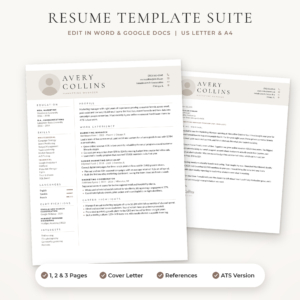 Sloane Resume Template for Word & Google Docs | Modern Resume with Photo, Cover Letter & References | 1, 2 & 3 Page CV | ATS Resume | US Letter & A4 | Photo and no-photo | Word and Google Docs | 1, 2 and 3 | Stone, Sage, Navy, 42 .docx files | Writing toolkit, 40 icons, guide |
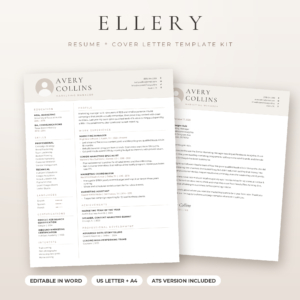 Ellery Resume Template for Word | Resume with Photo, Cover Letter & References | ATS Resume | 1, 2 & 3 Page | US Letter & A4 | Photo and no-photo | Word | 1, 2 and 3 | 2 colours, 32 files | Excel tracker, 23 icons, 21-page guide |
Which resume with photo template suits which job seeker?
Each template suits a different type of applicant, mostly based on how much choice and how much support you want.
- If you want the widest choice: the 9 Resume Templates Bundle for Word gives you 9 designs to try. Because the listing does not mention photo support, confirm the photo layout before you buy if a headshot is essential.
- If you want the most complete job-hunting set: Hollis adds a planner, a writing guide with 216 action verbs and a round photo maker to a full document set. The Marlowe Resume Template Kit and Linen also come with trackers and playbooks.
- If you want the simplest set-up: Calla keeps to 1 and 2 page resumes and provides separate Word and Google Docs editions. That suits people who find large kits overwhelming.
- If you prefer a quiet, minimalist look: Alder and the minimalist Marlowe Resume Template both use restrained layouts that read easily on screen and on paper.
- If you want a modern look in muted colours: Sloane offers Stone, Sage and Navy, and the Marlowe Resume Template Kit adds Mocha.
- If you only use Word: Ellery is the compact option, with 32 Word files and two colour themes.
How do you set up a resume with photo template?
You set up a resume with photo template by downloading the files, opening the version that matches your paper size and software, and replacing the sample text and photo. Most people finish a first draft in an hour or two.
- Download and unzip the files, then install any supplied font files if your template needs them. Hollis, Linen, Marlowe (minimalist) and Ellery embed fonts, so they should open correctly.
- Open the file matching your paper size (US Letter or A4) and your software.
- Replace the sample content line by line, keeping bullet counts similar so the layout holds.
- Add your headshot. If your kit has a round photo maker, use it to crop first, then insert the image.
- Save a no-photo copy and an ATS copy from the same kit, and name each clearly.
- Export to PDF before sending, unless the employer asks for Word, and open the PDF to check the spacing.
What mistakes should you avoid with a resume with photo?
The most common mistakes are using a poor headshot, overfilling the page and sending the wrong version. Each is easy to prevent.
- Using a casual or poorly lit photo. A clear, plain-background headshot with you facing the camera looks professional. Cropped holiday pictures do not.
- Adding extra sections to fit everything in. Templates are balanced around their sample content, so cramming in more breaks the spacing. Move to the 2 or 3 page version instead.
- Uploading the photo version to every portal. Use the ATS version when a company's online system asks for a resume upload.
- Mixing a resume from one kit with a cover letter from another. The matching set is the point of buying a kit, so keep fonts and colours consistent.
- Skipping the reading-aloud check. Sample text such as placeholder dates and names is easy to miss, so read every line once before sending.
What affects the price of a resume with photo template?
Price mostly follows how much you receive and how many tools are added. A single-design kit costs less than the large bundle, and kits with extra file counts, colour themes and planners tend to cost more than the plainer ones.
Software support also plays a part. A kit with separate Word and Google Docs editions is more work to produce than a Word-only file. Compare the number of files and the bonuses on the product cards rather than assuming that a higher price means a better design.
How do you choose the best resume with photo for you?
Choose by software first, then by whether you need a photo or monogram option, and finally by the extras you will genuinely use. Following that order removes most of the choice quickly.
- If you only use Word and want a compact kit, look at Ellery.
- If you use Google Docs, or move between both programs, shortlist Hollis, Linen, Calla, Alder, Sloane or either Marlowe.
- If you want a tracker and playbook included, favour Hollis, Linen or the Marlowe Resume Template Kit.
- If you want variety above all, try the 9 Resume Templates Bundle for Word, after checking the photo layout.
Pick the one that is easiest for you to edit, because a template you finish today will do more for your job search than a perfect one you never complete.
Common questions
Should I put a photo on my resume at all?
It depends on the country and the industry. Photos are common in some regions and unexpected in others, and some employers ask you not to include one. That is why a kit with a no-photo version is worth having.
Can I use a Word template in Google Docs?
You can usually upload a Word file to Google Docs, but formatting may shift. Templates sold with separate Word and Google Docs editions, such as Calla, are built to keep their layout in each program.
What does ATS-friendly mean on a resume?
It means the resume has a simple structure, with standard headings and no decorative elements, so tracking software can read it correctly. A photo layout can confuse some systems, so use the ATS version when applying through a portal.
How long should my resume be?
Use one page if you have a few years of experience, two pages for a longer career, and three only when your history genuinely needs the space. Most kits on this page include all three lengths.
What is a round photo maker?
It is a small tool included with Hollis, Calla and Alder that crops your headshot into a circle. This saves you opening separate image software and helps your photo sit neatly in the template.