Simple billing needs five things: a clean invoice, a way to send it, a list of who has paid, a receipt when they do, and a monthly total. That is all. If an online accounting app feels like far more than that, a well-built spreadsheet or offline tool can cover all five jobs without an account to sign in to.
This guide is for tutors, cleaners, coaches, designers and other small operators who started with Wave or a similar online service and now want something plainer. We will look at what simple billing truly involves, when a spreadsheet is enough, and three Taskdale tools that handle invoicing in different ways: a billing tracker, an all-in-one business hub, and an offline app for cleaning businesses.
Quick picks: simple billing tools you keep
| Product | Best for | Price | Link |
|---|---|---|---|
| Client Billing Hub Invoice Tracker | Invoices, payments, receipts and statements | $6.49 | View |
| Keystone Business Hub | Clients, quotes, invoices and books in one file | $6.99 | View |
| Gleamwise Cleaning Business App | Cleaning businesses with recurring clients | $77.96 | View |
| ProfitPetal Bookkeeping Spreadsheet | Simple income, expense and tax records | $26.00 | View |
What simple billing really involves
Strip billing back to the bone and you get a short loop. It repeats every week or month, whatever your trade.
- Create. Make an invoice with your details, the client’s, the work and the amount.
- Send. Save it as a PDF and email it.
- Track. Keep a list of what is unpaid and how late it is.
- Confirm. Mark it paid and, if the client wants one, send a receipt.
- Summarize. At month end, see what came in and what is still owed.
That loop is billing. Bank reconciliation, double-entry ledgers, payroll and balance sheets are accounting. Useful, sometimes essential, but separate. A piano teacher with 12 students needs the first list. She may never need the second.
Knowing that split makes the choice easier. If you only need billing, you can choose a much smaller tool.
Why some owners look for a Wave invoicing alternative
Wave is an online accounting and invoicing service that many small businesses start with. You sign up, connect what you want, and work in the browser. Its features, plans and payment fees are set by Wave and can change over time, so check the current details on their site.
People who go looking for something else usually mention one of these:
- Too much screen for a small job. Menus for accounts, reports and settings when all you wanted was to bill Mrs. Ferreira for four lessons.
- Online only. No signal at a client’s house means no invoice until later.
- Data in someone else’s account. Some owners simply prefer their records in a file on their own computer.
- Wanting a fixed setup. A file you buy once does not change its layout or terms next month.
There is also a mental side. When billing lives inside a full accounting dashboard, every login shows you charts, categories and alerts you did not ask for. A dog walker who opens the app to send one invoice can end up 20 minutes later wondering whether her chart of accounts is set up right. A plain billing file does not invite that. You open it, do the one job, and close it.
None of this means online software is wrong. It means simple billing has simpler options, and some owners find them a better fit.
The spreadsheet billing loop, done properly
A blank spreadsheet can do billing, but you will spend evenings building it. A purpose-built workbook already has the loop wired up: invoice, payment, receipt, statement, and a dashboard that shows who is late.
Here is what that looks like day to day. You type each client and each price once. To bill, you pick an invoice number and the page fills in. When money arrives, you log it, the status changes on its own, and a receipt is ready to print. On the 1st of the month you glance at the aging table and see that one client is in the 31 to 60 days column. One polite email later, it is sorted.
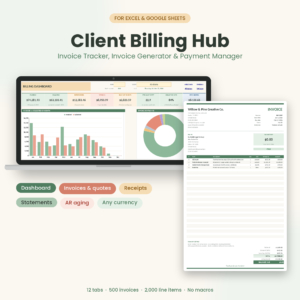
Client Billing Hub Invoice Tracker
Price: $6.49 | Best for: freelancers and small service businesses
This workbook runs the whole billing loop in Excel 2010 or newer, or in Google Sheets after upload, with no macros, add-ins or monthly fees. It creates print-ready invoices and quotes, logs full or part payments, prints numbered receipts, builds client statements and shows accounts receivable aging from current to over 90 days. Start on the Settings tab with your business details and currency.
The aging view is the quiet star. It turns a vague feeling of “I think a few people owe me” into a short, clear list with numbers on it.
What to write in a reminder
Online apps often send reminders for you. With a spreadsheet you send them yourself, so keep a ready-made message you can paste. Something like: “Hi Daniel, a quick reminder that invoice 0217 for $180 was due on 12 May. I have attached it again for easy reference. Thanks so much.” Short, friendly, with the number, the amount, the date and the PDF. Save two versions, a gentle one for a few days late and a firmer one for 30 days, and you will never stare at a blank email again.
Billing, clients and books in one file
Some owners want a bit more than billing but still far less than full accounting software. A client list with notes. A place for quotes. A simple income and expense log. A to-do list for the week. All linked, so recording a payment updates the invoice, the client and the reports at once.
That middle ground suits a freelance designer juggling eight clients, a few leads and a stack of receipts. One file opens on Monday morning and shows the whole business.
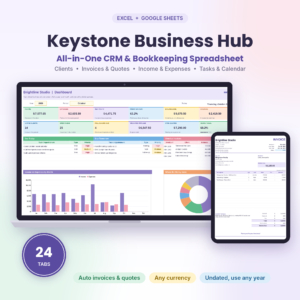
Keystone Business Hub
Price: $6.99 | Best for: freelancers wanting CRM and books together
Keystone is a 24-tab workbook for Excel 2016 or newer and Google Sheets. It holds a client directory and leads pipeline, quotes and invoices built from your own price list, income and expense tracking, a weekly planner and a dashboard for any month or year. Record a payment and the invoice marks itself paid while the client balance drops. Enter your price list first, then your current clients.
If dashboards are new to you, our look at small business dashboard templates in Excel explains which numbers are worth watching each month.
Cleaning businesses: an offline app instead of a spreadsheet
Cleaning companies have a billing pattern of their own. Recurring visits, square-foot pricing, first-clean surcharges, lockbox codes, crew schedules. A spreadsheet can track the invoices, but it struggles with the scheduling side.
For that trade, a small offline app can do more. Picture a two-person cleaning business with 25 regular homes. Each home is booked on a repeat schedule. Each visit gets a checklist and photos. At month end, invoices come from the visits already logged, so nothing gets missed and nobody has to count visits from a paper diary.
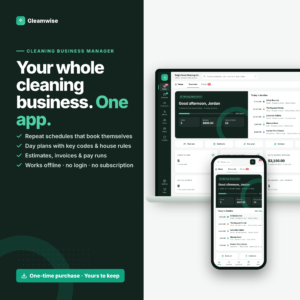
Gleamwise Cleaning Business App
Price: $77.96 | Best for: cleaning businesses with regular clients
Gleamwise is a single HTML file that opens in your web browser, with no install, no login and no internet needed. It handles recurring schedules booked up to 104 weeks ahead, a square-foot quote calculator, room-by-room checklists, before and after photos, service reports, invoices and payroll. Client details and entry codes stay on your own device. Set your rates and add your regular clients first.
Because it runs in the browser on your own device, it was tested in Chrome and Edge on desktop and adapts to tablet and phone screens. Back up the data file regularly, since it lives with you rather than on a server.
Setting up simple billing in one evening
Whichever tool you pick, the setup follows the same pattern. Give it one evening, a quiet table and about two hours. You will not need to touch the setup again for months.
- Business details. Name, address, email, phone, logo, currency, and your tax rate if you charge tax. These print on every invoice, so spell-check them.
- Payment instructions. Write exactly how clients should pay and what reference to use. “Bank transfer, reference = invoice number” is clear enough.
- Price list. Every service or product you sell, with its standard rate. A tutor might have three lines: 45-minute lesson, 60-minute lesson, exam prep session.
- Client list. Names, emails and billing addresses. Start with your active clients only. Old ones can wait.
- Opening balances. Any invoices already sent and still unpaid. Enter them so your overdue list is right from day one.
- A test invoice. Bill yourself for one item, log a payment against it, and check the status, receipt and dashboard all move. Then delete it.
Most people are surprised how quickly this goes. By bedtime you have a working billing system with your own logo on it, and the next invoice takes about three minutes.
Keep the original download in a separate folder, untouched. If you ever break a formula by accident, you can copy your data into a fresh file and carry on.
A month of simple billing: a worked example
Elena tutors maths to 12 students. Most come weekly. Parents pay by bank transfer. Here is her month with a billing spreadsheet.
On the 1st
She creates 12 invoices, one per family, each listing last month’s lesson dates. Four lessons at $40 is $160. A student who missed one is billed for three, $120. It takes her about 30 minutes, with a cup of tea.
Through the month
Payments come in over two weeks. Each time, she logs it. The invoice turns to Paid. If a parent asks, she prints a receipt.
On the 15th
Two invoices are open. The aging table shows both at 14 days. She sends a short, warm reminder to each. One pays that evening. The other replies that they will pay Friday.
At month end
Her dashboard shows $1,720 invoiced, $1,600 collected, $120 still due. She feels a small, real satisfaction looking at it. Every number is hers, in a file she understands, and it took less than two hours across the whole month.
Do you still need bookkeeping?
Billing tells you what came in from clients. Bookkeeping tells you what you kept. If you have business costs, such as travel, supplies, software or a phone, you need to record those too, especially at tax time.
Some billing workbooks include an expense log. If yours does not, pair it with a simple bookkeeping spreadsheet. ProfitPetal, for example, turns a list of money in and money out into dashboards, profit goals, a tax set-aside estimate and a print-ready Profit and Loss statement, in Excel or LibreOffice Calc.
The habit is the same as billing: a short weekly slot. Ten minutes on a Friday to enter receipts from the week, and the end-of-year scramble disappears.
For a side-by-side look at bookkeeping options, see our roundup of the best bookkeeping templates for self-employed pros. And if irregular income makes planning hard, our guide to a cash flow budget for small businesses and freelancers shows how to smooth out lean months.
When an accounting app is still the better call
Be honest with yourself here. A simple tool is not right if:
- You have staff on payroll and need it run properly every pay period.
- Your accountant asks for a full set of double-entry books.
- Most clients pay by card through a link that must be on every invoice automatically.
- You send well over a hundred invoices a month.
In those cases, accounting software earns its place. For the many small operators who send 10 to 50 invoices a month and want to stay out of menus, a spreadsheet or offline app is plenty.
Frequently asked questions
What is a simple alternative to Wave for invoicing?
An invoice tracker spreadsheet that creates invoices, logs payments and shows overdue balances covers simple billing. Client Billing Hub does this in Excel or Google Sheets without an account or monthly fee.
Can I invoice offline without accounting software?
Yes. Excel workbooks run on your computer without internet, and Gleamwise runs in a browser with no connection needed. You only need internet to email the finished PDF.
Is a spreadsheet good enough for my small business billing?
For most sole traders and small service businesses, yes. If you send a modest number of invoices a month and do not run payroll, a linked billing spreadsheet handles creating, tracking and summarizing invoices well.
How do I move my clients from an online app to a spreadsheet?
Look for a customer export in the app’s settings or reports, then paste names, emails and addresses into your new client tab. Save PDFs of past invoices and carry on with the next invoice number.
Do I need Microsoft Excel to use a billing spreadsheet?
Not always. Client Billing Hub and Keystone also work in Google Sheets with a free Google account. ProfitPetal opens in Excel or the free LibreOffice Calc. Check the software list on each product page before you buy.
Can two people use the same billing spreadsheet?
In Google Sheets, yes, once you share the file. In Excel, keep one master copy in a shared folder and agree who updates it, so you do not end up with two versions.
Your next step
Write down the five billing jobs from the list above and tick the ones your current tool makes harder than it should. If the answer is most of them, set up the Client Billing Hub Invoice Tracker this week and send next month’s invoices from it.