Best Yearly Habit Tracker: Spreadsheets and Printables
The best yearly habit tracker for most people is a 12-month spreadsheet for Excel or Google Sheets, where you tick each day with an x and the file works out your streaks and a year dashboard. If you would rather write by hand, the Rhythm Monthly Habit Tracker is a printable and fillable PDF that does the same job on paper.
A year of habits can feel like a lot to organise, and many people give up on a tracker by February because it asks too much of them. This guide is here to make the choice simple. We'll go through what matters, compare the five trackers on this page, and help you pick one you will still be using in December.
- Four of the five trackers are spreadsheets for Excel and Google Sheets, and one, Rhythm, is a printable and fillable PDF.
- Daily habit limits run from 20 habits per page (Rhythm) to 32 (Habit Bloom Tracker), with 30 on the other three.
- Bloom Habit Tracker Spreadsheet, Habit Atlas and HabitPulse each give you a year dashboard, and Habit Bloom Tracker adds trend charts and a heatmap.
- Mood tracking is included in the four spreadsheets, and sleep tracking is listed for Bloom and HabitPulse.
- Browse all 5 options below once you know which format suits you.
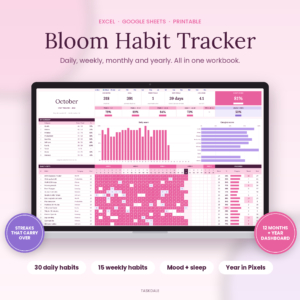 Bloom Habit Tracker Spreadsheet for Excel & Google Sheets | 12-Month Daily, Weekly & Monthly Habit Tracker with Streaks, Mood & Sleep Tracker, Year in Pixels Dashboard + Printable
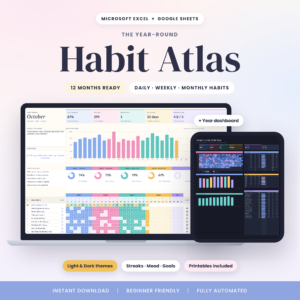 Habit Atlas Habit Tracker Spreadsheet for Excel & Google Sheets | 12-Month Daily, Weekly & Monthly Habit Tracker with Streaks, Mood Tracker, Year in Pixels Dashboard | Light & Dark + Printables
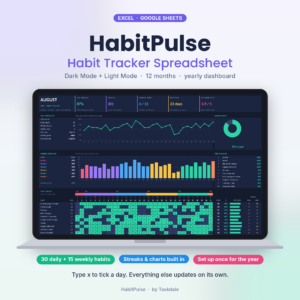 HabitPulse Habit Tracker Spreadsheet | Dark Mode Habit Tracker for Excel & Google Sheets with Daily & Weekly Habits, Streak Tracker, Yearly Dashboard & Mood Tracker
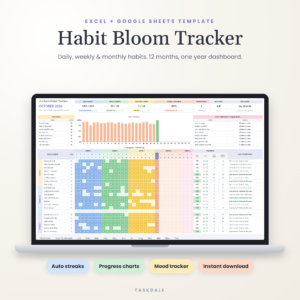
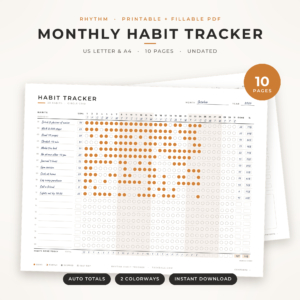
Table of Contents
Toggle
- What should you look for in a yearly habit tracker?
- How do the five yearly habit trackers compare?
- Which yearly habit tracker suits which person?
- How do you use a yearly habit tracker so it lasts all year?
- What mistakes should you avoid with a yearly habit tracker?
- What affects the price of a yearly habit tracker?
- How do you decide on the best yearly habit tracker for you?
- Common questions
What should you look for in a yearly habit tracker?
A good yearly habit tracker covers all 12 months in one file or booklet, lets you list your habits once, and shows your progress without you doing sums. Six factors separate the options on this page, and each is worth a minute of thought before you choose.
Spreadsheet or printable format
A spreadsheet is a file you open in Excel or Google Sheets, where formulas calculate scores and streaks for you. A printable is a page you fill in by hand. Four products here are spreadsheets, and the Rhythm Monthly Habit Tracker is a PDF that you can print or fill in on screen. Spreadsheets do the arithmetic, while paper is quicker to glance at on a desk or fridge.
How many habits it holds
Count the habits you actually want to track, then add a few for growth. Bloom Habit Tracker Spreadsheet, Habit Atlas and HabitPulse each allow up to 30 daily habits. Habit Bloom Tracker allows 32 daily habits, 13 weekly and 26 monthly. Rhythm keeps up to 20 habits on one landscape page. Most people do better with fewer than ten, so the limits matter less than the right mix of daily and weekly slots.
Daily, weekly and monthly habits
Some habits are not daily. Going to the gym three times a week or a monthly budget review need their own slot. Bloom and HabitPulse allow up to 15 weekly habits, Habit Atlas up to 10, and Habit Bloom Tracker lets you add monthly habits too. HabitPulse describes its goals as fair days-per-week targets, and Habit Atlas sets goals to fit how often you aim to do each habit.
Streaks that carry across months
A streak is the number of days in a row you have completed a habit. In a year-long tracker it only works if it carries from one month tab to the next. Bloom states that current and best streaks carry across months, and Habit Bloom Tracker shows best and current streaks. Check this before buying, because a streak that resets on the first of every month is more discouraging than useful.
Year dashboard and visual summaries
A year dashboard is a single view of the whole year. Bloom and Habit Atlas offer a Year in Pixels view, a grid with one square for each day. HabitPulse gives a day-by-day heatmap, and Habit Bloom Tracker adds trend charts and a habit heatmap. If you are motivated by seeing a pattern fill in, this feature matters more than the habit limit.
Mood, sleep and reflection
Mood tracking lets you see whether habits and how you feel move together. All four spreadsheets include a mood tracker, and Bloom and HabitPulse add sleep. HabitPulse also has a monthly reflection section. Rhythm covers review with a monthly review page and a scoreboard.
How do the five yearly habit trackers compare?
The five trackers differ mainly in format, habit limits and dashboard style. This table uses only the details listed for each product.
Which yearly habit tracker suits which person?
The right tracker depends on how you like to look at your progress and how many habits you follow. Here is how we would match each one to a buyer.
- Bloom Habit Tracker Spreadsheet suits someone who wants the most complete picture, including sleep, a habit leaderboard and printable pages. It also states that no macros are needed, which helps if your workplace computer blocks them.
- Habit Atlas suits people who like a clean visual style. It has Light and Dark versions, week rings and a Top 10 of your strongest habits, though its limit of 10 weekly habits is the lowest of the four spreadsheets.
- HabitPulse suits anyone who works in the evening and prefers dark mode. The monthly reflection and illustrated user guide help if spreadsheets make you nervous.
- Habit Bloom Tracker suits people with a long habit list, especially those who also want monthly habits such as a bill check. It has the highest daily limit, with trend charts and a heatmap.
- Rhythm Monthly Habit Tracker suits anyone who would rather write than type. It gives you a Goal, Done and % on every row, and the fillable version fills in weekdays, totals and percentages (tested in Chrome and Firefox).
How do you use a yearly habit tracker so it lasts all year?
A yearly habit tracker lasts when you set it up once, keep it in a place you see daily, and review it monthly. Follow these steps.
- Choose three to eight habits to begin with, not the maximum allowed.
- Enter them once in the habit list, and set a goal for each, such as five days a week.
- Open the tracker at the same time every day and type x for each habit done.
- Check your streaks and mood row weekly, looking for patterns rather than perfection.
- At the end of each month, review what worked, and remove or change one habit that did not.
What mistakes should you avoid with a yearly habit tracker?
The most common mistake is loading in too many habits at once. Other pitfalls are quieter but just as costly.
- Treating every habit as daily. Use weekly slots for habits that do not need a tick every day, so one missed day does not feel like failure.
- Picking a format you will not open. A spreadsheet in a folder you never visit does less than a printout on your desk.
- Ignoring the print page size. The printable pages here come in US Letter and A4, so choose the one that matches your printer paper.
- Chasing the streak alone. A broken streak is information, not a verdict. Look at the month score as well.
- Skipping the user guide. Several of these come with one, and it is the quickest way to learn which cells to edit.
What affects the price of a yearly habit tracker?
The price of a yearly habit tracker mostly reflects how much is built in and how much the file calculates for you. We have left figures out because they change, and the product cards show the current ones.
A spreadsheet with a year dashboard, heatmap, streak logic and mood and sleep tracking costs more to produce than a simple PDF. Extra items such as a user guide, light and dark versions, and several print sizes also add to the cost. A printable like Rhythm has no formulas to build for Excel, though its fillable version does fill in totals for you. Check what you would actually use before paying for extras.
How do you decide on the best yearly habit tracker for you?
Pick the format first, then the habit limits, then the dashboard. If you want paper, choose Rhythm Monthly Habit Tracker. If you want a spreadsheet and track sleep, choose Bloom Habit Tracker Spreadsheet or HabitPulse. If you have a very long list or need monthly habits, choose Habit Bloom Tracker. If you want a clean look in Light and Dark, choose Habit Atlas.
If you are still unsure, start with whichever one you can picture opening tomorrow morning. That is the one you will keep using.
Common questions
What is a Year in Pixels view?
A Year in Pixels view is a grid showing every day of the year as one small square, usually coloured by how the day went. Bloom Habit Tracker Spreadsheet and Habit Atlas both include one. It lets you see your whole year at a glance.
Do these spreadsheets work in both Excel and Google Sheets?
Yes. All four spreadsheet products on this page are listed for both Excel and Google Sheets. You can use whichever you already have, and Google Sheets works in a browser without installing anything.
Can I print a spreadsheet tracker?
Bloom Habit Tracker Spreadsheet and Habit Atlas both include printable pages in US Letter and A4. HabitPulse and Habit Bloom Tracker do not list printables, so check the product page if paper matters. Rhythm Monthly Habit Tracker is a printable PDF by design.
Is a yearly tracker better than a monthly one?
A yearly tracker lets you see trends and carry streaks across months, which a single monthly page cannot do. A monthly page is simpler to start with. Rhythm gives you both, with monthly trackers plus a yearly tracker page in one 10-page PDF.
How many habits should I track at once?
Most people do better with a small number, often three to eight, even though these trackers allow 20 to 32 daily habits. Start small and add one habit at a time once the first ones feel automatic.