If you went looking for Zety free CV templates and ended up wondering where the catch is, you are not alone. Online resume builders, Zety among them, make it easy to design a CV in the browser. Whether the finished, editable file is yours to keep and download freely depends on each service’s current terms, so it is worth checking before you put in an evening of work.
The alternative this guide focuses on is simple: CV templates you download once and keep as your own Word or Google Docs files. You will see the free routes that give you a file you fully control, why owning your CV file pays off over a whole career, how to set up a tidy CV folder, how to get feedback on your file, and four Taskdale kits matched to different needs.
Quick picks: CV templates you download and keep
| Product | Best for | Price | Link |
|---|---|---|---|
| Hollis Resume Template | Opens cleanly in Google Docs, photo or monogram | $8.99 | View |
| Marlowe Resume Template | Classic look plus a writing playbook | $4.79 | View |
| Sloane Resume Template | Modern two-column layout | $4.49 | View |
| Alder Resume Template with Photo | Full set with a job tracker | $4.79 | View |
“Free to design” and “free to keep” are different things
When a website offers free CV templates, it can mean one of several things. Sometimes the whole process is free, download included. Sometimes building is free and certain downloads, formats or features sit behind a plan or trial. Sometimes the CV lives in an online account rather than as a file on your computer. None of these models is wrong. They just suit different people.
The useful question is not “is it free?” but “at the end, will I have an editable file I can open on any computer, with no account, as many times as I like?” If the answer is yes, you own your CV. If the answer is “it depends”, read the service’s current help pages and pricing before you start, so the last step holds no surprises.
Imagine finishing a CV at 10pm for a job that closes at midnight, then finding that the format you need is not part of what you signed up for. That small panic is exactly what owning your files avoids.
Free routes that give you a file you own
These options are free and leave you with a file you control.
- Google Docs. Free with a Google account. Use a template from the Docs template gallery, and your CV lives in your own Drive. Download it as Word or PDF any time.
- Microsoft Word templates. In Word, go to File, New and search for “resume”. If you already have Word, these cost nothing extra and save as normal .docx files.
- Word for the web. Free with a Microsoft account, with a small template set and PDF export.
- LibreOffice Writer. Free, open-source software that opens and saves Word files. Good on older computers.
- University and college careers services. Many share free Word templates and will review your CV, sometimes long after you graduate.
Free templates vary a lot in quality, especially from random download sites. Our comparison of free vs paid resume templates sets out what usually goes wrong with free files and when a free one is perfectly fine.
Why owning your CV file pays off over a career
A CV is not a one-off. Most people update theirs many times across a working life. Owning the file makes each of those moments easier.
You can edit it anywhere
Laptop, phone, a library computer, a friend’s tablet. A Word or Google Docs file opens on almost anything.
You can keep every version
A file for retail roles, one for admin roles, one for the stretch job you really want. Save as many as you like.
You can come back years later
When you look for work again in three or five years, your file is still there. Open it, add your latest job and you are halfway done.
You can share it for feedback
Send it to a mentor, a careers adviser or a friend who works in your field, and let them comment directly in the file.
You know the full cost up front
With a one-off download, you pay once at checkout. Nothing renews.
That’s why a template you keep is often worth more than it first appears. You are not buying a CV for this month. You are buying the base for every CV you write from here on.
Picking a kit that opens cleanly everywhere
If you plan to edit on different devices, the most important detail is fonts. A template that depends on a font you have to install will look broken on any computer where that font is missing, and Google Docs may swap it for something else. A kit with fonts built into the Word files, and fonts Google Docs already has, avoids that headache entirely.
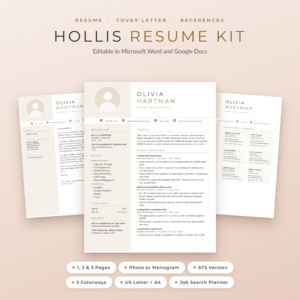
Hollis Resume Template
Price: $8.99 | Best for: editing on several devices
Hollis has its fonts built into every Word file, and Google Docs already has them, so the layout looks right on any device. You get resumes with photo and with monogram in 1, 2 and 3 pages, 1 and 2 page ATS resumes, cover letters, a references page and a thank-you letter, sorted into folders: 84 Word files in Champagne, Rosewood and Graphite and two paper sizes. A Job Search Planner, a Resume Writing Guide with 216 action verbs and a 13-page user guide are included. Upload one file to Google Drive first to see it open cleanly.
Set up a CV folder you will thank yourself for
Owning your files is only useful if you can find them. Ten minutes of setup now saves hours later.
- Make one folder called “Career”. In Google Drive, OneDrive or Dropbox, so it is backed up automatically.
- Inside it, make three folders: “Templates”, “Master” and “Applications”.
- Templates: the untouched files you downloaded. Never edit these directly.
- Master: your long master CV with every job, bullet and course, plus a master cover letter.
- Applications: one subfolder per month, holding the tailored Word file and PDF you sent to each employer.
- Name files clearly: “Priya-Shah-CV-Finance-Assistant-Nov.pdf” rather than “CV new 2.pdf”.
A simple log of where each version went closes the loop. Our guide to running a job search from one spreadsheet shows a tidy way to do that, and some kits include a tracker already.
Matching the kit to what you need most
All four kits in the table above give you Word and Google Docs files in US Letter and A4, a matching cover letter and references page, and a single-column ATS version for online portals. Here is how to choose between them.
| If you most want… | Choose |
|---|---|
| Files that open cleanly on any device, with a monogram option | Hollis |
| Help with the words, plus a calm classic design | Marlowe |
| A modern two-column layout with a skills sidebar | Sloane |
| A quiet design with a job tracker and photo cropper included | Alder |
If the words are your weak spot, the extra guidance in a playbook can matter more than the design. A ready formula for your profile and examples of strong bullets help you write a CV that is worth owning in the first place.
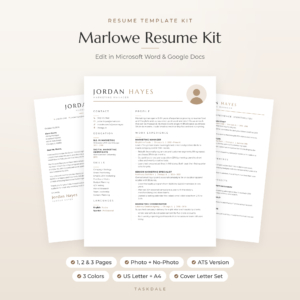
Marlowe Resume Template
Price: $4.79 | Best for: people who want help with wording
Marlowe has a calm, classic design with a wide-spaced serif name and lots of white space. You get 1, 2 and 3 page resumes with and without photo, an ATS resume, a cover letter, references page and thank-you letter, in Sand, Sage and Slate and US Letter and A4: 60 Word files. The 10-page Resume Playbook covers how recruiters read CVs, a three-sentence profile formula, before-and-after bullets, 120+ action verbs and 12 interview questions. Save the untouched files in your Templates folder, then copy one into Master.
Getting feedback on a file you own
One underrated benefit of owning your CV file is how easy it becomes to get help. A second pair of eyes catches things you will never see yourself.
In Google Docs
Click Share, add your reviewer’s email and set them as a Commenter. They can highlight any line and leave a note. You accept or ignore each one. Nothing changes without your say.
In Word
Send the .docx and ask your reviewer to turn on Track Changes (Review tab). Their edits appear in colour, and you accept or reject each one.
Who to ask? A friend who hires people, a former manager, a careers adviser, or someone already doing the job you want. Ask a specific question: “What would make you skip this CV?” A blunt answer to that question is worth more than a dozen polite compliments. Picture a nursery nurse whose friend, a primary school deputy head, spends ten minutes in comment mode and points out that her best qualification is buried on page two. One moved line, and the CV reads twice as strong.
Modern layout, still yours
If you like the look many online builders offer, a modern two-column page with a neat sidebar, you can have that in a file you own too. The key is a layout built from tables rather than floating boxes, so it keeps its shape when you or a reviewer edit it.
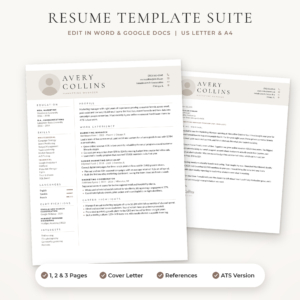
Sloane Resume Template
Price: $4.49 | Best for: a modern look in your own file
Sloane has a serif name, round photo frame, neat contact icons, and a slim left column for education, skills and languages beside a wider column for experience. It is built from tables and real Word styles with no floating text boxes. You get a 1-page resume, 2-page resume, 3-page CV, an ATS-friendly resume, cover letter and references page in Stone, Sage and Navy and US Letter and A4, with a Resume Writing Toolkit. Share it in Google Docs with a reviewer once your first draft is done.
Bringing an existing online CV home
Already built a CV in an online builder? You can move it into a file you own without retyping from memory. The words are the valuable part, and they come with you.
Open your CV in the builder and copy each section in turn, header, profile, each job, education, skills, into a plain document called “CV words backup”. Save that document in your Master folder straight away. Even if you never use the builder again, nothing is lost.
Then open your new template and paste each section in as plain text, using Ctrl+Shift+V, so the new design keeps its fonts and spacing. Read every line aloud as you go. Builders sometimes suggest stock phrases, and this is the perfect moment to swap two or three of them for real numbers from your own work. A line like “Excellent communication skills” might become “Answered around 70 customer calls a day and handled escalations for the team of six.”
The whole move usually takes an hour or so. The feeling afterwards, of having your CV sitting safely in your own folder, is a quiet but real relief.
If you are moving across during an active search, a kit that also tracks your applications keeps everything in one place from day one.
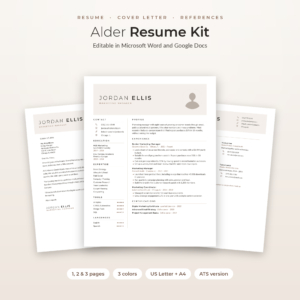
Alder Resume Template with Photo
Price: $4.79 | Best for: active job seekers moving files across
Alder includes a 1, 2 and 3 page resume with photo, a 1-page resume without photo, a one-column ATS resume, a cover letter, references page and thank-you letter, all with one shared header: 48 Word files in Mocha, Sage and Slate and US Letter and A4. A Job Application Tracker for Excel with a dashboard and follow-up alerts, a six-page Job Search Toolkit and a Round Photo Maker are included. Paste your backed-up words into the 1-page file, then log your open applications in the tracker.
Mistakes to avoid
- Editing the original template. Keep an untouched copy so you can always start fresh.
- Saving only on one laptop. Use cloud storage so a broken laptop does not take your CV with it.
- Sending the Word file by default. Send a PDF unless the advert asks for Word.
- Forgetting the ATS version. Upload the single-column file to company portals.
- Letting the master go stale. Add new jobs, courses and results every few months.
Frequently asked questions
Are there free CV templates I can keep?
Yes. Templates in Microsoft Word, Google Docs and LibreOffice give you a normal file you can keep and edit. Many careers services also share free Word templates.
Can I download my CV from an online builder as a Word file?
It depends on the service and your plan. Check the builder’s help pages for the formats it offers before you start.
What is the best free alternative to an online resume builder?
Google Docs is the easiest free option. You get simple templates, automatic saving to your own Drive and free PDF or Word downloads.
Do downloadable CV templates work in Google Docs?
Most Word templates do. Upload the .docx to Google Drive and open it with Google Docs. Kits with built-in or common fonts keep their layout best.
How do I keep my CV safe for the future?
Store it in a cloud folder such as Google Drive or OneDrive, keep an untouched template copy and update your master CV a few times a year.
Your next step
Create your “Career” folder in your cloud storage today, with Templates, Master and Applications inside. Then pick the kit that fits what you need most. If you want files that open cleanly on any device, start with the Hollis Resume Template.