A 3 year digital planner solves a problem single-year planners keep creating. Every December you set up a new file, copy over birthdays, rebuild your templates and lose the habit tracker you finally got going. With three years in one file, you set it up once. That dentist appointment in 2029 has somewhere to live.
The catch is size. Three years means well over a thousand pages, and a badly built planner turns into a slow, laggy maze. So the things that matter most are links, speed and which years it covers.
Below are three hyperlinked tablet planners from Taskdale that each cover three years, how they differ, and which one fits your timing and your tablet.
Check the years first
This sounds basic, but it’s the choice that decides everything else. Two of these planners start in January 2026. One starts in January 2027.
If you’re buying late in 2026, a 2026 to 2028 planner gives you the rest of this year plus two full ones. A 2027 to 2029 planner gives you three clean years starting fresh in January. Neither is wrong. It depends on whether you want to start today or on New Year’s Day.
1. Horizon Digital Planner 2027 2028 2029: the most room
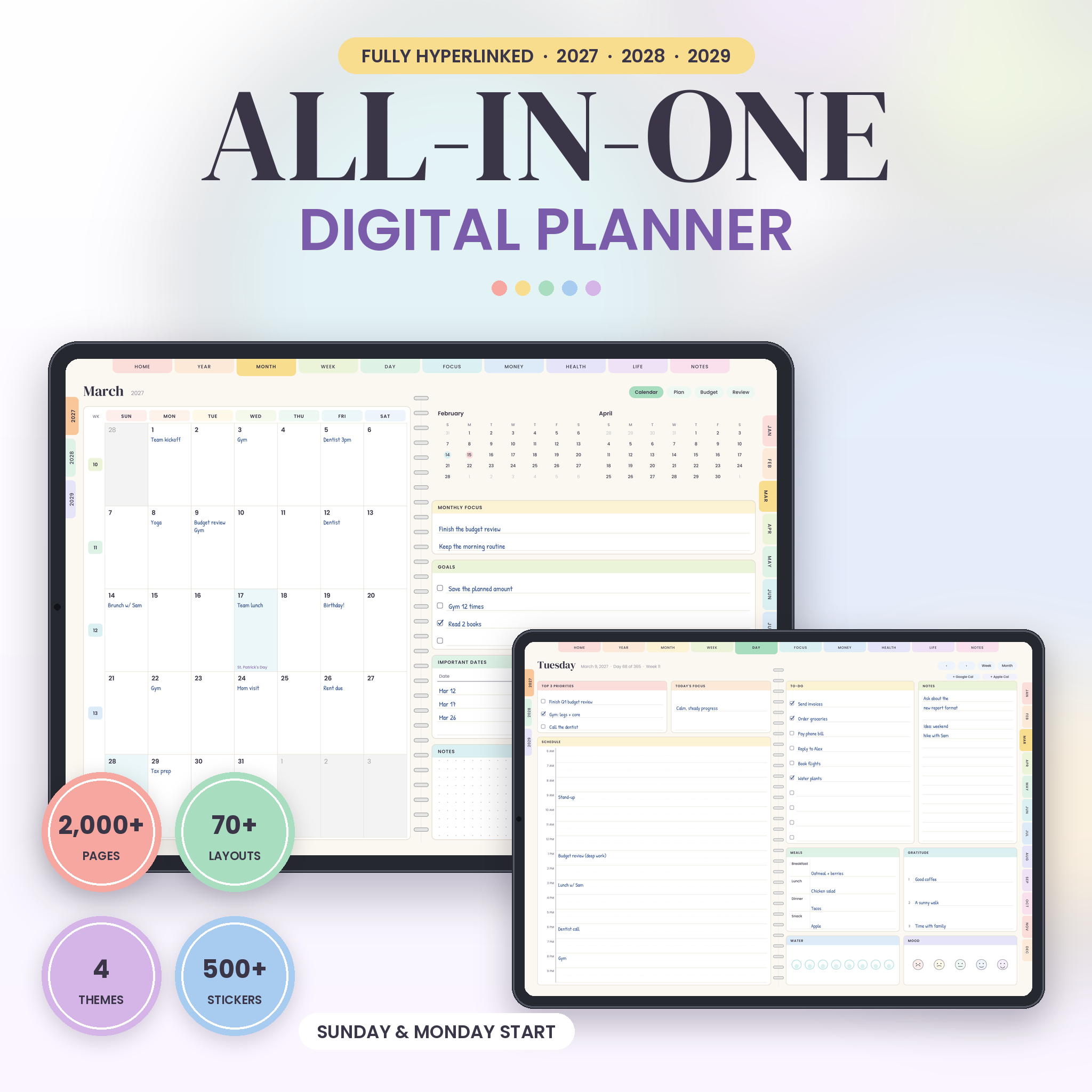
The Horizon Digital Planner runs from January 2027 to December 2029 in a single file of 1,996 pages. That’s 36 monthly spreads (each with a calendar, plan, budget and review page), 158 weekly spreads and 1,096 daily pages.
A few things stand out:
- Four weekly layouts. Each week can switch between Plan, Schedule, Focus and Wellness views, which is handy if some weeks are meeting-heavy and others are about recovery.
- A full daily page. Three top priorities, a daily focus, an hourly schedule from 6 AM to 9 PM, a 10-line to-do list, notes, meals, gratitude, water and a mood row.
- Calendar buttons. Two small buttons on each day page link to Google Calendar and Apple Calendar for that date.
- 57 templates in four groups: Focus, Money, Health and Life. Study planner, debt payoff, workout log, gift tracker and plenty more.
- Extras: 548 PNG stickers, 32 covers and four colour themes (Pastel Rainbow, Blush Pink, Sage and Sand, Ocean Mist), each in Sunday and Monday start.
Getting around works through tabs on three edges: section tabs across the top, years on the left and months on the right, with the current tab highlighted. The Index lists every template, notebook and month.
One trade-off to know about: each PDF is about 20 MB, so it takes a few seconds to open the first time. It’s also designed for screen use only, with landscape pages that don’t make sense printed.
Best for: people who want to start clean in January 2027 and like a lot of template choice.
2. Bloom Digital Planner 2026 2027 2028: Google Calendar on every hour
The Bloom Digital Planner covers January 1, 2026 to December 31, 2028. You get daily pages, a weekly planner and an hourly weekly schedule for every week, 36 monthly calendars and a year plan for each year.
Its party trick: every hour on a day page is a link. Tap 2 PM on a Thursday and a new Google Calendar event opens for that day and time. If you live in Google Calendar for work but like handwriting your plans, that bridge is useful. It needs internet and a Google account; the rest of the planner works offline.
What else is inside:
- Monthly habit tracker, mood tracker, sleep and water log, bill list, budget box and a review page every month
- 48 templates across goals, wellness, finance, life and home, study and work, journal and notes (the study and work section includes a content calendar and client tracker, which freelancers will like)
- Five colour themes: Blush, Rainbow, Boho, Neutral and Midnight, each in Sunday and Monday start
- 410 stickers and 20 notebook covers
Each planner file is about 3.5 MB, which is light for three years of pages. You can also print single pages for yourself in landscape on Letter or A4.
Best for: Google Calendar users, and anyone who wants to start planning now rather than waiting for January.
3. Petal & Pace Digital Planner: dark mode and an undated backup
Petal & Pace covers 2026, 2027 and 2028, and it’s built a bit differently. Each year is its own file of about 2.5 MB, so pages turn quickly even on older iPads. And there’s an undated version too, so the planner never runs out.
Its links and tabs came first in the design. Every page has the same tabs, breadcrumbs and arrows in the same place, with around 28,000 links per year file. Tabs and buttons are sized for fingers, not just a stylus tip.
- Two themes: Pastel for daytime and Midnight dark mode for evening planning
- Four pages every month (calendar, focus and habit tracker, budget, monthly review) and two spreads every week, including a Plan & Review spread with meal plan and grocery list
- A daily page with top 3 priorities, an hourly schedule from 6 AM to 10 PM, to-do list, mood, water, gratitude, meals and notes
- 34 templates on 42 pages, 8 notes styles, 110 stickers and 12 covers
Best for: people on older tablets, anyone who plans late at night and hates a bright white screen, and planners who skip months and want an undated fallback.
Comparing the three 3 year digital planner options
| Horizon | Bloom | Petal & Pace | |
|---|---|---|---|
| Years | 2027 to 2029 | 2026 to 2028 | 2026 to 2028, plus undated |
| File setup | One file, about 20 MB | One file, about 3.5 MB | One file per year, about 2.5 MB |
| Templates | 57 | 48 | 34 |
| Themes | 4 | 5 (incl. Midnight) | Pastel and Midnight |
| Stickers | 548 | 410 | 110 |
| Calendar links | Google and Apple, per day | Google, per hour | None listed |
Which one should you pick?
Starting fresh in January 2027 and want the biggest template library? Horizon.
Want to start now and connect your handwritten plans to Google Calendar? Bloom.
Using an older iPad, love dark mode, or worried you’ll fall off and want an undated version to come back to? Petal & Pace.
Whichever you choose, test the first few pages in your app before you commit. All three are standard hyperlinked PDFs built for apps like GoodNotes and Notability, but apps handle links differently. Tap tabs in read mode, write in pen mode.
FAQ
Will a 3 year planner be slow on my iPad?
It depends on file size and your device. Planners that split each year into its own file, like Petal & Pace, stay quick on older iPads. A single large file can take a few seconds to open the first time.
Can I use a digital planner on an Android tablet?
Usually, yes, in a PDF annotation app that follows internal links, such as Xodo or Samsung Notes. Android apps vary, so test a few pages before you start planning.
Can I print a digital planner?
Horizon isn’t designed for printing. Bloom allows printing single pages for yourself in landscape. Petal & Pace is made for tablets and isn’t designed for printing.
Do the budget pages work in my currency?
Horizon and Bloom have no currency symbols on their money pages, so you write your own amounts in any currency.