A Google Sheets budget template to share with your partner fixes the most common couple money problem: two people, two versions of the truth. One of you thinks the grocery budget is fine. The other has seen the card statement. When both of you open the same live file, on a laptop or a phone, that argument mostly goes away.
This guide is for couples who live together, are about to, or have just merged a few bills and want a calm system. You will learn how to share the file safely, pick a split that feels fair, set up columns that show who paid for what, and run a 20-minute weekly check-in. We also cover four Taskdale spreadsheets built to handle the heavy lifting.
Quick picks: shared budget spreadsheets
| Product | Best for | Price | Link |
|---|---|---|---|
| Cashcove Budget Planner for Google Sheets | Couples with different pay dates | $26.00 | View |
| Budget Planner Spreadsheet for Excel and Google Sheets | Simple shared bill tracking | $2.00 | View |
| Ultimate Annual Budget Spreadsheet | A full year of joint planning | $6.00 | View |
| Executive Budget Dashboard Spreadsheet Suite | Couples who love detail and charts | $9.99 | View |
Why Google Sheets suits a two-person budget
Google Sheets lives online, so there is only ever one copy. When Sam logs a $64 pharmacy run from the car park, Priya sees it on her phone two seconds later. No emailing files back and forth. No “which version is the latest” confusion on a Sunday night.
It is also free with a Google account and runs in the Google Sheets phone app on both iPhone and Android. That matters more than it sounds. The partner who logs spending is usually the one with the easiest way to do it, and a phone in your pocket beats a laptop in a drawer.
Two more features help couples. Version history keeps earlier copies of the file, so an accidental deletion is not a disaster. And comments let you leave a note on a cell, like “this was the birthday gift for your mum”, without starting a debate over dinner.
If you are brand new to Sheets, our walkthrough on setting up a Google Sheets budget template in one evening covers the basics before you add a second person.
How to share the file without breaking anything
Sharing takes about two minutes. Do it carefully once and you will not have to think about it again.
- Pick an owner. One of you opens or copies the template into their own Google Drive. That person owns the file.
- Click Share. The button sits at the top right of the sheet. Type your partner’s Google email address.
- Choose Editor. Viewer lets them look but not type. Commenter lets them leave notes. For a shared budget, both of you need Editor.
- Keep link sharing restricted. Leave general access set so only the people you add can open it. A budget holds account balances and debts, and it should not be open to anyone with a link.
- Protect the formula cells. Go to Data, then Protect sheets and ranges, and lock the tabs or cells that hold formulas. You can still edit them yourself, and you will get a warning before anything important is overwritten.
- Add it to both phones. Install the Google Sheets app, open the file once, and star it so it sits at the top of your list.
That fifth step saves a lot of grief. Most shared budgets that “stop working” broke because someone typed a number over a formula. Locking those cells means the maths keeps running no matter who is typing.
Choose a split before you choose a template
The spreadsheet has to reflect how you two actually handle money. There are three common setups, and none is more grown-up than the others.
Fully joint
All income goes into one pot and all spending comes out of it. This is simplest to track. You need one income section, one set of categories and one pool of savings. It suits couples who have been together a while, share most goals, and earn on similar terms.
Yours, mine and ours
Each of you keeps your own account and pays an agreed amount into a joint account for shared costs. The spreadsheet only tracks the joint account in detail. Each person tracks their own money however they like. This setup suits couples who value some financial independence.
Proportional split
Shared bills are split by income share rather than 50/50. Say Jordan takes home $5,000 a month and Alex takes home $3,000. Together that is $8,000, so Jordan earns 62.5 percent and Alex earns 37.5 percent. If shared bills come to $3,200, Jordan puts in $2,000 and Alex puts in $1,200. Both are left with the same share of their own pay. Many couples find this the fairest option when incomes differ a lot.
Once you know your split, the template choice gets easier. Fully joint couples need a strong monthly dashboard. Proportional couples need clear income lines for each person.
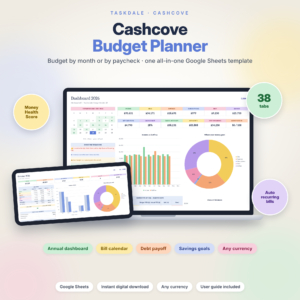
Cashcove Budget Planner for Google Sheets
Price: $26.00 | Best for: couples paid on different schedules
Cashcove is built for Google Sheets and lets you budget by month or by paycheck. Recurring paychecks, rent, subscriptions and debt payments are entered once and scheduled for the whole year, which helps when one partner is paid biweekly and the other monthly. It runs on standard formulas with no scripts or add-ons, so there are no permission prompts when your partner opens it. Set up both paychecks first.
Columns that stop the “who paid for that?” fight
Most templates have a Transactions sheet with date, description, category and amount. For a couple, add two columns.
- Paid by: a dropdown with both names, plus “Joint”. Use Data, then Data validation, to build the list so nobody types “Sammy” one day and “S” the next.
- Shared or personal: another dropdown. This marks whether the cost counts toward the joint budget or one person’s own spending money.
With those two columns you can filter the sheet in seconds. Click the filter icon, choose Shared, and you see exactly what came out of the joint pot this month. If one partner has been quietly covering more of the groceries, you will spot it in March instead of discovering it in a tense moment in July.
Keep descriptions short and plain. “Groceries, Saturday shop” beats “stuff”. And log spending within a day or two. A budget that is a week behind turns into a guessing game, and guessing is where couples start to bicker.
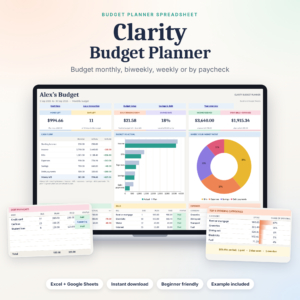
Budget Planner Spreadsheet for Excel and Google Sheets
Price: $2.00 | Best for: couples who want a simple setup
This planner keeps every purchase, paycheck and payment on one Transactions sheet, and the dashboard shows money left, days left, bills due and goal progress. Bills mark themselves Paid, Due soon, Upcoming or Overdue once you give them a due day. It handles monthly, weekly, biweekly or payday-to-payday budgets. Add your shared bills on day one and let the status column do the reminding.
Agree on categories in one sitting
Categories cause more quiet friction than almost anything else in a shared budget. One of you files a takeaway pizza under Groceries. The other files it under Eating Out. By the end of the month both lines look wrong and nobody knows why.
Fix this once, at the start, with a short list you both sign off on. Sit down with last month’s bank statements and sort every purchase into a draft group. You will probably land on something like this:
- Home: rent or mortgage, utilities, internet, home insurance
- Food: groceries, eating out, coffee and snacks
- Getting around: fuel, transit passes, parking, car insurance
- Life admin: phones, subscriptions, bank fees
- Health and care: pharmacy, gym, haircuts
- Goals: emergency fund, holiday fund, debt payoff
- Personal money: one line for each partner
Then write a few house rules in a note at the top of the sheet. Takeaway counts as Eating Out. Toilet paper bought at the supermarket counts as Groceries. Gifts for family come from a shared Gifts line, not personal money. These rules look fussy written down. They also save you a dozen small debates a year, and that is worth five minutes of fuss.
Review the list every three months. If a category is always empty, delete it. If one keeps overflowing, split it. A list that matches your real life is one you will both keep using.
Give each person some no-questions money
This is the step couples skip and then regret. Each of you gets a personal spending amount every month, and nobody has to justify what it buys.
Pick a number you can both live with, like $150 each. Set it up as its own category for each person. Coffee, a video game, a new lipstick, a round of golf: it all comes from that line, and the other partner does not comment. It sounds small, but it takes the sting out of shared tracking. Nobody feels watched.
If one of you earns much more, you can scale personal money by income too. Many couples keep it equal anyway. Talk it through once and write the answer in a note on the sheet so you never have to argue it again.
The 20-minute weekly money check-in
A shared file works best with a short, regular habit. Pick a time when neither of you is tired or rushed. Sunday morning with coffee works for plenty of couples.
- Catch up the log (5 minutes). Each person adds anything they forgot. Check receipts and bank apps.
- Look at the dashboard (5 minutes). Which categories are on track? Which are running hot?
- Check upcoming bills (5 minutes). What is due in the next 14 days, and which account pays it?
- Agree one adjustment (5 minutes). Move $40 from eating out to groceries, or push a purchase to next month. One change, not ten.
Keep it light. End on something you are saving toward together, like a weekend away or a new sofa. Seeing that progress bar move a little each week is a nice shared win, and it makes the next check-in something you look forward to rather than dread.
A full-year view for bigger shared goals
Monthly tracking keeps the lights on. A yearly view helps you plan the big stuff together: a holiday in August, car insurance in March, the December gift pile. When both of you can see those costs on one sheet, you can save for them a little each month instead of panicking in the week they land.
Sinking funds are the tool for this. Divide each large yearly cost by the months left until it is due. A $1,200 trip in eight months means $150 a month. Put it in the plan, and when the trip comes, nobody has to raid the emergency fund.

Ultimate Annual Budget Spreadsheet
Price: $6.00 | Best for: couples planning a whole year together
The Ultimate Annual Budget has 22 tabs: an annual dashboard, 12 monthly dashboards with expected versus actual, a 50/30/20 dashboard, net worth tracker, debt payoff calculator, sinking funds tracker and a calendar for due dates. It works in Google Sheets, Excel 2016 and newer, and LibreOffice, and you only fill the gold cells. Start with the sinking funds tab and list every big cost you both know is coming this year.
Common mistakes couples make with a shared sheet
A few habits trip up even well-meaning couples:
- One person does everything. If only one partner logs and checks, the other loses touch. Share the logging, even if one person runs the weekly review.
- Too many categories. Forty categories sound thorough. In practice, 12 to 18 is plenty for most homes, and fewer choices means fewer “which category is this?” debates.
- Using the sheet as evidence. The budget is a planning tool, not a courtroom. If a number surprises you, ask about it kindly during the check-in.
- Skipping protection. Lock the formulas on day one.
- Never revisiting the split. A new job or a baby changes everything. Review your split each time income changes.
If you are still choosing a file, our list of the best budget spreadsheets for Excel and Google Sheets compares layouts and features in one place.
Frequently asked questions
Can two people edit a Google Sheets budget at the same time?
Yes. Once you share the file with Editor access, you can both type in it at once, on any device. You will see each other’s cursors and changes appear live.
Do we both need a Google account?
For editing, yes. Each partner needs a Google account so the owner can add them by email. A free personal account is enough.
Is it safe to keep our budget in Google Sheets?
Keep sharing restricted to the two of you, use strong passwords and two-step verification on both accounts, and never store full card numbers or online banking logins in the sheet.
How do we split bills fairly if we earn different amounts?
Many couples use a proportional split. Work out each person’s share of total take-home pay, then each covers that percentage of shared bills.
What if my partner never updates the spreadsheet?
Make logging easier, not stricter. Put the file on their phone home screen, cut categories down, and agree that they only log shared purchases. A partner who logs five things a week is far more useful than one who logs nothing because the rules felt like homework.
Where to start tonight
Sit down together for 15 minutes, agree on your split, and write it in a note at the top of a new sheet. Then pick one template, share it with Editor access, and lock the formulas. If one of you is paid on a different schedule, Cashcove is the easiest place to begin.