An expenses spreadsheet for home or business answers one plain question: where did the money go? For a household, that answer shows you why the account runs dry by the 24th. For a business, it shows your real profit and gives you a clean record when tax time comes. The tool is the same. The setup is not.
This guide helps you decide which kind of expense sheet you need, which columns and categories to use, and how to keep home and business money from tangling together. It covers four situations: a family home, the costs of keeping a house in good repair, a small business, and rental property. You will also get a short weekly routine and the mistakes that make a spreadsheet useless by spring.
Quick picks: expense spreadsheets for every setup
| Product | Best for | Price | Link |
|---|---|---|---|
| Fernleaf Home Budget Planner Spreadsheet | Household spending in Excel | $7.49 | View |
| Sill & Season Home Maintenance Tracker | Repairs, servicing and house costs | $6.99 | View |
| Orchid Business Hub | Small business income, costs and profit | $6.99 | View |
| Lantern Lane Rental Property Spreadsheet | Landlords with one or many units | $42.99 | View |
Home, business or both? Decide first
Before you open a blank sheet, decide what the spreadsheet is for. It sounds obvious. It is also the step most people skip, and it is why so many expense files end up as a jumble of grocery runs, printer ink and client lunches with no clear totals.
A home expenses spreadsheet is about control. You want to see spending by category, compare it with a budget and spot where to cut. Tax rarely comes into it.
A business expenses spreadsheet is about records. You want every cost dated, categorised and matched to a receipt, so you can work out profit and back up any deductions you claim. Accuracy matters more than charts.
If you run a side hustle from home, you need both, but kept apart. A candle maker who buys wax with the same card she uses for groceries will spend an anxious weekend every year untangling which was which. Two sheets, or one sheet with a strict Home or Business column, saves that weekend. More on that further down.
The columns every expense sheet needs
Whatever the purpose, the core columns are the same. Here is a layout that works for nearly everyone:
| Column | What goes in it | Home | Business |
|---|---|---|---|
| Date | The day you paid | Yes | Yes |
| Payee | Who you paid, such as the shop or supplier | Yes | Yes |
| Category | Chosen from a fixed dropdown list | Yes | Yes |
| Amount | The total paid, as a number with no symbol | Yes | Yes |
| Account or card | Which account it came from | Helpful | Yes |
| Receipt saved? | Yes or No, or a file name | Optional | Yes |
| Deductible? | A flag for costs you may claim | No | Yes |
| Notes | Anything you will forget, like what the purchase was for | Helpful | Yes |
Two small rules make a huge difference. First, use a dropdown list for categories so you never type “Grocery” one day and “Groceries” the next, which splits your totals in two. Second, type amounts as plain numbers. A cell holding “$45” as text will not add up, and you will not notice until the totals look strangely low.
Setting up a home expenses spreadsheet
For a household, start with 12 to 15 categories. Fewer than that and the totals are too blurry to act on. Many more and you will spend your evenings deciding whether shampoo is Personal Care or Household.
A good home list looks something like this: Housing, Utilities, Groceries, Eating Out, Transport, Insurance, Health, Kids, Pets, Personal Care, Clothing, Subscriptions, Gifts, Fun, and Savings. Put a monthly budget beside each one.
Then log every expense in one list, all year long. Avoid the trap of copying a fresh tab for every month. Twelve separate tabs mean twelve chances to break a formula, and it makes year-on-year comparisons painful. One long list with a date column is easier, and a dashboard can pull out any month you choose.
Picture a family of four with take-home pay of $6,200. After two months of logging into one list, they find Eating Out at $540 a month, not the $250 they assumed. They do not ban takeaway. They set a $350 cap and put the difference toward a summer trip. That is what a home expense sheet is for: one honest number that leads to one calm decision.
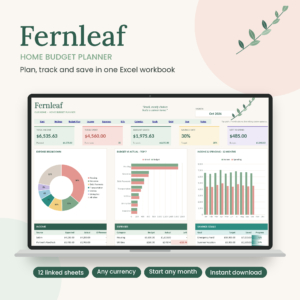
Fernleaf Home Budget Planner Spreadsheet
Price: $7.49 | Best for: couples and families using Excel
Fernleaf is an Excel budget planner where every purchase goes into one Expenses list and every paycheck into one Income list. Pick any month from a dropdown and the dashboard shows where you stand, with a bill calendar, savings pots and debt payoff. Your budget year can start in any month. Type your categories and budgets into the white boxes first, then log last week’s spending.
The house costs that dodge the monthly budget
Homeowners have a category of spending that rarely shows up in a monthly budget until it hurts: upkeep. Furnace servicing. Gutter cleaning. A new water heater. The dishwasher that dies two months after the warranty ran out. These costs are irregular, and they can be large.
A common rule of thumb is to set aside 1 to 2 percent of your home’s value each year for maintenance, though older homes often need more. On a $300,000 house, that is $3,000 to $6,000 a year, or $250 to $500 a month. Even if your real figure is lower, tracking what you actually spend for a year will tell you what to budget next year.
A separate maintenance log also gives you something a normal expense sheet cannot: a history. When did you last service the boiler? Which plumber fixed the leak, and what did it cost? If you sell the house, a tidy record of work done can reassure buyers. If you are curious how this fits into a bigger household system, our guide to what to put in a home management binder shows where these records live alongside the rest.
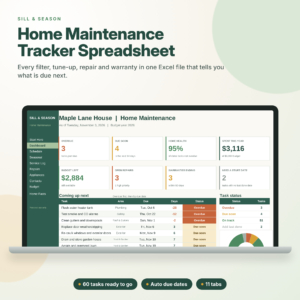
Sill and Season Home Maintenance Tracker
Price: $6.99 | Best for: homeowners who forget servicing dates
Sill and Season is an Excel home maintenance tracker with 60 common jobs already listed, each with a frequency. Enter the date you last did a job and it works out the next due date and tags it Overdue, Due soon or On track. A service log, repair log and warranty tracker sit beside a dashboard showing spending by area and by month. Delete the jobs that do not fit your home first.
Setting up a business expenses spreadsheet
Business categories should match the way your tax return or accountant groups costs. You do not need to know the official names on day one. Start with clear, practical groups and tidy them up at year end. A typical small service business might use:
- Supplies and materials
- Software and subscriptions
- Advertising and marketing
- Travel and mileage
- Equipment
- Phone and internet (business share)
- Bank and payment fees
- Professional fees, such as an accountant
- Training
- Rent or workspace
The receipts column earns its keep here. Snap a photo of every receipt the day you get it and name the file with the date and amount, like 2026-11-04_42.50_printer-ink. Put the file name in the spreadsheet. When someone asks about a cost later, you can find proof in seconds. What you can claim and how long you must keep records depends on where you live and how your business is set up, so check the rules with your tax office or an accountant.
Track income in the same file, too. Expenses alone tell you what you spent. Income minus expenses tells you whether the business is working.
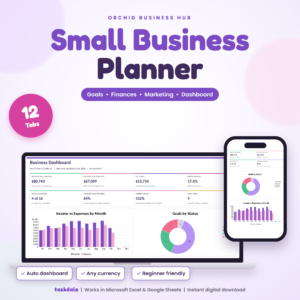
Orchid Business Hub
Price: $6.99 | Best for: small business owners and side hustlers
Orchid Business Hub is a 12-tab small business planner for Excel and Google Sheets. Log a sale or expense and the monthly profit and loss, budget check and dashboard update on their own. Goals, tasks and marketing campaigns sit beside the numbers, so you can see which plans pay off. It arrives blank. Add your expense categories and opening goals, then log this month’s costs.
For more options, including files with tax set-aside and reconciliation tabs, see our roundup of the best bookkeeping spreadsheets for small business.
Side hustles: one person, two sets of books
A side hustle is where home and business expenses collide most often. The dog walker who pays for treats and poo bags from her personal card. The weekend photographer who buys a lens on the family credit card. Each purchase is small and sensible. A year of them, mixed in with groceries and school shoes, is a headache.
The cleanest fix is a separate bank account and card for the hustle, even a basic free one. Every business cost goes on that card, and every payment from clients lands in that account. Your business spreadsheet then only has to follow one account, and your home spreadsheet never sees a lens or a bag of dog treats.
If a separate account is not possible yet, use one spreadsheet with a Home or Business column and fill it in for every single row. Then filter by Business at month end to see your hustle on its own. When you pay yourself from the hustle, log it as a transfer, not as income twice. It takes a little discipline in the first month. By the second, it is automatic, and tax season stops feeling like an archaeology dig.
Landlords: track expenses by property
Rental property sits halfway between home and business. It is often owned personally, but it earns income and has business-style costs. The key difference is that you need expenses broken down per property, and sometimes per unit.
Say you own a duplex. The roof repair, the water bill and the insurance cover both units, while the new oven only went into the upstairs flat. A plain expense list will tell you the total. It will not tell you which unit is actually profitable. Add a Property column and a Unit column, and split shared costs between units so each one shows its true earnings.
Landlords should also log rent received, deposits held and any late payments in the same workbook. Having expenses and rent side by side makes year-end reporting far less painful.

Lantern Lane Rental Property Spreadsheet
Price: $42.99 | Best for: first-time and growing landlords
Lantern Lane is a 32-tab landlord workbook for Excel and Google Sheets covering properties, units, tenants, leases, rent, expenses and repairs, with nine dashboards. Shared bills like water or a roof repair can be split across a property’s units automatically, and it flags paid, partial and overdue rent. It handles up to 50 properties and 250 units. Add your first property and its units before logging any costs.
A 10-minute weekly routine that keeps the sheet current
The best expense spreadsheet in the world is useless if it is three months behind. Keep it current with a short, fixed routine.
- Same time each week. Friday afternoon works for many business owners. Sunday evening suits many households.
- Open your bank and card apps. Go through every transaction since last week.
- Log each one with a category from your dropdown. For business costs, check the receipt is saved.
- Glance at totals. Is any category running well over budget?
- Write one note about anything unusual, like a one-off repair.
On the first of each month, add a 20-minute review: compare each category with its budget, note the three biggest costs, and adjust next month’s plan. For a business, this is also a good moment to check how much you have set aside for tax. That first month where the sheet balances to the cent against the bank feels great, and it gets easier every time.
Mistakes that make expense spreadsheets fail
- Mixing home and business on one card with no column to separate them.
- Typing categories freehand instead of using a dropdown.
- One tab per month, which makes yearly totals a chore.
- Logging only big costs. Small business fees add up fast, and they are often deductible.
- No backup. Keep a copy in cloud storage, or save a dated copy at the end of each month.
- Waiting until tax season. Twelve months of receipts in a shoebox is nobody’s idea of a fun weekend.
Frequently asked questions
Can I use one spreadsheet for home and business expenses?
You can, if you add a strict Home or Business column and filter by it. Separate files and separate bank accounts are cleaner, especially once the business grows.
What categories should a household expense spreadsheet have?
Twelve to fifteen is a good range: housing, utilities, groceries, eating out, transport, insurance, health, kids, personal care, clothing, subscriptions, gifts, fun and savings.
Is Excel or Google Sheets better for tracking expenses?
Both work well. Google Sheets is easier to share and use on a phone. Excel works offline and suits people who already use it daily.
How do I track expenses for more than one rental property?
Add Property and Unit columns to every expense, split shared costs between units, and log rent in the same file so you can see profit for each one.
How often should I update my expense spreadsheet?
Weekly is the sweet spot. It takes about 10 minutes and keeps receipts and memories fresh.
Set up your sheet this week
Decide today whether your sheet is for home, business or both. Then write your category list on paper before you touch the spreadsheet, and log last week’s spending as a test. If you are tracking a household in Excel, the Fernleaf Home Budget Planner gets you set up in an evening.