A Skynova invoice alternative with no monthly fee is really a question about renting versus owning. Online invoicing services, Skynova among them, give you invoice tools inside an account. You pay to keep using them. A downloaded template or spreadsheet is bought once, or found free, and stays on your computer for as long as you want it.
This guide is for freelancers, sole traders and small service businesses who like what an online invoice tool does but would rather stop paying for it every month. You will see what you actually lose and keep when you switch, where free templates come from and where they fall short, three one-time-purchase options, a simple cost comparison and a calm way to move your records.
One fair point first. Online services change their plans and features over time, so check Skynova’s own site for what it offers today. This article sticks to what is true of online invoicing in general.
Quick picks: invoice templates you buy once
| Product | Best for | Price | Link |
|---|---|---|---|
| PaidPath Client & Invoice Hub | Invoices, payments, expenses and profit in one Excel workbook | $9.49 | View |
| Ledgerline Invoice, Quote & Receipt Template Kit | A matching invoice, quote and receipt set with an Excel log | Original price was: $3.00.$1.50Current price is: $1.50. | View |
| Client Billing Hub Invoice Tracker Spreadsheet | Excel or Google Sheets users who want receipts and client statements | $6.49 | View |
What a monthly invoicing plan is really paying for
Before you cancel anything, list what the service does for you. It is easy to underrate the parts that run quietly in the background.
Most online invoicing tools do some mix of these:
- Invoice design and maths. You fill in boxes and a tidy invoice comes out.
- Storage. Every invoice sits in your account, searchable by client or date.
- Sending. The invoice goes out by email from inside the tool.
- Status. You can see paid, unpaid and overdue at a glance.
- Extras. Reminders, payment links, reports, other business forms.
Here is the good news. A well-built spreadsheet handles the first four. The fifth depends on which extras you use. If you tick off the list and find you only use invoice design and status, you are paying monthly for something a one-time file does.
What “no monthly fee” can mean
There are three roads, and they are not equal.
Free blank templates
Word, Excel and Google Docs all have free invoice layouts built in, and many websites give them away. They cost nothing and they are fine for someone who sends two or three invoices a month. The limits are real, though. Most are a single page with no saved clients, no log and no maths beyond a basic sum. You track who has paid in your head or on a sticky note.
Free online generators
Some websites let you make an invoice for free in the browser. They are handy for a one-off. Expect the usual trade-offs of free online tools: sign-up prompts, limits on saved invoices, the site’s branding on your document, or ads. Your records still live on their side.
One-time-purchase templates
This is the middle road. You pay once for a calculating workbook that saves your clients and prices, keeps a log and shows who owes you. No account, no renewal. You get most of what an online service offers, minus the automatic sending and reminders, which you replace with a short weekly habit.
For a deeper look at which file type suits you, see our guide to invoice templates in Word, Excel and PDF.
What to look for in a no-fee invoice template
Not every template is worth switching to. A few features decide whether you will still be using it in a year, or quietly signing back up to an online plan.
- Saved clients and prices. You should type each client’s address once, then pick it from a list forever after.
- Automatic totals. Line amounts, discount, tax and balance due should fill in as you type a quantity.
- An invoice log. One row per invoice, with a status that changes to overdue on its own when the due date passes.
- Part payments. A client who pays $300 of a $900 invoice should show $600 still owing, not “unpaid”.
- Your currency and paper size. US Letter and A4, and a currency setting you change once.
- A guide. A written walkthrough saves a lot of guessing on setup night.
If a file only gives you a pretty page, it will replace the design part of your online tool and nothing else. That is the path back to a subscription.
The three-year sum
Monthly fees feel small because they arrive in small pieces. Add them up over the time you are likely to run your business and the picture changes.
Take any plan price and multiply. A plan at $12 a month is $432 over three years. At $25 a month it is $900. Those are example numbers, not anyone’s actual price list, so plug in your own figure from your bank statement.
Now compare that with a template you buy once and use for the same three years. The gap is usually large enough to pay for a decent printer, a new laptop bag and a nice lunch. Not life-changing. But for a business earning $2,500 a month, it is money you keep.
The fair counterpoint: if the online tool saves you three hours a month in chasing payments, those hours are worth something too. Be honest about how much of your time it really saves.
Option one: an all-in-one hub for service businesses
If your online tool gave you a dashboard and you will miss it, start here. A linked workbook can show invoiced, collected, outstanding and overdue totals, and add expenses so you see profit too, which many invoice-only tools never show.

PaidPath Client and Invoice Hub
Price: $9.49 | Best for: Consultants, coaches and small studios
A 12-tab Excel workbook that links clients, services, invoices, quotes, payments and expenses. Invoice statuses change on their own, overdue invoices rise to the top of the dashboard, and partial and installment payments are tracked. It prints a one-page invoice, quote or statement on US Letter or A4, with your logo. Open the Setup tab first and set your currency and default payment terms.
It also has a calendar tab showing what is due when, which does a lot of the job that automatic reminders used to do.
Option two: a clean invoice, quote and receipt set
Maybe you liked your online tool mostly for its tidy documents. You want an invoice that looks professional, a quote that matches it, and a receipt for clients who pay cash. And you want the totals to add up without thinking.
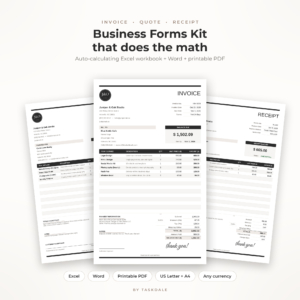
Ledgerline Invoice Quote and Receipt Kit
Price: Original price was: $3.00.$1.50Current price is: $1.50. | Best for: Freelancers who want tidy matching forms
An Excel workbook with auto-calculating invoice, quote and receipt sheets, an invoice log for up to 300 invoices that flags late ones in red, client statements with aging and a dashboard. You also get 6 Word templates and 4 printable PDFs in US Letter and A4, plus a 16-page guide. It is licensed for use in your own business. Swap in your logo on the Settings sheet before your first invoice.
A photographer who sends 10 invoices a month can have this set up in an evening and never think about invoice layout again.
Option three: if you work in Google Sheets
One thing people like about online tools is reaching their invoices from any device. Google Sheets gives you some of that without a subscription, as long as you have a Google account. Your file sits in your own Drive, not in a service you rent.
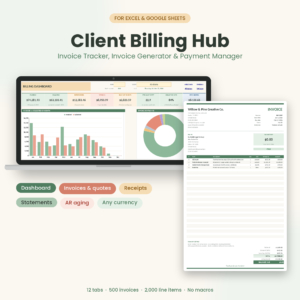
Client Billing Hub Invoice Tracker Spreadsheet
Price: $6.49 | Best for: Sheets users who bill weekly
A 12-tab workbook that runs in Excel or, once uploaded to Google Drive, in Google Sheets. It builds print-ready invoices and quotes, logs full and part payments with numbered receipts, makes client statements for any date range and shows an aging dashboard. Add your clients and products once and every later invoice fills in from them.
Open it on your laptop at the desk, check a balance on your phone at the shop. That covers most of what “in the cloud” meant to you.
A month with a template: what changes
Here is how one billing month looks for Priya, a bookkeeper-turned-virtual-assistant with 7 retainer clients, after she dropped her online plan.
On the 1st she opens her workbook. Each client is already saved with their rate and 14-day terms, so the 7 invoices take about 12 minutes. She saves each as a PDF and sends them from her own email with a two-line message she keeps in a text file.
On the 8th, five clients have paid. She logs the payments in a few minutes and the dashboard updates. On the 15th, the due date passes for the last two. One pays that afternoon after a short reminder. The other pays half and promises the rest at month end. Priya logs the part payment, and the invoice shows the balance still owing.
Total time across the month: under an hour. The difference from her old setup was mostly one thing. She now looks at the overdue list herself instead of waiting for the software to tell her, and she likes knowing exactly where every invoice stands.
Replacing the online extras by hand
The extras are where online services earn their keep. Here is how to cover each one without a monthly plan.
| Online feature | How to replace it |
|---|---|
| Email sending | Save the invoice as a PDF and attach it to an email from your own inbox. Keep a short email template ready to paste. |
| Automatic reminders | A 10-minute Friday check of the overdue list, then one polite email per late client. |
| Card payment link | Create a payment link with your card processor and paste it into your invoice’s payment instructions. |
| Searchable history | Filter the invoice log by client or date. Name PDFs the same way every time: 0215 ClientName 2026-11. |
| Reports | Use the workbook dashboard, or export the log for your accountant. |
Most people find the Friday check is the only real change to their week. And it has a side effect: you notice slow payers sooner, because you are looking.
How to move over without losing anything
- Export first. Download every invoice PDF and any client or payment report the service offers. Do this before you touch your plan.
- Set up the template. Business details, logo, payment terms, clients and services. Allow an hour.
- Copy over open invoices. Enter each unpaid invoice with its original number and date, so your overdue list is right from the start.
- Carry on the numbering. If your last invoice was 0311, your next one is 0312.
- Run both for one billing cycle. Send from the template, but keep the old account until the month closes cleanly.
- Cancel and file the export. Keep the exported folder with your tax records.
The day you cancel feels good. One less charge on the statement, and nothing lost.
Who should keep paying monthly
Templates are not the right answer for every business. Keep an online service if most clients pay by card through invoice links, if you send invoices from your phone between jobs all day, or if several people in your business need to create invoices at once. Shared spreadsheets can handle a second person, but a team of five quickly outgrows them. Online tools also suit owners who know, honestly, they will never open a tracker on a Friday.
Frequently asked questions
Is there a free alternative to Skynova for invoices?
Yes, in the sense that free blank invoice templates come with Word, Excel and Google Docs. They suit a handful of invoices a month. If you want saved clients, automatic totals and a payment log, a one-time-purchase spreadsheet is the step up.
Can I make professional invoices without a subscription?
Yes. A calculating spreadsheet with your logo, saved as a PDF, looks as professional as any online tool. The client sees the PDF, not the software behind it.
How do I send reminders without invoicing software?
Check your tracker’s overdue list once a week and send a short, friendly email to each late client. Keep two or three reminder wordings saved so it takes a minute per client.
Do one-time invoice templates work on a Mac?
The three picks here are Excel workbooks that run on Windows or Mac. The Client Billing Hub also works in Google Sheets. Check each listing for the versions supported.
Can I still take card payments with a template?
Yes. Most card processors let you make a payment link. Paste it into the payment instructions on your invoice, beside your bank details.
Will I lose my old invoices if I cancel an online plan?
That depends on the provider’s rules. Play it safe and export every invoice and report before you cancel, then store the folder with your tax records.
Your next step
Open your bank statement and find what you paid for invoicing in the last 12 months. Write the number down. If it is more than you would like, set up the PaidPath Client and Invoice Hub this week, send your next invoice from it, and keep the old account only until that billing cycle ends. For more one-time tools, our roundup of the best small business templates is a good browse.