Generic macro meal plans fail for a simple reason: they were built for somebody else. Somebody who likes cottage cheese, eats at 6 am and has an hour to cook. If that is not you, the plan lasts about as long as the cottage cheese.
A custom plan starts from the other end. You already have your targets, say 160 g protein, 200 g carbs and 65 g fat. Now you build meals out of food you actually buy and enjoy, arranged around the hours you actually live. This guide shows you how, step by step: a personal food library, a fill order that stops you running out of room at dinner, separate templates for training and rest days, ways to bend your favorite recipes to fit, and a four-week rotation so you are not reinventing the wheel every Sunday.
If you do not have targets yet, work those out first. Everything below assumes you know your numbers.
Quick picks: tools for a custom macro plan
| Product | Best for | Price | Link |
|---|---|---|---|
| MacroBloom Macro Meal Planner Spreadsheet | Live remaining macros as you build each day | $27.95 | View |
| SlimBloom Weight Loss & Fitness Planner Spreadsheet | Matching meals to logged workouts | Original price was: $2.99.$1.19Current price is: $1.19. | View |
| Pantry Bloom Meal Planner Spreadsheet | A big recipe library with macros per serving | $18.99 | View |
| Larkspoon Meal Planner Spreadsheet | Macros plus cost for a whole household | $12.99 | View |
Start from your numbers, not from a menu
Write your targets at the top of a page before you think about a single meal. For this guide we will use one set throughout:
- Protein: 160 g (640 calories)
- Carbs: 200 g (800 calories)
- Fat: 65 g (585 calories)
- Total: about 2,025 calories
Then write how many times a day you realistically eat. Not how many times you think you should. If you never eat breakfast before 10, you have lunch, an afternoon snack, dinner and maybe something in the evening. Four eating windows. Divide your protein across them so no single meal has to carry more than about 50 g, which is roughly a large chicken breast and gets hard to eat beyond that.
That gives you a skeleton. Something like: 40 g protein at lunch, 30 g at the snack, 55 g at dinner, 35 g in the evening. Now you fill in food.
Build a personal food library of about 20 items
A food library is just a list of things you eat often, each with its macros for the portion you normally use. Twenty items is plenty. Most people eat the same 20 to 30 foods for 80 percent of their meals anyway, they just never wrote them down.
Here is the start of one, with rough values:
| Food and portion | Protein | Carbs | Fat |
|---|---|---|---|
| Chicken thigh, skinless, 150 g cooked | 38 g | 0 g | 12 g |
| Greek yogurt 0%, 200 g | 20 g | 8 g | 0 g |
| Basmati rice, 1 cup cooked | 4 g | 45 g | 0 g |
| Sourdough, 1 thick slice | 4 g | 25 g | 1 g |
| Eggs, 2 large | 12 g | 1 g | 10 g |
| Cheddar, 30 g | 7 g | 0 g | 10 g |
| Whey protein, 1 scoop | 24 g | 3 g | 2 g |
| Banana, medium | 1 g | 27 g | 0 g |
Use the labels from your own cupboard where you can. Your yogurt brand and portion are what matter, not a database average. Once the list exists, planning becomes picking from it rather than searching for things. That shift is the moment custom macro planning stops feeling like homework.
If you also keep family recipes, store them alongside the library with macros per serving. Our guide to building a meal planner spreadsheet with recipes shows how to set up that database so each recipe only needs entering once.
The fill order: protein, then fat, then carbs
Building a day in the wrong order is why people end up at 9 pm with 40 g of protein left and 15 calories to spend. Fill in this order instead:
- Protein first, at every meal. It is the hardest target to hit and the easiest to run short on.
- Fat second. It often comes along for the ride with protein (eggs, cheese, thigh meat), so check what is left before adding oils or nuts.
- Carbs last. They are the most flexible. Add rice, bread, fruit or potatoes until you hit the number.
Here is how that looks across our sample day, with what is left after each meal:
| After | Meal | Left: P / C / F |
|---|---|---|
| Lunch | 150 g chicken thigh, 1.5 cups rice, salad, 1 tsp oil | 116 / 132 / 48 |
| Snack | Greek yogurt, scoop of whey, banana | 71 / 94 / 46 |
| Dinner | Lean beef chili (2 portions of a 4-serving pot), 1 cup rice | 19 / 19 / 21 |
| Evening | 2 eggs, 1 slice sourdough, 30 g cheddar | about 0 / 0 / 0 |
Doing this on paper works, but a sheet that shows the “left” column live as you choose each food saves a lot of mental arithmetic.
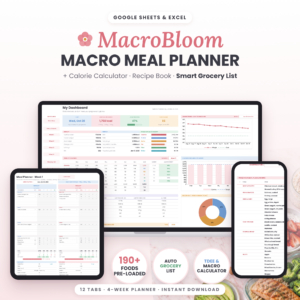
MacroBloom Macro Meal Planner
Price: $27.95 | Best for: custom planners who want live remaining macros
MacroBloom runs in Google Sheets and Excel. Its 4-week planner has 7 days with breakfast, lunch, dinner and snack rows, and shows live totals, targets, remaining macros and percent of target as you pick foods. It includes a 190-food library you can add to, 40 recipe cards with per-serving macros, and seven diet styles including a Custom split. Enter your own targets as a custom style, add your 20 library foods, then build one day using the fill order above.
Two templates: training days and rest days
If you exercise on some days and not others, one fixed plan can feel too lean on heavy days and too full on quiet ones. Many people solve this with two template days. Protein stays the same on both. Carbs move.
- Training day: 160 g protein, 240 g carbs, 55 g fat (about 2,095 calories)
- Rest day: 160 g protein, 160 g carbs, 75 g fat (about 1,955 calories)
Across a week with four training days and three rest days, the average sits very close to the original target. On training days, the extra carbs go around the session: a bigger lunch before an evening workout, or an extra slice of toast after a morning one. On rest days, a few more nuts or a little more cheese make meals feel satisfying without the carbs.
The bonus is simplicity. You do not plan 28 separate days a month. You plan one training template and one rest template, then swap foods within them for variety.
Linking meals to actual workouts makes this even easier, because you can see which days really were training days and adjust if the week did not go as planned.
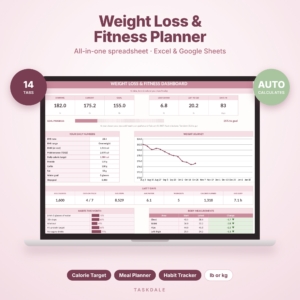
SlimBloom Weight Loss and Fitness Planner
Price: Original price was: $2.99.$1.19Current price is: $1.19. | Best for: people pairing meals with workouts
SlimBloom is a 14-tab Excel spreadsheet where workouts you log flow into your daily calories. Its settings tab gives you a calorie target and macro grams in Balanced, High protein or Lower carb styles, and the meal planner covers seven days and four meals with calories and macros adding up from a food library of 68 starter foods plus room for 112 of your own. Add your library foods first, then plan a training week in the meal planner and check each day’s summary against target.
If you are also planning workouts, habits and meals together, our roundup of fitness planners for women compares a few all-in-one options.
Bend your favorite recipes to fit
A custom plan should keep the dinners you love. Usually it only takes one or two swaps to bring a recipe into line.
Swaps that move protein up
- Stir 200 g of blended cottage cheese into a pasta sauce. It turns creamy and adds around 25 g protein to the pot.
- Use high-protein pasta or half lentil pasta.
- Add a can of white beans to a soup or stew.
Swaps that move fat down
- 5% beef mince instead of 20%. Same chili, about 15 g less fat per portion.
- Half the cheese on top, but a stronger cheese so the flavor stays.
- Spray oil or a measured teaspoon instead of a free pour.
Swaps that move carbs either way
- Half rice, half cauliflower rice on rest days.
- An extra potato or a bread roll on training days.
Once a recipe is adjusted, save it with its new per-serving macros. A recipe library that remembers your versions is worth more than any cookbook.
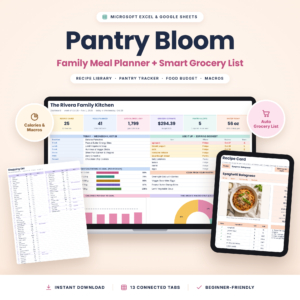
Pantry Bloom Meal Planner Spreadsheet
Price: $18.99 | Best for: cooks saving adjusted family recipes
Pantry Bloom holds up to 200 recipes in its Recipe Library, each with meal type, cuisine and diet tags, and works out calories, protein, carbs, fat and fiber per serving. Pick recipes from dropdowns on the Weekly Meal Plan and it totals each day per person against goals, then builds a grocery list checked against your pantry. It runs in Excel and Google Sheets. Save your adjusted chili and pasta first so they are ready for every future week.
Turn your templates into a four-week rotation
Here is where the work pays off. With a food library, two templates and a handful of adjusted recipes, you can build four weeks and then loop them.
- Pick 8 dinners that fit your templates. Two per week, each appearing twice, with leftovers for lunch.
- Pick 3 breakfasts or first meals and rotate them.
- Pick 4 snacks that each bring at least 20 g protein.
- Lay them out across four weeks, mixing training and rest days.
- Check every day lands within about 10 g of each macro target. Swap foods where they do not.
After four weeks, start again at week one. Change a dinner or two each cycle to keep things fresh. Some people prefer a five-week loop so the same meal never lands on the same date each month, and why a 5-week meal planner beats planning by the month explains that idea well.
There is something freeing about opening the planner on Sunday and finding the week already done. You check it, shop and get on with your weekend.
Keep a gap-filler list for the end of the day
Even a good custom plan ends some days a little short. Keep a short list of quick fixes taped inside a cupboard door:
- Short on protein, room on calories: 150 g Greek yogurt, a protein shake made with water, or a can of tuna.
- Short on protein, no room left: egg whites, a small pot of skyr, or turkey slices.
- Short on carbs: a banana, rice cakes, a bowl of cereal.
- Short on fat: a small handful of nuts or a spoon of peanut butter.
These keep you from staring into the fridge at 9 pm trying to do sums in your head.
Where custom macro plans go off track
Building a library of foods you do not actually eat
If you add salmon because it is “healthy” but only buy it twice a year, it clutters the list. Keep the library honest.
Planning to the exact gram
Within 10 g of protein and 10 g of fat is a win. Chasing zero on every macro is tiring and adds nothing.
Too many templates
Two templates work. Five templates (heavy leg day, light cardio day, rest day, social day, travel day) usually collapse within a month.
Never updating targets
When your weight or training changes, your targets should change too. Update the numbers, then rebalance the templates.
Frequently asked questions
How do I make my own macro meal plan?
Write down your targets, list 20 foods you eat often with their macros, then build each day by adding protein first, fat second and carbs last until you hit the numbers.
Can I build a custom macro plan without weighing food?
You can, but weighing for the first two weeks makes your food library far more accurate. After that, most people can estimate their usual portions.
Should my macros change on rest days?
Many people keep protein the same and move carbs up on training days and down on rest days. Others keep every day identical. Both can work.
How many meals a day should a custom macro plan have?
As many as you naturally eat. Three meals and a snack suits most people, but two big meals or five small ones are fine if the totals are right.
What if my family won’t eat my macro meals?
Cook one base meal for everyone and change your own portion and sides. Your plate fits your targets while the pot stays the same.
Your next step
Open a notebook or a blank sheet and list the 20 foods you ate most in the last fortnight, with your normal portion of each. Look up their macros from the labels. That list is the foundation of your custom plan. When you want live remaining macros and a four-week planner to build on, set up the MacroBloom macro meal planner with your own custom split.