Most bound planners are designed for an imaginary person. She needs exactly one page per day, a weekly spread with seven equal boxes, and a habit tracker in the back she will fill in twice. You are not her. Your Mondays are packed and your Sundays are empty. You need a meal plan but not a fitness log. You budget weekly, not monthly.
Custom planner pages you mix and match solve this. You pick the layouts that suit how you plan, print only those, and put them in a binder or disc planner. When life changes, a new job, a new baby, a new side business, you swap pages instead of buying a new planner.
This guide walks you through choosing a binding, building a small core set, adding modules for your real routines, and printing and punching without fuss. You will also see sample builds for four very different people, and four Taskdale page sets that work well together.
Quick picks
| Product | Best for | Price | Link |
|---|---|---|---|
| Mix & Match Planner Library | A big library of undated pages in four sizes | $5.49 | View |
| The Everyday Planner Kit | Disc planners and dated 2026 to 2028 calendars | $14.99 | View |
| Greyfinch Undated Budget Binder | Adding a full money section | $12.99 | View |
| EverDates Important Dates Planner | Birthdays and anniversaries that carry over every year | $3.49 | View |
Why a fixed planner stops fitting by March
January is kind to bound planners. Everything is fresh, and you fill in every box. Then February brings a busy patch at work, and the daily pages go blank for nine days. By March you feel guilty every time you open it, so you stop opening it.
The problem is rarely you. It is the layout. A one-page-per-day planner suits someone with many appointments. A person with three big tasks a day and lots of quiet time would be better served by a weekly page with a short daily list. When the layout does not match the life, the planner loses.
Mixing and matching lets you fix that in minutes. Swap the daily pages for a weekly grid, add a time-blocking page for your two busiest days, and leave the rest of the week loose. Same binder. Better fit.
Choose your binding before your pages
The binding decides your page size, so settle it first. Here are the common choices and what they suit.
| Binding | Common page size | Good for |
|---|---|---|
| Full-size ring binder | US Letter or A4 | Home command centers, budget binders, teachers |
| A5 ring planner | A5 | Carrying in a handbag or work bag |
| Classic disc planner | 7 x 9.25 inches | People who rearrange pages often |
| Half Letter binder | 5.5 x 8.5 inches | US users wanting a compact planner from Letter paper |
| Tablet | Any, as a PDF | Stylus users who want no paper at all |
A quick test: will this planner leave the house? If yes, go A5 or Half Letter. If it lives on the kitchen counter, full size gives you room to write and is easier to read at a glance.
Disc planners deserve a mention because they suit mixing and matching so well. Pages pull out and push back in without opening rings, so moving the meal plan from the back to the front takes two seconds. For a detailed walkthrough of sizes and punching, our guide on printing and punching planner inserts at home covers the tools you need.
Build a small core set first
Start with five page types and nothing else. You can always add later. Most people need these:
- Year at a glance. One page for the shape of the year.
- Monthly calendar. For appointments and deadlines.
- Weekly planner. The page you will use most.
- To-do or brain dump page. For everything that has no date yet.
- Notes. Lined or dot grid, a handful of sheets.
Use only those for two weeks. You will quickly notice what is missing. Maybe you keep writing meals on the weekly page and running out of room. That is your signal to add a meal planner. Maybe you never touch the to-do page because the weekly layout already has a task list. Take it out.
This slow start feels less exciting than printing 60 pages on day one. But it builds a planner from what you actually do, not what you hope to do. That is the whole point of going custom.
Add modules for the life you really have
Once the core set works, add modules: small groups of pages for one area of life. Money, meals, health, home, work, study. Pick one or two at a time.
Sample build: the new parent
Weekly planner, a daily routine tracker for feeds and naps, a meal planner and grocery list, health appointments, and important contacts for the pediatrician and the babysitter. No goal pages for now. That season will come back.
Sample build: the side hustler
Weekly planner, a project planner for each product launch, an expense tracker, a priority matrix and meeting notes. Time-blocking pages for the two evenings a week given to the business.
Sample build: the college student
Weekly schedule for lectures, Cornell notes, a monthly calendar with exam dates, a reading log and a simple budget page for the semester.
Sample build: the retiree
Monthly calendar with large boxes, a medication log, health appointments, a birthday list for grandchildren, a gratitude journal and a travel planner for the spring trip.
Four people, four completely different planners. All could come from the same page library.
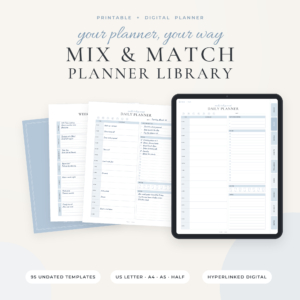
Mix and Match Planner Library
Price: $5.49 | Best for: binder fans building their own system
A printable planner bundle of 95 undated templates across plan, goals, habits, wellness, home, money, mindset and notes, in US Letter, A4, A5 and Half Letter. Each page has a short code at the bottom, like PL10 for the Daily Planner, and page numbers match across all four sizes, so reprinting a favorite is quick. It also includes a hyperlinked digital version with 12 monthly calendars. Print the five core pages first, use them for two weeks, then add one module.
Mixing dated calendars with undated pages
Undated pages are flexible, but writing the dates on every monthly calendar gets old fast. Many people like a hybrid: dated monthly calendars so the grid is ready, with undated weekly and tracker pages they can start on any day.
This mix also makes the year easier to see. You slot in the dated months at the front of the binder, then file the undated weekly pages behind each month as you use them.
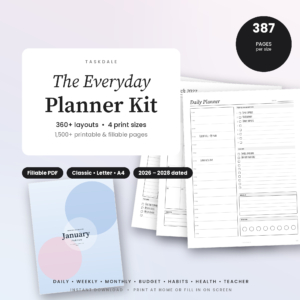
The Everyday Planner Kit
Price: $14.99 | Best for: disc planner users and teachers
A set of 387 printable and fillable planner pages in four files: Classic 7 x 9.25 inch disc inserts, US Letter, A4 and Classic-on-Letter with light cut marks. It includes dated calendars for every month from January 2026 to December 2028 in Sunday and Monday start, thirteen weekly styles, daily pages, and trackers for money, habits, meals, health, reading and the classroom. The pages are black and white with light gray fills for clean home printing. Print the dated months for the next quarter and one weekly style to try first.
Thirteen weekly styles sounds like a lot, and it is. That is the fun of it. Try one style for a month, then another. Most people settle on a favorite by the third swap and keep it for years.
A money section that slots in
Budget pages are the most common module people add, and the one most often done badly. A single monthly budget page is not enough on its own. You also need somewhere to track bills, list debts and log savings, or the budget never connects to real life.
A dedicated budget insert set, in the same size as your main planner, gives you a whole money tab without crowding the rest. You keep the money pages in one section with a divider, and pull them out for your weekly money check.
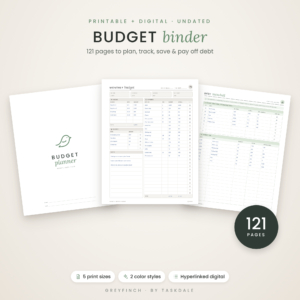
Greyfinch Undated Budget Binder
Price: $12.99 | Best for: households adding a money section
An undated budget binder with 121 pages across nine tabbed sections, covering paycheck planning, bills, spending, debt payoff, savings and reviews. It comes in a Classic monochrome style and a soft Sage style, in five print sizes including Letter, A4, A5 and Happy Planner, plus a tabbed digital edition. Amount fields carry no currency symbol. Begin with the Start Here page and the Money Snapshot, which take about 15 minutes.
Match the print size to your main binder and the money pages sit beside your weekly pages as if they had always been there. That small sense of everything belonging together is one of the quiet pleasures of a custom planner.
Small inserts that earn their place
Some of the most useful planner pages are tiny ones you set up once and keep for years. A birthday list. A key contacts page. A list of renewal dates for insurance and passports. These do not need to be dated, and they should not be thrown out each January.
Keep them in a pocket or at the very front of the binder. When you move to a new year, you lift them out and drop them straight into the new set.
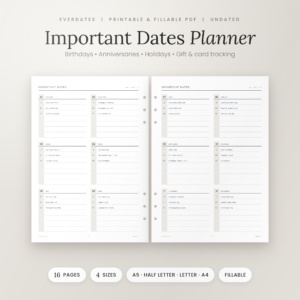
EverDates Important Dates Planner
Price: $3.49 | Best for: family organizers who send the cards
A 16-page undated set of inserts for birthdays, anniversaries, holidays and other important dates, with columns for birth years, wedding years, gift ideas and whether the card and gift are sorted. It comes in A5, Half Letter, US Letter and A4, with double-sided, single-sided and cut-in-half printing options, and the pages are fillable. Fill in the half-year pages once, then carry them into every new planner.
Printing, punching and swapping pages
A few habits make a mix-and-match planner much easier to live with.
- Print a test page at 100% or Actual Size. “Fit to page” shrinks the layout slightly and the holes can land in the wrong spot.
- Use slightly heavier paper for pages you handle daily. Around 24 to 32 lb (90 to 120 gsm) stops tearing at the holes.
- Print double-sided only after a test. Check that the back lines up with the front before printing a full stack.
- Keep a master folder on your computer with your favorite pages renamed clearly, like “weekly-grid-A5.pdf”. Reprinting next month takes a minute.
- Write the page code in a note if your set uses them. You will remember PL10 faster than page 47.
- Use dividers with tabs for each module. Five tabs are plenty: Calendar, Week, Money, Home, Notes.
If you have never built a binder planner, our guide on how to build your own planner from printable pages goes step by step from blank binder to finished setup.
The quarterly page check
Every three months, take 20 minutes and go through each section. For every page type, ask one question: did I use this in the last month?
- Used often: keep it, and print more.
- Used sometimes: keep it, but maybe move it to the back.
- Not used: take it out. No guilt. It is just paper.
Then ask what you wished you had. Maybe you kept a packing list on a sticky note for a weekend away. Add a travel page. Maybe you started a reading challenge. Add a reading log. The planner grows and shrinks with you, which is the opposite of how a bound planner works.
One parent described the feeling well after her first quarterly check: the planner finally felt like hers. Not a product she was failing to use, but a tool shaped around her actual week.
Mistakes that make custom planners messy
- Printing everything on day one. A 100-page binder is heavy, slow to flip and mostly empty. Start with five page types.
- Mixing sizes. A Letter page and an A4 page look almost the same until you punch them. Pick one size and stick to it.
- Too many trackers. Five habit trackers at once is a recipe for blank grids. Track one or two habits at a time.
- No dividers. Without tabs, you spend more time hunting than planning.
- Copying someone else’s setup. A beautiful layout online was built for that person’s life. Borrow ideas, not the whole thing.
Frequently asked questions
How do I make my own planner with printable pages?
Choose a binding and size first, then print five core pages: year view, monthly calendar, weekly planner, to-do list and notes. Use them for two weeks before adding extra modules such as meals or money.
What size planner pages should I print?
Letter or A4 for a home binder, A5 or Half Letter for a planner you carry, and Classic 7 x 9.25 inches for a disc planner. Always print at 100% or Actual Size.
Can I mix dated and undated planner pages?
Yes. Many people use dated monthly calendars with undated weekly and tracker pages, filing weekly pages behind each month as they go.
Are undated planner pages reusable?
Printable undated pages can be printed again whenever you need fresh copies for your own use, so you never run out mid-year.
How often should I change my planner pages?
Check them every three months. Keep what you use, remove what you skip, and add pages for anything new in your life.
Your next step
Decide tonight whether your planner stays home or travels, and pick a size to match. Then print just five core pages from the Mix and Match Planner Library, put them in a binder, and use them for two weeks before adding anything else.