An invoice can be perfect and still sit unpaid because the email around it was vague. “Invoice attached” with no amount, no date and a subject line that looks like every other email in the inbox. The fix is simple: a clear subject, three or four short lines, a PDF attached, and a polite follow-up plan.
This guide shows you how to send invoice emails that get opened and paid. It is for freelancers, consultants, trades and small service businesses who bill by email. You will get a subject line formula, ready-to-adapt wordings for first invoices, retainers, deposits and final bills, a set of reminder emails from gentle to firm, and a routine for tracking who has paid so you know which email to send next.
Quick picks: invoices and trackers that back up your emails
| Product | Best for | Price | Link |
|---|---|---|---|
| Ledgerline Invoice, Quote & Receipt Template Kit | Clean one-page PDF invoices to attach, with an Excel log | Original price was: $3.00.$1.50Current price is: $1.50. | View |
| PaidPath Client & Invoice Hub | Knowing exactly who is overdue and who is due in the next 14 days | $9.49 | View |
| Client Billing Hub Invoice Tracker Spreadsheet | Client statements and receipts for clients with several invoices | $6.49 | View |
| Tallyhive Small Business Spreadsheet | Product sellers emailing invoices from orders | $35.99 | View |
Why invoice emails get ignored
Clients rarely ignore an invoice on purpose. More often, something about the email lets it slide.
- The subject line says nothing. “Invoice” from a name they half know gets skipped on a busy Monday.
- The amount and due date are hidden. They have to open the attachment to find out what you want.
- It went to the wrong person. The manager who hired you does not pay invoices. Accounts does.
- It arrived late. An invoice sent three weeks after the job feels less urgent to everyone, including you.
Every one of those is fixable before you press send.
Subject lines that get opened
A good invoice subject line tells the reader four things before they open it: that it is an invoice, from whom, for how much, and by when. Use this formula:
Invoice [number] from [your business]: [amount] due [date]
Some examples you can adapt:
- Invoice 0214 from Bright Pane Windows: $180 due 21 Nov
- Invoice 0088 from Lena Cho Design, October retainer: $1,200 due 15 Nov
- Deposit invoice 0302, kitchen tiling: $450 to book your start date
- Final invoice 0145, website build: $2,100 due 30 Nov
- Invoice 0061 for Daniel’s tutoring, October: $180 due 14 Nov
Short, specific and searchable. When the accounts person looks for your invoice next week, they will find it by typing the number or your name.
Send it to the person who pays
Ask one question at the start of every new job: “Who should I send invoices to?” In a small business it may be the owner. In a larger one, it is often a shared accounts address. Send the invoice there, and copy the person who hired you so they know it has gone out.
For private customers, check the email address while you are with them. A typo in the address is the most avoidable late payment there is.
What goes in the body of the email
Keep the body short. The invoice holds the detail. The email needs only five things:
- A greeting with their name.
- One line saying what the invoice is for.
- The amount and the due date, written out.
- How to pay, in one line, or a pointer to the payment details on the invoice.
- A short thank-you and your name.
Here is a standard version:
“Hi Sarah, please find attached invoice 0214 for the window cleaning on 12 November. The total is $180, due by 21 November. Bank details are on the invoice, or you can pay by card using the link below. Thanks again, Marcus”
Under 60 words. Everything the client needs, nothing they have to work out. If you want help choosing the due date itself, our guide to invoice payment terms that get you paid sooner covers it.
Wordings for different situations
The first invoice to a new client
“Hi James, thank you for choosing us for the garden clearance. Attached is invoice 0117 for $640, due by 28 November. Payment details are at the bottom of the invoice. If your accounts team needs anything else from us, such as a supplier form, just let me know.”
Offering help with supplier forms up front saves a week of back and forth with larger companies.
A monthly retainer
“Hi Priya, here is invoice 0089 for the November social media retainer: $950, due 15 November as usual. Thanks for another good month.”
Same day, same format, every month. Regular clients start paying on autopilot.
A deposit request
“Hi Tom, as agreed, attached is deposit invoice 0302 for $450, which is 30% of the tiling quote. Once it is paid, I will confirm your start date of 2 December.”
Linking payment to a clear next step gives the client a reason to pay today.
A final invoice with a deposit already paid
“Hi Tom, the bathroom is finished, and thank you for being so easy to work with. Attached is final invoice 0318. The job total was $1,500, less your $450 deposit, so the balance is $1,050, due by 16 December.”
Spelling out the deposit avoids the “haven’t I already paid?” reply.
An invoice after a part payment
“Hi Ana, thanks for the $300 received on 3 November. Attached is an updated invoice 0255 showing the remaining $200, due by 20 November.”
Attach a PDF, not a link
Always attach a PDF. It opens on any phone, prints cleanly, cannot be edited, and sits in the client’s inbox forever. Links to documents can expire, ask for logins or show the client more than you meant. Name the file clearly: “Invoice 0214 Bright Pane Windows.pdf” is far better than “scan001.pdf”.
A clean, one-page PDF also signals that you are organized. That matters more than people admit. Clients pay professionals promptly.
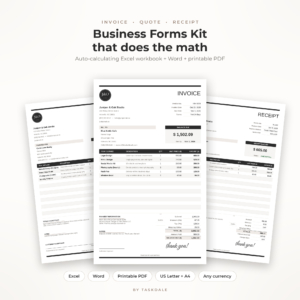
Ledgerline Invoice Quote and Receipt Kit
Price: Original price was: $3.00.$1.50Current price is: $1.50. | Best for: Freelancers who email PDF invoices
An Excel workbook where each invoice, quote and receipt is set to fit one page, ready to print or save as a PDF to email. Totals, discount, tax and balance due calculate as you type, and the Balance Due box reads PAID IN FULL once settled. An invoice log tracks up to 300 invoices with late ones flagged. It includes Word templates and printable PDFs too. Set your payment wording on the Settings sheet once.
Once your payment wording lives in Settings, every PDF you attach carries the same clear instructions, so your emails can stay short.
When to send invoice emails
The best time to send an invoice is as soon as the work is done. The job is fresh, the client is happy, and the value is obvious. A painter who emails the invoice the evening the last coat dries tends to get paid faster than one who waits for month end.
For retainers and regular clients, pick a fixed date and stick to it: the 1st, or the last working day of the month. Clients plan around it.
Try to send during working hours on a weekday, when the person who pays is at their desk. An invoice that lands at 11pm on Saturday is buried under the weekend’s emails by Monday morning.
Reminder emails, from gentle to firm
Most late payers just need a nudge. Keep reminders short, attach the invoice again every time, and stay friendly until there is a reason not to.
3 days before the due date
Subject: Reminder: invoice 0214, $180 due Friday. “Hi Sarah, just a quick heads-up that invoice 0214 is due on Friday 21 November. Copy attached for convenience. Thanks!”
1 to 3 days after
Subject: Invoice 0214 now due. “Hi Sarah, I have not seen payment for invoice 0214 ($180, due 21 November) yet. Could you let me know when it is scheduled? Copy attached.”
About 10 days after
Subject: Overdue: invoice 0214, $180. “Hi Sarah, invoice 0214 is now 10 days overdue. Please arrange payment by 5 December, or reply if there is an issue I can help with.”
Around 30 days after
Subject: Second notice: invoice 0214 overdue 30 days. “Hi Sarah, invoice 0214 for $180 remains unpaid. I will need to pause further bookings until it is settled. Please pay by 24 December or call me to discuss.”
After that, a phone call usually works better than another email. Hearing a real voice changes things.
Know which email to send next
A reminder plan only works if you know where each invoice stands. Flicking through your sent folder is how a $900 invoice gets forgotten for two months. A tracker that sorts unpaid invoices by how late they are tells you, in one glance, who gets the gentle email and who gets the phone call.

PaidPath Client and Invoice Hub
Price: $9.49 | Best for: Anyone chasing more than a few clients
An Excel workbook linking clients, invoices, payments and expenses. Overdue invoices rise to the top of the dashboard, sorted by how late they are, and a second list shows everything due in the next 14 days, which is exactly who gets a pre-due reminder. Statuses change on their own as payments are logged. Add your open invoices first, then check the two lists each Monday.
There is a real lift in opening a dashboard and seeing the overdue list is empty. It does not happen every week, but it happens more once you have a system.
Statements for clients with several invoices
Some clients collect invoices like loose change: three small ones, all a bit late. Chasing each separately is tiring for both of you. A single statement email works better.
Subject: Account statement, Greenleaf Cafe, to 30 November. “Hi Ben, attached is a statement showing three open invoices totalling $735. The oldest is 41 days overdue. Could you arrange payment of the full balance by 10 December?”
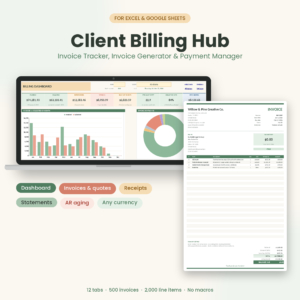
Client Billing Hub Invoice Tracker Spreadsheet
Price: $6.49 | Best for: Businesses with repeat clients
A workbook for Excel and Google Sheets that builds a client statement for any date range, showing all invoices or unpaid only, with a five-bucket aging strip. It also prints a numbered receipt for every payment, which makes a nice thank-you email attachment. Pick a client and a date range on the Statement tab to create your first one.
Sending a receipt when money arrives is a small courtesy that clients remember. It closes the loop, and it often leads to the next booking.
Getting the tone right
Friendly, clear and never apologetic. You did the work; asking to be paid is normal. Avoid phrases like “sorry to bother you” or “whenever you get a chance”. They tell the client it can wait.
Equally, skip anger and capital letters, even on the fourth reminder. A calm, factual email is easier to forward to a boss, and it keeps the relationship intact for future work. If you need to understand which document to send at each stage of a job, see our guide on quote vs estimate vs invoice.
Mistakes that slow payment
- No amount in the subject or body. Make the client open the PDF and you add a step.
- Several invoices in one email with no summary. Add a one-line total.
- Forgetting the attachment. Attach the PDF before you write the body.
- Different numbers on email and invoice. Copy the amount from the invoice, never retype it.
- No follow-up plan. Decide your reminder dates when you send, not when you are already annoyed.
Frequently asked questions
What should I write in an invoice email?
A greeting, one line about what the invoice is for, the amount and due date, how to pay, and a short thank-you. Attach the invoice as a PDF and keep the email under about 60 words.
What is a good subject line for an invoice email?
Include the word invoice, the number, your business name, the amount and the due date, for example: “Invoice 0214 from Bright Pane Windows: $180 due 21 Nov”.
How do I politely remind a client to pay?
Send a short note a few days before the due date, then a friendly follow-up a day or two after. Restate the invoice number, amount and date, attach the invoice again and ask when payment is scheduled.
Should I send an invoice as a PDF or Word file?
PDF. It looks the same on every device, cannot be edited by accident and prints cleanly.
How long should I wait before sending a reminder?
A gentle reminder can go a few days before the due date. If it is still unpaid, follow up within one to three days after it falls due, then again at about 10 days.
Should I send a receipt after payment?
Yes, if you can. A short thank-you email with a receipt confirms the money arrived and leaves a good last impression.
Your next step
Pick your three most recent unpaid invoices and rewrite their emails using the subject line formula above: number, business, amount, due date. Then add every open invoice to a tracker such as the PaidPath Client and Invoice Hub, so next Monday you know exactly which reminder each client gets.