Homeschooling asks you to do two things with one planner. Look forward and plan the lessons. Look back and prove they happened. Most families are good at the first and scramble at the second, usually in late May, with a shoebox of worksheets and a calendar full of half-crossed-out days.
This guide shows you how to set up a homeschool planner that handles both: a weekly lesson plan for each child and a running record of days, hours, grades and books that is ready whenever an evaluator, umbrella school or relative asks. You will get a setup checklist, a Friday routine that takes 15 minutes, and four planners that match different families.
Quick picks: homeschool planners that keep records
| Product | Best for | Price | Link |
|---|---|---|---|
| Brightpath Homeschool Planner Spreadsheet | Preschool through high school, up to 6 kids | $6.99 | View |
| Little Oak Homeschool Command Center | Families who teach some subjects together | $8.99 | View |
| Hearthside Homeschool Command Center | Report cards and a high school transcript | $8.99 | View |
| Lesson Lane Digital Teacher and Homeschool Planner | Parents who plan on a tablet | $9.99 | View |
Lessons and records are two different jobs
A lesson plan is a promise to yourself. “Monday: Chapter 4 of the history spine, map work, read-aloud.” It changes all the time. Someone gets sick, a field trip comes up, a math lesson takes three days instead of one.
A record is what actually happened. “Monday: history, 45 minutes, Chapter 4 done. Math, 30 minutes, lesson 52 started.” It never changes once written.
The trouble starts when families keep only the plan and assume it doubles as the record. Then June arrives, and nobody can say whether week 14 really happened or just got planned. The fix is simple. Plan in one place. Mark each lesson done, skipped or moved. Let the done lessons become your record. That one habit turns a planner into proof.
What records are worth keeping
Requirements differ a lot by state and country, and some families report to an umbrella school or evaluator with their own checklist. Look up what your state or provider asks for before you start. Then keep at least the basics below, because they cover most situations and they are useful for your own peace of mind.
- Attendance: a dated list of school days, with absences and half days marked.
- Hours: minutes per subject, especially if your rules count core hours.
- Lesson log: what was covered, by subject and date.
- Grades or progress notes: scores for older kids, written notes for younger ones.
- Reading list: titles and authors. It adds up fast and looks great in a portfolio.
- Work samples: two or three pieces per subject per term.
- Field trips and activities: co-op classes, museum days, sports.
- Curriculum and spending: what you used and what it cost.
Eight lists sounds heavy. In a linked spreadsheet most of them fill themselves from the lesson log. A family logging three kids for 180 days can end up with well over 1,000 lesson rows by June. Nobody wants to total those by hand. A workbook does it in the background, so the numbers are ready the day you need them.
Set up your planner in one afternoon
Give yourself two to three hours on a quiet Saturday. Here is the order that saves the most rework.
- School year settings. First day, last day, breaks, and how many days or hours you need.
- Students. Name, grade, and the subjects each child takes.
- Grading scale. Decide whether 90 is an A in your home, and whether tests count more than homework.
- Curriculum list. Each book or course, with the number of lessons. Math with 160 lessons over 36 weeks means about four and a half a week.
- Week one. Plan just the first week in detail. The rest can wait.
A family with three kids in grades 2, 5 and 8 can get through all five steps in one afternoon with a linked workbook. Doing it by hand on paper takes about twice as long, mostly because of the counting.
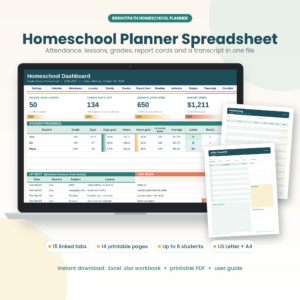
Brightpath Homeschool Planner Spreadsheet
Price: $6.99 | Best for: families with kids from preschool to high school
One workbook for up to 6 students and 12 subjects, with a year calendar, attendance codes, a lesson planner for 3,000 lessons, a weekly view per child, a gradebook, report cards and a high school transcript with credits and GPA. It also includes 14 printable pages. Fill in the Settings tab with your dates, required days and hours, and grading scale before you log a single lesson.
Log once, count it for every child
Many homeschool families teach history, science, art or read-aloud to everyone at the same table. Logging that lesson three times, once per child, is exactly the kind of chore that makes record keeping slide by October.
Look for a planner that lets you log a family lesson once and counts it for each child. On a typical Tuesday, that might mean one row for “Family science: plant cells, 40 minutes” and three separate rows for each child’s math. Four rows instead of six. Across a 180-day year, that saves hundreds of entries.
The same goes for attendance. If most days are school days, a planner that counts each day as present by default, so you only mark sick days and days off, saves you typing 180 Ps.
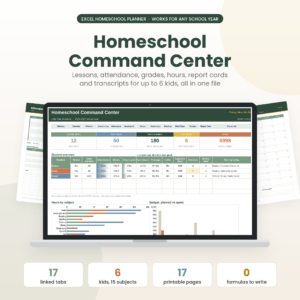
Little Oak Homeschool Command Center
Price: $8.99 | Best for: families mixing group and one-on-one subjects
An Excel workbook with 17 linked tabs, where a lesson logged for All Students counts for every child. It has a dashboard with days, hours and grades per child, a year calendar, a lesson log for 3,000 lessons, a weekly planner, attendance with an auto-present option, reading and field trip logs, spending, report cards and a transcript, plus 17 printable pages in US Letter and A4. Set your required days or hours first, then log your first family lesson.
If you are teaching several ages at once, this guide on how to set up a homeschool planner for multiple kids covers scheduling and shared subjects in more detail.
A Friday routine that keeps records current
Records go wrong when they pile up. Fifteen minutes every Friday afternoon fixes that for good.
- Mark every lesson from the week as done, skipped or moved. Move skipped ones to next week.
- Check attendance. Add any sick day or half day you forgot.
- Enter scores from tests or graded work.
- Add any books finished this week to the reading log.
- Drop one work sample per child into a labeled folder, paper or digital.
Then close the laptop and go do something fun. By the end of a term you will have 12 neat weeks of records, and the end-of-year report becomes a print job instead of a project. That feeling in May, when someone asks for records and you just hit print, is worth every Friday.
High school years: grades, credits and the transcript
Records matter most once a child reaches ninth grade. Colleges, employers and some programs will want a transcript with course titles, credits and a GPA. Building that from four years of memory is hard. Building it from a running log is easy.
Keep a course list for each high schooler with the title, the year taken, the level (standard, honors, dual enrollment) and the final grade. One credit usually means a full-year course; a half credit means a semester. Write a short course description as you go, not in senior year.
A quick worked example. Four courses with an A, two with a B and one with a C, all one credit, gives (4 x 4 + 2 x 3 + 1 x 2) / 7 = 3.43 unweighted. A planner that does this per term saves a lot of scribbled math.
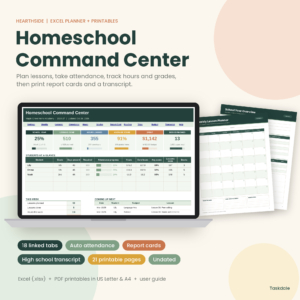
Hearthside Homeschool Command Center
Price: $8.99 | Best for: parents of middle and high schoolers
An 18-tab Excel workbook for one to six children, with a lesson log and weekly planner, automatic attendance, hours by subject against your required hours, weighted grading, report cards per term and a high school transcript with credits and weighted and unweighted GPA. You also get 21 printable pages in US Letter and A4 and an illustrated guide. Enter each high school course once on the transcript tab as soon as it starts.
For a step-by-step on the final document, see how to make a homeschool transcript for high school.
Prefer a pen? A tablet planner with a spreadsheet behind it
Some parents just think better with a stylus. They want to sketch the week, jot notes about who struggled with long division and add stickers for field trips. Spreadsheets feel like work to them, and that is fine.
The best middle ground is a digital planner for daily planning and notes, with a small spreadsheet behind it for the numbers. You plan on the tablet, then spend five minutes on Friday entering grades into the sheet. A parent teaching a first grader and a fourth grader might keep a weekly checklist page per child on the iPad, tick boxes during the day, and copy the totals across once a week.
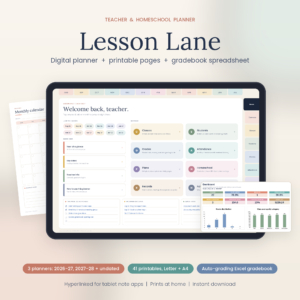
Lesson Lane Digital Teacher Planner
Price: $9.99 | Best for: homeschool parents who plan on an iPad
Hyperlinked planners for 2026-2027, 2027-2028 and an undated year, with a homeschool section for up to four learners: student profiles, a curriculum planner, weekly subject checklists, a 180-day tracker, an hours log, a reading log and term progress reports. It also includes 41 printable templates and a gradebook spreadsheet. Import the planner into GoodNotes or Notability and fill in the student profiles first.
Turning a year of records into a portfolio
If you keep records weekly, the end-of-year portfolio is mostly a matter of printing and sorting. Set aside one evening in late May or June and work through it in this order.
- Cover page: child’s name, grade, school year dates and your homeschool name if you use one.
- Attendance summary: total days, or total hours by subject. One page.
- Subjects and curriculum: a short list of what each subject used, such as the math program, the history spine and the science kits.
- Report card or progress notes: grades for older kids, a few lines per subject for younger ones.
- Reading list: sorted by month or subject.
- Work samples: one from the start of the year and one from the end in each core subject, so growth is easy to see.
- Activities: field trips, co-op classes, sports, music lessons, volunteer hours.
A family that does the Friday routine can usually finish this in two or three hours. The best part is the before-and-after samples. Seeing a September spelling page next to a May one is a quiet proud moment, for the kid and for you.
Keep a copy of each year’s portfolio, even if nobody asks for it. High school transcripts, a move to a new state or a return to school all go smoother with a paper trail.
Who a spreadsheet planner may not suit
Unschooling families and those with very young children often find a full lesson log too rigid. If most learning happens through play, reading together and daily life, a simple daily journal of “what we did today” may be the better record. One line a day, a few photos a week.
Parents who rarely sit at a computer may also struggle to keep a spreadsheet current. In that case a printable or tablet planner, plus a once-a-month session to add up days and hours, is more realistic than a workbook you never open.
Mistakes that leave gaps in your records
Recording only what went to plan
Field trips, nature walks, baking with fractions and library days count as learning. Log them, with minutes and a subject.
Waiting until the end of the term
Ten weeks of catch-up is miserable and full of guesses. Friday is the deadline, every week.
Keeping work samples with no dates
Write the date and the subject on every saved page. Undated samples are hard to use in a portfolio.
Changing systems mid-year
If the planner is annoying, fix one thing about it. Switching tools in February splits your records in two places.
Frequently asked questions
What records should a homeschool parent keep?
Attendance, hours or days, a lesson log, grades or progress notes, a reading list and work samples. Check your state or umbrella school for any extra items.
Is a spreadsheet or a paper homeschool planner better?
Spreadsheets win for counting days, hours and grades. Paper is great for daily planning. Many families combine them; this comparison of a homeschool planner spreadsheet vs printable vs app walks through the trade-offs.
How do I track homeschool hours?
Log minutes per subject with each lesson, then let a spreadsheet add them up. Five minutes a day is easier than estimating at the end of the year.
Can one homeschool planner handle several children?
Yes. Pick one that lets you add each child and log shared lessons once for everyone, so family subjects do not mean triple entry.
When should I start a high school transcript?
In ninth grade, as soon as the first course begins. Add each course and grade as it finishes.
Your next step
This weekend, write down your school dates and what your state or provider asks you to record. Then set up just the settings and week one. If you want the days, hours and grades counted for you from the start, open the Brightpath Homeschool Planner Spreadsheet and fill in its Settings tab tonight.