

The Hearthside Homeschool Command Center is a homeschool planner spreadsheet that keeps your whole year in one place. You plan lessons, take attendance, count hours, record grades, track books, field trips and spending, then print report cards and a high school transcript. One Excel file, 18 linked tabs, no macros. It also comes with 21 printable pages for the days you want paper.
Most planners give you blank tables. This one does the math. Mark a lesson Done and hours, the weekly view, curriculum progress and the Dashboard update.
What this homeschool planner spreadsheet does
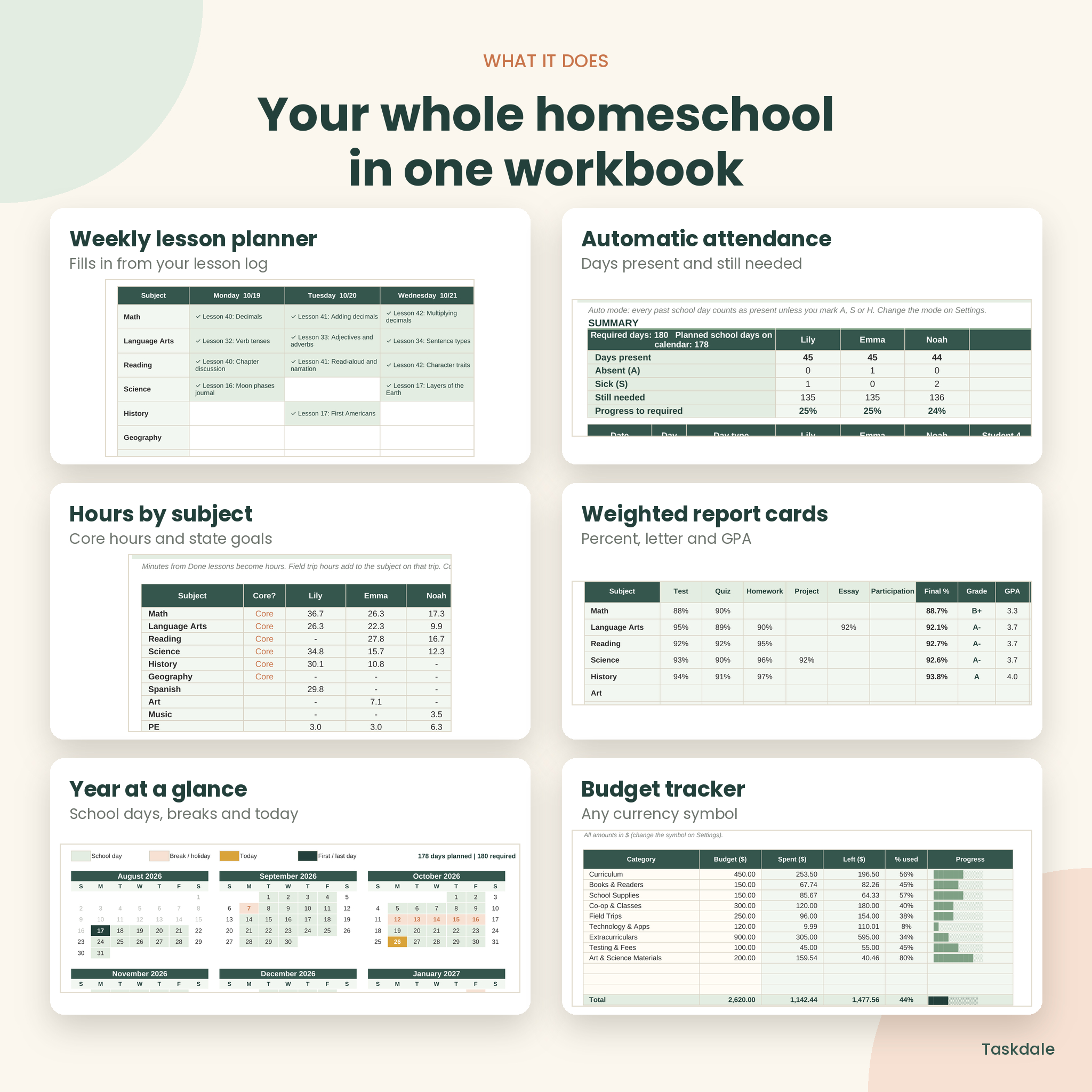
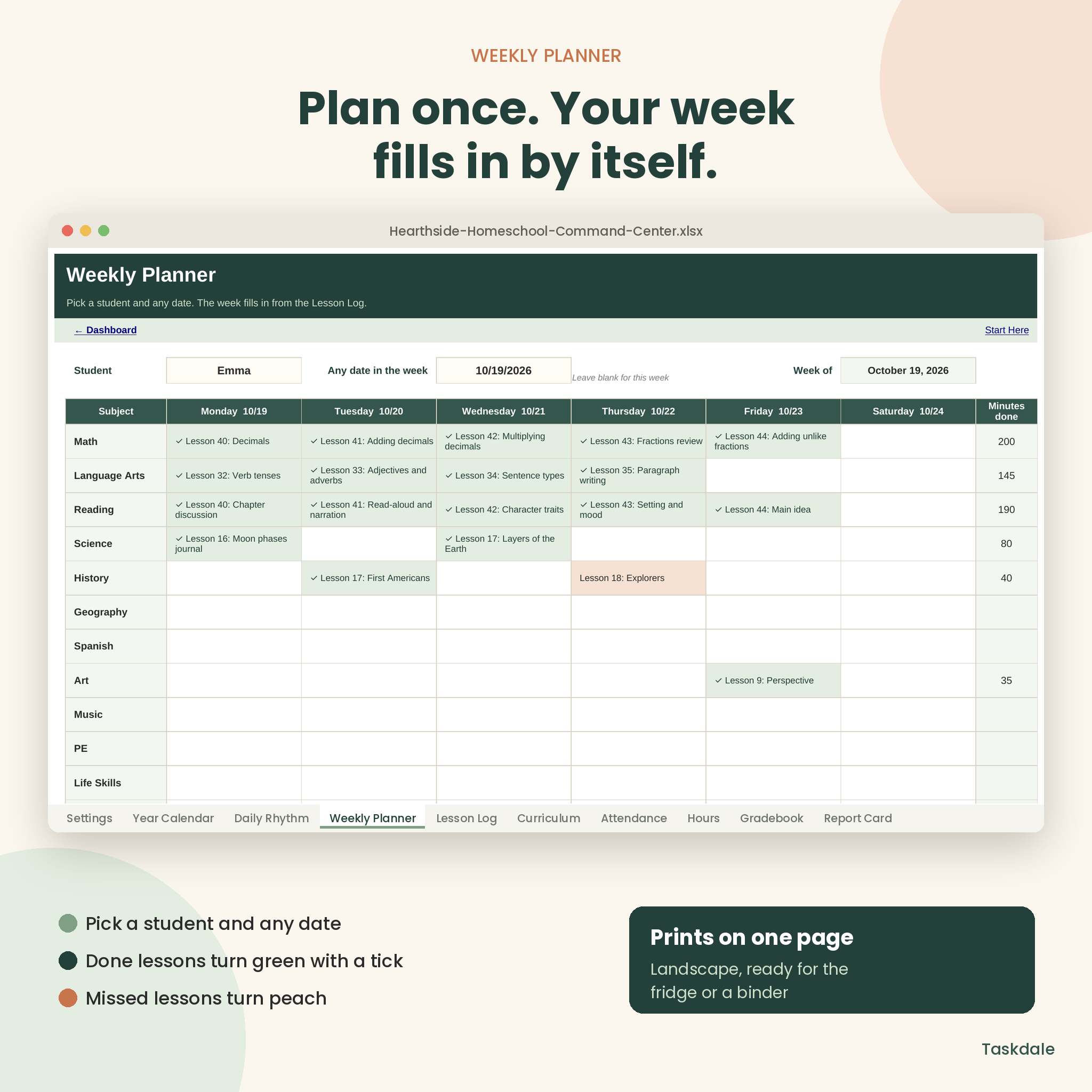
- Plans your week for you. Add lessons to the Lesson Log and the Weekly Planner fills in for any student and any week. Done lessons turn green with a tick. Missed ones turn peach.
- Takes attendance automatically. In Auto mode every school day up to today counts as present, so you only mark absences, sick days or days off. Breaks and weekends come off by themselves.
- Counts hours. Minutes from Done lessons and field trips become hours per subject, with core and non-core totals measured against your state’s required hours.
- Grades fairly. Set weights for tests, quizzes, homework, projects, essays and participation, or switch to total points. Percent, letter grade and term fill in for every score.
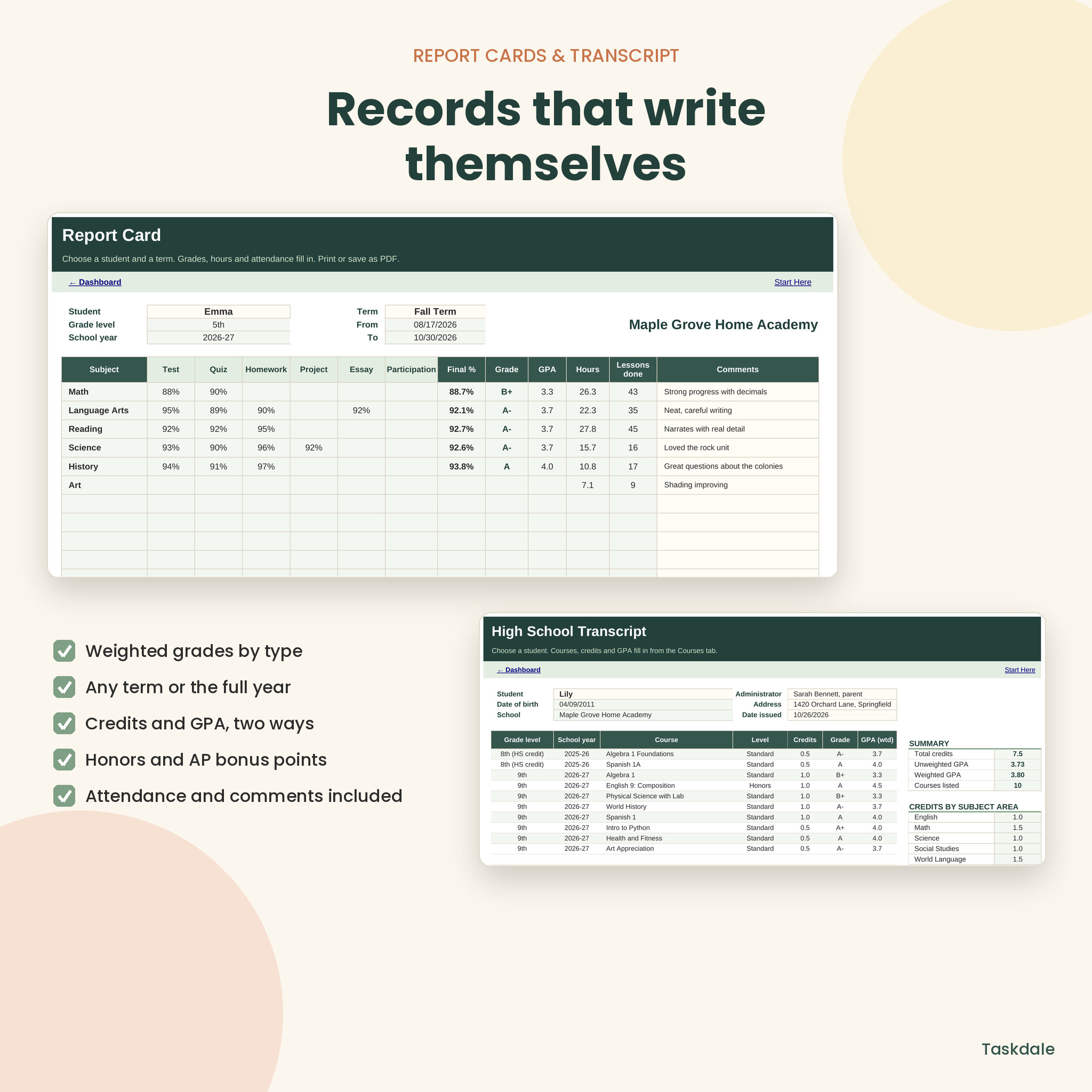
- Writes report cards. Pick a student and a term and get weighted grades per subject, GPA points, hours, lessons done, attendance and room for comments.
- Builds a high school transcript. Enter each course once and get credits, unweighted and weighted GPA (Honors and AP bonus points) and credits by subject area.
Who it is for
This planner is for homeschool parents teaching one to six children, from Pre-K through 12th grade. It suits families in states that ask for attendance days, hours or a portfolio, parents of high schoolers who need a transcript, and co-op leaders or tutors who want a tidy record of lessons and grades. No spreadsheet skills needed. Cream boxes are for typing, everything else fills in, and formulas are locked so nothing breaks.
What is included
- Hearthside-Homeschool-Command-Center.xlsx: the 18-tab Excel workbook, clean and ready for your family
- Printable pages, US Letter (PDF): 21 undated pages with a clickable contents page
- Printable pages, A4 (PDF): the same 21 pages sized for A4
- User guide (DOCX): illustrated setup steps, a walkthrough of every tab, tips, troubleshooting and FAQ
The 18 workbook tabs
Start Here, Dashboard, Settings, Year Calendar, Daily Rhythm, Weekly Planner, Lesson Log, Curriculum, Attendance, Hours, Gradebook, Report Card, Reading Log, Field Trips, Budget, Expenses, Courses and Transcript.
The 21 printable pages
Cover, Contents, Year at a Glance, School Year Overview, Student Profile, Yearly Goals by Subject, Curriculum Planner, Monthly Calendar, Weekly Lesson Planner, Daily Plan, Monthly Attendance, Hours Log, Grade Tracker, Reading Log, Field Trip Journal, Expense Tracker, Report Card, High School Transcript, Year-End Review and Portfolio checklist, dot grid Notes, and Terms of Use.
Features you will use every week
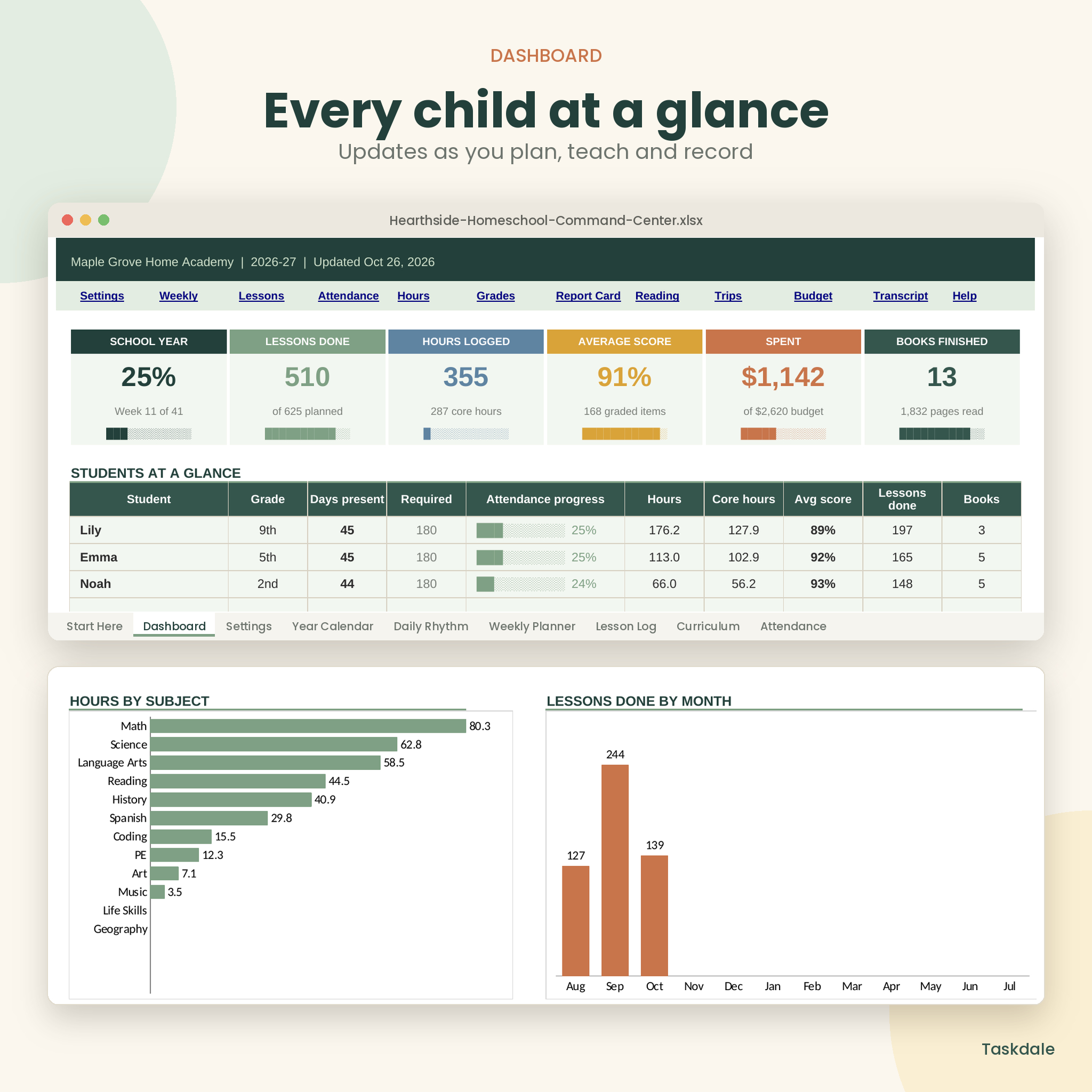
- Dashboard: school year progress, lessons done, hours, average score, money spent against budget, and books finished, plus a table for each child and three charts
- Coming up next: your next eight planned lessons, with a count of overdue lessons
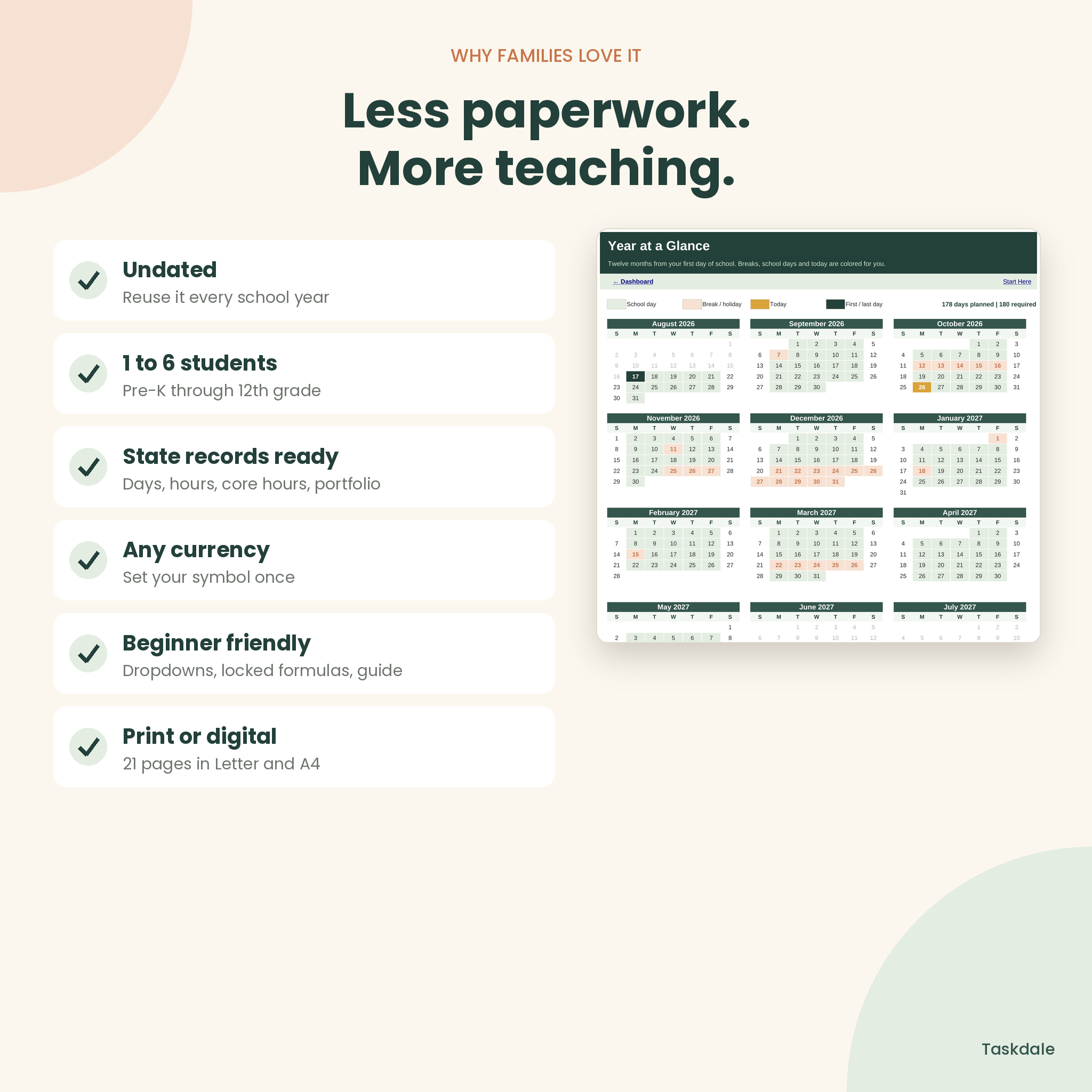
- Year Calendar: twelve months colored for school days, breaks and today, with a count of planned school days against the days you need
- Curriculum pace: each curriculum shows percent done and whether you are on track or behind by a number of lessons
- Reading Log: pages, star ratings and status for every book
- Field Trips: hours count toward a subject, and costs go to your budget
- Budget and Expenses: yearly budget by category, spent and left, overspend warnings and spending by student
- Data checks: rename a student or subject and older rows are flagged in red, so totals never go quietly wrong
How it works
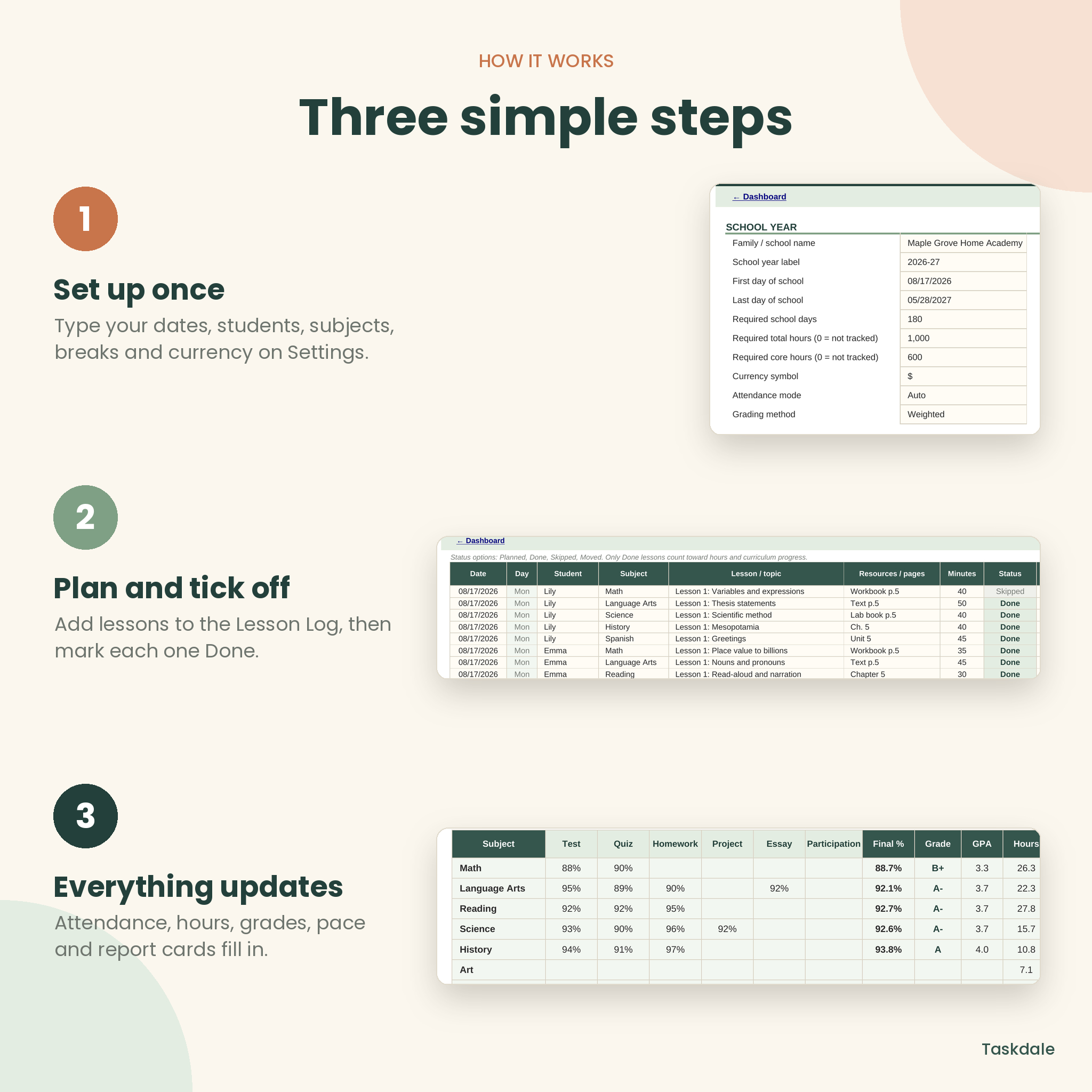
- Set up once. On Settings, add your dates, required days and hours, students, subjects, breaks, terms and currency symbol.
- Plan lessons. Add lessons to the Lesson Log with the status Planned. A week or two at a time works well.
- Tick them off. Change the status to Done as you teach. Log grades, books, trips and purchases as they happen.
- Review and print. Check the Dashboard and print a Weekly Planner, Report Card or Transcript when you need one.
File formats and software
- Excel workbook (.xlsx) for Microsoft Excel 2016 or newer and Excel for Microsoft 365 on Windows or Mac. It also opens in the free LibreOffice Calc.
- No macros, add-ins or internet connection needed.
- Printable pages are PDF files in US Letter (8.5 x 11 in) and A4, with embedded fonts.
- The guide is a Word document (.docx).
- Google Sheets and Apple Numbers are not supported.
Make it yours
Rename subjects, change the grading scale and GPA points, set your own assignment weights, pick four, five or six teaching days, rename budget categories and set any currency symbol. Every money heading and total reads from that one currency cell, with $ as the default. It is undated, so save a blank copy and reuse it every year. High school courses can stay in place so the transcript grows from 9th to 12th grade.
Real ways families use it
- A mom of three plans the week on Sunday night and ticks lessons off at the kitchen table.
- A family in a state that requires 1,000 hours checks core hours each month and knows exactly where they stand.
- A parent of a 10th grader prints a clean transcript with weighted GPA for a dual enrollment application.
- At year end, report cards, the reading list and the portfolio checklist are ready for an evaluator.
Digital download
This is a digital product, so nothing is shipped. After checkout you download one ZIP file with the workbook, both printable PDFs and the guide. Unzip it and open the Start Here tab.
Homeschool planner FAQ
Is this homeschool planner dated?
No. You type your own dates on Settings and the calendar, attendance and progress follow. Reuse it every year.
Does it track homeschool attendance automatically?
Yes. In Auto mode, past school days count as present unless you mark them absent, sick or a day off. Manual mode is there too.
Can I track homeschool hours for my state?
Yes. Set your required total and core hours on Settings. The Hours tab shows progress for each child.
How many children can I use it for?
Up to six students in one file, with up to 15 subjects. For more, save a second copy.
Does it make a high school transcript with GPA?
Yes. It works out credits, unweighted GPA and weighted GPA with Honors, AP and Dual Enrollment bonus points that you can change.
Will it work on a Mac?
Yes, in Excel for Mac or the free LibreOffice. It is designed for a laptop or desktop rather than a phone.
Can I use it in Google Sheets?
Google Sheets is not supported, because sheet protection, colors and charts may not carry over. Use Excel or the free LibreOffice Calc.
Personal use license. You may print copies for your own family. Do not resell, share or upload the files. © Taskdale.
Reviews
There are no reviews yet.