The best digital planner features for tablets are not the flashy ones in the preview images. Two thousand stickers and fifty covers look great in a listing. What decides whether you still use the planner in April is duller: how fast you can reach today’s page, whether the daily layout fits how you think, and whether the file opens without a three-second lag every time.
This guide is for anyone comparing planners for an iPad, Galaxy Tab or other tablet with a stylus. You will get a feature checklist ranked by how much each one matters, a simple way to test each feature, a list of features you can safely ignore, and four Taskdale planners that show each strength well.
Think of it as a buyer’s cheat sheet. Ten minutes here could save you from a planner you abandon in three weeks.
Quick picks: tablet planners by standout feature
| Product | Best for | Price | Link |
|---|---|---|---|
| Evenkeel 2027 Digital Planner | Eight ready-made editions, portrait or landscape | $29.99 | View |
| Bloom Digital Planner 2026 2027 2028 | Three dated years with five color themes | $1.29 | View |
| Taskdale All-in-One Digital Planner 2027 | The most templates and notebooks | $2.00 | View |
| Washi Doodle Weekly Planner | Using the same planner on paper and tablet | $5.00 | View |
Start with your tablet, not the planner
Before you look at a single feature, look at the device in your hands. A planner that feels roomy on a 12.9-inch iPad Pro can feel cramped on an 8.3-inch iPad mini. The same file, the same pages, a very different experience.
Screen size and orientation
On a large tablet, landscape layouts shine. You see two pages side by side, like an open paper planner, and the writing space is generous. On a smaller tablet, portrait is usually better, because each page fills the screen and your handwriting does not have to shrink. If a planner only comes in one orientation, make sure it matches the way you hold your tablet.
Which app you will use
Hyperlinked planners are PDFs, so they work in note apps that read PDF links: GoodNotes, Notability, Noteshelf, Xodo and Samsung Notes are the common ones. Check that the planner lists your app. If you are still choosing an app, pick one first. It is much easier to match a planner to an app than the other way round.
Light or dark
If you plan at night, a dark mode edition is easy on tired eyes. Some planners include both, which is handy if you plan at a sunny kitchen table in the morning and in bed at night.
The feature checklist, ranked
Here is the list in order of how much each feature affects daily use. The top three matter for almost everyone. The bottom ones are nice extras.
| Feature | Why it matters | How to test it |
|---|---|---|
| Linked navigation on every page | Gets you to today in one or two taps | Tap month tabs, dates and the home button from a random page |
| A daily or weekly layout that fits you | You will see this page more than any other | Fill one day of real plans on a sample page |
| Right time span | Stops you paying for months you missed | Check start and end dates, and whether undated is included |
| Large tap targets | Fewer missed taps with a finger | Tap tabs with your fingertip, not the stylus |
| Monday or Sunday start | Matches the week in your head | Look for both versions in the download |
| Small file size | Faster opening and less lag | Check MB per file, or whether years are split |
| Templates and notebooks | Keeps budget, goals and notes in one place | Count only the templates you will really use |
| Print option | Paper backup and a desk copy | Look for printable sizes in the listing |
For a deeper look at how tabs and links behave in GoodNotes, our guide to the GoodNotes planner with hyperlinked tabs walks through a five-tap link test.
The daily page: where the real work happens
You will open the daily page hundreds of times a year. So its layout matters more than the cover, the colors or the sticker count combined. Look closely at what sits on it.
What a good daily page holds
- A short priority list. Top 3 is the sweet spot. Ten priority lines invite you to fill them all.
- A schedule that matches your hours. If you start work at 6 a.m. and the schedule starts at 8, you are writing in the margin every day.
- Half-hour guides. Useful if your day is full of 30-minute calls or classes.
- A to-do list and some notes space. A blank area for whatever does not fit the boxes.
- A linked mini calendar. Lets you hop to another day without going back to the month.
A nurse on 12-hour shifts and a student with four classes need very different pages. Picture your busiest weekday and ask whether it fits.
The week view
Many people plan by the week and only open the daily page for detail. A two-page week, with one spread to plan and one to review, gives a lot of room for meals, habits and a quick look back.
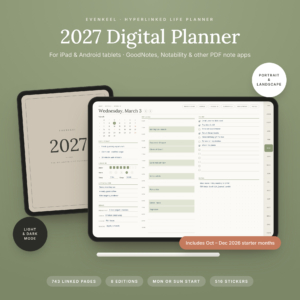
Evenkeel 2027 Digital Planner
Price: $29.99 | Best for: people who want strong daily pages
743 linked pages in each of 8 editions: portrait or landscape, light or dark, Monday or Sunday start. Its 365 daily pages for 2027 hold a Top 3, a 6 a.m. to 10 p.m. schedule with half-hour guides and a to-do list, and each week has a Week Plan plus a Week Reset for habits, meals and groceries. Start with the nine-page North Star workbook to set your direction for the year.
Time span: one year, several years or undated
This feature quietly decides how much value you get. A dated 2027 planner bought in July has six months of empty pages behind you. That is fine if you are happy with it, but worth knowing.
- Single-year dated: clean and focused. Best bought before the year starts.
- Multi-year dated: two or three years in one purchase. Great for long projects, a degree or anyone who hates setting up a new planner every January.
- Undated: you write the dates. Start any time and reuse forever. Slightly more setup each month.
A multi-year planner has one more perk. On 3 November you can tap ahead to next March and drop in a wedding date without opening a separate file.
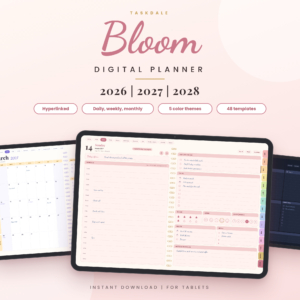
Bloom Digital Planner 2026 2027 2028
Price: $1.29 | Best for: long-range planners who like color
A hyperlinked planner running from January 1, 2026 to December 31, 2028, with 1,096 daily pages, a weekly planner and hourly weekly schedule for every week, 36 monthly calendars and a year plan for each year. Choose from five color themes (Blush, Rainbow, Boho, Neutral or Midnight) in Sunday or Monday start, so you get ten files. Pick one theme and stick with it for a month before switching.
Templates, notebooks and extras
Templates are the pages that sit outside the calendar: budget trackers, goal planners, meal plans, reading logs, project pages. A good set means you are not juggling four apps. A bloated set means 200 pages you scroll past forever.
The trick is counting only the ones you will use. Write down your top five needs before you shop. Maybe it is a monthly budget, a habit tracker, a meal plan, a project page and a lined notebook for meetings. If a planner covers all five well, it does not matter that it also has a movie tracker you will never touch.
Notebooks matter more than people expect
Built-in notebook sections, with lined, dotted, grid or Cornell pages, turn a planner into the one file you open all day. Class notes, meeting notes, a running shopping list. Without them, you end up with notes in a separate app and plans in the planner, and the two never meet.
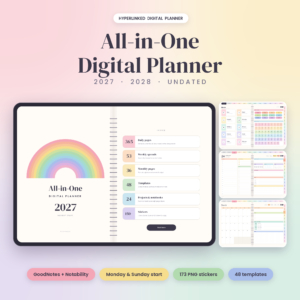
Taskdale All-in-One Digital Planner 2027
Price: $2.00 | Best for: people who want everything in one file
Six hyperlinked planners for GoodNotes or Notability: 2027, 2028 and undated, each in Monday and Sunday start. You get daily pages with an hourly schedule and Top 3, about 53 weekly spreads, 36 monthly pages with budget reviews, 48 templates for goals, home, wellness, fitness, finance and work, 12 project pages and 12 notebooks with 8 page styles including Cornell. Set up the undated file if you are starting mid-year.
File size and speed: the feature nobody lists
A planner with 1,000 pages, heavy artwork and full-page backgrounds can be slow to open and slow to turn pages, especially on an older tablet. That lag sounds small. It is maddening by week three.
Some planners split each year into its own file to keep things light. Others compress artwork so a full year sits at just a few megabytes. If a listing mentions file size or one-file-per-year, that is a good sign the maker thought about speed.
You can help too. Avoid stacking dozens of stickers on one page. Keep only the edition you use in your app, not all eight. And if pages start to drag, duplicating the planner into a fresh document sometimes clears out bloat from months of edits.
Printable and digital in one: the flexible option
Some people want a tablet planner most of the time and paper some of the time. A printed week on the fridge for the family. A printed page for a meeting where tablets feel rude. A backup for when the battery is flat.
Planners that come as both a hyperlinked PDF and printable pages solve this neatly. The layout is the same on screen and on paper, so you never relearn where things go.
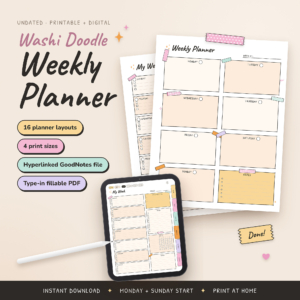
Washi Doodle Weekly Planner
Price: $5.00 | Best for: weekly planners who switch to paper
An undated weekly planner with 16 layouts, from a classic seven-box week to an hourly schedule, a to-do list by category, a meal planner, a habits page, a week in review and a weekly budget. Use it three ways: a 255-page hyperlinked PDF for GoodNotes, Notability, Noteshelf and Samsung Notes, a fillable PDF, or printables in US Letter, A4, A5 and Half Letter. Try the My Week page first.
Features you can safely ignore
Some features look great in a listing but rarely change how well a planner works. Do not pay extra or choose a planner only for these.
- Huge sticker counts. A few hundred are plenty. Most people use the same twenty.
- Dozens of covers. You will pick one and keep it.
- Every possible tracker. A water tracker, a movie log, a bucket list, a password page. Nice, but you will use three.
- Elaborate page decorations. Busy backgrounds can make handwriting harder to read and files slower to load.
- Fancy home dashboards. A plain index that works beats a pretty one with tiny buttons.
That does not mean extras are bad. They just should not be the reason you choose. If you would like to see full planners compared side by side, our roundup of the best digital planners for iPad lines up layouts, years and page counts.
How to test a planner in your first 30 minutes
Once you have bought a planner, give it one focused half hour before you commit your whole life to it.
- Import one edition only. The one that matches your orientation, start day and mode.
- Run a link test. Tap ten links from random pages. All should land correctly.
- Fill tomorrow’s daily page with real appointments and tasks. Does everything fit?
- Fill next week’s spread. Do the boxes suit your busiest day?
- Find your three most-used templates and bookmark them in your app.
- Close and reopen the file. Notice how long it takes to load.
If all six steps feel good, you have found your planner. There is real relief in that. No more downloading samples every other week.
Frequently asked questions
What features should a digital planner have?
Linked navigation on every page, a daily or weekly layout that fits your day, the right time span, large tap targets and a Monday or Sunday start option. Templates and stickers come after those.
Is landscape or portrait better for a digital planner?
Landscape suits large tablets and two-page spreads. Portrait suits smaller tablets and gives each page the whole screen.
Do digital planners work on Android tablets?
Yes, in apps that support PDF links, such as Samsung Notes, Noteshelf or Xodo. Check that the planner lists Android or your app.
Why is my digital planner slow?
Large files, heavy artwork and lots of stickers slow things down. Use one edition only, limit stickers per page and choose planners that split years into separate files.
Should I buy a dated or undated digital planner?
Dated saves setup time if you are starting near the beginning of the year. Undated suits mid-year starts and anyone who plans in bursts.
Your next step
Write down your tablet size, your note app and the five templates you would actually use. Then compare planners against that list, not against the photos. If strong daily pages and a choice of eight editions top your list, start with the Evenkeel 2027 Digital Planner.