A transaction coordinator checklist is the thing standing between a signed contract and a closing that slips by a week because nobody chased the appraisal. Every deal has 30 to 60 moving parts. Most of them are boring. One of them, missed, can cost the buyer their earnest money.
If you’re a TC running files for a few agents, or an agent doing your own paperwork, this is the checklist I’d hand you on day one. It’s split by stage, from the moment the contract is executed to the week after closing.
One caveat before we start: deadlines and required documents vary by state, brokerage and contract form. Treat this as a framework and check every date against the actual contract in front of you.
Stage 1: opening the file (day 0 to 2)
The first 48 hours set the tone. Get these done before anything else lands in your inbox.
- Receive the fully executed contract and check every page is initialled and signed.
- Note the acceptance date. Every other deadline counts from it.
- Write out each contractual deadline with its actual calendar date: earnest money, inspection, appraisal, loan approval, closing.
- Send the intro email to all parties: clients, co-op agent, lender, title or escrow, and attorney if your state uses one.
- Open escrow or title and send them the contract.
- Collect contact details for everyone in one place. You’ll need the loan officer’s direct number at 4:45pm on a Friday, trust me.
- Enter the deal in your tracker and on your calendar.
Stage 2: earnest money and disclosures
- Confirm the buyer has delivered earnest money by the deadline (often around 3 business days, but check).
- Get a receipt from title, escrow or the holding broker and save it to the file.
- Send or collect required seller disclosures and lead-based paint forms for older homes.
- Track who has signed what. Unsigned disclosures are one of the most common things a compliance review flags.
Stage 3: inspection period
This is where deals wobble. Keep a close eye on the clock.
- Confirm the inspection is scheduled well inside the inspection window.
- Order any extra inspections the buyer wants: termite, sewer scope, roof, radon.
- Get the report to the buyer’s agent the day it arrives.
- Track the repair request or amendment, the seller’s response and any counter. Each one is a document with its own signatures.
- Note the date the inspection contingency is removed or expires.
Stage 4: appraisal and financing
- Confirm the lender has ordered the appraisal. Don’t assume. Ask.
- When the appraisal comes back, check value against price. A low appraisal triggers renegotiation fast.
- Check in with the loan officer weekly on conditions and underwriting.
- Watch the loan contingency date. If approval looks like it’ll be late, the agents need to know now, not on the deadline.
- Confirm the buyer has bound homeowner’s insurance.
Stage 5: title and pre-closing
- Review the title commitment for liens, easements or anything odd and flag it to the agent.
- Order HOA documents and payoff statements if needed.
- Confirm the Closing Disclosure has gone to the buyer on time (in the US, lenders must deliver it at least three business days before closing).
- Schedule the final walkthrough, usually within 24 to 48 hours of closing.
- Confirm closing time, place, who’s signing and whether anyone signs remotely.
- Send the wire fraud warning. Every deal. Every time.
Stage 6: closing and after
- Confirm funding and recording.
- Confirm commission disbursement and check the figures against your commission agreement.
- Upload the full file to your brokerage’s compliance system.
- Send a thank-you and a review request to the clients.
- Close the file in your tracker and log the final numbers.
Turning the transaction coordinator checklist into a system
A printed checklist works for one deal. With eight files open, each at a different stage, paper falls over. What you actually need is for each deal’s tasks to have real dates, so you can sort the whole pipeline by “due this week”.
Three things make that easier:
- Different workflows by side. A listing has different tasks than a buyer file. Keep separate templates for buyer, seller, dual and lease.
- Dates calculated from anchors. Most tasks are “X days after acceptance” or “Y days before closing”. Store the offset, not the date, and let the date work itself out.
- One view across all deals. A list of the next 14 deadlines across every file beats opening eight folders.
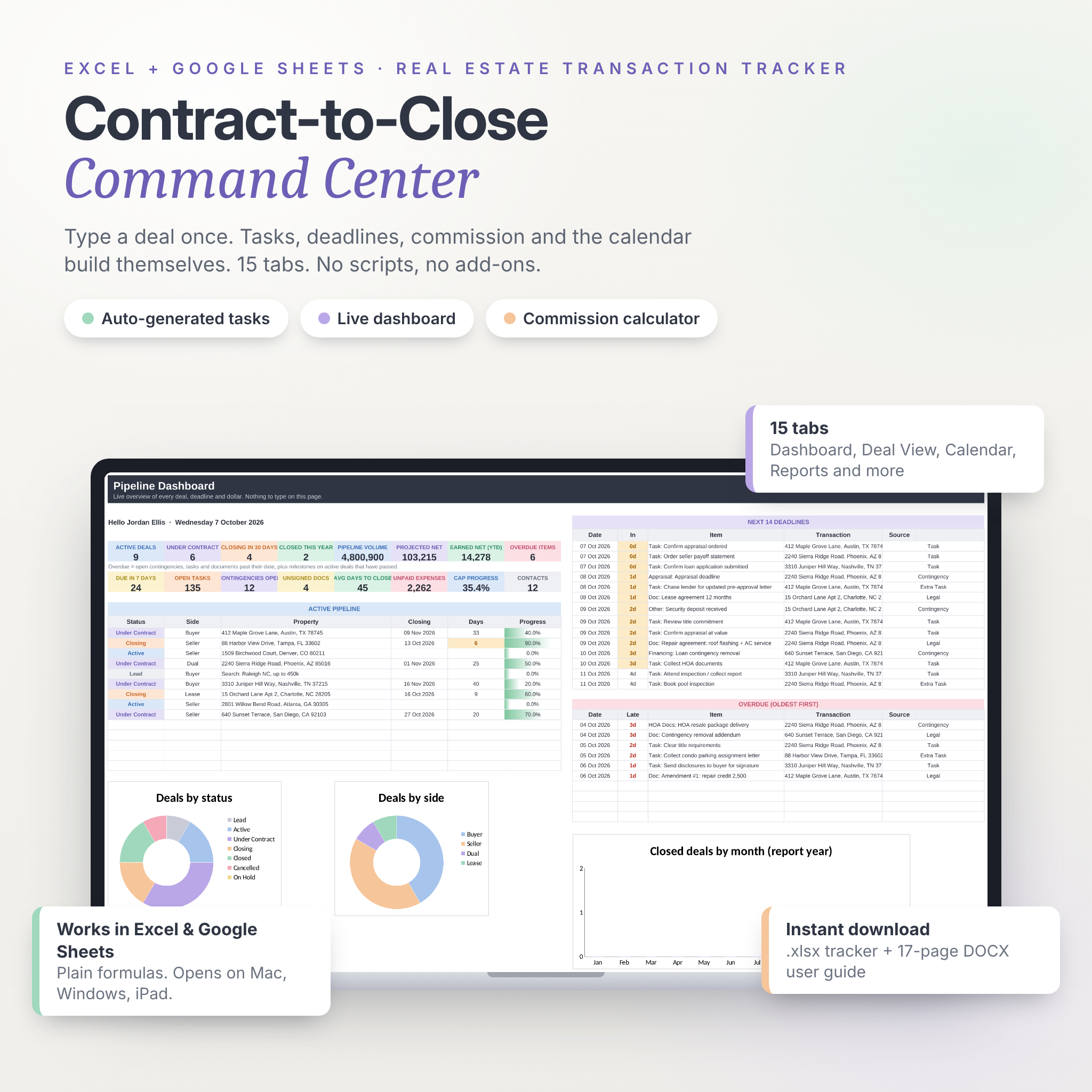
That’s exactly how the Contract-to-Close Command Center spreadsheet is built. You add a deal on one row, enter the contract date, and five milestone dates fill in from your own defaults (3 days to earnest money, 10 to inspection and so on, all adjustable). Pick Buyer, Seller, Dual or Lease and the matching 20-step workflow appears on the Tasks tab, with each task dated from the contract or closing date. You can edit the four workflows once, and every new deal follows your process.
The dashboard has 16 live tiles, including open contingencies, unsigned documents and items due in 7 days, plus the next 14 deadlines and an overdue list. There’s a Legal tab that tracks contracts, amendments, addendums, counter offers and disclosures from Draft to Filed, and a Deal View that prints a one-page summary for any property. It works in Excel and Google Sheets with plain formulas, and comes with 12 sample deals so you can see it working before you clear them out.
A few habits good TCs share
- They send a short status update to the agent every week, even when nothing changed. Especially then.
- They never trust “it’s been ordered”. They ask for a confirmation number.
- They check the tracker first thing, before email. Email shows what’s loud. The tracker shows what’s due.
- They keep the commission maths in the same file, so there’s no surprise on the settlement statement.
FAQ
What does a real estate transaction coordinator do?
A TC manages the paperwork and deadlines between contract and closing. That means tracking contingencies, collecting signatures, keeping lender and title on schedule, and making sure the file is complete for compliance. They let the agent focus on clients.
How many files can one transaction coordinator handle?
It depends on the market and how much is automated, but many TCs carry somewhere between 10 and 30 active files. A good tracker with dated tasks is what makes the higher end possible.
What’s the most commonly missed item on a transaction coordinator checklist?
Contingency removal deadlines and unsigned addendums come up again and again. Both are easy to miss when you’re relying on email, and both can cause real trouble.
Can I use a spreadsheet instead of TC software?
Yes, especially if you run fewer than a few dozen files a year or don’t want another subscription. A spreadsheet tracker won’t send e-signatures, so you’ll still use your usual signing tool.