A small business KPI dashboard is supposed to tell you, in about ten seconds, whether things are fine. Most don’t. They show 26 numbers, half of which you never act on, and the one that matters (cash) is hidden on a tab you forgot existed.
When you’re the CEO, the bookkeeper and often the person packing orders, you don’t need a wall of metrics. You need six or seven numbers you check on purpose, and a habit of looking at them.
This guide covers which numbers deserve a spot, which ones to leave off, and how to run a monthly review using the Small Business CEO Dashboard spreadsheet. I’ll also be clear about who it isn’t right for.
The 7 numbers on a good small business KPI dashboard
1. Revenue
The obvious one. Show this month and year to date. On its own it can mislead you, which is why it’s never the only card.
2. Net profit
Revenue minus every expense. A month with 12,000 revenue and 11,400 costs is a worse month than 8,000 and 5,500, and only this card makes that clear.
3. Profit margin
Net profit as a percentage of revenue. Watch the trend more than the number. A margin sliding from 31 to 24 percent over four months usually means costs crept up or discounts crept in.
4. Cash on hand
Profitable businesses still run out of money when clients pay late. Cash on hand is the number that decides whether you can pay next month’s bills. If I could keep only one card, it’d be this.
5. Tax set-aside
How much you should have put away for tax, and whether you have. It turns a scary annual bill into a boring monthly transfer.
6. Progress toward your annual goal
Say your goal is 90,000 for the year and it’s the end of June. You should be near 45,000, give or take seasonality. A progress bar shows that faster than mental arithmetic.
7. Overdue invoices
Money you’ve earned but don’t have. Total and count. If it’s growing, your follow-up habit needs attention.
Numbers to leave off the front page
Social followers, website visits, email open rates. They matter for marketing, but they don’t belong on a financial dashboard you check monthly. Put them in a marketing tracker. Mixing them in makes the important cards easier to ignore.
Same goes for detailed category spend. Keep a chart of your expense breakdown, sure. But the first screen should be the handful of numbers that tell you whether to relax or act.
Running your business from the CEO Dashboard
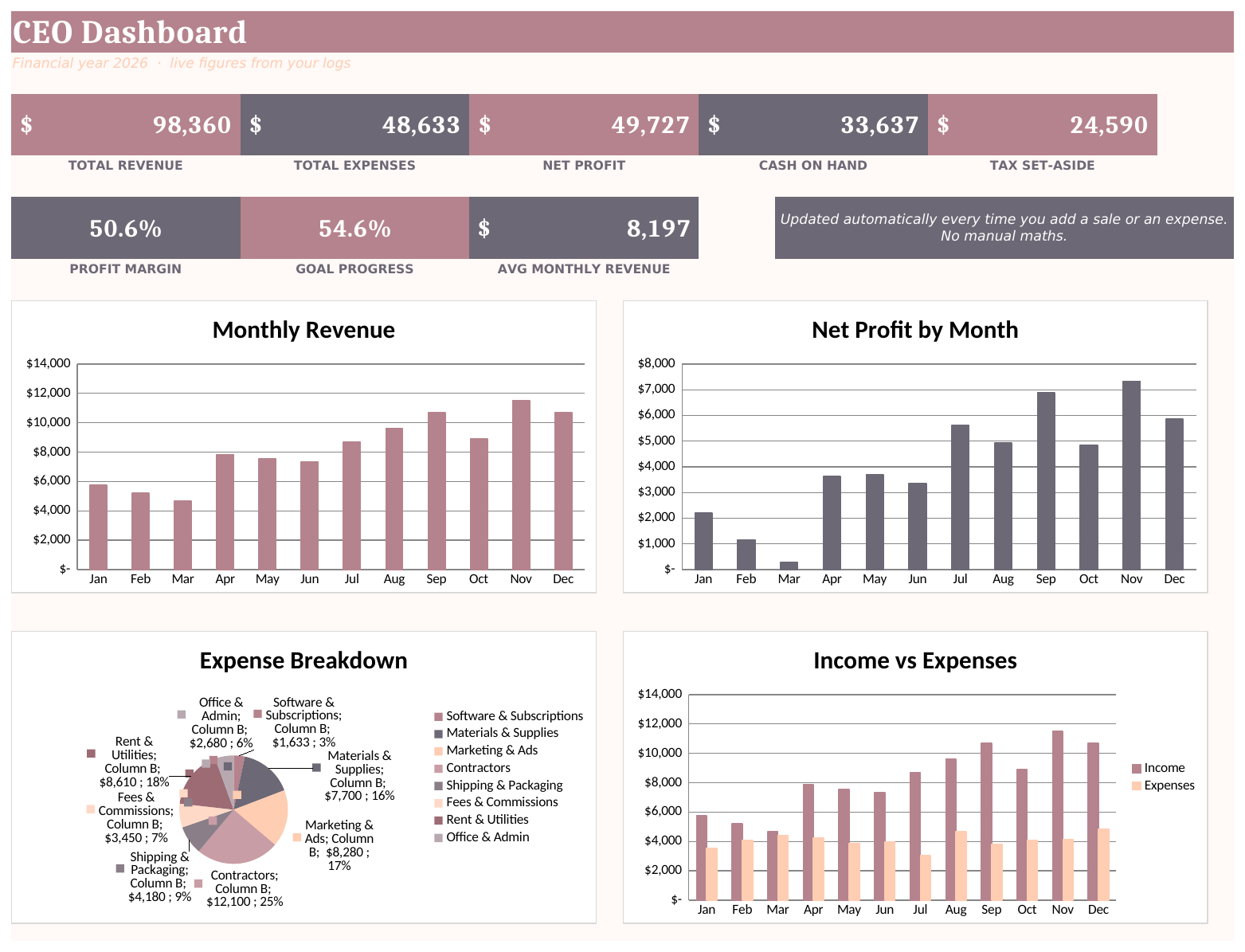
The Small Business CEO Dashboard is built around exactly the cards above. You log sales on one tab and expenses on another, and that’s the only typing. Revenue, expenses, net profit, cash on hand, tax set-aside, profit margin and progress to your annual goal all appear as KPI cards, with live charts for monthly revenue, profit by month, your expense breakdown and income against expenses.
It has two dashboard styles in the same file: a calm, minimal version for everyday use, and a bold, high-contrast one that looks good on a client call or a screenshot. Both read the same numbers.
Week to week
Log sales and expenses. When a client pays, record it on the separate payment-received log. That split matters: an invoice sent isn’t cash, and the dashboard’s cash view stays honest because of it. The invoice tracker colour-codes paid and overdue invoices so you know who to nudge.
Once a month
This is where the bundle is most useful. Its guided monthly review walks you through the numbers, so the habit doesn’t depend on willpower. A good order:
- Check cash on hand and the cash flow tracker’s running balance.
- Look at net profit and margin against last month.
- Open the budget planner, where overspend shows in red.
- Check the tax set-aside tracker and move the amount it tells you to bank.
- Use the profit allocation planner to pay yourself first.
- Check revenue by stream and the sales goal planner. Which streams are carrying you?
That’s maybe 30 minutes. You come out of it knowing what to change next month, which is the whole point of a dashboard.
Quarterly and yearly
The quarterly tax overview helps at filing time, and the annual summary is laid out for your accountant. There’s also a 12-month business snapshot and a profit margin calculator plus cost breakdown worksheet for when you’re reviewing prices.
Who it’s for
- Service providers, coaches and freelancers who’ve outgrown a notebook and a bank app
- Makers and online sellers who want profit and cash in one place
- Owners who want to look at their numbers monthly without hiring anyone
Setup is guided by a start-here tab with six steps, and a customise-categories tab lets you rename every income stream and expense bucket. It ships with believable starter data, so you can see a busy month in action before you clear it. It works in Excel and Google Sheets.
Who it’s not for
- Product businesses that need stock control. It tracks money, not inventory or recipes.
- Businesses that need formal double-entry accounts or bank feeds. Use accounting software and treat a dashboard as a summary layer.
- Teams wanting sales pipeline or marketing KPIs. This is a financial dashboard. Leads and conversion rates belong elsewhere.
FAQ
What KPIs should a small business track?
Start with revenue, net profit, profit margin, cash on hand, tax set-aside, progress toward your goal and overdue invoices. Add industry-specific ones later, such as average order value for a shop or utilisation for a service business.
How often should I check my KPI dashboard?
A quick look weekly and a proper review monthly. Daily checking mostly creates anxiety without better decisions.
Can I build a small business KPI dashboard in Google Sheets?
Yes. SUMIFS, a few charts and some formatted cells will get you a basic version. A ready-made one saves you the build and the formula debugging.
What’s the difference between a KPI and a metric?
Every KPI is a metric, but not every metric is a KPI. A KPI is one you’ve decided matters enough to act on when it moves.