Running a small business means making decisions with half the information. Can you afford that hire? Is the slow month a blip or a trend? Are you actually profitable, or just busy? A good small business dashboard Excel template puts the answers on one screen, so you stop guessing.
The trouble is that “dashboard” gets used for anything with a chart on it. Some are pretty covers on a thin spreadsheet. Others are proper financial systems where the dashboard is the top layer of real bookkeeping underneath.
Here are three dashboards from the Taskdale shop, what each is best at, and how to choose.
What a small business dashboard should tell you
Before comparing, here’s the short list of numbers worth having on one page:
- Income, expenses and net profit for the month and year to date
- Profit margin, because $10,000 profit on $20,000 revenue is a very different business from $10,000 on $200,000
- Cash position and, ideally, how many months it would last
- Outstanding invoices, money you’ve earned but don’t have
- Tax set aside vs what you’re likely to owe
If a dashboard shows all five clearly, it’s doing its job. Everything else is a bonus.
The 3 best small business dashboard Excel templates
1. The Ultimate Small Business Spreadsheet Dashboard: best for planning ahead
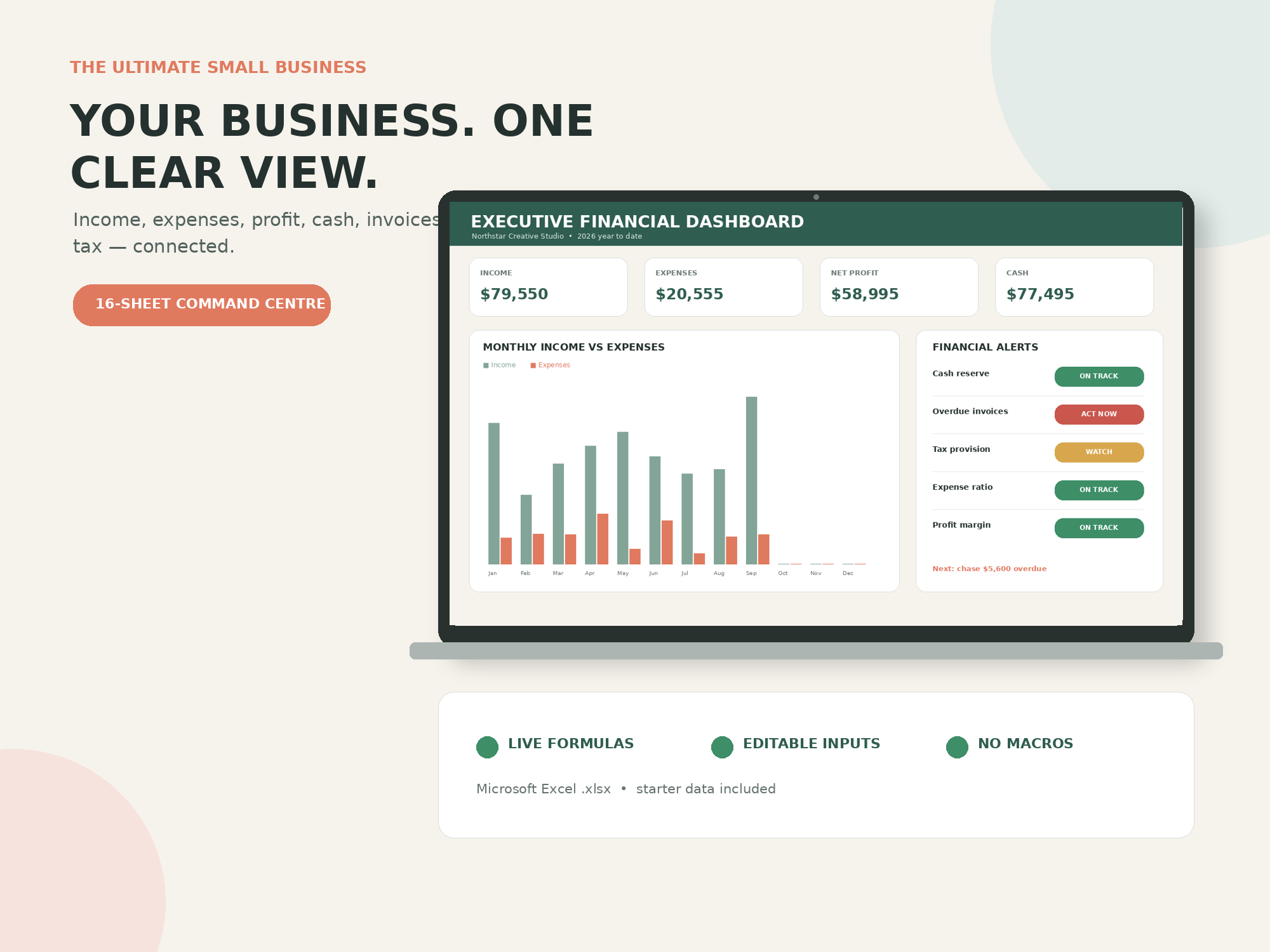
The Ultimate Small Business Spreadsheet Dashboard is the most forward-looking of the three. You enter a transaction once, and the monthly P&L, year-to-date summary, executive dashboard, tax estimate and cash reporting all stay connected. KPI cards show income, expenses, net profit, margin, cash position, outstanding invoices, tax reserve and cash runway.
Where it stands out is planning. There’s a rolling 12-month cash-flow forecast, scenario planning (test a new client, a price increase, an overhead cut, time away or hiring a contractor and see the estimated effect on profit, tax and cash) and a break-even tool that turns your costs and target profit into revenue targets. Client and project profitability includes non-billable time, so you see your effective hourly earnings, not just revenue per client.
Traffic-light alerts flag cash pressure, overdue invoices, tax reserve coverage, expense levels and margin, with thresholds you can adjust. A 90-day action queue turns each warning into an action, owner, deadline and follow-up.
Best for: freelancers, consultants and service businesses who want to plan, not just record. Note: it’s designed for Excel 2021 and Microsoft 365. Other spreadsheet apps may change chart styling or conditional formatting.
2. Small Business Command Center: best for product sellers
The Small Business Command Center works from two logs: sales and costs. From those it builds an executive dashboard with KPI cards and live charts, a one-page business snapshot and your net profit.
It leans towards selling products. The sales tracker tags every order by channel and flags unpaid orders, and there’s an inventory tracker with low-stock alerts. On the planning side you get a cash flow forecast, a tax estimator, a KPI scorecard (profit margin, average order value, monthly growth and expense ratio, each with a note on what good looks like) and a scenario planner comparing worst, expected and best cases. A monthly review ties it together.
Best for: shop owners, makers and online sellers. Runs in Excel and Google Sheets, with a sage-and-gold design.
3. Small Business CEO Dashboard: best for knowing what to pay yourself
The Small Business CEO Dashboard has 21 working tabs, again driven by a sales log and an expense log. KPI cards cover revenue, expenses, net profit, cash on hand, tax set-aside, margin and progress toward your annual goal, with charts for monthly revenue, profit, expense breakdown and income vs expenses.
Two touches make it different. You get two dashboard styles in the same file: a calm minimal one for daily use and a bold high-contrast one for client calls or screenshots, both fed by the same numbers. And it includes a profit allocation planner that pays you first, plus a tax set-aside tracker, quarterly tax overview, payment-received log, revenue-by-stream breakdown, monthly budget planner and an annual summary built for your accountant.
Best for: coaches, freelancers and service providers who want to feel in control of money without hiring a bookkeeper. Works in Excel and Google Sheets.
Side by side
| Ultimate Dashboard | Command Center | CEO Dashboard | |
|---|---|---|---|
| Main input | Transaction register | Sales + costs logs | Sales + expense logs |
| Cash forecast | Rolling 12 months | Yes | Cash flow tracker |
| Scenario planning | Yes, detailed | Worst / expected / best | No |
| Inventory | No | Yes, low-stock alerts | No |
| Client profitability | Yes, with hourly earnings | No | Revenue by stream |
| Software | Excel 2021 / Microsoft 365 | Excel and Google Sheets | Excel and Google Sheets |
Which one should you pick?
If you sell services and want to know which clients are worth keeping and whether you can afford a quiet month, pick the Ultimate Small Business Spreadsheet Dashboard. Just make sure you’re on a recent version of Excel.
If you sell products and need stock alerts alongside your numbers, the Command Center is the better fit.
If you mainly want a clear monthly picture, a tidy tax pot and a plan for paying yourself, the CEO Dashboard is the friendliest of the three, and the two dashboard styles are a nice touch if you share screens with clients.
Getting value from any small business dashboard Excel file
A dashboard you never open is just a nice file. Pick a regular slot (Friday afternoon works for many owners), log the week’s transactions and look at three numbers: profit to date, cash, and overdue invoices. Act on one thing. That’s enough to stay ahead of most problems.
FAQ
Can I build a small business dashboard in Excel myself?
Yes, with a transactions table, SUMIFS formulas, a few charts and some conditional formatting. It takes time to get right, especially forecasts and alerts. A template gives you a tested structure to start from.
Do these dashboards work in Google Sheets?
The Command Center and CEO Dashboard work in both Excel and Google Sheets. The Ultimate Small Business Spreadsheet Dashboard is designed for Excel 2021 and Microsoft 365.
What’s the most important number on a business dashboard?
For most small businesses, cash. Profit tells you if the model works. Cash tells you if you’ll still be open next month. Watch both, but don’t ignore cash.
Do I need accounting knowledge to use these?
No. All three come with example data and setup guidance, so you can see how they behave before entering your own numbers.