The best teacher planner layout is the one that matches how your day is cut up. A secondary teacher with six periods and four different year groups needs a grid by period. A primary teacher with one class and nine subjects needs subjects down the side. A head of department buried in meetings needs a page per day. Pick the wrong layout and even a lovely planner turns into a chore by week three of a busy term.
This guide walks through five layouts that hold up under pressure, who each one suits, and how to mix them across the weeks of a term that includes mocks, parents’ evening and a nativity. Four Taskdale planners are featured, each built around a different layout.
Quick picks by layout
| Product | Best for | Price | Link |
|---|---|---|---|
| Classroom Compass Teacher Planner | Period-by-period weekly grid from your bell times | Original price was: $6.49.$4.99Current price is: $4.99. | View |
| Lesson Lane Digital Teacher Planner | Subject rows across the week, plus printables | $9.99 | View |
| Chalk & Bloom Digital Teacher Planner | A full page for every school day | $3.49 | View |
| Teacher’s Compass Editable Lesson Plan Template Pack | One-page lesson, week and unit plans in Word | $2.49 | View |
Why layout matters more when the term gets busy
In a quiet September week, any planner works. You have time to flick between pages and fill every box. Then November arrives. Mocks for Year 11, a book scrutiny, two parents’ evenings and a carol service rehearsal that eats Thursday afternoon.
Under that kind of pressure, you only use what you can read in five seconds. If your layout makes you turn three pages to find period 4, you stop turning pages. The planner goes quiet, and plans move back onto sticky notes.
So the test for a layout is simple. Can you glance at it between lessons, with a coffee in one hand and a Year 8 at your elbow, and know what comes next? If yes, keep it. If not, change the layout, not your effort.
Layout 1: periods down, days across
This is the classic secondary grid. Monday to Friday along the top, periods 1 to 6 down the side, and each box holds the class, the room and a one-line plan. A teacher with 9X2 in period 2 and 11Y1 in period 5 sees both without scrolling.
It works best when your week repeats. Set the bell times and class pattern once, and every week starts with the right classes in the right boxes. You only type what changes: the lesson title and a short note.
Make it work harder
- Colour each class the same shade all year. Year 9 green, Year 11 blue.
- Keep the box to one line. “Persuasive letters: model para, then draft” is enough.
- Put duties and meetings in the same grid so you can see a pinch point like a Tuesday break duty right before a double.
A browser-based planner suits this layout well because it can build the grid from your bell schedule and copy last week in one click.
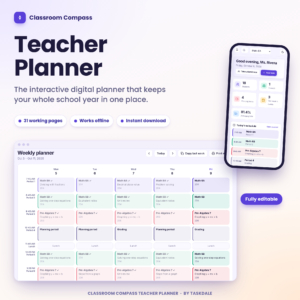
Classroom Compass Teacher Planner
Price: Original price was: $6.49.$4.99Current price is: $4.99. | Best for: secondary teachers with a fixed timetable
A single HTML file that opens in your browser and works offline. The weekly planner is a grid built from your own bell schedule: click a cell, pick a class and attach a lesson, and the plan repeats every week on that day, with a one-click copy of last week into this one. A lesson bank, unit plans, a gradebook and a substitute plan builder sit alongside. Enter your bell times first and the grid follows.
Layout 2: subjects down, days across
Primary teachers live a different week. One class, one room, but phonics, English, maths, science, topic, RE, PE, music and PSHE all need a slot. A period grid feels wrong because the day does not run in periods. It runs in subjects.
So flip it. Put subjects down the left and days across the top. Each row becomes a strand you can read left to right: Monday fractions, Tuesday fractions, Wednesday fractions of amounts, Thursday problem solving, Friday check-up. You see the progression of each subject through the week at a glance.
A Year 2 teacher with 28 children might use seven rows: phonics, reading, writing, maths, science, topic and a final row for PE, music and the odd assembly. It fits on one landscape page and leaves room for a weekly priorities box.
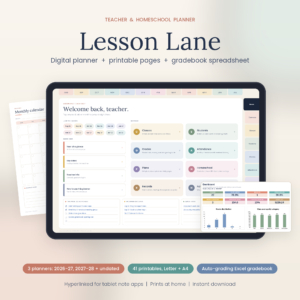
Lesson Lane Digital Teacher Planner
Price: $9.99 | Best for: primary teachers and home educators
Hyperlinked planners for 2026-2027, 2027-2028 and an undated year, with weekly pages that give a column to each school day and weekly lesson plan pages with seven subject or period rows linked from every week. It also includes 41 printable undated templates in US Letter and A4 and a gradebook spreadsheet. Import your year’s planner into GoodNotes or Notability and fill in the week one lesson plan page first.
If a single week is all you need, the guide to a weekly lesson plan template shows how to plan the whole week in about 30 minutes.
Layout 3: one page per day
Some roles are not about lessons. They are about everything around them. A head of year, a SENCo or a teacher with a TLR might teach four periods and spend the rest of the day in meetings, on the phone to parents and chasing paperwork.
For them, a day per page beats a grid. The period schedule goes down one side, and the rest of the page holds top three priorities, a to-do list, copies to make, parent calls and notes. Wednesday’s page might hold a safeguarding follow-up, two calls home and a reminder to print 60 copies of the mock paper. None of that fits in a grid box.
The trade-off is that you lose the week view. Fix that by checking a month or week overview on Sunday and copying the big items onto each daily page.
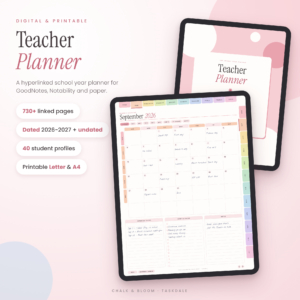
Chalk and Bloom Digital Teacher Planner
Price: $3.49 | Best for: teachers with heavy admin and meetings
A hyperlinked PDF for GoodNotes, Notability, Xodo and similar apps where every date has its own daily page with a period schedule, top 3 priorities, to-dos, copies to make, parent contacts and notes. Each week also gets an overview and a lesson plan grid with 8 periods across Monday to Friday. You get dated 2026-2027 versions, two undated versions and printable US Letter and A4 files. Start each morning on the daily page and tap up to the week when planning.
Layout 4: the one-page lesson plan
Most lessons do not need a full plan. A line in a grid will do. But some do: an observed lesson, a tricky practical, a lesson you are handing to a trainee, or a first go at a new unit.
For those, use a one-page plan with a timed flow. Objective at the top. Then starter, input, guided practice, independent work and plenary, each with minutes beside it. Add a box for adaptations, such as who needs a word bank or a scaffolded worksheet. Finish with a short reflection line after the lesson. The minutes column is the secret. If the timings add up to 72 in a 60-minute lesson, you find out at your desk, not with 30 pupils watching.
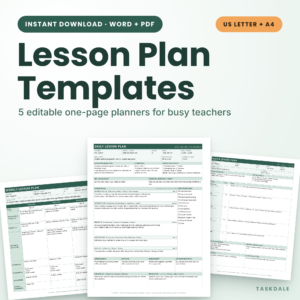
Teacher's Compass Lesson Plan Template Pack
Price: $2.49 | Best for: teachers who plan key lessons in Word
Five one-page templates in Word and PDF: a detailed daily lesson plan with a timed five-stage flow and differentiation boxes, a quick daily plan built on I do, we do, you do, a landscape weekly plan, a unit plan with a ten-lesson sequence, and a substitute teacher plan. Each comes in two colour styles and US Letter and A4. Open the detailed plan in Word for your next observed lesson and fill in the minutes column first.
Layout 5: the term overview
The layout most teachers skip is the one that saves busy terms. A single page with the weeks of the term down the side and your classes or subjects across the top. Each box holds a unit name, an assessment or an event.
Here is a slice of what that might look like for an autumn term:
| Week | Year 9 | Year 11 | Whole school |
|---|---|---|---|
| 8 | Poetry unit starts | Mock revision | Parents’ evening Thursday |
| 9 | Poetry | Mocks week 1 | Book scrutiny |
| 10 | Poetry assessment | Mocks week 2 | Report data due Friday |
| 11 | Feedback and redraft | Mock feedback lessons | Carol service rehearsal |
Seen like this, week 10 jumps out. A Year 9 assessment to mark, a pile of mock papers and report data due on the same Friday. That is the week to plan lighter lessons, book in marking time and say no to anything optional. Spotting it in September is the whole point.
Matching layouts to the weeks of a busy term
You do not have to pick one layout for the whole year. Many experienced teachers switch depending on the week.
- Normal teaching weeks: the weekly grid, by period or by subject.
- Assessment and mock weeks: a daily page, because invigilation, marking and data deadlines matter more than lesson content.
- Observation weeks: a one-page plan for the observed lesson, grid for the rest.
- The last two weeks of term: the term overview, to see what is still owed and what can wait until January.
A tablet planner makes switching easy because daily, weekly and term pages are linked. With paper, keep the term overview as a loose sheet tucked inside the front cover so it is always one flick away.
For a wider look at gradebooks and lesson planners across formats, see this comparison of the best teacher templates.
Test a layout before you commit to it
A planner can look perfect in a preview image and feel wrong by Wednesday. Before you settle on one for the whole year, give it a two-week trial with real lessons.
- Pick your hardest week. Not a gentle one. Choose the week with the most classes, a duty and a meeting or two.
- Fill it in properly. Every lesson, every duty, every call home you have planned. If something has no obvious place, note it.
- Use it for real. Teach from it for five days. Notice how often you look at it, and when you reach for a sticky note instead.
- Count the sticky notes. Each one is a gap in the layout. Three or more in a week means the layout is missing a section you need.
- Adjust once. Add a box, change a label, or swap to a different page type for the second week. Then decide.
A Year 6 teacher might find that the subject grid works beautifully for lessons, but SATs booster groups and interventions keep landing on scraps of paper. The fix could be as small as using the notes column for groups, or as big as adding a daily page during booster season. Either way, two weeks tells you more than any amount of browsing.
Digital planners make this trial cheap. You can try the weekly grid one week and the daily page the next, inside the same file, without printing anything. On paper, print just two weeks of the layout you are testing before you print a whole term.
Mistakes that make a layout fail mid-term
Boxes too small for your handwriting
If you plan by hand, test the layout before buying in bulk. Print one page, fill in a real Tuesday and see if it fits.
Copying a colleague’s layout
Your head of department’s planner suits their timetable, not yours. Borrow ideas, not the whole system.
Planning everything at the same level of detail
Full plans for every lesson burn out even keen teachers by October half-term. One line for routine lessons, one page for the few that need it.
No place for the unexpected
Leave a notes box on every week. A fire drill, a cover lesson, a pupil who needs a quiet word. They will happen. Give them a home.
If you are weighing up the different Classroom Compass versions, this guide on which Classroom Compass teacher planner fits your classroom sets them out side by side.
Frequently asked questions
What is the best teacher planner layout for secondary teachers?
A weekly grid with periods down the side and days across the top. It shows every class in its slot and handles a repeating timetable well.
What layout suits primary teachers?
Subjects down the side and days across the top. You can follow each subject through the week and fit the whole class plan on one page.
Is a daily or weekly teacher planner better?
Weekly is better for lesson planning. Daily is better when meetings, calls and admin take up most of your day. Many teachers use both.
Should I plan the whole term in advance?
Plan units, assessments and events for the whole term on one overview page. Plan lessons in detail only a week ahead.
Can I use a different layout for observed lessons?
Yes. A one-page plan with timings and adaptations is ideal for an observed or tricky lesson, while the weekly grid covers the rest.
Your next step
Pull up your timetable and ask one question: is my day cut up by periods, by subjects or by meetings? Then pick the layout that matches and sketch one real week in it before Sunday. If periods rule your day, start with the Classroom Compass Teacher Planner and let your bell times build the grid.