Here’s a slightly unfashionable opinion: a colorful bookkeeping spreadsheet is more likely to get used than a grey one. Not because pastel tabs make the maths better. Because if opening your books feels like opening a tax form, you’ll put it off, and books that are three months behind are worse than no books at all.
Color also does real work when it means something. Pink for a missing receipt. Amber when a budget is 80 percent used. Red when an invoice is late. Your eye catches those before you’ve read a single number.
This is a practical walkthrough of keeping small business books with Sorbet Books, a colourful spreadsheet for Excel and Google Sheets: how to set it up, a routine that works, and who it suits (and who should pick something else).
What Sorbet Books does in one sentence
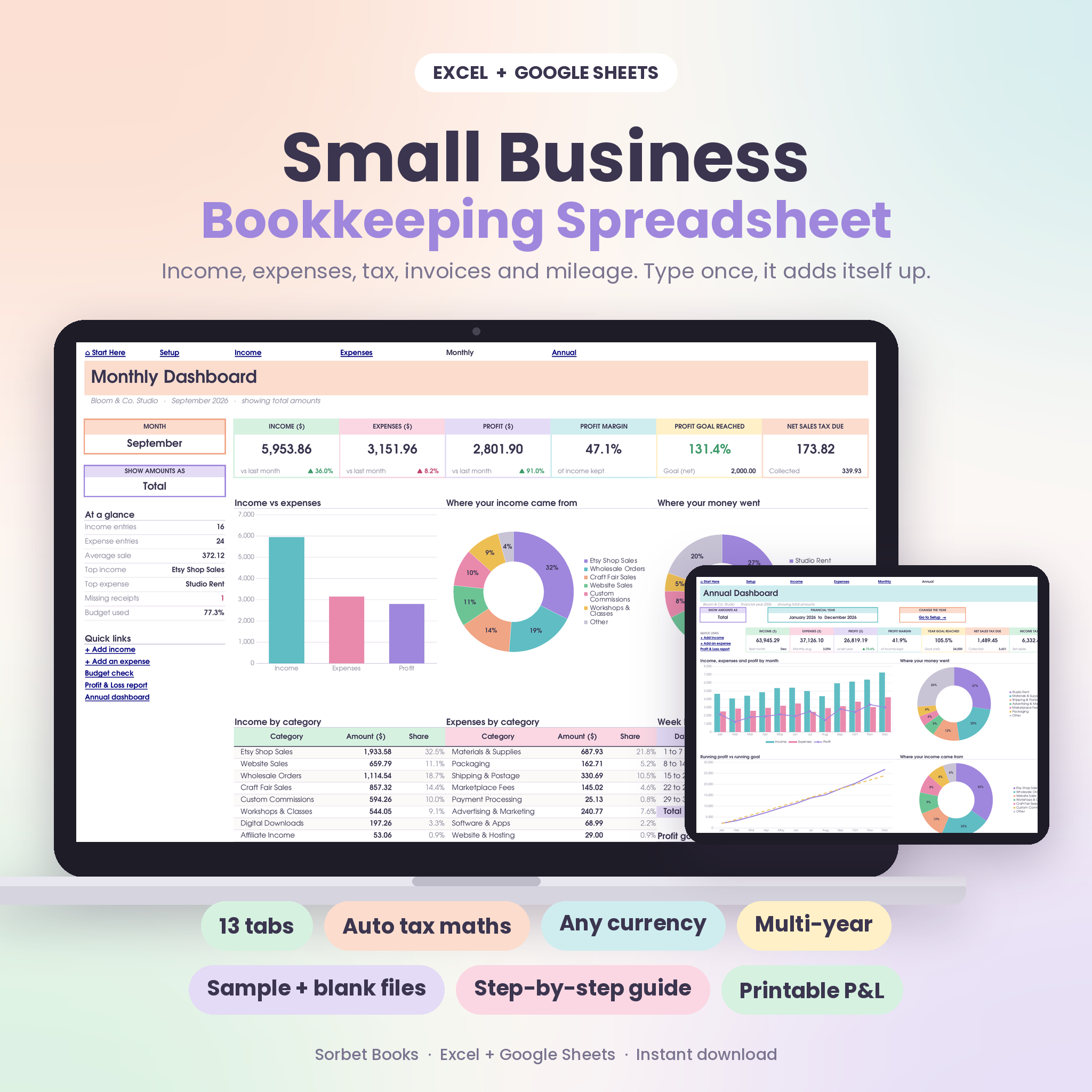
You type each payment once, on an Income tab or an Expense tab, and 13 connected tabs work out the rest: tax, net amounts, monthly and yearly totals, charts, budgets, account balances, invoices, a Profit & Loss and a five-year comparison.
No accounting background needed. If you can type a date and an amount, you can keep proper books with it.
Setting it up (about 20 minutes)
Everything starts on the Setup tab. Do this once and you rarely touch it again.
- Business details and currency. Any currency symbol works.
- Tax. Name it whatever your country calls it (VAT, GST, Sales Tax, HST), set the rate, and choose whether your amounts include tax or have it added on top.
- Start month. If your financial year starts in March or July, set it here.
- Categories. Up to 20 income categories and 30 expense categories. Rename them to match your business. A salon might have Cuts, Colour, Treatments and Product Sales.
- Accounts. Up to 12: your bank account, a card, PayPal, a cash tin.
- Monthly profit goal. You can set a different goal for each month, which helps if December is always your big one.
There’s a sample file filled with example data, and a blank one. Spend ten minutes clicking around the sample before you start yours. It’s the fastest way to see what each tab expects.
The colorful bookkeeping spreadsheet routine
A weekly habit is enough for most small businesses. Here’s how it looks in Sorbet Books.
Log the week’s money
Open the Income tab and add each sale or payment: date, description, category and account from dropdowns, amount. Refunds go in as negative amounts. Then do the same on the Expense tab. There’s a column to mark whether you have the receipt, and missing receipts turn pink. That one detail saves a lot of hunting at year end.
Check invoices
The Invoices tab sets each invoice to Paid, Part paid, Open, Due soon or Overdue on its own, with days late. Sort by status and chase anything red.
Glance at the monthly dashboard
Pick the month and you get 6 summary cards with change from last month, 3 charts, category tables, week-by-week cash flow and a profit goal tracker. You can switch the view between total, net and tax amounts.
Once a month: budget and accounts
The Budget planner lets you set monthly limits per category and shows money left and percent used, with traffic-light colours. If marketing hits amber by the 12th, you know before it becomes a problem rather than after.
The Accounts tab shows a live balance for each bank account, card, wallet and cash pot, with a transfers log. Check it against your real bank balance. If they match, your books are right. If they’re 40 off, you’ve missed an entry, and it’s much easier to find in week one than in month eleven.
At tax time
This is where keeping books weekly pays off. The Tax summary shows tax collected against tax paid by quarter, an income tax savings pot and a list of deductible expenses (the Expense log flags deductible items automatically). The Mileage log works out a deduction by month, including round trips.
The Profit & Loss is print-ready for the full year, any quarter or any single month. Hand that to your accountant along with the receipt folder and you’ll probably have a shorter, cheaper appointment.
And because it’s multi-year, you just keep logging into the same file the following year. Year Compare puts five financial years side by side with growth and a trend chart.
Who Sorbet Books is for
- Etsy sellers, makers and online shop owners
- Freelancers, consultants, coaches and creatives
- Salons, cleaners, tutors, photographers and other service businesses
- Side hustles that need real records before tax time
- Anyone who knows they’ll actually open a file that looks nice
It runs in Excel 2010 or newer and Google Sheets, with no macros or add-ins, so older laptops are fine.
Who should pick something else
- Businesses with stock to track. Sorbet Books records money, not inventory. If you need materials and recipes, use an inventory-based template alongside it or instead.
- Anyone running payroll for staff. There’s no payroll tab.
- Companies that need double-entry accounts or bank feeds. Once you have an accountant asking for journals, or hundreds of transactions a month, proper accounting software makes more sense.
- People who prefer a minimal look. You can recolour any tab, but if you want plain black and white from the start, a simpler template might suit you better.
FAQ
Is a colorful bookkeeping spreadsheet less professional?
Not where it counts. The colours are for you while you work. The Profit & Loss and dashboards are set up to print neatly, which is what your accountant or bank sees.
Can I change the colours?
Yes. You can recolour any tab to match your brand, rename categories and accounts, and change the currency symbol.
Does it work on a tablet?
It works on desktop, laptop and tablet. A larger screen is better for the dashboards, so most people log entries on whatever’s handy and review on a laptop.
Is there a guide?
Yes, a 23-page illustrated guide with screenshots, troubleshooting and FAQs comes with the files.