Running a blog, three social accounts and a newsletter feels like feeding three hungry pets on different schedules. The blog wants a long post every week or two. Instagram wants something most days. The newsletter wants a thoughtful email every Thursday. Plan them separately and you end up writing three times as much as you need to.
A content planner for blogs, socials and newsletters puts all three on one calendar, fed by one list of ideas. A single blog post becomes five social posts and the heart of a newsletter. The work shrinks. The message gets clearer. And you stop staring at a blank caption box at 9 p.m.
This guide is for small business owners, makers, coaches and solo creators who handle their own content. You will learn how to set a pace you can keep, how to turn one idea into three formats, how to batch a month in one sitting, and which Taskdale planners fit people who like apps, spreadsheets or paper.
Quick picks
| Product | Best for | Price | Link |
|---|---|---|---|
| Plannova Social Media Content Calendar | Turning one idea into posts for every channel | $18.99 | View |
| Feedwell Social Media Content Planner | A calm idea-to-posted pipeline in your browser | $12.99 | View |
| Cadence Social Media Planner Spreadsheet | Planning and results in Excel or Google Sheets | $11.99 | View |
| Content Studio Social Media Planner | Planning strategy on paper first | $4.99 | View |
One calendar, every channel
The most common setup is also the most tiring: blog ideas in a notes app, social posts in a scheduling tool, newsletter drafts in the email platform. Each lives in its own world. Nobody, including you, can see that the blog post about spring cleaning goes out the same week the newsletter talks about tax season and Instagram shows a cake.
Putting everything on one calendar fixes three things at once. You see themes line up across a week. You spot gaps, like a fortnight with no newsletter. And you notice overload, like four launches crammed into the last week of the month.
Each channel just needs a label or a color. Blog in blue, newsletter in green, each social platform in its own shade. Then one glance at the month tells you the whole story.
Setting a pace you can keep
Consistency beats volume. A newsletter that arrives every other Thursday for a year builds more trust than one that arrives daily for three weeks and then vanishes. So choose a rhythm based on the hours you really have, not the hours you wish you had.
| Channel | Steady starting pace | Rough time per piece |
|---|---|---|
| Blog | 2 posts a month | 2 to 4 hours |
| Newsletter | Every other week | 1 to 2 hours |
| Main social platform | 3 posts a week | 20 to 40 minutes |
| Second social platform | Reshare adapted versions | 10 minutes |
Add that up and you get roughly 14 to 20 hours a month. For a shop owner with a full-time business, that might be too much. If so, drop the second platform or the blog frequency first. Never drop the channel you own outright, which is the newsletter. Social platforms change their rules. Your email list stays yours.
One idea, three formats
This is where the hours come back. Instead of thinking up separate ideas for each channel, you start with one core idea and shape it for each place.
A worked example
Rosa runs a small online plant shop. Her core idea for the second week of April is “how to repot a root-bound plant”.
- Blog post (Tuesday): a 1,200-word guide with step photos, a list of tools and three common mistakes.
- Instagram (Wednesday): a carousel of the six steps, one photo each.
- Instagram (Friday): a short video of roots being teased loose, with a link to the blog in the caption.
- Pinterest (Wednesday): a tall pin with the title and the best photo, pointing to the blog.
- Newsletter (Thursday): a short personal intro about the fern she nearly lost, the top three tips, a link to the full guide and a mention of the new pots in stock.
That is five pieces of content from one afternoon of photos and one draft. Each piece points back to the others, so a reader who finds her on Pinterest can end up on her email list.
A planner that holds the core idea and lists each format beneath it, with its own status and date, makes this repeatable instead of a one-off good week.

Plannova Social Media Content Calendar
Price: $18.99 | Best for: creators repurposing across many channels
An offline content planner that runs in your web browser with no account or subscription. Its Repurposing Matrix turns one core idea into a version for every platform, each with its own caption, status and date, and you can add custom platforms, so a blog and a newsletter can sit beside your social channels. It also has a Batch Planner for generating weeks of post slots, an Idea Bank with 60 prompts and a drag-and-drop calendar. Set up your channels first, including Blog and Newsletter, then add your next core idea.
A pipeline that shows what is stuck
Every piece of content passes through the same stages: idea, drafting, ready, posted. Most people only track the last one, so they never notice that six blog drafts have been sitting at “half written” since February.
Seeing content on a board, with a column for each stage, makes the jams obvious. If the Drafting column is full and Ready is empty, you know your next free hour goes to finishing, not starting something new. There is a small, real satisfaction in dragging a card into Posted, too.

Feedwell Social Media Content Planner
Price: $12.99 | Best for: solo business owners and bloggers
A content calendar that runs from one HTML file in Google Chrome or Microsoft Edge, offline, with your data kept on your own computer. Posts move across Idea, Drafting, Ready and Posted on a drag-and-drop board, and a This Week dashboard shows what goes out in the next seven days and what has slipped. You can add as many platforms as you need, copy a post to other platforms in two clicks and repeat a weekly series up to 52 times. Add Blog and Newsletter as platforms during the one-minute setup.
A tip for newsletters: give each issue its own card with a checklist. Subject line, intro, main section, link, call to action, test send. Ticking those off stops the classic mistake of sending an email with a broken link at 6 a.m.
If you would rather use a spreadsheet
Some people think best in rows and columns. A spreadsheet also has one clear advantage for a small team: you can share it in Google Drive and everyone edits the same file. Add an owner column and the person writing the blog knows the social posts are someone else’s job.
A good content spreadsheet keeps one list of posts and builds the calendar, the upcoming list and the results from that list. You do not want to type a post into a calendar tab and again into a tracker.
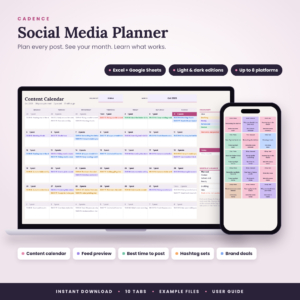
Cadence Social Media Planner Spreadsheet
Price: $11.99 | Best for: small teams sharing one content plan
A content calendar for Excel and Google Sheets where you plan each post once on a 1,000-row Posts list with date, platform, format, pillar, status, owner, caption and links. The month calendar, a Next 14 Days list, a feed grid preview and a results dashboard all fill in from that list. You can set up to 8 platforms with your own handles and caption limits, so one can be your blog and one your newsletter. Setup on the Settings tab takes about 15 minutes.
Note that planners like this one do not post for you. You plan in the sheet, then publish in your blog editor, email tool or social app. Many people like that separation. Planning stays calm and away from the noise of the feeds.
Planning strategy on paper first
Before any calendar, it helps to answer a few big questions. Who are you writing for? What three to five topics do you keep coming back to? What do you want readers to do next, buy, book, reply? Those answers make every later decision faster.
Plenty of people find these questions easier to think through with a pen. A printed planner on the desk, away from the screen, slows you down just enough to think clearly.
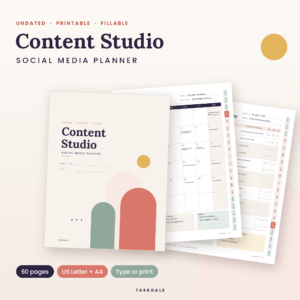
Content Studio Social Media Planner
Price: $4.99 | Best for: makers who plan best with a pen
A 60-page undated planner you can print or fill in on screen. It starts with brand, audience and five content pillars, then moves to a month calendar, a weekly planner for 14 posts, a Batch Day Planner, a Content Repurposing Planner and monthly review tables. The post planning pages cover the main social platforms plus blog or email. Fill in the Content Pillars page first, then plan one month.
Content pillars are worth the effort. Rosa’s are plant care, new stock, behind the scenes and customer homes. Every idea she has must fit one of the four. If it does not, it waits.
The monthly batch day
Writing content in the gaps between other work is slow and scattered. Batching, doing one kind of task for a long block, is far quicker. Many solo creators keep one day a month, or two half days, just for content.
- Hour 1: choose the core ideas. Pick two to four from your idea list, one per blog post.
- Hours 2 to 4: write the blog drafts. Rough first drafts only. Do not edit yet.
- Hour 5: photos or video. Shoot everything for the month in one go while the light is good.
- Hour 6: cut social posts from the blogs. Three to five per blog post, captions included.
- Hour 7: outline the newsletters. Two issues, each built around one blog post plus a personal note.
- Last half hour: put it all on the calendar. Dates, statuses, owners.
Then during the month, your job is only to polish and publish. That feels very different from starting from nothing every morning. If captions are your sticking point, our list of AI prompts for social media captions can help you draft faster before you edit in your own voice.
Checking what each channel brings back
A plan is only half the job. The other half is noticing which pieces earn their keep, so next month’s plan leans toward them. You do not need fancy analytics for this. Ten minutes on the first of each month is enough.
For the blog, note the two posts that got the most visits and the one that brought in the most email sign-ups. For the newsletter, note the open rate and which link got the most clicks. For each social platform, note the three posts with the most saves or shares, because those are better signs of real interest than likes.
Then look for the pattern. Rosa noticed that every newsletter featuring a plant rescue story got more replies than her product round-ups. So she now opens each issue with a short rescue story, even when the main topic is a sale. Small change, clear result.
Write your findings in one line at the top of next month’s plan. “More rescue stories. Fewer flat-lay photos.” One line you will actually read beats a report you will not.
Mistakes that make content planning harder
- Planning too far ahead. A full quarter of fixed posts leaves no room for news, a sale or a surprise trend. Plan one month in detail and the next two loosely.
- Treating the newsletter as an afterthought. It is often your best channel for sales, because readers asked to hear from you. Give it a fixed day.
- Copying the same caption everywhere. A LinkedIn post and an Instagram caption read differently. Adapt the opening line at least.
- Never looking at results. Once a month, note your three best pieces and ask why. Do more of that.
- Too many platforms. Two done well beat five done badly. Add a new one only once the first two run on autopilot.
If you want more on the social side, our guide to a social media content calendar template covers posting rhythms and pillar balance in more depth.
Frequently asked questions
How do I plan content for a blog and social media together?
Start with one core idea per blog post, then cut three to five social posts and one newsletter section from it. Keep all of them on one calendar, with a color or label for each channel.
How often should I send a newsletter?
Every other week is a steady starting point for most small businesses. Pick a fixed day and keep it. Readers come to expect it.
Can a social media planner handle blogs and newsletters?
Many can if they let you add your own platforms. Feedwell and Plannova let you add custom platforms, and Cadence lets you set up to eight, so Blog and Newsletter can each have their own label.
What is a content pillar?
A broad topic you return to again and again, such as product tips, behind the scenes or customer stories. Three to five pillars keep your content focused and make idea hunting easier.
Do these planners publish posts for me?
No. They are for planning, drafting and tracking. You publish in your blog editor, email tool and social apps.
Your next step
Write down your next blog topic, then list the four social posts and one newsletter section you could cut from it. Put all six on one calendar this week. If you want a planner built for exactly that, set up Blog and Newsletter as channels in Plannova and add that idea as your first core piece.