Best Eisenhower Matrix Templates and Planners to Buy
The best Eisenhower matrix depends on where you plan your day. The Focus Desk Work Planner Kit suits paper and PDF, the two Clearday spreadsheets suit Excel and Google Sheets, and Tallyday suits an offline browser app. Each sorts tasks by urgency and importance, so your time goes to what matters.
An Eisenhower matrix can look simple and still feel hard to start. You have a long list, a few deadlines and a nagging sense that the wrong things are getting your attention. We'll walk through what to look for, how the options on this page differ, and how to pick one you will still be using in a month.
Key facts at a glance
- An Eisenhower matrix is a four-box grid that sorts tasks by whether they are urgent and whether they are important.
- The Focus Desk Work Planner Kit is a fillable PDF in US Letter and A4, usable on screen or printed.
- Both Clearday spreadsheets work in Excel 2010 or newer and in Google Sheets, with no Microsoft 365 needed.
- Tallyday runs offline in your web browser, needs no account and keeps your data on your computer.
- The Project Management Spreadsheet and Tallyday include a matrix inside a wider project toolkit, so they suit work with deadlines and teams.
 Task Planner App with Dashboard, Kanban Board, Gantt Chart & Calendars | Tallyday All-in-One Offline Task Tracker with Recurring Tasks, Focus Timer & Time Tracking
 ADHD Planner Spreadsheet for Excel | Task, Habit & Goal Tracker with Recurring Tasks, Daily Weekly Monthly Planner & Time Blocking
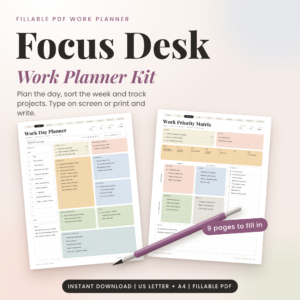 Focus Desk Work Planner Kit: Fillable Work Day Planner PDF, Priority Matrix and Weekly Planner (US Letter and A4)
 Project Management Spreadsheet for Excel & Google Sheets | Gantt Chart, Kanban Board, Task Tracker & Dashboard Template
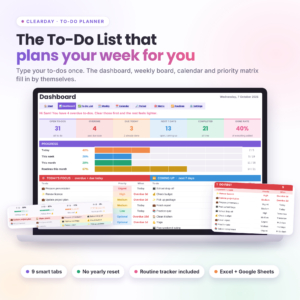
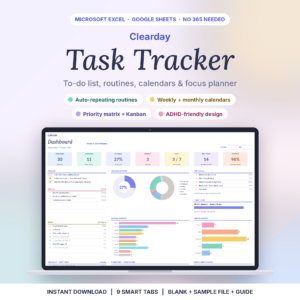
Table of Contents
Toggle
- What is an Eisenhower matrix and how does it work?
- What should you look for in the best Eisenhower matrix?
- How do the Eisenhower matrix options compare?
- Which Eisenhower matrix suits which person?
- How do you use an Eisenhower matrix day to day?
- What mistakes should you avoid with an Eisenhower matrix?
- What affects the price of an Eisenhower matrix template?
- How to choose your Eisenhower matrix with confidence
- Common questions
What is an Eisenhower matrix and how does it work?
An Eisenhower matrix is a grid of four boxes that sorts every task by two questions: is it urgent, and is it important? It is named after US President Dwight D. Eisenhower, who is associated with the idea of separating urgent work from important work.
The four boxes each have a job:
- Urgent and important: do these today. A bill due tomorrow or a client deadline sits here.
- Important but not urgent: schedule these. Planning, health appointments and learning belong here.
- Urgent but not important: hand these on or keep them short. Many emails and interruptions land here.
- Neither: drop or park these.
The value comes from the second box. Most people react to the first and third boxes all week, and the second box is where the longer-term gains are. A good matrix makes that box visible.
What should you look for in the best Eisenhower matrix?
The best Eisenhower matrix is the one you will actually open every morning. Five practical factors separate the options on this page, and each is worth checking before you buy.
Format: paper, spreadsheet or app
Format decides how often you will use the matrix. The Focus Desk Work Planner Kit gives you a fillable PDF you can type into or print and write on by hand. Clearday and the Project Management Spreadsheet are spreadsheets for Excel and Google Sheets. Tallyday is a browser app. If you think best with a pen, choose the PDF. If you already keep lists in Excel, a spreadsheet will feel familiar.
Whether the matrix updates itself
A static grid needs you to redraw it. Clearday describes its priority matrix as part of a connected set of tabs, so you add a to-do and every tab keeps up on its own. Tallyday works the same way: add a task once and it appears across its views, including the decision matrix. The PDF kit is manual by design, which some people prefer because the writing itself forces a decision.
How it handles repeating tasks
Many urgent-looking jobs are really routines. Clearday Task Tracker Spreadsheet repeats tasks daily, on weekdays, weekly, every 2, 3 or 4 weeks, monthly, quarterly and yearly. Tallyday offers 15 repeat patterns. The ADHD Planner Spreadsheet for Excel also lets you add a routine once, for example Mon/Wed/Fri, and fills your pages for you. If your week is full of recurring chores, this feature saves more time than any extra chart.
Where your data lives
Tallyday has no account and no subscription, and your data stays on your computer. The spreadsheets are files you download, so your lists stay with you too. The Clearday Task Tracker works in Excel for the web and Google Sheets, which helps if you switch between devices. Think about whether you need your matrix on one machine or several.
Extra views you will really use
A matrix on its own is enough for many people. Others want a calendar, a Kanban board or a Gantt chart beside it. Tallyday offers 17 connected views. The Project Management Spreadsheet has 14 linked tabs with a Gantt chart, Kanban board and dashboard. If you only need to sort your day, a lighter tool will be easier to keep up.
How do the Eisenhower matrix options compare?
The six options differ mainly in format, matrix style and how much else they do. This table compares them on the details supplied in each listing.
The ADHD Planner is the one to check carefully. Its listing does not mention a matrix, so choose it for routines and time blocking, not as a pure Eisenhower grid.
Which Eisenhower matrix suits which person?
Each option suits a different working style, and the right pick follows from how you plan. These pairings are based on what each listing describes.
Choose the Focus Desk Work Planner Kit if you want a printed or typed page and a quick start. It includes a Work Day Planner, Priority Matrix, Time Blocker and six more pages, plus filled examples and a Word user guide.
Choose Clearday To-Do Planner if your life is a mix of tasks and household routines. Its 12-month routine tracker keeps habits and chores next to your to-dos, and there is room for 500 to-dos.
Choose Clearday Task Tracker Spreadsheet if repeating jobs dominate your week. It builds an overdue list, a today list, calendars, a priority matrix and a Kanban board from what you type.
Choose Tallyday if you want a single offline app with a focus timer and no sign-up. You can type tasks in plain words, such as "Call Sam friday 3pm !high".
Choose the Project Management Spreadsheet if you run projects for clients or a team. It tracks budgets, hours, dependencies and workload, and prints a one-page report.
Choose the ADHD Planner Spreadsheet if you want routines, streaks and goal cards, and you are happy to sort priorities by its own method.
How do you use an Eisenhower matrix day to day?
You use an Eisenhower matrix by sorting your full task list into four boxes once a day, then working from the first box down. It takes about five minutes if the list is current.
- Capture everything. Put every task on one list before you sort. Do not judge yet.
- Ask about the deadline. Is there a real consequence if this slips in the next day or two? If so, it is urgent.
- Ask about the outcome. Does it move forward something you care about? If so, it is important.
- Place the task in a box. Be honest. Most tasks are not both.
- Give box two a time slot. Put at least one important but not urgent task in your calendar today.
- Review each morning. Tasks move boxes as deadlines approach, so recheck.
With a spreadsheet or app, the sorting updates as you mark things done. With the PDF kit, reprint or retype the page each morning.
What mistakes should you avoid with an Eisenhower matrix?
The most common mistake is marking everything urgent and important, which turns the matrix into a long to-do list in a grid. If more than a third of your tasks land in box one, you are probably confusing noise with deadlines.
- Never using box two. Planning and prevention stay undone because nothing forces them. Book time for them.
- Overbuilding the system. A tool with 17 views is useful only if you open more than one. Start with the matrix and add views later.
- Skipping the review. A matrix you fill in on Monday and ignore until Friday is out of date by Tuesday.
- Keeping delegated tasks in your head. If you hand a task on, note who has it and when you will check.
- Choosing the format you admire, not the one you use. A handsome spreadsheet is no help if you plan on paper.
What affects the price of an Eisenhower matrix template?
The price of an Eisenhower matrix template is shaped mainly by how much else the product does, not by the matrix itself. Live prices appear on the product cards, so this section explains the differences in words.
A single-purpose planner, such as a fillable PDF with a handful of pages, tends to cost less than a multi-tab system. Products with a Gantt chart, budgets, time billing and team workload, like the Project Management Spreadsheet and Tallyday, are built for more demanding work and are likely to cost more up front. Support material matters too: Clearday includes a blank file, a sample file and a user guide of 14 or 17 pages depending on the version. Look also at whether there is a recurring subscription. Tallyday and the Clearday files state no subscription, which means one payment rather than an ongoing one.
How to choose your Eisenhower matrix with confidence
Pick by format first, then by how much else you need. If you plan on paper, take the Focus Desk Work Planner Kit. If you plan in Excel or Google Sheets and want self-updating tabs, take a Clearday spreadsheet. If you want a private offline app, take Tallyday.
Move to the Project Management Spreadsheet only when you are managing budgets, dependencies or other people. Treat the ADHD Planner Spreadsheet as a routine and habit tool, not a matrix. Browse all 6 options below and open the ones that match your format.
Common questions
What is the difference between urgent and important?
Urgent tasks demand attention now because a deadline or another person is pushing, while important tasks serve your own goals or responsibilities. A ringing phone is urgent. Reviewing your finances is important. Many tasks are one or the other, and the matrix helps you tell them apart.
Can I use an Eisenhower matrix for personal life as well as work?
Yes. The four boxes work for any list, including household jobs, appointments and family plans. Clearday To-Do Planner is the closest fit here because its routine tracker places habits and chores beside your tasks, so personal and work items sit in one view.
Do I need Microsoft 6 for the spreadsheet options?
No for the Clearday Task Tracker Spreadsheet, which works in Excel 2010 or newer, Excel for the web and Google Sheets without Microsoft 365. Clearday To-Do Planner also supports Excel 2010 or newer and Google Sheets. Check each listing for the exact version support.
How often should I update my matrix?
Update it once each morning, and again briefly if your day changes. Tasks drift between boxes as deadlines near. A five-minute daily review is enough for most people, and a weekly check helps you spot box-two tasks you keep postponing.
Should I start with the simplest option?
If you have never used an Eisenhower matrix, yes. Start with the Focus Desk Work Planner Kit or a Clearday spreadsheet and use only the matrix for two weeks. Move up to Tallyday or the Project Management Spreadsheet only when you find yourself needing calendars, Gantt charts or budgets.