
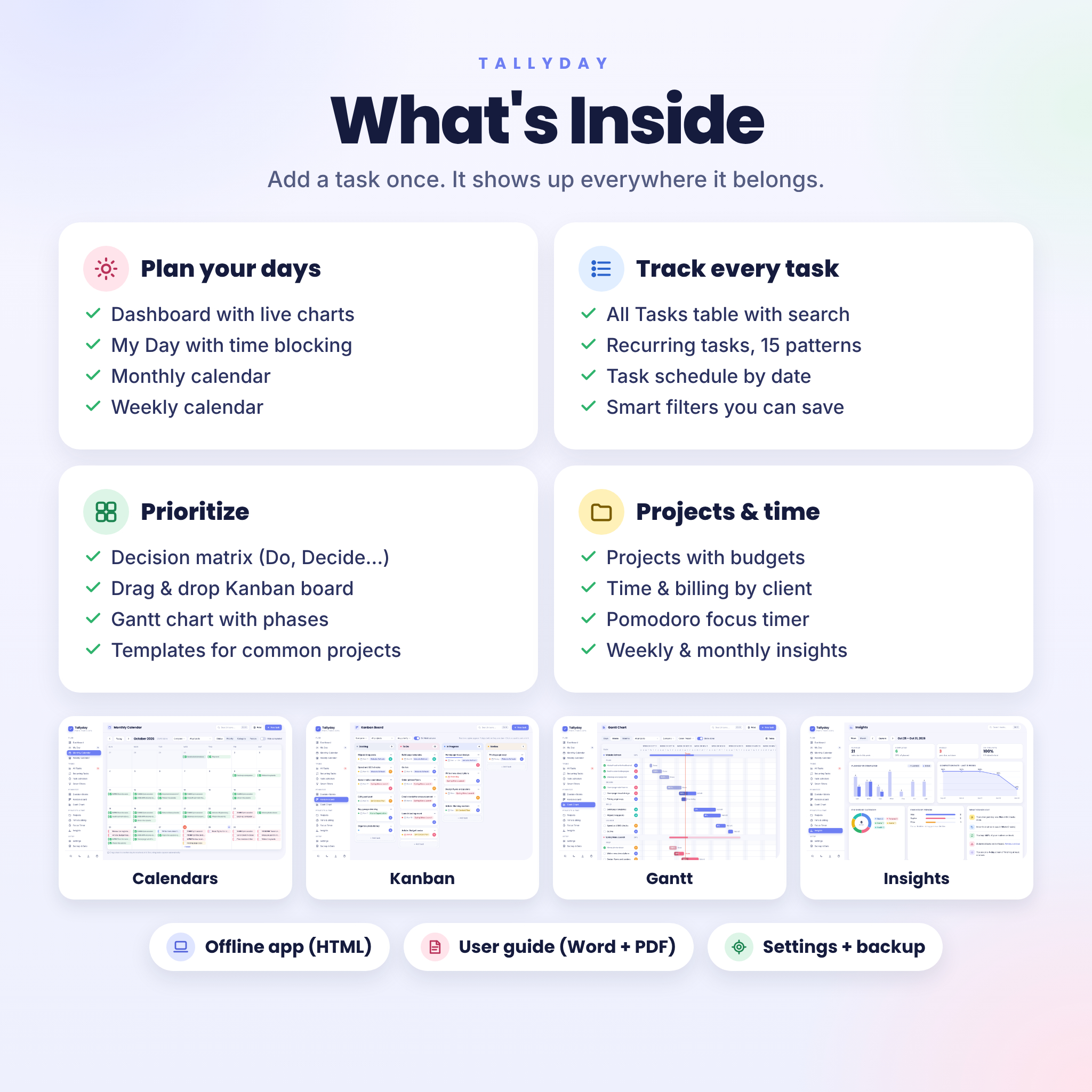


Most to-do apps make you choose. A list that looks nice but can’t handle projects, or a project tool that feels like homework. Tallyday is a task planner app that gives you both in one file. You open it in your browser, add your tasks, and every page fills itself in: the dashboard, the calendars, the Kanban board, the Gantt chart and the decision matrix.
There is nothing to install and no account to create. It works offline, and your tasks never leave your computer.
What this all-in-one task planner app does
Every view reads from the same tasks. Tick something off on the calendar and the dashboard ring moves. Drag a card to Review on the board and the task list updates. Give a task a start date and a due date and it turns into a bar on the timeline, ready to drag.
It also handles the boring parts for you. Routines repeat on their own. Overdue work gets flagged in red. Focus sessions log their minutes to the right task, and billable hours become amounts at your client rates.
Features
Plan your days
- Dashboard: today’s tasks, the next 14 days, a mini calendar, matrix rings, status and person charts, priority bars and project progress. Click any total to open those tasks.
- My Day: choose your top 3, then drag tasks onto an hourly timeline to block time. Plan tomorrow tonight if you like.
- Monthly and weekly calendars: check tasks off in place, drag them to a new day, color them by status, priority, category or person, and print a clean copy.
Track every task
- All Tasks: search, quick filters, grouping, sorting, inline status changes and bulk actions.
- Natural-language quick add: dates, times, priority, people, categories, projects and even repeats are picked up as you type.
- Recurring tasks with 15 patterns: every weekday, every 3 days, the 2nd Tuesday, the last weekday of the month, quarterly and more. Pause and resume any routine.
- Task Schedule lists every dated task and routine copy, one row per date.
- Smart Filters: nine ready-made filters plus your own saved ones.
- Subtasks, notes, tags, time estimates, costs and a progress setting on every task.
Prioritize and plan projects
- Decision matrix: drag tasks into Do, Decide, Delegate or Delete, with a tray for new tasks that still need sorting.
- Kanban board: six stages, drag and drop, card order, subtask progress and work-in-progress limits.
- Gantt chart: bars grouped by project and phase, day, week or month zoom, drag bars to move dates, drag the edge to change the due date, a today line and days-left labels.
- Projects: budgets, clients, progress rings and overdue counts on one card.
- Templates: six built in (weekly review, client onboarding, product launch, event planning, moving house, blog post), and you can save any project as your own.
Time, focus and insights
- Focus timer: Pomodoro rounds with short and long breaks, a chime, auto-start and an option to mark the task done.
- Time and billing: manual or timer entries, hourly rates per client or project, billable and invoiced flags, totals by client and project, CSV export and a printable timesheet.
- Insights: planned vs completed, missed tasks, on-time rate, an 8-week trend, finished work by category and person, and your streak.
Who it is for
Freelancers who need to see clients, deadlines and billable hours together. Small business owners keeping a handful of projects moving. Students balancing assignments and exams. Busy households sharing one computer. Or anyone who has tried a spreadsheet task tracker and wished it would update itself.
Real ways to use it
- A designer tracks three client websites on the Gantt chart, logs focus sessions, then exports the month’s billable hours for invoicing.
- A parent sets up “Pay rent” on the 1st, “Bins out” every Tuesday and school forms as one-off tasks, then plans each evening in My Day.
- A student drops every assignment into the calendar, sorts revision in the decision matrix and checks Insights on Sunday.
- A small team on one office PC assigns tasks to each person and filters the board by name in the Monday check-in.
What is included
- Tallyday.html: the offline task planner app (one file, about 0.5 MB)
- User guide: 34 pages in Word (.docx) and PDF, with screenshots of every view
- Licence.txt: your personal-use terms
Everything comes in one ZIP file.
How it works
- Download the ZIP after checkout and unzip it.
- Double-click Tallyday.html. It opens in your browser.
- Choose to explore with sample data or start fresh. Pick your date format, week start and currency.
- Add tasks. Tallyday saves as you go.
File format and software requirements
- Format: a single offline HTML app, plus a DOCX and PDF guide.
- Works on Windows, Mac, ChromeOS and Linux computers in a current browser. We test with Google Chrome and Microsoft Edge.
- The layout adapts to tablets and small screens, though a computer is the best fit for daily use.
- No internet needed after download. No account, no login, no subscription.
Make it yours
Switch between light and dark mode and six accent colors. Set your own people, categories, clients and hourly rates, and rename the statuses. Choose your date format, 12 or 24 hour time, and whether weeks start on Sunday, Monday or Saturday. One currency setting controls every money value in the app, with $ as the default and 16 currencies ready to pick, or type your own symbol.
Your data is yours too. Download a backup file in one click, restore it on another computer, and import or export tasks as CSV for Excel or Google Sheets.
Digital download
This is a digital product. Nothing physical is shipped. Your files are ready to download as soon as payment goes through. The licence covers personal use by the buyer, for personal or business planning. Please do not share or resell the files.
FAQ
Does this task planner app work offline?
Yes. After you download it, Tallyday runs from the file on your computer with no internet connection.
Is there a monthly fee?
No. You pay once and keep the file.
Where is my data saved?
In your own browser on your own device. Nothing is uploaded. Use the backup button to keep a copy.
Can I use it on my phone?
The screens adapt to phones and tablets, but phones handle downloaded HTML files in different ways, so we recommend a computer for everyday use.
Can I move my tasks to a new computer?
Yes. Download a backup, copy it and the app to the new computer, and restore it from Backup & Data.
Can I import tasks from a spreadsheet?
Yes. Import a CSV with a Title column. Dates, statuses, people, categories and projects come across too.
Does it support other currencies?
Yes. Pick from 16 currencies or type your own symbol. Budgets, costs and billing all follow it.
Is it a Google Sheets or Excel template?
No. It is a standalone app that opens in your browser, so the calendars, board and Gantt chart are fully interactive. You can still export to CSV for Excel or Google Sheets.
Winny Mueller –
Simple and wonderful
good product that I liked very much!