A zero-based budget does not need an app. It needs a page, a pen or a keyboard, and twenty minutes before the month begins. EveryDollar made the method feel friendly, but the method itself is older than any phone: income at the top, every dollar handed a job below it, and a balance of zero at the bottom.
This guide is for people who like the EveryDollar way of budgeting but want something they own outright. Maybe the free version feels too limited, maybe the paid tier is one more subscription you do not need, or maybe you just think better on paper. You will get the method step by step, a full sample month with real numbers, three ways to run it without an online account, and the habits that keep it going past February.
Quick picks: zero-based budget files to keep
| Product | Best for | Price | Link |
|---|---|---|---|
| Hazelwood Budget Planner | Printing, or typing into a PDF that adds up | $3.75 | View |
| Petalwise Budget Planner | iPad or Android tablet with a stylus | $3.20 | View |
| Thriftwood Money Studio | An app-like screen with no login | $12.99 | View |
| Cedarly Money Hub | Several accounts and paydays in one view | $19.00 | View |
Why people go looking for an EveryDollar alternative
EveryDollar deserves credit. It took a method that sounds like accounting homework and made it feel like a to-do list. You type in your income, drag it into categories, and the app tells you how much is left to budget. When that number hits zero, you are done. Plenty of households got their first grip on money that way.
So why leave? The reasons people give are usually practical, not dramatic:
- The paid tier is a subscription. Bank syncing and extra features sit behind a recurring fee, and that fee keeps coming whether you open the app daily or twice a month.
- It needs an account. Your spending history lives on someone else’s server, behind a login and a password you have to keep track of.
- Screens make it easy to skim. Tapping a category is quick. Too quick, for some people. Writing “groceries: $640” by hand makes you look at the number.
- Not everyone wants a phone in the loop. A couple who budgets together at the kitchen table on the 1st often finds one shared sheet easier than two phones.
None of that means the app is bad. It means the method can live somewhere else. If you want a refresher on the idea itself before choosing a format, our guide to the zero-based budget walks through it from the ground up.
Zero-based budgeting on paper, step by step
The paper version follows the same logic as the app. You just do the adding yourself, or let a fillable PDF do it for you.
- Write down the money you expect this month. Take-home pay only, after tax and deductions. If you are paid every two weeks, list each paycheck with its date.
- List the four walls first. Housing, utilities, food and transportation. These keep the lights on and the car running, so they get funded before anything else.
- Add every fixed bill. Phone, insurance, loan minimums, streaming, the gym. Check last month’s bank statement so nothing hides.
- Fund your sinking funds. These are small monthly amounts for costs you can see coming: car repairs, birthdays, the water bill that arrives every quarter.
- Pick a savings or debt goal. One goal, not five. An emergency fund or one debt, whichever matters most right now.
- Give the rest a job. Fun money, eating out, extra debt payments. Keep going until income minus every line equals zero.
Zero does not mean your bank account is empty. It means nothing is unassigned. The $300 headed to savings still sits in your savings account. It just has a name now.
A sample month: $4,180 with a job for every dollar
Here is a real-looking month for a household that brings home two paychecks of $2,090. Seeing the whole thing filled in makes the method click faster than any explanation.
| Line | Planned |
|---|---|
| Rent | $1,450 |
| Electric, water, gas | $210 |
| Phone and internet | $120 |
| Groceries | $640 |
| Fuel | $180 |
| Car insurance | $145 |
| Car payment | $310 |
| Student loan minimum | $220 |
| Sinking funds: car repairs, holidays, annual renewals | $160 |
| Emergency fund | $300 |
| Household and toiletries | $90 |
| Eating out | $120 |
| Fun money (split two ways) | $150 |
| Extra student loan payment | $85 |
| Total assigned | $4,180 |
Notice the last line. After everything else was covered, $85 was left floating. In a zero-based budget, floating money is the money that vanishes on a Tuesday afternoon. So it went to the student loan. Next month it might go to the emergency fund instead. That choice is yours, and making it on purpose is the whole point.
Also notice the order. Rent and groceries got their money before eating out did. If this household had come up $200 short, the cut would come from the bottom of the list, not the top.
The printable route: one planner, paper or typed
Printable budgets have one weakness. You do the math with a calculator and it is easy to slip a digit. A fillable PDF fixes that while keeping the paper feel, because you can type into the boxes on a laptop and print the finished page for the fridge or a binder.
That mix suits people who switched away from an app but still want the total to work itself out. Type the plan on the 1st, print it, then pencil in what you actually spend through the month.
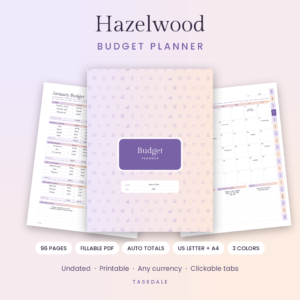
Hazelwood Budget Planner
Price: $3.75 | Best for: paper lovers who hate doing sums
Hazelwood is an undated budget planner with 96 pages in seven tabbed sections, sold as a fillable PDF that also prints cleanly. Subtotals, totals and the left-over figure fill in as you type, and it includes zero-based and 50/30/20 pages, a bill tracker, debt payoff pages and savings challenges. Start with the monthly zero-based page and copy in your income and four walls before anything else.
A tip on printing: run off twelve copies of the monthly budget page and only one copy of the yearly overview. Punch them, clip them into a binder, and you have a full year ready to go. If you are building a binder from scratch, this guide to what to put in a budget binder covers the tabs worth adding.
The tablet route: handwriting without the printer
Some people want the slow, deliberate feel of writing numbers by hand but have no printer, or no desk space for a binder. A hyperlinked planner on a tablet sits in the middle. You still write every figure yourself with a stylus. You just never run out of ink.
The real advantage is finding things. A paper binder with forty pages gets messy by March. A linked planner jumps from this month’s budget to the bill list in one tap, which means you actually open it on the 14th when the electric bill lands.
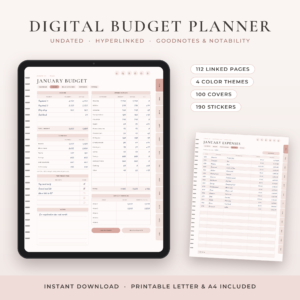
Petalwise Budget Planner
Price: $3.20 | Best for: iPad and tablet budgeters
Petalwise is an undated digital budget planner with 112 hyperlinked pages for GoodNotes, Notability, Noteshelf and Xodo, in four color themes, plus a printable edition in US Letter and A4. Each month has its own calendar, budget, bills and savings, expenses and review pages, with tabs down the side. Import your favorite theme, then fill in this month’s budget page before you touch the stickers.
Tablet budgeting works best when the tablet lives somewhere you will see it. On the kitchen counter beats inside a bag.
When you still want an app feel, minus the account
Paper is not for everyone. If what you liked about EveryDollar was the clean screen, the live “left to budget” number and the tap-to-log spending, an offline budget app keeps all of that and drops the login.
These tools run from a single HTML file. You double-click it, it opens in your web browser, and your numbers stay on your own computer. No bank password, no renewal date.
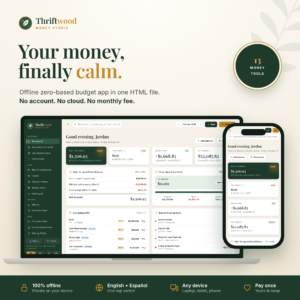
Thriftwood Money Studio
Price: $12.99 | Best for: app fans who want zero logins
Thriftwood is an offline budget app in one HTML file, built around zero-based budgeting with a live To assign counter that turns green at zero. It also has a bill tracker with due dates, a paycheck planner, a debt payoff calculator, savings goals and a safe-to-spend figure on the dashboard. Open it, add your accounts, then use quick fill to set up your first month.
If you juggle several accounts and two paydays, Cedarly Money Hub in the table above takes the same no-login approach and matches each payday to the bills it has to cover. Either way, back up the file once a week to a USB stick or a cloud folder you already use. Your data is only as safe as your last copy.
The Sunday check-in that keeps it alive
Apps nag you. Paper does not. That is the single biggest change when you leave EveryDollar, and it is the reason most paper budgets fade by the third week. So give yourself the nudge the app used to give.
Pick a fifteen-minute slot each week. Sunday evening works for a lot of people because the week’s receipts are still in the car. Then do the same four things:
- Gather receipts and check the bank app for card spending since last week.
- Write each purchase under its category and update the running total.
- Look at what is left in groceries, fuel and fun money. Those three run out first.
- If a line is overspent, move money from another line and write down the change.
That last step matters most. Moving $40 from eating out to groceries is not failure. It is the budget doing its job. The first month you finish with every category still in the black, you will feel it. A small, quiet win.
Mistakes that sink a paper budget in month two
Month one goes well for almost everyone. Excitement carries it. Month two is where the habits get tested, and these are the usual cracks.
Budgeting gross pay instead of take-home
A $58,000 salary is not $4,833 a month in your hand. Use what lands in the bank, or the budget will be short by hundreds before the first bill clears.
Forgetting the once-a-year bills
Car registration, a warehouse club membership, the dentist. A $360 bill in October wrecks a month that had no room for it. Divide it by twelve and fund $30 every month instead.
Leaving no fun money
A budget with zero for enjoyment lasts about three weeks. Even $25 each, spent guilt-free, keeps people on side.
Starting over instead of adjusting
You overspent on a birthday dinner. Fine. Move money, note it, keep going. Throwing out the page and promising to start fresh next month is how budgets die.
Who should stick with EveryDollar
Honesty helps here. A printable or offline budget is not the right call for everyone.
If you make thirty small card purchases a week and want each one to appear on its own, a bank-linked app saves real time. Typing or writing every coffee by hand gets old fast. The same goes for couples who live in different places or work opposite shifts and need to see the same budget from two phones at once.
And if the app is working for you right now, keep it. Switching tools during a tight month adds stress for no gain. The best budget is the one you will open next Sunday.
Frequently asked questions
Is there a free alternative to EveryDollar?
Yes. A blank sheet of paper, a free spreadsheet program, or a notes app can all run a zero-based budget. You lose automatic totals and a tidy layout, which is why many people move to a ready-made planner after a month or two.
Can I do zero-based budgeting without an app?
Absolutely. List your take-home pay, assign every dollar to a category until the total matches, and track spending against each line. A fillable PDF or spreadsheet does the adding up so you only type numbers.
What is the best printable zero-based budget for beginners?
Look for one page that shows income, every category and a “left to assign” box together. If it also has a bill list and a place to log spending, you have everything you need for month one.
How do I handle irregular income on a paper budget?
Budget from your lowest normal month. When a bigger paycheck lands, assign the extra straight away to a sinking fund, savings or debt, so it never floats unassigned.
Do offline budget apps work on a phone?
Most HTML budget tools are designed for a laptop or desktop browser. Some open on a phone, but typing in a month of spending is far easier on a bigger screen.
Your next step
Before the 1st of next month, write down your take-home pay and your four walls on a single page. That alone is half a zero-based budget. When you want the rest laid out and adding up for you, start with the Hazelwood Budget Planner and fill in your first month tonight.