Desktop invoicing programs such as Express Invoice made billing easy for a lot of small businesses: type a customer, add items, print or email. But plenty of owners now want something lighter. No installs, no license keys, no prompts to upgrade, just a file they open in Excel or Word and use for years. If that is you, an Express Invoice alternative with simple templates can cover nearly everything you used the program for.
This guide is for small service businesses, tradespeople, tutors and makers who want to keep the good parts of invoicing software and drop the rest. You will see which template replaces which feature, which kind of template fits your type of business, how to handle recurring invoices and moving your customer list, and where templates genuinely fall short.
Quick picks: simple template alternatives
| Product | Best for | Price | Link |
|---|---|---|---|
| PaidPath Client & Invoice Hub | Service businesses wanting invoices, payments and reports | $9.49 | View |
| Ledgerline Business Forms Kit | Trades who send estimates, quotes and purchase orders | $2.99 | View |
| Maker’s Business Forms Kit | Crafters billing custom orders | $3.00 | View |
| Ledgerline Invoice, Quote & Receipt Template Kit | Just invoices, quotes and receipts, done well | Original price was: $3.00.$1.50Current price is: $1.50. | View |
Why people swap invoicing software for templates
Invoicing software is not the problem. For some businesses it is exactly right. The reasons owners look elsewhere tend to be small, practical frustrations that add up over a year:
- Installs and computers. A desktop program lives on one machine. Change laptops and you have to move the program and its data together.
- Licenses, plans and limits. Software may come with license terms, paid tiers or limits on what the basic version does. Those can change over time.
- Upgrade prompts. Some programs nudge you toward extra modules you do not need.
- Your data in a format you cannot read elsewhere. Moving years of invoices out of a program can be awkward.
A template is just a file. Excel, Word or PDF. It opens on any computer with the right program, it can be copied to a USB stick, and it does not ask you to update anything. That simplicity is the whole appeal.
Feature by feature: what replaces what
Before switching, list what you actually did in your invoicing program each month. Then match each task to its template version.
| What you did in the software | The template way |
|---|---|
| Create and print invoices | An invoice sheet that fills in client and item details from dropdowns |
| Email invoices to customers | Save as PDF, attach to your normal email |
| Send quotes and convert them to invoices | A quote sheet in the same workbook, with matching lines |
| Keep a customer list | A clients tab with address, email and terms |
| Keep an item or service list | A products or services tab with prices |
| Record payments | A payments log that updates each invoice’s status |
| Print customer statements | A statement sheet for one client and a date range |
| Run reports on sales and unpaid invoices | A dashboard tab with totals, overdue lists and charts |
| Recurring invoices | Duplicate last month’s invoice row and change the date |
Most people find that eight of those nine tasks carry over without any loss. The ninth, recurring invoices, takes a little routine, which we cover below.
Pick the template by the way you work
There is no single best replacement. A dog walker, a kitchen fitter and a candle maker bill in completely different ways. Choose by what your typical job looks like.
Service businesses billing time or packages
Consultants, coaches, bookkeepers, designers, tutors and cleaners mostly bill the same clients over and over. What matters is saved clients, a service list, payment tracking and a view of who is late. If you used reports in your software, you will want a dashboard.

PaidPath Client and Invoice Hub
Price: $9.49 | Best for: Service businesses replacing billing apps
An Excel workbook with 12 linked tabs: Start Here, Dashboard, Clients, Client Card, Services, Invoices, Line Items, Payments, Expenses, Calendar, Print Invoice and Setup. It handles quotes, drafts, part payments, up to three taxes and automatic statuses, and prints one-page invoices and client statements on US Letter or A4. Capacity runs to 300 clients and 1,000 invoices. Copy your customer list into the Clients tab first.
Trades sending estimates and quotes
Plumbers, electricians, handymen and landscapers usually send an estimate before the work and an invoice after it, sometimes with a deposit in between. They may also order materials from suppliers. A forms kit with matching estimate, quote, invoice, receipt and purchase order covers the whole paper trail. If clients get muddled about the difference, our guide on quote vs estimate vs invoice is worth sending them.
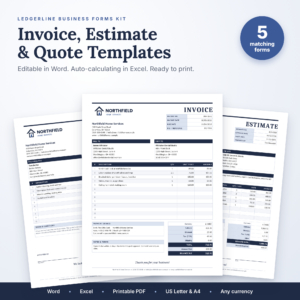
Ledgerline Business Forms Kit
Price: $2.99 | Best for: Trades with estimates and deposits
Five matching forms (invoice, job estimate, quote, sales receipt and purchase order) as editable Word templates in US Letter and A4, plus an 11-tab Excel Invoice Maker that fills in saved clients and items, works out tax and balance due, and logs up to 300 invoices on a tracker with a dashboard. Blank printable PDFs are included for site work. Set your payment terms on the Settings tab before your next estimate.
Makers and custom-order sellers
Crafters need order details captured correctly long before an invoice is written: sizes, colors, names, pickup dates. A kit that pairs order forms with an invoice and an order tracker fits better than generic invoice software ever did.
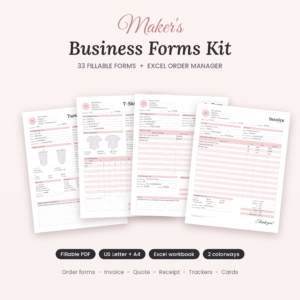
Maker’s Business Forms Kit
Price: $3.00 | Best for: Crafters taking custom orders
33 fillable PDF forms in US Letter and A4, including order forms for apparel, tumblers, mugs, signs and decals, an invoice, price quote, sales receipt and deposit agreement. The 13-tab Excel Order Manager turns each logged order into a print-ready invoice or receipt and shows sales, unpaid balances and top products on a dashboard. Log your open orders first so every balance is in one place.
Just invoices and receipts
If you only ever used the program to make an invoice and a receipt, keep it simple. The Ledgerline Invoice, Quote & Receipt Template Kit gives you an auto-calculating Excel invoice, quote and receipt, matching Word templates and printable PDFs.
What to check before you buy a template
Templates vary a lot. Some are a pretty page with empty boxes. Others are proper little systems. Before you buy, read the listing for these points:
- Which programs it works in. Excel only, Excel and Google Sheets, or LibreOffice too. If you are on a Mac, check that Mac is mentioned.
- Whether totals calculate. Word and PDF forms usually do not. Excel invoices usually do.
- Saved clients and items. Dropdowns save more time than any other feature.
- Payment tracking. Can you log part payments? Does the status change by itself?
- Capacity. How many clients and invoices it holds. A tutor with 18 families needs far less room than a cleaner with 60 weekly clients.
- Paper size. US Letter for North America, A4 almost everywhere else. Many kits include both.
- A user guide. Ten minutes with a guide beats an hour of clicking around.
Write your must-haves on a sticky note before you start browsing. It stops you buying the prettiest option instead of the useful one.
Recurring invoices without software
This is the one feature people worry about. A piano teacher billing 18 families on the 1st of every month, or a bookkeeper on monthly retainers, relied on the program to create those invoices by itself.
With a template, recurring billing becomes a 15-minute routine:
- On the last working day of the month, filter your invoice log to last month’s recurring invoices.
- Copy those rows and paste them at the bottom.
- Change the invoice numbers, dates and the month in the description.
- Adjust anything that changed: a missed lesson, an extra session.
- Print each invoice to PDF and send.
It is less automatic, true. But the review step is a hidden benefit. You catch the family that cancelled two lessons before they have to email you about it.
Moving your customer and item lists across
Do not retype hundreds of customers. Most invoicing programs let you export lists to a CSV or spreadsheet file. Look for an Export or Backup option in the customer and item screens.
- Export customers and items to CSV.
- Open the CSV in Excel and line up the columns to match your new template: name, address, email, phone, payment terms.
- Paste the values into the template’s client and item tabs. Use Paste Values so you do not bring formatting across.
- Check five random customers to be sure nothing shifted a column.
- Export a list of unpaid invoices too, and enter those as open invoices in the new log.
Keep PDF copies of every old invoice in a folder, and keep the old program’s backup file as well, for as long as your tax records need to be kept. If you also want a simple place to track client notes and follow-ups, our guide to a simple CRM in Google Sheets pairs well with an invoice template.
A worked example: a tutoring business switches over
Ana runs a small tutoring business with 18 families and two part-time tutors. She used an invoicing program for monthly invoices and the odd receipt. Her switch took one Sunday afternoon.
She exported her customer list and pasted it into the Clients tab. She added three services: one-to-one lessons, group lessons and exam prep packs. She entered October’s four unpaid invoices so the chase would continue. Then she created November’s 18 invoices by copying October’s rows, changing the month and adjusting two families who had booked extra sessions.
By 5pm she had 18 PDFs ready to send and a dashboard showing what was still owed from October. The best part, she said, was opening one file on her laptop or her partner’s and finding everything there. No reinstall, no license key hunt.
Keeping the change invisible to your clients
Clients should notice nothing, except perhaps a tidier invoice. A few small details make that happen.
Keep the same business name, address and payment details, exactly as before. Keep your payment terms the same for at least the first month. Use the same style of invoice number, so a client’s accounts team does not wonder whether invoice 1042 and invoice INV-0001 came from the same supplier. And send from the same email address, so your invoices do not land in a junk folder.
If you decide to change something, such as moving from 30-day to 14-day terms, do it on purpose a month later, with a short friendly note. One change at a time keeps everyone calm, you included.
Where templates fall short
An honest list, so you can decide with clear eyes:
- No automatic recurring invoices. You run a short monthly routine instead.
- No automatic email sending. You attach PDFs to emails yourself.
- No built-in payment reminders. The overdue list tells you who to remind.
- Multi-user access is limited. One person editing a workbook at a time is simplest.
- Very high volume. If you send hundreds of invoices a week, dedicated software will save you time.
For most businesses sending 10 to 100 invoices a month, none of these is a deal-breaker.
Common switching mistakes
- Restarting invoice numbers at 1. Carry on from your last number instead.
- Forgetting open invoices. Anything unpaid on switch day must go into the new log.
- Deleting the old program too early. Keep it until every old invoice is paid and backed up.
- Typing over formula cells. Use templates with locked formulas, and type only in the input cells.
- Skipping the test invoice. Make one invoice for yourself first and check the PDF.
For a wider look at templates that can run other parts of a small business, see our roundup of the best small business templates.
Frequently asked questions
Is there a simple alternative to Express Invoice that works without installing software?
Yes. An Excel invoice template opens in Excel or, for many templates, the free LibreOffice Calc, with nothing extra to install. Word and PDF templates work the same way.
Can I import my Express Invoice customers into an Excel template?
If your program can export customers to CSV, you can open that file in Excel and paste the details into the template’s client list.
Do invoice templates do recurring invoices?
Not automatically. You copy last month’s invoices, change the dates and send. It takes a few minutes and lets you check each one.
Can I email invoices from an Excel template?
Save the invoice as a PDF and attach it to an email in your usual email program. That keeps the message personal.
Will an Excel invoice template work on a Mac?
Standard .xlsx templates work in Excel for Mac. Check each listing for its tested programs and versions.
How long does it take to switch to an invoice template?
For most small businesses, one afternoon: an hour to set up details and lists, an hour to enter open invoices and test, and the rest to send your first batch.
Your next step
Open your invoicing program today and export your customer list while you remember. Then set up a template alongside it and send next month’s invoices from the template, keeping the old program as a backup until everything is paid. For service businesses, the PaidPath Client & Invoice Hub is a strong place to start.