Some people want their invoices in an app. Others want them in a folder on their own laptop, in files that open next year and the year after with no password and no plan to renew. If you are the second kind, this Invoicely alternative is for you: simple invoice templates you own outright.
This article is for freelancers, makers, cleaners, trades and small service businesses who have tried an online invoicing tool, Invoicely or another, and found they want something plainer. You will see what owning your templates really means, what you give up compared with an online service, three kinds of kits worth considering, how to make the forms look like your business, a worked switch-over, and a backup plan so you never lose a record.
Online services change their features and plans over time, so check Invoicely’s own site for what it currently offers. Nothing here is a claim about its pricing or limits.
Quick picks: invoice templates you keep
| Product | Best for | Price | Link |
|---|---|---|---|
| Ledgerline Business Forms Kit | Service businesses that want invoice, estimate, quote, receipt and purchase order forms | $2.99 | View |
| Maker’s Business Forms Kit | Handmade sellers with custom orders, deposits and market days | $3.00 | View |
| Rinsewell Pressure Washing Business Kit | Exterior cleaning businesses that need contracts as well as invoices | $7.59 | View |
| Ledgerline Invoice, Quote & Receipt Template Kit | A smaller three-form set with an Excel invoice log | Original price was: $3.00.$1.50Current price is: $1.50. | View |
What “templates you own” actually means
When you buy a downloadable template kit, you get files: Word documents, Excel workbooks, PDFs. They sit on your computer. You open them with software you already have. Nothing checks in with a server, and nothing stops working if you skip a payment, because there is no payment to skip.
Owning the files is not the same as owning the design to resell, though. Most kits are licensed for use in your own business. You can make as many invoices as you like for your own clients, but you cannot share or sell the files themselves. Read each listing’s licence line once and you will know where you stand.
In practice, owning your templates gives you three things:
- No login. Open the file and go.
- No lock-in. Your invoices are PDFs and spreadsheets you can open with many programs.
- Full control of the look. Change the wording, the colors, the layout, the logo.
Three signs a simple template is enough
Not sure which camp you are in? These three signs usually settle it.
You send invoices in a batch
If you bill once a week or once a month, sitting down at a laptop for half an hour is no hardship. An app’s speed on site matters less when you are not on site.
Your clients pay by bank transfer
When most money arrives by transfer, a built-in card payment page adds little. Your bank details on a PDF do the same job.
You only ever used three features
Open your current tool and list the features you actually touched last month. For many small owners it is: make an invoice, send it, mark it paid. A good template covers all three, and the tracker in an Excel version shows who still owes you.
If all three signs fit, you will probably find templates calmer to live with.
What you give up, honestly
Templates are simpler, and simple has trade-offs. Before you switch, be clear about what an online tool did for you that a file will not.
- Automatic reminders. You will need to check for late payers yourself, once a week.
- A client payment page. Online tools often give clients a link to view and pay. With templates, you add your own payment link or bank details.
- Sending from the tool. You will save a PDF and email it yourself.
- Several users at once. A shared file can work for two people, but it is not built for a team.
If two or more of those are deal breakers, an online tool may still be the right fit. If not, the files win on simplicity and long-term cost.
What “simple” should look like
A simple invoice is not a bare one. It is one where every box earns its place and nothing else clutters the page. On a good template you will find your details, the client’s details, an invoice number, the date and due date, line items with quantity and rate, a totals block with any tax, deposit and balance due, payment details and a short thank-you. One page. Room to breathe.
The simple part should also apply to filling it in. In a calculating Excel version, you pick a client, pick a service, type a quantity, and the totals appear. In Word, you click a placeholder and type over it. If a template needs a 40-page manual to send a $250 invoice, it is not simple.
A matching set for service businesses
Most service businesses send more than invoices. A cleaner sends a quote, a landscaper sends an estimate with a deposit, and everyone sends receipts. When those forms match, clients see one tidy business from first price to final payment.
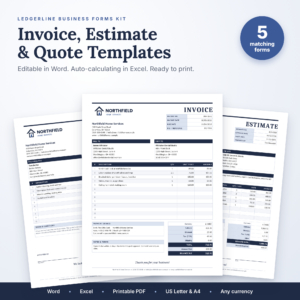
Ledgerline Business Forms Kit
Price: $2.99 | Best for: Contractors, cleaners and consultants
Five matching forms (quote, job estimate, invoice, sales receipt and purchase order) as Word templates and printable PDFs, each in US Letter and A4. An Excel Invoice Maker adds saved clients and items, automatic totals and due dates, PAID and OVERDUE status, and a tracker for up to 300 invoices. Licensed for use in your own business. Drop your logo into the dashed box on each Word form first.
The Word headings use real styles, so changing the navy bars to your brand color across a whole form takes a couple of clicks, not an afternoon.
Forms for makers and custom orders
Makers often outgrow general invoicing tools first. A custom tumbler order needs the cup style, the color, the name spelled exactly, and a deposit. An online invoice form has no box for half of that. A set of order forms that feed into an invoice fits the work much better.
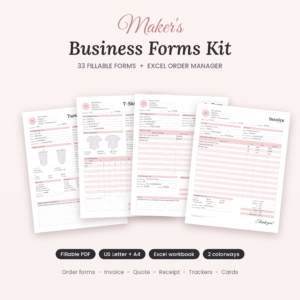
Maker’s Business Forms Kit
Price: $3.00 | Best for: Crafters, tumbler and apparel makers
33 printable and fillable PDF forms in US Letter and A4, including nine order forms, an invoice, price quote, sales receipt and a custom order and deposit agreement, plus records and market-day planners. An Excel Order Manager turns orders into invoices, receipts and a sales dashboard. Licensed for personal and small business use. Print a stack of the general order form for your next market first.
If you sell on Etsy as well as in person, our guide to an Etsy bookkeeping spreadsheet shows how to track the real profit behind those orders.
Trade kits that go beyond the invoice
Some trades need paperwork that no general invoicing tool covers. A pressure washing business, for example, needs a service agreement that deals with water and power, runoff, plants and existing damage, a pre-service inspection form and a job sign-off. The invoice is the last page of a longer story.
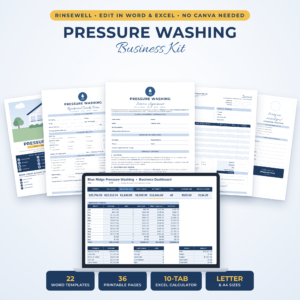
Rinsewell Pressure Washing Business Kit
Price: $7.59 | Best for: Pressure washing and exterior cleaning
22 Word templates (36 printable pages) in US Letter and A4, covering a service agreement, maintenance plan, client intake forms, proposals, inspection and completion forms, invoice and estimate, plus marketing pieces like door hangers. A 10-tab Excel workbook calculates quotes and invoices, and a 12-page guide walks you through it. Fill in the service agreement’s Schedule A with your prices first.
If you are just starting out in this trade, our guide on how to start a pressure washing business covers costs, pricing and the rest of the paperwork.
Making the templates look like your business
A template only feels like yours once it carries your details and your voice. Spend 30 minutes on this once.
- Logo. Insert it in the placeholder. A clean text logo in a good font is fine if you do not have an image.
- Color. Change the header color to match your van, website or business cards.
- Wording. Rewrite the thank-you line in your own voice. “Thanks for trusting us with your garden” beats “Thank you for your business”.
- Payment details. Add bank details and any card payment link.
- Terms. Add your payment terms and any deposit rule.
- Save a master. Save the finished file as your master, and always work from copies.
There is a small, real pride in sending the first invoice that looks exactly like your business. Clients feel it too.
A worked switch-over
Carmen runs a two-person house cleaning business with 22 regular clients. She bills weekly clients on the last Friday of each month, about 22 invoices averaging $240 each, for roughly $5,280 a month.
Here is how her switch from an online tool went.
- Saturday morning, 40 minutes: exported all past invoices and her client list as PDFs and a spreadsheet. Saved them in a folder called “Archive to Oct 2026”.
- Saturday afternoon, 45 minutes: added her logo and colors, entered 22 clients and three services (weekly clean, deep clean, oven add-on) in the Excel invoice maker.
- Sunday, 20 minutes: entered the four invoices still unpaid from October, keeping their original numbers.
- Last Friday of November, 50 minutes: created 22 invoices by picking clients and services, saved each as a PDF, and emailed them.
The first month took a little longer than her old tool. By the second month, it took about the same. She cancelled her plan in December, and every invoice she has ever sent now sits in one folder she controls.
A ten-minute weekly habit
The one job a template will never do for you is notice when someone is late. So give it ten minutes every week, at the same time. Friday after lunch works for a lot of people.
- Open the invoice tracker and log any payments that arrived.
- Sort by status and look for anything marked overdue.
- Send each late client a short, friendly email with the invoice attached again.
- Note anything due next week so it does not surprise you.
That is the whole routine. Owners who keep it up tend to get paid just as quickly as they did with automatic reminders, because a personal note is harder to ignore than a system email.
A backup plan for files you own
Owning your files means looking after them. Use a simple rule of three copies.
- Copy one: on your computer, where you work.
- Copy two: in a cloud drive that syncs automatically.
- Copy three: on a USB stick or external drive, updated once a month and kept somewhere else.
It takes two minutes a month. Do it on the same day you send invoices, so it becomes part of the routine.
Mistakes when moving to owned templates
- Restarting invoice numbers. Carry on from your last number.
- Typing into the master. Work from copies, always.
- Using a template built for the wrong paper size. Pick US Letter or A4 to match where you print.
- Forgetting reminders. Put a weekly 10-minute check in your calendar.
- Cancelling the old tool too soon. Wait until a full billing cycle has run smoothly.
Frequently asked questions
What is a good alternative to Invoicely?
If you want to avoid an online account, a downloadable kit with Word, Excel and PDF invoice forms is a simple alternative. Pick one that matches your work: a general service kit, a maker’s order and invoice kit, or a trade-specific set.
Can I keep using the templates forever?
Yes. Once downloaded, the files are yours to use in your own business for as long as you like. They are not for resale or sharing.
Do downloadable invoice templates do the maths?
The Excel versions do. Pick an item, type a quantity and the totals fill in. Word and PDF versions are for typing or writing amounts yourself.
How do clients pay if I use templates?
Put your bank details and any card payment link in the payment section of the invoice. Clients pay the same way they would from an online tool.
Can I edit the design?
Yes. You can add your logo, change colors and fonts, and rewrite the labels and terms in Word or Excel.
Do I need Microsoft Office to use these kits?
The Word and Excel files are built for Microsoft Office on Windows or Mac. The PDF forms open in a free PDF reader, so you can type into them or print them without Office.
Your next step
Make a folder on your computer called “Invoices” today, and export everything from your current tool into it. Then set up the Ledgerline Business Forms Kit with your logo and colors, send next month’s invoices from it, and enjoy having every record in a place you control.