Most small businesses don’t need a CRM. They need to remember who they talked to, what was promised, and when to follow up. That’s it. Yet the usual advice is to sign up for software that charges per seat, buries the basics under menus, and sends you a newsletter about features you’ll never touch. A google sheets crm does the core job for nothing, and you already know how to use a spreadsheet.
This guide shows you how to build a simple one, what to track, and where it starts to creak. You’ll also see two Taskdale spreadsheets that come with a client tracker built in, if you’d rather not start from a blank sheet.
Quick picks: spreadsheets with a client tracker
| Product | Best for | Price | Link |
|---|---|---|---|
| Keystone Business Hub | CRM, client tracker, invoices and bookkeeping in one file | $6.99 | View |
| Orchid Business Hub | Goals, budget, P&L and a marketing dashboard | $6.99 | View |
Why a Google Sheets CRM is enough for most small businesses
A CRM is just a list of people with a history attached. If you have thirty clients, or even three hundred, a spreadsheet handles that without breaking a sweat. It’s also easy to share. Send a link to your assistant or business partner and you’re both looking at the same live sheet.
Picture a freelance designer who keeps leads in her inbox, notes on her phone and invoices in a folder. She forgets to reply to a quote request for nine days, and the job goes elsewhere. One sheet with a “next follow-up” column would have saved it. Not fancy software. A column and a date.
The trade-off is that a sheet won’t send automatic emails or track every click. For most small teams, that’s a feature, not a bug. You stay in control, and you pay nothing.
The columns every simple CRM needs
Resist the urge to track forty things. Start with about ten columns and add more only when you miss something. Here is a sensible starting set.
- Name and company
- Email and phone
- Source: how they found you
- Status: lead, quoted, active, finished, lost
- Last contact date
- Next follow-up date
- Deal or job value
- Notes
The two date columns do most of the work. Last contact tells you who’s gone quiet. Next follow-up tells you what to do today. Everything else is detail around those two.
Keep the status list short
Five statuses is plenty. Lead, quoted, active, finished, lost. If you invent twelve stages you will stop updating them. Use a dropdown so you can’t mistype a status, because “Qouted” and “Quoted” will count as different things when you filter.
How to set up your Google Sheets CRM in an hour
You don’t need to be a spreadsheet wizard. Follow this order and you’ll be running before lunch.
- Create a new sheet and type your column headings in row one.
- Freeze row one so the headings stay visible as you scroll.
- Add a dropdown to the Status column using data validation.
- Add a filter to the header row so you can sort and narrow your list.
- Paste in your existing contacts, even if the data is messy.
- Add colors to the Status column with conditional formatting.
Then do one more thing. Set a rule that highlights any follow-up date that is today or earlier. A red cell is hard to ignore. It turns your sheet from a list into a nudge.
A tab for each job
Use separate tabs for different jobs. One for contacts, one for deals, one for a simple dashboard. It keeps each sheet small and fast, and it stops you from scrolling through a hundred columns to find a phone number.
Using filters and views in your google sheets crm
Filters are your poor man’s dashboard. Filter by status to see only active clients. Filter by next follow-up date to see who needs a message this week. Save those filters as filter views, so you and a teammate can each look at the list your own way without messing up the other person’s screen.
A pivot table can sum your deal values by status or by source. In two minutes you’ll know how much money sits in quoted jobs and which source brings in the best clients. That one small table often changes where people spend their marketing time.
Where a plain google sheets crm starts to creak
Be honest about limits. A sheet gets clumsy when many people edit it at once, when you want automatic reminders sent to your phone, or when your list tops several thousand rows. It also has no built-in way to attach an email thread to a person.
That isn’t a reason to pay for software on day one. It’s a reason to keep your sheet tidy so that moving later is easy. Clean columns, one row per person, consistent spelling. If you ever export to a paid tool, you’ll be glad.
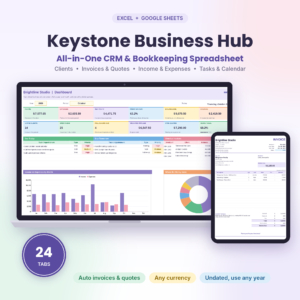
Keystone Business Hub
Price: $6.99 | Best for: small businesses that want a CRM and client tracker with bookkeeping in one file
The title describes a small business spreadsheet for Excel and Google Sheets with a CRM, bookkeeping, invoice tracker, client tracker and business dashboard. If you want the tabs already laid out instead of building them, this is the closest match to the setup described above.
Linking your CRM to invoices and money
A client list on its own is half the story. The other half is what they owe you. Add an invoice tab with columns for invoice number, client name, amount, date sent, due date and paid status. Then your CRM can answer a question most people struggle with: who owes me money right now?
Use a simple lookup so the client name in the invoice tab pulls from your contacts list. That way you type each name once. Typos are the quiet enemy of every spreadsheet. A name spelled two ways splits one client into two, and your totals go wrong.
Once invoices and contacts live in the same file, chasing payment gets easier. Filter for unpaid invoices past their due date, and send a polite nudge to each one. It takes ten minutes on a Friday afternoon, and it often brings in cash you had half forgotten.
Tracking marketing and goals alongside clients
Clients are only part of a business. You also want to know whether your marketing is working and whether you’re on track for the year. A second sheet can hold monthly goals, a basic budget and a profit and loss summary, so you see revenue next to what you spent to get it.
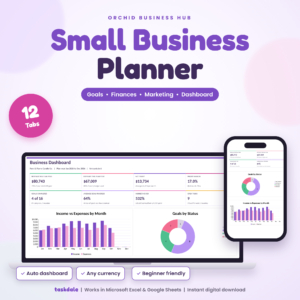
Orchid Business Hub
Price: $6.99 | Best for: owners who want goals, budget, P&L and marketing in one planner
The title describes a small business planner spreadsheet for Excel and Google Sheets with goals, budget, P&L and a marketing dashboard. It pairs well with a client list, since it covers the money and planning side that a CRM sheet leaves out.
Side by side: building versus buying a template
| Product | Format | Price | Best for | Link |
|---|---|---|---|---|
| Keystone Business Hub | Excel and Google Sheets | $6.99 | CRM, client tracker, invoice tracker, bookkeeping, dashboard | View |
| Orchid Business Hub | Excel and Google Sheets | $6.99 | Goals, budget, P&L, marketing dashboard | View |
Building your own teaches you how the sheet works, and that’s worth something. Buying a template saves the setup hours, and you can still tweak every column. If you want to see how other sheets stack up, our roundup of the best Google Sheets templates is a good next read.
A sample week with a Google Sheets CRM
Numbers help, so picture a small bookkeeping service with twenty-five clients and eight open leads. On Monday morning the owner opens the sheet and filters for follow-ups due this week. Six rows show up. She sends three emails before her coffee is cold and books two calls. On Wednesday she logs the call notes in sixty seconds each. On Friday she scans for anyone with a last contact date older than three weeks.
Total time: maybe forty minutes across the week. No logins to forget, no monthly fee, no training video. And nobody falls through the cracks, which is the whole reason to keep a CRM at all.
The same pattern works for a photographer, a tutor, a cleaning company or a one-person agency. Swap the status names to fit your trade and you’re set. A photographer might use enquiry, quoted, booked, shot, delivered. A tutor might use trial, regular, paused, ended.
Mistakes to avoid when you build your own
Too many columns is the classic one. If entering a contact takes five minutes, you’ll skip it. Merged cells are another trap, because they break sorting and filters. Keep every cell a single cell. Don’t color rows by hand either. Let conditional formatting do it, so colors update on their own when a status changes.
A fourth mistake is keeping a second list somewhere else. If half your contacts live in your phone and half in the sheet, neither is complete. Pick one home and move everything there, even if it takes an evening. And finally, don’t wait for a perfect design. Start ugly. A messy sheet that you use beats a lovely one that sits unopened.
Habits that keep a simple CRM useful
A CRM only works if it’s current. So build a tiny routine. Each morning, filter for follow-ups due today and send those messages. After each call, spend sixty seconds updating the last contact date and the next step. Each Friday, scan for leads that have gone quiet and decide whether to chase or close them.
Put the sheet where you’ll see it. Pin the tab in your browser. Make it your start page for the first week. A CRM you have to remember to open is a CRM you’ll forget.
Also, keep notes short and dated. “12 Mar: asked for a revised quote, wants it by Friday” is useful. A paragraph of background is not. Six months later you won’t read the paragraph, but you’ll scan the dated line.
Privacy and backups
A client list holds personal details, so treat it with care. Share the sheet only with people who need it, and give view-only access where you can. Turn on two-step sign-in for your Google account. Don’t put anything sensitive in the notes, like payment card numbers.
Make a backup copy now and then. Use File, then Make a copy, and name it with the date. Or download an Excel version once a month. It takes a minute and protects you from the accidental delete that everyone does at least once.
Frequently asked questions
Can Google Sheets work as a CRM?
Yes, for small teams and modest lists. A sheet can hold contacts, statuses, follow-up dates and deal values, and filters give you quick views. It won’t send automatic emails, but it’s free, flexible and easy to share, which is plenty for many small businesses.
What should a simple CRM spreadsheet include?
Start with name, contact details, source, status, last contact, next follow-up, deal value and notes. The two date columns matter most because they tell you who to contact today. Add more columns only when you notice you’re missing something specific.
How do I remind myself to follow up?
Use conditional formatting to turn a follow-up date red when it’s due or overdue, then filter by that column each morning. You can also set a calendar reminder for a daily check of the sheet. A visible color and a short routine beat any complicated setup.
When should I move to paid CRM software?
Consider it when many people edit at once, when you need automatic emails or reminders, or when your list grows past a few thousand rows. Until then a tidy sheet is fine. Keep your data clean so that exporting later is simple.
Is a Google Sheets CRM safe for client data?
It can be, with sensible habits. Limit who has access, use view-only sharing where possible, turn on two-step sign-in and avoid storing sensitive details such as card numbers. Back up your sheet regularly so one wrong click doesn’t wipe out your records.
Your next step
So, the short version for any google sheets crm: open a blank sheet, add ten columns, and put today’s date in the next follow-up column for your five warmest leads. If you want the tabs ready to go, grab Keystone Business Hub for the CRM and client tracker, and add Orchid Business Hub when you want goals, budget and marketing in view.