A finance tracker for income, bills and savings answers three questions without any mental arithmetic. How much came in? What has already gone out, or is about to? And is the savings pile actually growing? If you cannot answer all three in under a minute, your money is running you a little more than you would like.
This guide is for people with more than one thing going on. A main job plus a side hustle. Two partners with two paydays. A freelancer whose invoices land on random dates. You will learn what to record, how to stop savings transfers from looking like spending, and how to keep the habit going with a short weekly check. We also look at four Taskdale trackers, from spreadsheets to an offline app.
Quick picks: finance trackers on Taskdale
| Product | Best for | Price | Link |
|---|---|---|---|
| Penny & Petal Income and Expense Tracker | Several income streams, net worth, Excel or Sheets | $4.99 | View |
| Cedarly Money Hub | An app-style dashboard that works offline | $19.00 | View |
| Thriftwood Money Studio | Zero-based budgeting with a safe-to-spend number | $12.99 | View |
| Rosefold Small Business Bookkeeping Printable | Keeping side-business money separate | $19.99 | View |
What a finance tracker does that a budget doesn’t
A budget is a plan. A tracker is the record of what really happened. You need both, but people often build a lovely plan in January and never check it against reality. By March the plan says groceries cost $500 a month and the bank says $680.
A tracker closes that gap. Every paycheck, every bill and every transfer goes in, and the totals tell you the truth. That truth can sting the first time. It also brings a strange calm. Once you know the real numbers, you stop guessing, and guessing is where most money worry lives.
The best trackers also look forward a little. They show which bills are due in the next seven days and what is left once those are paid. That is the number you need on a Thursday night when a friend suggests dinner out.
Track income from every source, not just the paycheck
Start with money coming in. List every source, even small ones. Take a nurse who works three shifts a week and sells hand-poured candles online. Her month might look like this:
| Income source | How often | Typical amount |
|---|---|---|
| Hospital paycheck | Every two weeks | $1,640 each |
| Extra weekend shift | About once a month | $290 |
| Candle shop payouts | Weekly | $60 to $180 |
| Cash back on card | Monthly | $14 |
On paper she earns about $3,800 a month. In practice it swings between $3,500 and $4,200 depending on shifts and sales. Tracking each source separately shows her which one is worth the effort. If the candle shop brings in $400 a month but costs $250 in wax, jars and postage, that is a very different story from the $400 headline.
Tag income so you can filter it later
Give each entry a source tag: salary, overtime, side business, gifts, refunds. Six months later you can filter by tag and see exactly what the side business earned. That matters at tax time, and it matters when you are deciding whether to keep going. Our guide to setting up a creator income tracker goes deeper on side income, fees and what you really keep.
Plan on your lowest month
When income swings, plan your bills around the leanest month you have had in the last six, not the average. For the nurse, that means building the month on $3,500. Anything above it is a bonus that can go straight to savings or debt. It is a small mental trick, and it takes a lot of the fear out of a quiet month at the candle shop.
A spreadsheet built for more than one stream makes this painless, which is where Penny & Petal fits.

Penny and Petal Income and Expense Tracker
Price: $4.99 | Best for: households with several income streams
Penny & Petal is an income and expense tracker for Excel and Google Sheets with 12 connected tabs. You log income, expenses and transfers, and the monthly and annual dashboards, account balances and net worth update on their own, including your top 5 income sources. Bills and subscriptions show the next due date and a 7-day alert, and you can set up to 15 savings goals. Start on the Start Here tab, add your accounts, then log this month’s paychecks.
Keep bills on a schedule you can see
Bills are the part of tracking that saves real money. A missed card payment can cost a late fee of $30 or more, plus interest. A forgotten free trial quietly turns into $15 a month. Neither is a disaster alone. Together, over a year, they add up to a weekend away.
For each bill, record five things: the name, the amount, how often it repeats, the next due date and how it is paid (auto-pay or manual). The last one is easy to skip and worth keeping. Manual bills are the ones that slip.
- Weekly or biweekly: childcare, some loan payments.
- Monthly: rent, phone, internet, streaming, insurance.
- Quarterly: water in many towns, some insurance plans.
- Yearly: car registration, software, memberships.
A good tracker turns that list into a calendar and a countdown. Rent due in 3 days. Internet due in 9. You stop being surprised, and that alone is worth the setup time.
Know the true yearly cost
Multiply each bill by how often it repeats in a year. A $9.99 streaming plan looks tiny until you see $119.88 next to it. Seeing that number is often all it takes to cancel the service you watched twice last year. For a full bill setup, the walkthrough on setting up a bill tracker has more detail.
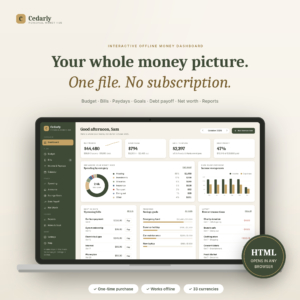
If you would rather click buttons than fill cells, an offline dashboard like Cedarly does the bill side very neatly.
Cedarly Money Hub
Price: $19.00 | Best for: people who prefer an app feel
Cedarly Money Hub is a single HTML file that opens in your browser like an app, with a sidebar, live charts, a month switcher and forms instead of cells. Mark a bill paid and the transaction is logged, the budget bar fills and the account balance drops at once. It covers zero-based or 50/30/20 budgets, paydays matched to bills, debt payoff, savings goals and net worth. Nothing leaves your computer, so start by adding your accounts and bills.
Record savings as transfers, not spending
This is the mistake that ruins most homemade trackers. You move $300 from checking to savings and log it as an expense. Now your spending total for the month is $300 too high, and your savings balance never moves in the tracker. You feel like you overspent when you actually did something good.
Treat savings as a transfer between your own accounts. Money leaves checking and lands in savings. Your spending stays honest and your savings balance climbs. The same rule applies to credit card payments. Paying the card is not new spending, because you already logged the purchases when you made them. Count the payment as spending and you count every purchase twice.
Watch the savings rate, not just the balance
A savings balance of $2,400 tells you where you are. A savings rate tells you how fast you are moving. If you take home $3,800 and move $380 to savings, your savings rate is 10%. Push it to 12% next quarter and you will feel the difference by summer. For goal-by-goal tracking, see our savings goal tracker guide.
Give each pot a name
One big savings account hides progress. Split it, at least in the tracker, into named pots: emergency fund, car repairs, December, a trip. When the car needs $380 of brake work, you take it from the car pot and the emergency fund stays whole. That is a lovely feeling the first time it happens.
Spreadsheet, offline app or printable?
There is no best format. There is the one you will open on a Sunday evening without groaning. Here is a quick way to pick.
Choose a spreadsheet if you like to see the numbers
Excel and Google Sheets show every figure, and you can add a column whenever you want. Google Sheets is handy when two people share the tracker from their phones. Penny & Petal opens in both.
Choose an offline app if cells put you off
Cedarly and Thriftwood are HTML files. You double-click, they open in your browser, and you get buttons, forms and charts. There is no account or bank login, and your numbers stay on your device. Thriftwood leans hard into zero-based budgeting and shows a safe-to-spend figure until payday.
Choose paper for a side business you want kept apart
Some people like their household money in a spreadsheet and their small business in a binder on the desk. A separate printable keeps business receipts, sales and mileage out of the family numbers, and it makes tax season far less painful.

Rosefold Small Business Bookkeeping Printable
Price: $19.99 | Best for: side hustlers and small sellers
Rosefold is a 59-page small business finance planner you can print in US Letter, A4 or A5, or type into as a fillable PDF with a clickable index. It covers a yearly budget, sales and expense logs, mileage, a monthly profit and loss, cash flow, pricing and break-even, and quarterly tax planning. Fill in the business goals page first, then log one week of sales and receipts.
A 15-minute weekly tracking routine
Daily tracking burns people out. Monthly is too slow to catch problems. Once a week hits the sweet spot. Pick a fixed time, say Sunday at 7pm with a cup of tea, and do this:
- Log income (3 minutes). Add every paycheck, payout and refund from the past seven days with its source tag.
- Log spending (6 minutes). Go through your bank app and enter each purchase. Round to the dollar if it helps you move faster.
- Log transfers (2 minutes). Savings moves and card payments go on the transfer list, not the expense list.
- Look ahead (2 minutes). Check which bills are due in the next 7 to 10 days and make sure the money is there.
- One glance at savings (2 minutes). Is the balance up from last week? Good. Note it and close the file.
That is it. Fifteen minutes, once a week, and you will know your money better than most people ever do. The first few weeks take longer while you learn the layout. By week four it is quick and oddly satisfying.
Once a month, add a slightly longer look. Compare this month to last, check your savings rate and glance at your net worth. If net worth went up by even $150, write it down somewhere you will see it. Small wins are what keep the Sunday habit alive.
Mistakes that make a tracker useless
Tracking only the big stuff. The $4 coffees and $7 lunches are where the money leaks. Skip them and your totals will be off by $150 or more each month.
Too many categories. Forty categories means forty decisions per receipt. Start with ten or twelve. You can split one later if you want more detail.
Catching up once a quarter. Three months of receipts is a miserable afternoon. Weekly keeps each session short and the memories fresh.
Not reconciling. Once a month, check the tracker balance against the bank balance. If they differ by $43, find the $43. Usually it is one missed entry, and finding it feels like solving a small puzzle.
Mixing business and personal. If you sell anything on the side, keep a separate account or at least a separate tag. Untangling it in April is not fun.
Who a finance tracker won’t help much
If you already pay every bill on auto-pay, save a fixed amount the day you are paid and never wonder where the money went, a detailed tracker may be more work than it is worth. A quick monthly glance at your bank balance could be enough.
A tracker also can’t fix a gap between income and bills on its own. If rent, the car and the minimum payments already take more than you bring home, the tracker will show that clearly, which is useful. The next step then is a conversation with a free nonprofit credit counselor, not more categories.
Frequently asked questions
What is the easiest way to track income and expenses?
Pick one tool, log everything once a week from your bank app, and keep categories to about ten. A ready-made spreadsheet or offline app saves you building formulas, so you can start tracking the same evening.
Should savings count as an expense in my tracker?
No. Log savings as a transfer between your own accounts. That keeps your spending total accurate and lets your savings balance grow in the tracker. Treat credit card payments the same way.
Can I track a side hustle in the same finance tracker?
You can, using a source tag for side income and a category for business costs. If the business has many receipts, mileage or tax to plan, a separate bookkeeping planner keeps things cleaner.
Do I need to link my bank account to track my money?
No. Spreadsheets and offline HTML trackers work with entries you type in yourself. It takes a few minutes a week, and nothing about your bank login is shared with anyone.
How often should I update a finance tracker?
Once a week works for most people. It keeps each session to about 15 minutes and catches upcoming bills before they are due. Add a short monthly review to look at trends.
Your next step
This Sunday, open your bank app, scroll back seven days and write down every dollar in and out, with a source for each paycheck or payout. Then move those entries into the Penny & Petal income and expense tracker and let the dashboards show you where you stand.