People looking for a Good CV com alternative usually want the same thing a CV website promises, a smart CV without the stress, but without paying again every month the job hunt drags on. A one-off template gives you that. You pay once, download the files and edit them in Word or Google Docs for as long as you need.
This guide is for job seekers weighing up an online CV site against a template they own. It sets out the questions worth asking any CV service, what you get and do not get with a one-off kit, a close look at four Taskdale templates and how to get your first version finished in an afternoon.
No scare stories here. Online CV sites help plenty of people. The aim is to make sure you choose with your eyes open.
Quick picks: one-off CV templates for Word and Google Docs
| Product | Best for | Price | Link |
|---|---|---|---|
| Marlowe Resume Template | Minimalist look plus a 10-page playbook | $4.79 | View |
| Sloane Resume Template | Modern two-column CV with photo | $4.49 | View |
| Alder Resume Template with Photo | Quiet design with a job tracker | $4.79 | View |
| Hollis Resume Template | Photo or monogram, 84 files | $8.99 | View |
What people want from an online CV site
Most people land on a CV website for three reasons. They want it to look professional, they want help with the words, and they want it done quickly. Those are good reasons. An online tool that walks you through each section can turn a dreaded job into a 40-minute one.
The trade-off is usually about ongoing access. Many CV sites, across the industry, work on an account basis: your CV sits on their servers, and downloading or editing it later may depend on a plan or trial. Pricing models differ and change, so the fair advice is simple. Read the current pricing and cancellation terms on any CV site before you start building.
If you are the kind of person who will edit your CV every few weeks for the next six months, or keep it for years, ongoing access starts to matter. That’s when owning the files looks attractive.
Five questions to ask any CV service before you sign up
Whether you pick an online builder or a template, these questions save regret later.
- Can I download an editable file, or only a PDF? A PDF is fine for sending, but you need an editable file to tailor each application.
- What happens to my CV if I stop paying? Can you still open it, or does it sit locked in an account?
- Is there a trial that turns into a subscription? If so, note the date it renews and put a reminder in your phone.
- Does it include a cover letter and references page that match? Most applications need more than the CV.
- Is there a single-column version for online job portals? Big employers often screen with software that reads simple layouts best.
Write the answers down for each option you are weighing. Two minutes with a notepad can save you an awkward bank statement in three months.
What a one-off template gives you
A downloadable CV template is a set of Word files. You open them in Word, Google Docs or another word processor, type over the sample text and save as PDF. There is nothing to cancel, and the files are yours to edit for your own search as often as you like.
Here is what that looks like in day-to-day job hunting:
- Tailoring without limits. Make one version for care roles and another for admin roles. Save twenty if you like.
- Edits on any device. Fix a typo on your phone in Google Docs while you wait for a bus.
- Your CV, years from now. When you go job hunting again in 2029, the file is still on your Drive.
- Full layout control. Move sections, change colours, swap the photo for a monogram.
What you give up is the step-by-step questionnaire. You will need to know roughly what to write. Good kits help with this through prompt-style placeholder text and short writing guides. Marlowe, for example, comes with a playbook that covers the words as well as the layout.
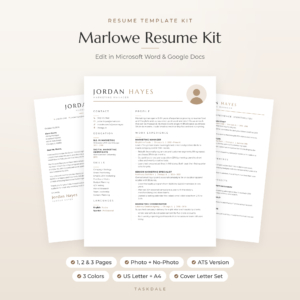
Marlowe Resume Template
Price: $4.79 | Best for: people who want writing guidance
Marlowe has a calm look with a wide-spaced serif name, soft taupe accents and a round photo. You get 10 editable Word templates, each in Sand, Sage and Slate and in US Letter and A4: 1, 2 and 3 page resumes with or without photo, an ATS resume, a cover letter, references page and thank-you letter. The 10-page Resume Playbook includes a three-sentence profile formula and 120+ action verbs, and a Job Search Tracker for Excel and Google Sheets is included. Start with the playbook’s profile formula.
Replacing the questionnaire with five prompts
The thing most people miss when they leave a CV site is the questionnaire. It asked what you did, and you answered. You can recreate that in a notes app in about ten minutes, and the answers end up better because they are yours.
Answer these, one or two lines each:
- What job do I want next, in plain words?
- What three things do colleagues rely on me for?
- What is one result from the last year I am proud of, with a number if I have one?
- Which tools, systems or machines do I use every day?
- What training or certificates have I finished recently?
Here is how that works for a real kind of applicant. A receptionist at a busy dental practice might write: “Practice coordinator. People rely on me for the diary, calming nervous patients and chasing unpaid invoices. Cut missed appointments by sending reminder texts the day before. Use the booking system, Outlook and Excel daily. First aid refreshed this spring.” That is a profile, three bullets and a skills list, written before the template is even open.
Then you open your kit and type over the placeholders. The questionnaire did its job without a login.
Comparing the four kits side by side
All four kits share the basics: Word and Google Docs, US Letter and A4, a matching cover letter and references page, and an ATS-friendly version. The differences are in looks and extras.
| Kit | Look | Colour options | Stand-out extra |
|---|---|---|---|
| Marlowe | Classic, minimalist, serif name | Sand, Sage, Slate | 10-page Resume Playbook |
| Sloane | Modern two-column with icons | Three colours | Resume Writing Toolkit with 96 verbs |
| Alder | Clean, quiet, shaded header | Mocha, Sage, Slate | Excel job tracker and photo cropper |
| Hollis | Soft champagne with sidebar | Champagne, Rosewood, Graphite | Monogram option and 216-verb guide |
Pick on looks first. You will open this file dozens of times, so choose one you like seeing. Then check that the extra suits your biggest weak spot: words, tracking or design flexibility.
If you want a modern CV with a photo
In much of Europe, Africa, the Middle East and Asia, a professional photo on a CV is normal. In the UK, US and Canada it is usually left off. A kit that gives you both versions means you never have to rebuild the layout when you apply across borders.
Sloane uses a two-column layout: a slim left column for education, skills and languages, and a wider right column for experience. It is built from simple tables and real Word styles, so when you add a job, the column grows rather than spilling text behind a box.
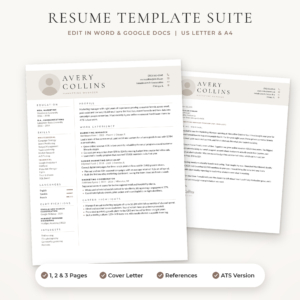
Sloane Resume Template
Price: $4.49 | Best for: modern CVs with or without photo
Sloane includes a 1-page resume, 2-page resume, 3-page CV, ATS-friendly resume, cover letter and references page, each in three colours and both US Letter and A4. The placeholders carry short writing tips, and the bonus Resume Writing Toolkit adds 96 action verbs, before-and-after bullet examples and a formula for strong bullet points. Fill in the left column first, since it is the quickest win.
If you are applying to lots of jobs
Volume brings its own problem: keeping track. After 25 applications, you need to know which employer has your CV, when you applied and when to chase. A kit that bundles a tracker saves you hunting for another file.
Alder is the calmest of the four to look at, and it ships with a job application tracker for Excel, a six-page Job Search Toolkit and a browser-based Round Photo Maker for cropping your headshot into a circle.
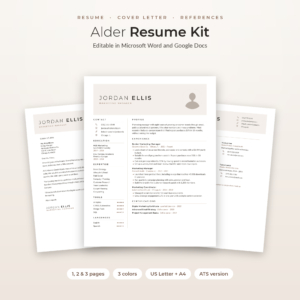
Alder Resume Template with Photo
Price: $4.79 | Best for: high-volume job seekers
Alder gives you 48 Word files across Mocha, Sage and Slate in US Letter and A4: a 1, 2 and 3 page resume with photo, a 1-page resume without photo, an ATS resume, plus a cover letter, references page and thank-you letter. The Excel tracker has a dashboard, dropdowns and follow-up alerts. Log your first three applications in the tracker the same day you send them.
If you want a photo-free design that still looks polished
Not everyone wants a photo, and not every country welcomes one. A monogram, your initials in a neat circle, fills the same spot in the layout and keeps the page looking finished. Hollis offers that as a full set, with its fonts already built into every Word file, so nothing looks broken when you open it.
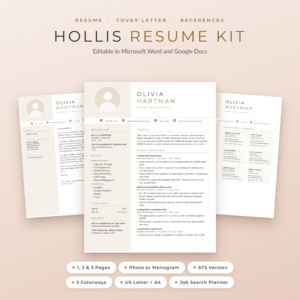
Hollis Resume Template
Price: $8.99 | Best for: photo or monogram designs
Hollis includes resumes with photo and with monogram in 1, 2 and 3 pages, ATS resumes in 1 and 2 pages, cover letters, a references page with six reference cards and an interview thank-you letter. There are 84 Word files in Champagne, Rosewood and Graphite, plus a Job Search Planner for Excel and Google Sheets, a Resume Writing Guide with 216 action verbs and a 13-page user guide. Choose your colourway, then open the monogram 1-page file.
Getting your first version done in an afternoon
Whichever kit you choose, here is a realistic afternoon plan.
- 15 minutes: List every job, date, qualification and licence in a notes app.
- 10 minutes: Open the 1-page or 2-page file in your colour. Fill in the header.
- 15 minutes: Write a three-sentence profile using the kit’s guidance.
- 45 minutes: Write your roles, newest first, with three to five results for the latest job.
- 15 minutes: Education, skills, training.
- 20 minutes: Copy the header to the cover letter and write three short paragraphs.
- 10 minutes: Export both to PDF and read them on your phone.
Just over two hours. You end the afternoon with a CV and letter you own outright, ready to tailor next week. For help with the letter, our guide to writing a cover letter that matches your resume shows a simple structure. And if you want to see more designs before you choose, browse our roundup of the best resume templates for Word and Google Docs.
Keeping your job search costs down
A job search can quietly cost money: printing, travel to interviews, a new shirt, phone data. Owning your CV files is one small way to keep that under control. A few others:
- Print interview copies at a library rather than buying a printer.
- Use free video call tools for practice interviews with a friend.
- Keep one master CV so you never pay anyone to start again.
- Log each application so you do not waste evenings chasing dead ends.
Small savings, but over a three-month search they add up, and every bit of control feels good when so much else is out of your hands.
Mistakes to avoid when switching from a CV site
- Cancelling before you copy your text. Get every word out first, section by section, into a plain document.
- Pasting with formatting. Use paste as plain text so the new template keeps its look.
- Keeping filler phrases. Swap generic lines like “dynamic team player” for real results with numbers.
- Forgetting the ATS file. Upload the single-column version to company portals and keep the designed one for email.
- Mixing styles. If your CV moves to a new design, move the cover letter and references page too.
Frequently asked questions
Is there a one-off payment alternative to CV websites?
Yes. Downloadable CV templates for Word and Google Docs are bought once and kept. There is no account to log into and nothing renews.
Can I use a Word CV template in Google Docs?
Yes. Upload the .docx file to Google Drive and open it with Google Docs. Kits built from simple tables and common fonts hold their layout well.
Do CV templates help with what to write?
Good ones do. Look for placeholder text that tells you what belongs on each line and a short writing guide with example bullet points.
How do I cancel an online CV subscription?
Each service has its own process, usually in account settings. Copy your CV text out first, then follow the steps on that site’s help pages.
Which CV template is best for online applications?
A single-column ATS version with standard headings. All four kits here include one.
Your next step
Pick the kit whose look you like best, then block out one afternoon this week for the two-hour plan above. If you want guidance on the words as well as a calm design, start with the Marlowe Resume Template.