Best Goodnotes Template: Planners Compared for iPad
The best Goodnotes template is a hyperlinked planner whose dating, page count and app support match how you plan. For a dated 2027 year with calendar buttons, choose the Wayfold planner. For a start-any-day planner, choose an undated one. Daybloom suits you if you want the most templates and prompts.
- Hyperlinked means every tab, date and menu jumps to its page with one tap, which is what makes a PDF behave like a planner.
- Undated planners can start in any month, while the Wayfold planner is dated for 2027 and includes a bonus October to December 2026 mini planner.
- Page counts on this page range from 199 pages in the Terra planner to 800 in the Wayfold planner.
- Dark mode is included in the Linen Days planner (two of its 8 themes) and in the 6-theme Undated Digital Planner for iPad & Android.
- Every planner here supports Monday and Sunday starts.
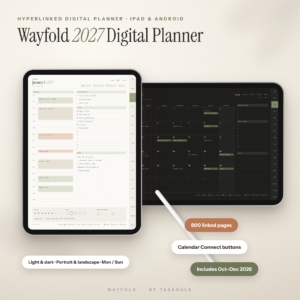 Wayfold 2027 Digital Planner for iPad and Android, Hyperlinked GoodNotes Planner with Calendar Buttons
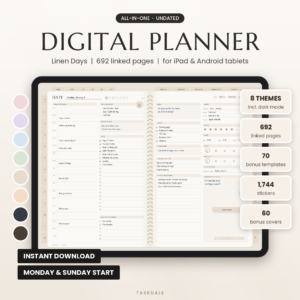 Linen Days Undated Digital Planner for GoodNotes & Notability, iPad & Android Daily Weekly Monthly Planner with Stickers
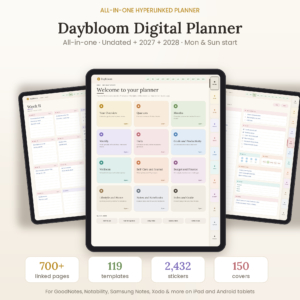 Daybloom All-in-One Digital Planner: Undated, 2027 & 2028 Hyperlinked Planner for GoodNotes, Notability & Android
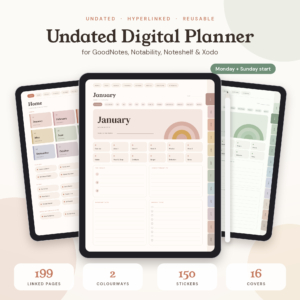
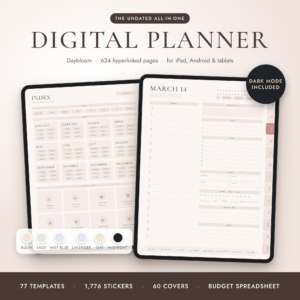
Table of Contents Toggle
- What should you look for in the best Goodnotes template?
- How do the best Goodnotes templates on this page compare?
- Which Goodnotes template suits which kind of planner?
- How do you set up and use a Goodnotes template?
- Which mistakes should you avoid when choosing a Goodnotes template?
- What affects the price of a Goodnotes template?
- Which Goodnotes template should you choose?
- Common questions
Choosing a digital planner can feel more complicated than it should. Listings quote page counts, sticker numbers and file types, and it isn't obvious which of those figures affect your week. This guide sorts the useful details from the padding, so you can pick a template with confidence and skip the ones that won't suit you. You'll find 5 options below, and the sections that follow explain how to narrow them down.
What should you look for in the best Goodnotes template?
The best Goodnotes template is the one you will open every day, which depends on six practical factors: navigation, dating, app support, layout, page count and the extras that come with it. Work through them in order and most of the choice makes itself.
Hyperlinks and navigation
A Goodnotes template is only as good as its links. In a well-built planner, tabs on every page take you to the year, month, week or day in one tap.
Daybloom is built around big tabs on every page, so you can reach any section quickly. The Wayfold planner goes a step further with Calendar Connect buttons on each day, which open Apple Calendar or Google Calendar on that exact date. If you already live in a phone calendar, that link saves a lot of switching.
Dated or undated
A dated planner is fixed to one year. An undated planner has blank date fields you fill in, so you can start in any month and reuse it.
Dated suits you if you want the calendar pre-built and are starting in January. The Wayfold 2027 planner is the dated choice here. Undated suits you if you start mid-year, skip weeks, or dislike the guilt of empty past pages. Daybloom sits in between, offering undated, 2027 or 2028 versions.
App compatibility
Goodnotes is the name in the search, but several planners here also work in other apps. Linen Days covers GoodNotes, Notability and Android note apps. Daybloom adds Samsung Notes. Terra lists Noteshelf and Xodo, and the Undated Digital Planner for iPad & Android adds Penly.
If you might switch apps, or you own an Android tablet, check the supplied app list before you buy. A planner can only be used with apps that support PDF links.
Orientation and colour mode
Portrait feels like a paper notebook, while landscape gives you more room for week-at-a-glance spreads. Dark mode is easier on the eyes at night.
The Wayfold planner includes all 8 versions: portrait or landscape, light or dark, Monday or Sunday start. Linen Days offers 8 colour themes, two of them in dark mode. The Undated Digital Planner for iPad & Android has 6 themes, including a true dark mode.
Page count and file weight
More pages mean more built-in layouts, but they also mean a bigger file to scroll through. A 800-page planner gives you a lot of room, while a 199-page planner like Terra is simpler to learn.
Linen Days states that its files are light, at 2 MB, so they open quickly on iPad and Android tablets. File size isn't supplied for the others, so don't assume either way.
Templates, stickers and covers
Stickers and covers are decoration. Templates are function. Count the templates that match your life: budget, habit, meal, fitness, goals or home.
Daybloom has 5 templates plus 120 journal prompts. The Wayfold planner has 5 templates and a guided True North workbook. Terra has habit, mood, sleep and budget trackers. Sticker counts range from 150 in Terra to 2,432 in Daybloom, but a large sticker library only matters if you enjoy decorating.
How do the best Goodnotes templates on this page compare?
The five planners differ mainly in dating, size and what's bundled. This table puts the supplied figures side by side.
Which Goodnotes template suits which kind of planner?
Each planner here suits a different habit, so match the product to how you plan rather than to its page count.
Wayfold 2027 planner: choose it if you want a ready-dated 2027 year and plan alongside Apple or Google Calendar. It offers guided goal work through True North, and the bonus mini planner covers the last three months of 2026.
Linen Days planner: choose it if you want a lived-in everyday planner with budget, habit, meal, fitness and self-care pages, and you like quick-opening files. Its 60 covers suit people who like to change the look.
Daybloom planner: choose it if you want one planner for everything, from hourly planning to home, health and money. It also lets you choose undated, 2027 or 2028, so it carries over if you plan ahead.
Terra planner: choose it if you want something calm and small. Its monthly hubs, five weekly spreads and trackers cover the basics without the sprawl of larger files.
Undated Digital Planner for iPad & Android: choose it if money is a priority. The bonus budget spreadsheet adds up figures for you, and the true dark mode helps with evening planning.
How do you set up and use a Goodnotes template?
Setting up a Goodnotes template takes a few minutes: you download the PDF, import it into the app, and start tapping the links. Exact menus vary by app and device, so use the supplied user guide where one is included, as with the Wayfold and Daybloom planners.
- Download the planner file to your iPad or tablet.
- Open Goodnotes, or your chosen note app, and import the PDF as a new document.
- Pick your version first: Monday or Sunday start, light or dark, portrait or landscape.
- Tap the tabs to confirm the links work, then add your first month.
- Add stickers and a cover last, once the layout feels right.
Keep one spare copy of the original file. If you scribble over a page you didn't mean to, you can import it again.
Which mistakes should you avoid when choosing a Goodnotes template?
The most common mistake is buying on sticker count instead of on the pages you will use. Thousands of stickers look generous, but they don't plan your week.
- Choosing dated when you start mid-year. Several months of blank past pages make some people give up. An undated planner avoids this.
- Ignoring the app list. If you use Samsung Notes or Noteshelf, confirm support first.
- Picking the biggest file by default. A 199-page planner you use beats an 800-page one you abandon.
- Skipping the version choice. Landscape and portrait feel very different, and changing later means re-importing.
- Assuming a bonus is a feature. The budget spreadsheet in the Undated Digital Planner for iPad & Android is useful only if you track money.
What affects the price of a Goodnotes template?
The price of a Goodnotes template mostly reflects how much is bundled. Larger page counts, more template libraries, extra versions and big sticker and cover collections usually push a listing towards the premium end.
Dated planners may also cost more up front when they include several versions, as the Wayfold planner does with all 8. The simpler Terra planner, with 199 pages, is the leaner option. Compare the live product cards and ask whether you'd use the extras before paying for them.
Which Goodnotes template should you choose?
Choose by one rule: if you want the calendar done for you, take the Wayfold 2027 planner. If you want freedom to start any day, take an undated one. Then use Daybloom for breadth, Terra for simplicity, and the Undated Digital Planner for iPad & Android for budgeting.
Before you commit, check three things: the apps you use, the orientation you prefer, and whether you'll really use the trackers on offer.
Common questions
Can I use these planners on an Android tablet?
Yes, for the ones that say so. The Wayfold, Linen Days, Daybloom and Undated Digital Planner for iPad & Android listings mention Android. Terra is listed for iPad and apps such as Noteshelf and Xodo, so check your app supports links before buying.
What is an undated Goodnotes planner?
An undated Goodnotes planner is a PDF whose calendar pages have no fixed dates. You enter the dates yourself, so you can begin in any month and reuse the file. Linen Days, Terra and the Undated Digital Planner for iPad & Android all work this way.
Does Monday or Sunday start matter?
It changes which day opens each week and month. Monday start suits most work weeks, and Sunday start suits those who plan the week ahead on Sunday. Every planner on this page includes both, so you can choose after you buy.
What does a hyperlinked planner do?
A hyperlinked planner lets you tap a tab, date or button to jump to another page. That replaces endless scrolling. Daybloom's large tabs and the Wayfold planner's Calendar Connect buttons are examples, the second opening your Apple or Google Calendar.
How do I pick between a small and a large planner?
Pick by how much you will fill in. If you want basic monthly, weekly and tracker pages, the 199-page Terra planner is enough. If you also want budgets, meals, fitness and journal prompts, a larger planner such as Daybloom is the safer choice.