Mobile invoicing apps like Invoice2go were made for people who work on the move, and trades are the classic case. You finish a job, tap out an invoice on your phone, and the client has it before you have packed the ladder. That is a real convenience. It also comes with an account, a plan to keep paying, and your records stored on someone else’s system.
So is there a sensible Invoice to Go alternative for tradespeople? For many plumbers, electricians, painters, roofers, landscapers and handypeople, yes: a set of quote, invoice and receipt templates you buy once, plus a short routine that gets invoices out the same day. This guide walks through when the app is worth it, when templates win, a worked example of a real trade day, and the templates that suit the job.
A fair note: apps change their features and plans, so check Invoice2go’s own site for what it offers now. Everything here is about mobile invoicing apps in general.
Quick picks for tradespeople
| Product | Best for | Price | Link |
|---|---|---|---|
| Ledgerline Business Forms Kit | Quote, job estimate, invoice, receipt and purchase order in one matching set | $2.99 | View |
| Client Billing Hub Invoice Tracker Spreadsheet | Trades who want invoices and payments in Google Sheets on any device | $6.49 | View |
| PaidPath Client & Invoice Hub | Owners who want profit, expenses and overdue invoices on one dashboard | $9.49 | View |
| Rinsewell Pressure Washing Business Kit | Pressure washing crews who need contracts, proposals and invoices | $7.59 | View |
What trades like about phone invoicing apps
Credit where it is due. A good invoicing app does a few things that matter on site.
- Speed at the job. The invoice can go out while the client is still standing in the kitchen.
- Card payments on the spot. Many apps let the client pay by card from a link.
- Photos and signatures. Some let you attach before-and-after photos or capture a signature.
- Reminders. Late invoices can get chased without you lifting a finger.
If your day is six short call-outs and most customers pay by card on the doorstep, those features are worth paying for. Keep the app. Honestly.
Why some tradespeople look for an alternative
Plenty of trades do not work that way. A painter on a five-day job sends one invoice at the end of the week. A landscaper bills a deposit, a stage payment and a final balance on a garden that takes a month. A roofer emails quotes from the kitchen table on Sunday night. For them, an app is a monthly cost for something they do a few times a week.
Other common reasons people give:
- They already pay for too many apps: scheduling, accounting, a van tracker, a phone plan.
- They want their quotes and invoices on their own laptop, in files they can open in ten years.
- They want full control over how the paperwork looks: their logo, their colors, their wording.
- They prefer paper estimates on site and a proper invoice typed up later.
None of that is wrong. It just points to a different tool.
What a trade invoice template must handle
A basic invoice template made for freelancers often falls short on a building site. Before you switch, make sure whatever you pick can do these jobs.
Labour and materials on separate lines
Customers want to see where the money went. “Labour, 7 hrs” and “Materials: copper pipe, fittings, valve” read better than one big number.
Job address as well as billing address
Landlords and property managers often live far from the property. Put the site on the invoice.
Deposits and stage payments
A $3,000 bathroom job might be billed as $900 deposit, $1,200 mid-job and $900 on completion. The template needs to show what has been paid and what is left.
A link back to the quote
Quoting “as per quote Q-0142” on the invoice ends most arguments before they start. If quoting is the part you dread, our guide on how to write a price quote walks through it.
Paper as well as screen
Some customers want a printed estimate in their hand. Some sites have no signal. A printable form you can fill in with a pen still earns its place in the van.
The matching paperwork set
Trades send more types of document than most small businesses: quote, estimate, invoice, receipt, and orders to your own suppliers. When all five share one design, you look like a firm that has its act together, even if the firm is you and a van.
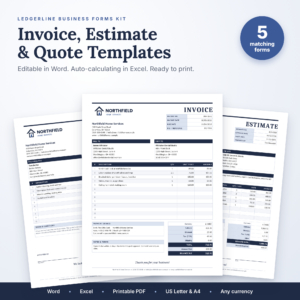
Ledgerline Business Forms Kit
Price: $2.99 | Best for: Plumbers, electricians, painters and landscapers
Five matching forms: quote with an Accepted By line, job estimate that splits labour and materials and asks for a deposit, invoice, sales receipt with a PAID IN FULL mark, and purchase order. Each comes as a Word template and printable PDF in US Letter and A4, plus an Excel Invoice Maker that fills in client details and totals and tracks up to 300 invoices. It is licensed for use in your own business. Print a few blank estimates for the van first.
The purchase order is a small extra that pays off. When you order $640 of timber from the yard, you have a record that matches the job, and your materials line on the invoice is easy to check.
A real trade day, start to finish
Here is how one day runs for Tom, a sole-trader plumber, using templates instead of an app.
7:30am. Tom checks yesterday’s invoices on his phone in the Google Sheets app. One customer has already paid. He notes it to log later.
9:00am. First job: a leaking valve. Small job, customer home. He fills in a printed receipt by hand for $145 paid by bank transfer while he waits. Done.
11:30am. Second visit: a bathroom refit to price. He walks the room and fills in a paper job estimate with labour, materials and a 30% deposit. He photographs it and texts it to the customer from the driveway.
2:00pm to 5:00pm. Third job: day two of a kitchen sink and dishwasher install. Not invoiced yet.
7:45pm. At the kitchen table, Tom opens his workbook. He logs the morning payment and the receipt, types a clean version of the refit estimate, and sends the kitchen invoice now the job is done. Fifteen minutes. Then the laptop shuts and the evening is his.
No app in the loop, and nothing slipped. The trick is the 15-minute evening slot. Skip it for a week and you will wish you had an app.
Getting at your invoices from your phone
The one thing trades miss most when they drop an app is checking things from the van. Google Sheets helps here. Put your invoice workbook in your own Google Drive and you can look up a balance or a due date on your phone, then do the proper typing on a laptop or tablet later.
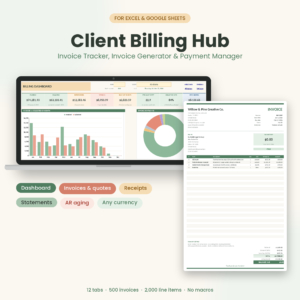
Client Billing Hub Invoice Tracker Spreadsheet
Price: $6.49 | Best for: Trades who check balances on the go
A 12-tab workbook for Excel that also runs in Google Sheets once uploaded to Drive. It creates print-ready invoices and quotes, logs full and part payments, prints numbered receipts, builds client statements and shows an aging view of who owes what. Two named taxes, discounts and shipping or extra fees are built in. Add your common jobs and materials to the Products tab first so invoices fill in fast.
Being able to answer “did the Hendersons pay yet?” from a driveway, without a subscription, is a small thing that feels like a big one.
Seeing your real profit, not just your invoices
A trade business can be busy and still lose money. Fuel, tool hire, materials that went over the quote, a day lost to rain. Many invoicing tools only show what you billed. A workbook that sits invoices next to expenses tells you what you kept.

PaidPath Client and Invoice Hub
Price: $9.49 | Best for: Trades owners who want profit in view
An Excel workbook that links clients, services, invoices, quotes, payments and expenses. The dashboard shows invoiced, collected, outstanding, overdue, expenses and net profit, with a list of overdue invoices sorted by how late they are. It handles deposits and installment payments and prints a one-page invoice or statement on US Letter or A4. Set up your service list and expense categories, such as fuel, tools and materials, first.
Run it for three months and you may find one type of job pays far better per hour than the others. That is worth knowing when you decide which calls to take.
Getting the materials line right
The materials line is where trade invoices most often get questioned. A customer sees “Materials: $386” and wonders what they paid for. A little detail fixes that.
- Group by type. “Pipe and fittings”, “Taps and valves”, “Sealants and fixings” is enough for most jobs. You do not need every washer.
- Keep supplier receipts. Snap a photo of each one and file it under the job number. If a customer asks, you can answer in a minute.
- Be consistent about markup. Many trades add a handling margin for buying, collecting and storing parts. Whatever you choose, apply it the same way on every job.
- Flag extras. If the job needed parts that were not on the quote, list them on their own line with a short note such as “replacement valve, agreed on site”.
A clear materials line is a quiet trust builder. Customers who understand the bill pay it faster and call you back next time.
Trade-specific kits
Some trades need more than invoices. A pressure washing crew needs a service agreement covering water, runoff and existing damage, an inspection form and door hangers for the neighbors. Taskdale has kits for a few trades like this, such as the Rinsewell Pressure Washing Business Kit in the table above, which pairs Word contracts and proposals with an Excel quote and invoice calculator. If your trade has one, it saves you writing a contract from scratch. Check the listing for what is included and how you may use it.
Switching from an app without losing records
- Export first. Download every invoice, estimate and client list the app allows, before you change your plan.
- Set up your templates. Logo, business details, bank details, payment terms, and your common jobs and materials with prices.
- Bring over unpaid invoices. Enter them with their original numbers and dates so nothing gets forgotten.
- Carry on the numbering. If the app’s last invoice was 1047, start the template at 1048.
- Run both for one month. Cancel only once a full month has gone smoothly.
Mistakes trades make when they switch
- No evening slot. Templates do not nag. Put 15 minutes in your diary on job days.
- Losing paper estimates. Photograph every handwritten estimate before you leave the site.
- Forgetting card payments. Set up a payment link with your card processor and print it on your invoice.
- One file on one laptop. Keep a weekly backup in a cloud drive. Vans get broken into.
- Waiting a week to invoice. The longer the gap, the slower the payment. Same day or next morning.
If you want a deeper look at keeping tabs on who owes you, see our guide to building an invoice tracker spreadsheet.
Frequently asked questions
What can I use instead of Invoice2go?
Tradespeople who invoice a few times a week often use a set of quote, invoice and receipt templates in Excel or Word, with a spreadsheet tracker for payments. Those who invoice many times a day on site may still prefer an app.
Can I invoice from my phone without an app subscription?
You can view a Google Sheets or Excel workbook on your phone and send a saved PDF from your email. Typing a full invoice is easier on a laptop or tablet, so many trades check on the phone and type in the evening.
What is the best invoice template for contractors?
Look for one with separate labour and materials lines, a job address, deposit and balance due, and a matching quote or estimate. The Ledgerline Business Forms Kit covers all of those.
Should I give customers a paper receipt?
If they pay on the day and want one, yes. A printed receipt with the amount, date, method and “paid in full” avoids confusion later, and it looks professional.
How do I take card payments without an invoicing app?
Most card processors offer payment links or a small card reader. Add the link to your invoice’s payment details, or take the card on site and write a receipt.
Do I need both a quote and an invoice for small jobs?
Not always. For a quick fixed-price call-out, a clear price on the phone and an invoice or receipt at the end is often enough. For anything larger, a written quote first protects you both.
Your next step
Look at last month and count how many invoices you sent from the job versus from home. If most went out from home, set up the Ledgerline Business Forms Kit this weekend, print five blank estimates for the van, and book a 15-minute invoicing slot into your evenings.